Is This iPhone Battery Safe to Reuse? A Repair Tech's Diagnostic Guide
Every iPhone battery health check during a screen replacement ends with the same question: do you put the original battery back in, or grab a fresh one off the shelf? The battery came out with a few creases from the pull tabs, and the customer didn't ask for a battery swap.
This is one of the most common judgment calls in phone repair — and getting it wrong goes in two directions. Reuse a battery that should have been replaced, and you're looking at a callback, a swollen screen, or worse. Replace a battery that was perfectly fine, and you've eaten into your margin on a job the customer didn't authorize.
Quick answer: a battery passes if (1) the device history is clean — no water damage, no major drop — (2) the battery clears three physical disqualifiers (no swelling, no punctures, no chemical smell), and (3) software readings show above 80% health with acceptable cycle count for the model. Below is the complete diagnostic sequence — visual, electrical, and software — so you can make that call confidently every time.
Buying Phone Batteries Wholesale?
OEM-cell batteries with safety packaging — iPhone, Samsung & more, factory-direct.
Get Wholesale QuoteThree Instant Disqualifiers — Check These First
Before you reach for a multimeter or plug anything into 3uTools, three conditions mean automatic replacement. No exceptions, no judgment call needed.
1. Any swelling or convexity. Place the battery on a flat surface. If it rocks or doesn't sit completely flat, it's gassing internally. A swollen battery that goes back into a phone will push the screen out within weeks. Replace it.
2. Any puncture or tear in the foil wrapper. Look for exposed silver material, especially near the edges where pry tools make contact. As one r/mobilerepair tech put it: "The creases are fine. My concern is that I see some silver up at the top — if the material is ripped then it's not fine." A compromised wrapper means the cell is exposed to air and moisture. Replace it.
3. Any unusual smell — sweet, fruity, or acidic. This is the community's go-to quick check, and for good reason. But understand what it actually means: by the time you can smell vented electrolyte, the battery has already experienced internal failure. OSHA's 2025 Lithium-ion Battery Safety fact sheet (FS-4480) classifies gas venting as a thermal runaway indicator. If you smell it, don't just set it aside — place it in a sand container or metal-lined fireproof bag and dispose of it properly.
If the battery passes all three, move to the full diagnostic sequence below.
Visual Inspection Checklist
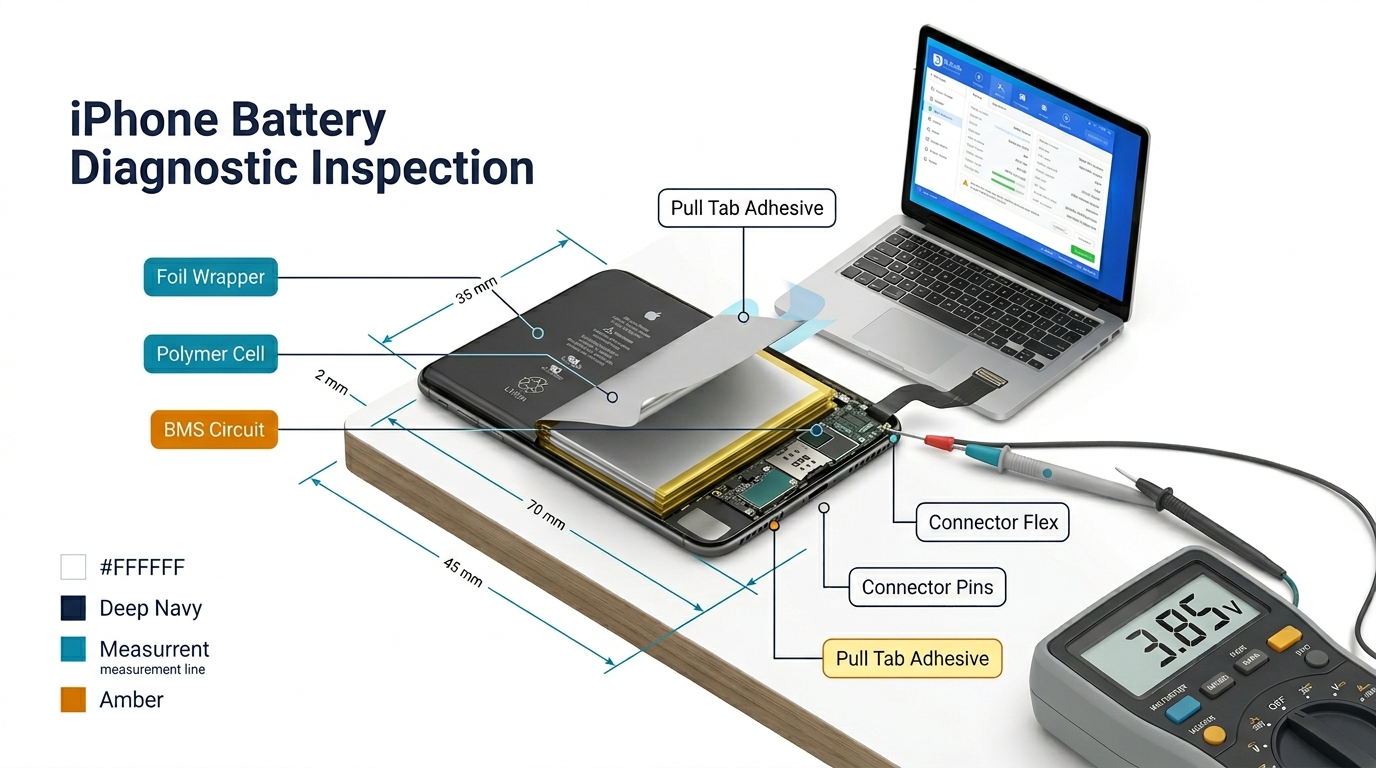
Beyond the three disqualifiers, a thorough visual inspection covers five additional areas. This takes 30 seconds and catches problems that electrical testing won't reveal.
Wrinkles and creases from removal
These are the most common cosmetic issue, and they're usually fine. The outer wrap stretches during removal, especially when adhesive pull tabs break and you have to pry. Multiple r/mobilerepair threads confirm: wrinkled batteries work fine as long as the foil isn't torn.
Critical warning: Do NOT try to smooth out creases with metal tools. A repair tech reported that a colleague at their shop "punctured an iPhone battery by trying to get the wrinkles smoothed out with a metal card." If the wrinkles bother you, use a plastic spudger or the flat of your fingernail — but honestly, leave them alone.
Connector pin condition
Check the battery connector for bent or corroded pins. Corrosion indicates moisture exposure, which may mean internal damage even if the cell looks fine externally.
Wrapper integrity around edges
Run your eye along all four edges. The polymer wrap should be continuous. Any peeling, bubbling, or discoloration suggests heat damage or chemical degradation.
Adhesive residue patterns
Unusual adhesive patterns — especially adhesive that looks melted or discolored rather than simply stretched — can indicate the battery was exposed to excessive heat during a previous repair or from device use.
How to avoid damaging the battery during removal
Prevention matters as much as inspection. When pull tabs break (they often do), a common bench practice among independent techs is to apply a few drops of 99% isopropyl alcohol along the battery edge and wait 30 seconds to soften the adhesive, then use a plastic pry tool — never metal — to gently lever the battery out. (Note: Apple's official training says to stop the repair and replace the battery if pull tabs break. Most independent shops continue with IPA and plastic tools, but be aware that this departs from OEM procedure.) This avoids the aggressive prying that creates the "is this still safe?" question in the first place.
iPhone Battery Health Check — Voltage and Software Readings
Visual inspection tells you if the battery is physically intact. Electrical testing tells you if it's still performing.
Multimeter voltage check
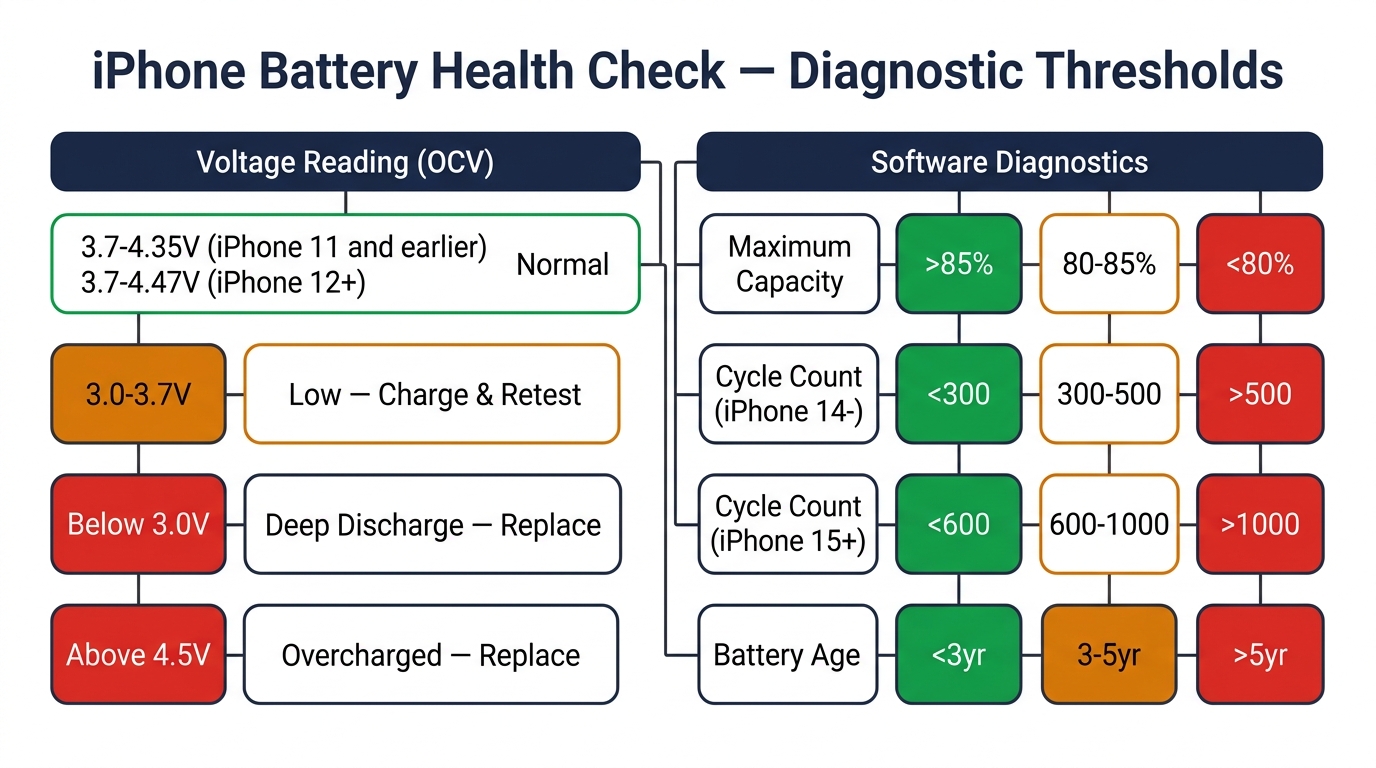
A quick open-circuit voltage (OCV) reading takes seconds and provides useful baseline data.
| Reading | What it means | Action |
|---|---|---|
| 3.7–4.35V | Normal operating range (iPhone 11 and earlier) | Continue to health check |
| 3.7–4.47V | Normal operating range (iPhone 12 and later) | Continue to health check |
| 3.0–3.7V | Low charge, but likely functional | Charge and retest |
| Below 3.0V | Deeply discharged — possible cell damage | Replace (deep discharge degrades lithium-ion cells permanently) |
| Above 4.5V | Overcharged or faulty BMS | Replace immediately — safety risk |
Important note: iPhone 12 and later use higher-voltage cells (nominal 3.83–3.89V, charging up to 4.45–4.47V), so don't flag a reading of 4.40V as "overcharged" on these models. OCV tells you state of charge — it doesn't measure capacity or internal resistance. For a complete picture, you need software diagnostics.
Software diagnostics: 3uTools, coconutBattery, iOS Settings
This is where you get the numbers that actually drive the reuse decision.
iOS Settings (iPhone 15+ with iOS 17.4 or later): Go to Settings > Battery > Battery Health & Charging. You'll see Maximum Capacity percentage AND cycle count. This is the fastest method for newer devices — no tools needed.
3uTools (Windows, free): Connect the iPhone via USB. The battery section shows actual capacity in mAh, cycle count, voltage, and charge status. This is the repair community's standard tool for iPhone battery diagnostics. As one tech recommended: "You can check the health by hooking it back up to a phone and using 3UTools on your computer."
coconutBattery (macOS, free/paid): Similar to 3uTools but for Mac users. Shows design capacity vs. current capacity, cycle count, and battery temperature.
Battery programmers (JCID, i2C BR13): These go deeper — they read the raw data from the Battery Management System (BMS), including cycle count, actual capacity, and voltage history. They can also write data (reset cycle count, restore health percentage), which is how technicians handle the "Unknown Part" warning after aftermarket battery installation. These tools cost $80–120+ and pay for themselves within a few weeks if you do regular battery work.
What the numbers mean for the reuse decision
| Metric | Reuse | Borderline | Replace |
|---|---|---|---|
| Maximum Capacity | >85% | 80–85% | <80% |
| Cycle Count (iPhone 14 and earlier) | <300 | 300–500 | >500 |
| Cycle Count (iPhone 15+) | <600 | 600–1000 | >1000 |
| Manufacturing date | <3 years old | 3–5 years | >5 years |
When metrics conflict: If Battery Health shows 92% but cycle count is 700 on an iPhone 13, weigh the cycle count heavily — the battery is past Apple's rated lifespan for that model (500 cycles), and the health percentage may not yet reflect the degradation. Use this priority: Physical integrity > Voltage > Cycle count > iOS Health percentage. The health percentage is a calculated estimate; cycle count and voltage are more direct measurements.
The Decision Flowchart — Reuse or Replace?
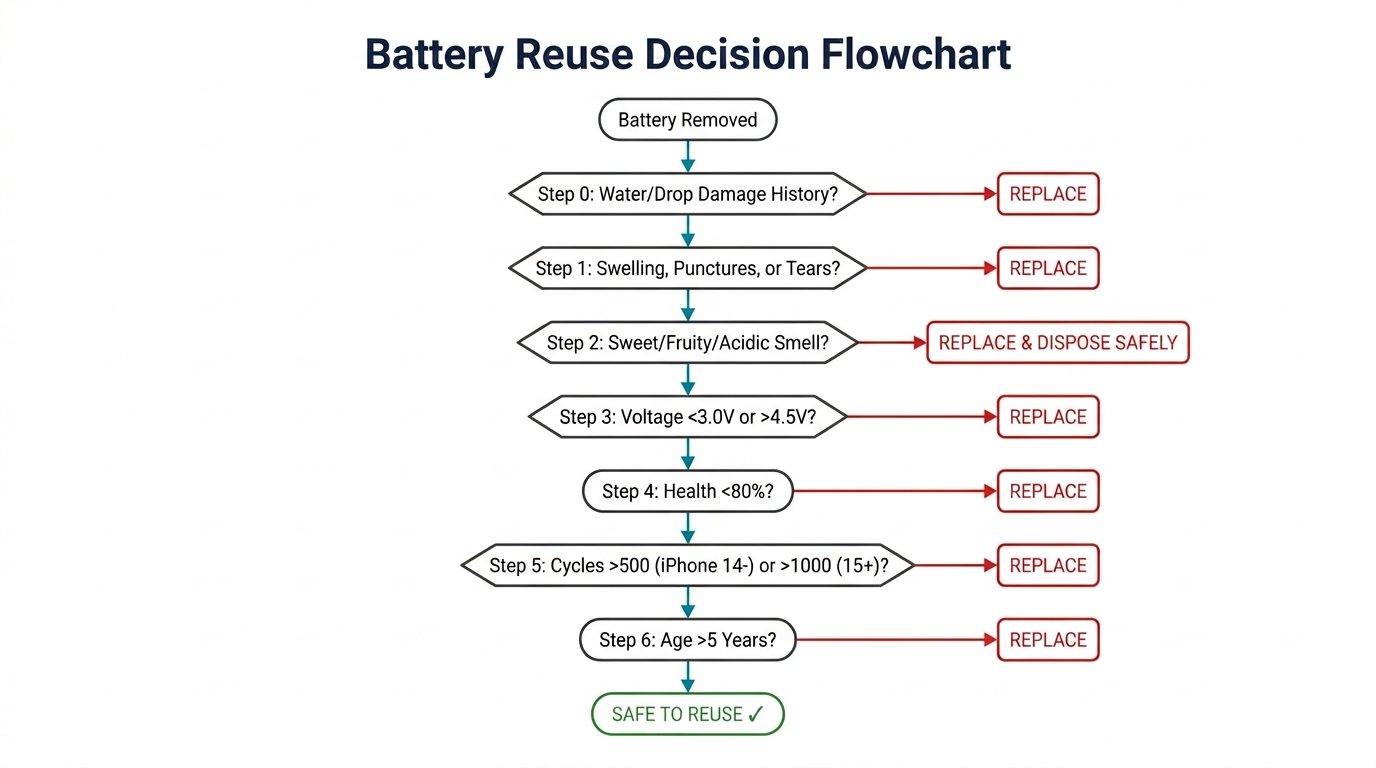
Here's the complete decision sequence, incorporating everything above:
Step 0 — Device history: Known water damage or severe drop? → Replace (internal separator damage is invisible to external testing)
Step 1 — Visual check: Any swelling, punctures, or wrapper tears? → Replace
Step 2 — Smell test: Any sweet, fruity, or acidic odor? → Replace (and dispose safely)
Step 3 — Voltage check: Below 3.0V or above 4.5V? → Replace (adjust upper threshold by model — see voltage table above)
Step 4 — Health check: Below 80% Maximum Capacity? → Replace
Step 5 — Cycle count check: Above 500 cycles (iPhone 14 and earlier) or above 1,000 cycles (iPhone 15+)? → Replace
Step 6 — Age check: Battery manufacturing date more than 5 years ago? → Replace (even if health reads fine — chemical aging makes cells less predictable)
If it passes all seven steps → Reuse.
Common scenarios where this flowchart applies
Screen replacement, battery looks fine: This is the most common case. If the customer didn't report battery issues and the battery passes all seven steps, reuse it. Don't upsell a battery the customer doesn't need — it erodes trust.
Housing swap (back glass replacement): The battery gets handled more aggressively during housing transfers. Apply a higher scrutiny standard — if the battery was bent significantly during extraction and then straightened, consider replacing it even if it looks OK. Internal separator damage from deformation won't show up on a voltage reading.
Customer reports poor battery life: Test the battery, but don't assume it's the battery. DIYFixTool's repair guide points out that perceived fast drain can be caused by motherboard leakage, not the battery itself. A DC power supply test (powering the board without the battery) helps isolate the issue. Replacing a good battery when the motherboard is the real problem wastes money and creates a callback when the issue persists.
Water damage repair: Always replace the battery. Even if readings look normal, water exposure compromises the internal separator and creates unpredictable failure risk. This isn't worth the gamble.
Drop damage (Apple SVC-19 standard): According to iPad Rehab's published notes on Apple's service certification training (SVC-19): "Always replace a dropped battery." Even a battery that passes visual inspection may have internal separator damage from impact. If you know the device was dropped hard enough to need screen repair, the battery took the same hit.
Apple's Battery Health System — What to Tell Your Customers
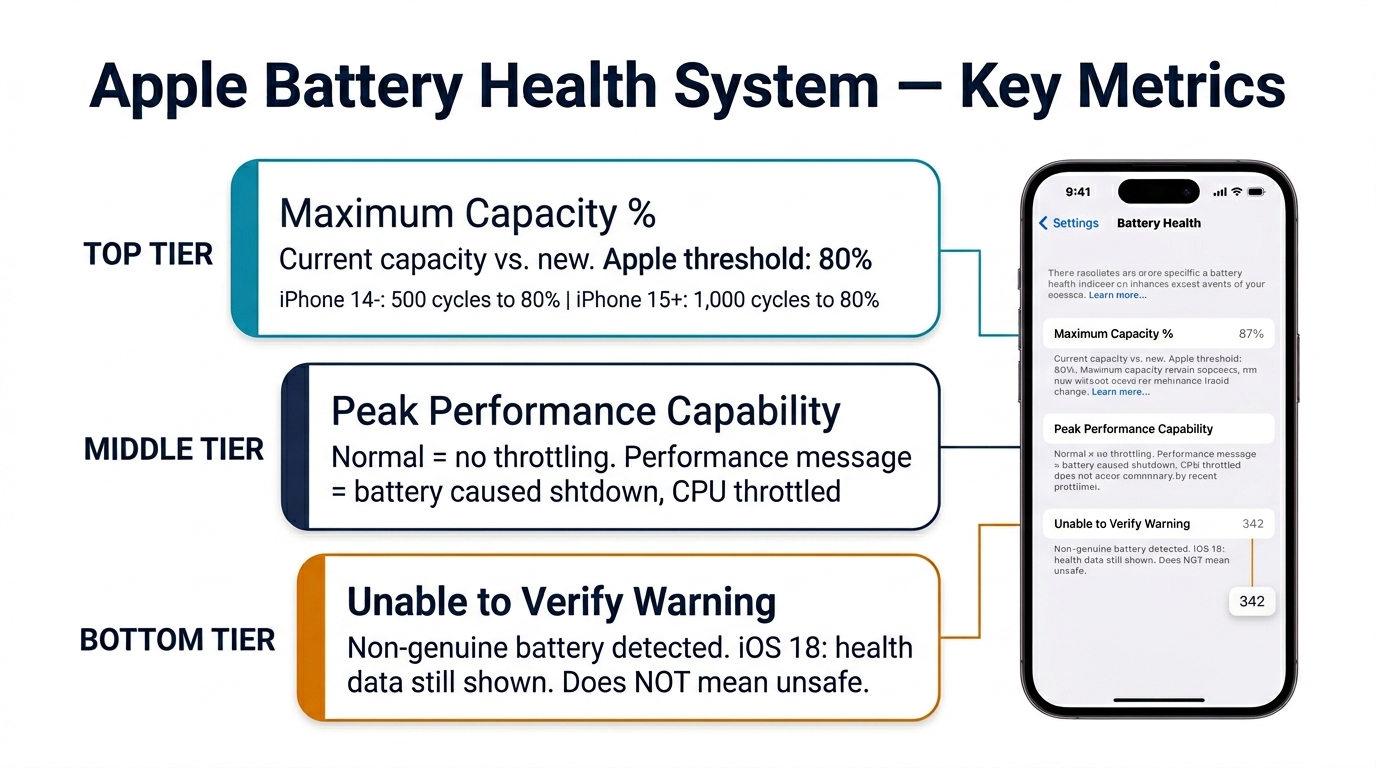
Understanding these metrics isn't just for your diagnosis — it's for explaining the situation to your customer. When you recommend a battery replacement, being able to point to specific numbers builds credibility.
Maximum Capacity
This is the percentage shown in Settings > Battery > Battery Health. It measures current capacity relative to when the battery was new. Apple's official specification: batteries on iPhone 14 and earlier are designed to retain 80% at 500 complete charge cycles. iPhone 15 and later raised this to 80% at 1,000 cycles.
When a customer asks "is 85% bad?", the answer depends on context. 85% on a 2-year-old iPhone 14 with 400 cycles is normal aging. 85% on a 6-month-old iPhone 15 with 150 cycles suggests a defective cell — that phone may still be under Apple's warranty.
Peak Performance Capability
This is the message below Maximum Capacity. "Your battery is currently supporting normal peak performance" means no throttling is active. If you see the performance management message, the battery has caused at least one unexpected shutdown and iOS is actively throttling the CPU/GPU to prevent another. This battery should be replaced.
The "Unable to Verify" warning
On iPhone XS and later, a non-genuine Apple battery triggers: "Unable to verify this iPhone has a genuine Apple battery." This affects third-party batteries — including quality aftermarket replacements. It doesn't mean the battery is unsafe. But customers see it and worry.
iOS 18 update: Apple now shows battery health data even with aftermarket batteries. The "Unknown Part" notification still appears, but the health percentage and cycle count are no longer hidden — a significant improvement for independent repair shops. One caveat: Apple states that health data with non-genuine batteries "might not be accurate," so treat these readings as directional, not absolute.
For shops that want to eliminate the warning entirely, BMS transplant (moving the Battery Management System circuit from the original battery to the new cell) or battery programmers (JCID, i2C) can restore full Apple battery health display. This adds 10–15 minutes per repair but some shops charge a premium for "genuine battery health display" as a service tier.
Liability and Business Risk
The cheapest iPhone replacement battery costs $5–15 wholesale. A single product liability claim from a battery that catches fire or injures a customer can cost tens of thousands. Here's where that gap matters.
What creates liability exposure
Many US states apply strict liability to product-related injuries, which some legal analyses suggest could extend to repair shops installing batteries. If you install a battery that you knew (or should have known) was degraded, your exposure increases. (Consult a local attorney for jurisdiction-specific advice.)
Reusing a visibly damaged battery in a customer device — creased wrapper with exposed foil, health below 80%, 4+ year manufacturing date — and having that battery fail is the kind of scenario that invites legal scrutiny.
Protect your shop with documentation
- Photo the battery at intake — before and after removal. A timestamped photo showing an intact battery protects you if the customer later claims you damaged it.
- Record the health reading — screenshot from 3uTools or iOS Settings. If you reused the battery, this documents it was within safe parameters. If you replaced it, it documents why.
- Get customer sign-off — for borderline cases (80–85% health, high cycle count), let the customer decide. Present the numbers, explain the risk, and have them sign off on their choice. This transfers the decision — and the risk — to the informed customer.
Battery disposal
Repair shops generate a steady stream of removed batteries. Don't throw lithium-ion batteries in regular waste. OSHA FS-4480 requires proper disposal. Most areas have commercial lithium-ion recycling services — Call2Recycle and Battery Solutions are two national options in the US. Keep a fireproof container at your bench for batteries awaiting disposal.
Economics — The Real Cost of Reuse vs. Replace
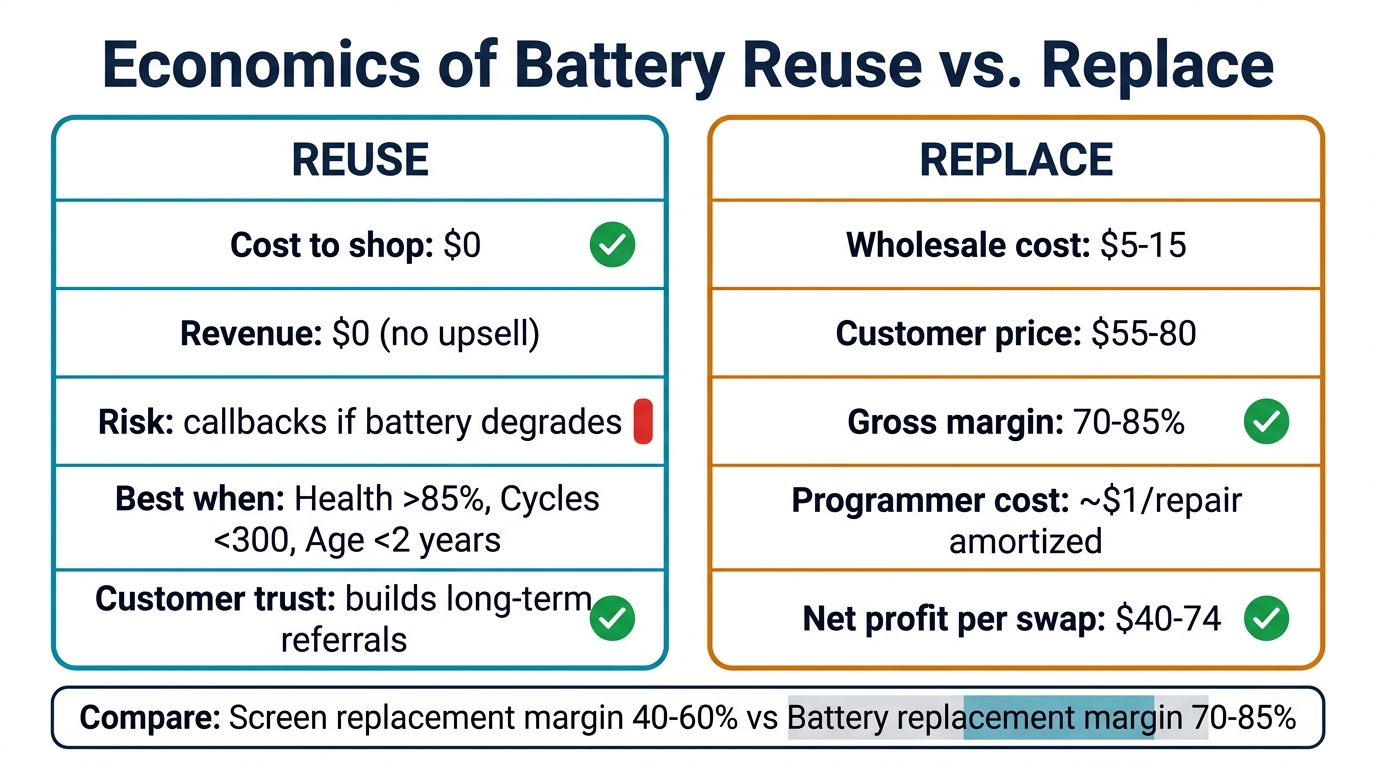
The margin on battery replacement
| Item | Cost | Revenue |
|---|---|---|
| Wholesale battery (bulk) | $5–15 | — |
| Customer price (battery replacement) | — | $55–80 |
| Battery programmer amortization | ~$1/repair | — |
| Gross margin per battery replacement | — | $40–74 |
Battery replacement is one of the highest-margin services in phone repair. At $5–15 wholesale and $55–80 retail, you're looking at 70–85% gross margins. Compare that to screen replacement margins of 40–60%.
When reuse makes economic sense
Despite the high margins on battery replacement, reuse is the right call when:
- The battery passes all seven diagnostic steps
- The customer didn't authorize battery work
- The battery is less than 2 years old with >90% health
Pushing unnecessary battery replacements on every screen repair customer is short-term thinking. Customers talk. The shop known for honest assessments gets more referrals than the shop that upsells every repair.
When replacement makes economic sense
Replace without hesitation when:
- Any of the seven diagnostic steps fails
- The customer specifically reports battery issues
- The device is 3+ years old (even if health reads OK — offer it as a recommendation)
- You're doing a housing swap (the labor is already done — adding a $10 battery makes sense)
Stocking strategy
Keep your top 5 battery models in stock. For most US repair shops in 2026, that's iPhone 11 through iPhone 15 series. At $5–15 per unit, holding 10 of each ties up $250–750 in inventory — a small investment for same-day battery service capability. PRSPARES offers wholesale iPhone batteries across the full model range if you need to stock up.
FAQ
At what battery health percentage should I replace an iPhone battery?
Apple's threshold is 80% Maximum Capacity — below this, the battery is considered "significantly degraded" and performance throttling may activate. For customer devices, we recommend replacement at or below 80%. Between 80–85%, it's a judgment call: discuss with the customer and let them decide based on how they use the phone.
How many battery cycles is too many for an iPhone?
It depends on the model. iPhone 14 and earlier: Apple rates the battery for 500 cycles to 80% health. iPhone 15 and later: 1,000 cycles to 80%. These aren't hard failure points — a battery at 550 cycles won't suddenly die — but they represent the manufacturer's confidence threshold. Beyond these numbers, expect accelerating degradation.
Can I check iPhone battery health without special tools?
On iPhone 15 and later running iOS 17.4+, yes — Settings > Battery > Battery Health & Charging shows both Maximum Capacity and cycle count. For older models, you'll need 3uTools (Windows, free) or coconutBattery (macOS) connected via USB. iOS Settings on older iPhones shows Maximum Capacity but not cycle count.
What does "Unable to verify genuine Apple battery" mean?
This message appears on iPhone XS and later when a non-Apple battery is installed. It does not mean the battery is dangerous or defective. It means iOS cannot verify the battery's serial number against Apple's database. Since iOS 18.1, the phone still displays battery health data even with this warning. To remove the warning entirely, technicians use BMS transplant or battery programmer tools (JCID, i2C) to pair the new battery with the device.
Is it safe to reuse a creased or wrinkled iPhone battery?
Generally yes, if the foil wrapper is not torn or punctured. Wrinkles from adhesive removal are cosmetic — the battery cell inside is unaffected. Do not attempt to smooth creases with metal tools (risk of puncture). Check for exposed silver material at crease points. If the battery was severely bent and straightened, consider replacing it — internal separator damage from extreme deformation won't show on external inspection.
Wrapping Up
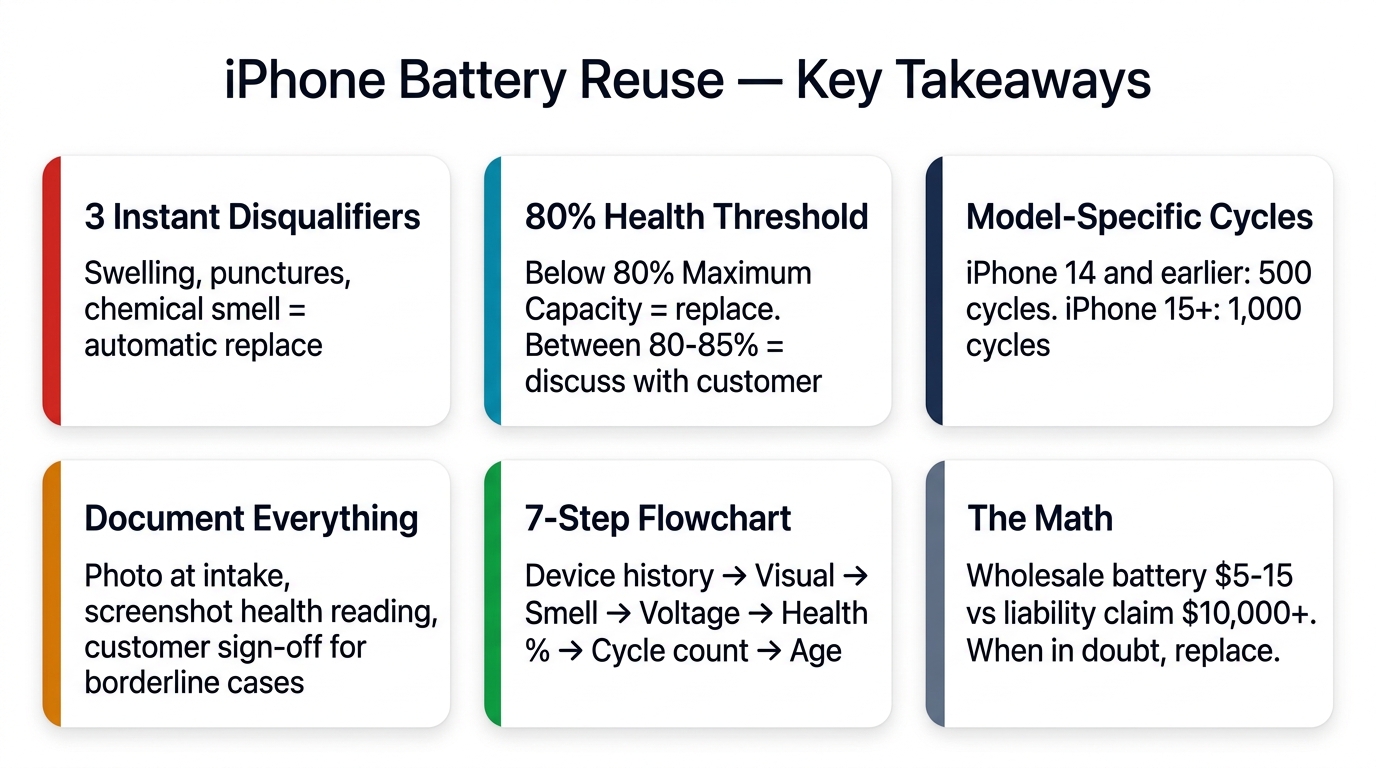
The battery reuse decision comes down to a 60-second diagnostic: verify device history is clean, check three instant disqualifiers (swelling, punctures, smell), then run three data checks (voltage, health percentage, cycle count). When any step fails, replace — a $10 wholesale battery is the cheapest insurance in the repair business. When everything passes, reuse confidently and save your customer unnecessary cost.
If you're looking to stock replacement batteries for the models you see most often, browse our wholesale iPhone battery catalog or request a quote for bulk pricing.
Related reading: