Common Battery Complaints After Replacement — and How Shops Can Avoid Callbacks

Every repair shop owner knows the feeling. A customer walks back in two days after a battery replacement, phone in hand, frustration on their face. "It's worse than before." Battery callbacks eat into margins, damage your reputation, and waste technician hours. The industry average callback rate for battery jobs sits around 5-8%, but shops with tight QC processes push that number below 2%.
This guide breaks down the most frequent battery problems after replacement, explains root causes for each, and gives you a repeatable system to prevent them. No fluff — just what works on the bench.
Buying Phone Batteries Wholesale?
OEM-cell batteries with safety packaging — iPhone, Samsung & more, factory-direct.
Get Wholesale QuoteThe 6 Most Common Battery Complaints After Replacement
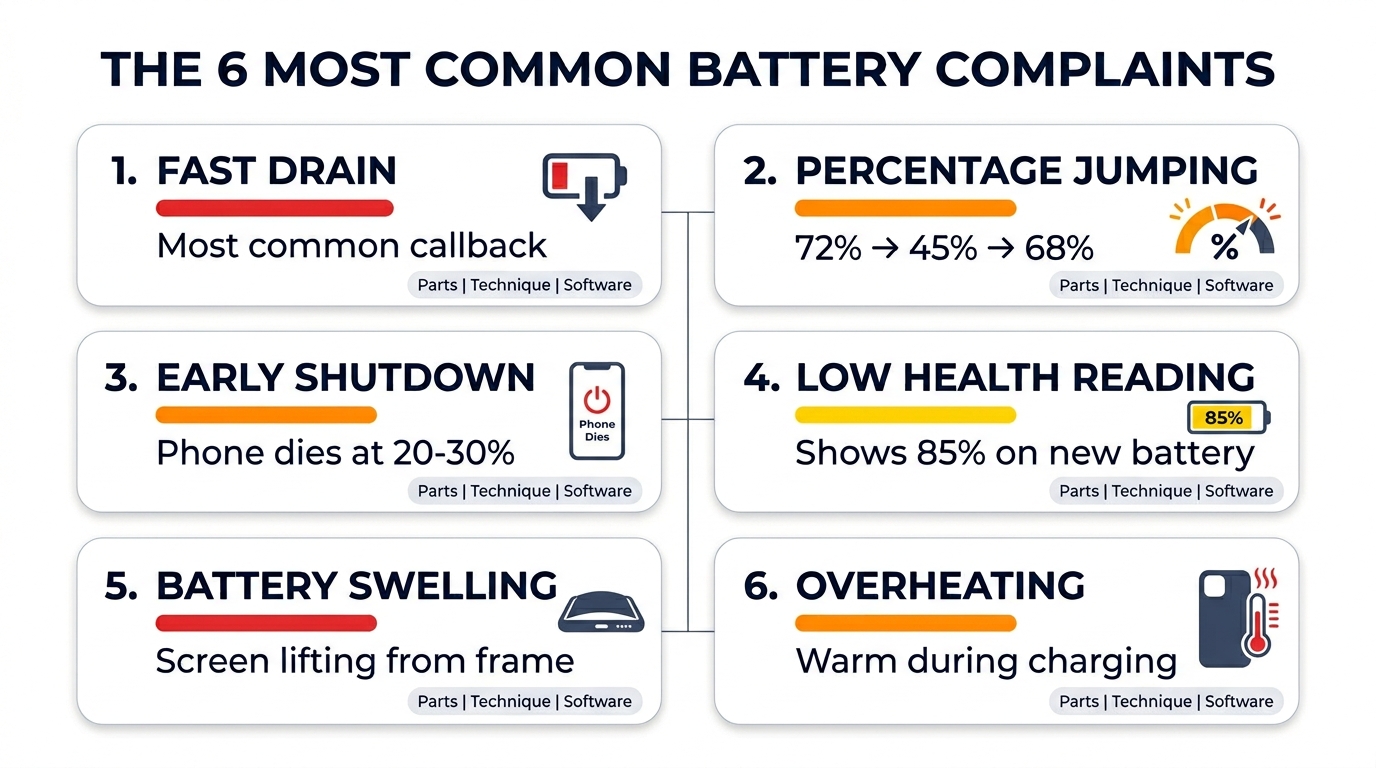
Before you can fix your callback rate, you need to understand what customers are actually complaining about. Based on data from repair shop networks and parts distributors, these six issues account for over 90% of battery-related callbacks.
1. Battery Draining Fast After Replacement
This is the number-one complaint. The customer expected a brand-new battery experience, but their phone dies by 3 PM. Battery draining fast after replacement has three distinct root causes, and each one demands a different response.
Parts quality issue: Low-grade aftermarket cells often ship with actual capacities 15-30% below their labeled mAh rating. A battery stamped "3,279 mAh" for an iPhone 14 might actually deliver 2,500 mAh. The customer feels this immediately.
Software/calibration issue: iOS and Android both use learned battery curves. After a swap, the OS may still reference the old battery's charge profile. On iPhones, it takes 1-2 full charge cycles for the battery analytics to recalibrate. On some Android devices, a battery stats reset through recovery mode speeds this up.
Installation error: A partially seated battery connector can cause intermittent power draw. Micro-tears in the flex cable — common when technicians rush adhesive tab removal — create resistance that generates heat and drains the cell faster.
2. Battery Percentage Jumping or Inaccurate
The phone shows 65%, then drops to 30% in minutes, or jumps from 20% back up to 45%. This is a calibration and communication problem between the battery's fuel gauge IC and the phone's power management system.
On newer iPhones (iPhone 11 and later), Apple ties battery data to the logic board via a Texas Instruments fuel gauge chip. Swapping the battery without transferring the fuel gauge data means iOS has no accurate baseline. Tools like the JC V1SE or i2C programmer can read and write this data, syncing the new cell to the board.
For Android devices, the issue is usually simpler. A full drain-to-100% cycle within the first 48 hours typically resolves percentage inaccuracies. If it persists after two cycles, suspect the battery's built-in protection circuit — a sign of a substandard cell.
3. Phone Shutting Down Early
The phone dies at 15%, 20%, or even 30% remaining charge. Customers interpret this as a defective battery, and they're often right.
The most common cause is a battery with high internal resistance. Quality cells from tier-1 manufacturers (ATL, Sunwoda, Desay) have internal resistance below 100 mOhm when new. Grade-B and Grade-C aftermarket batteries can ship with internal resistance above 150 mOhm, which causes voltage sag under load. When the processor demands peak current — opening the camera app, loading a game — the voltage dips below the phone's shutdown threshold even though charge remains in the cell.
You can test this pre-installation with a battery tester that measures internal resistance. Any cell above 120 mOhm should be rejected before it goes into a customer's phone.
4. Battery Health Showing Lower Than Expected
On iPhones, customers check Settings > Battery > Battery Health & Charging. They paid for a replacement and expect to see 100%. Instead, they see 85% or even "Service" warnings.
This ties directly to the fuel gauge data issue mentioned above. Starting with iOS 15.2, Apple expanded battery authentication. On iPhone 15 and later, non-genuine batteries trigger a persistent "Unknown Part" warning regardless of cell quality. For iPhone 11 through 14 series, reprogramming the fuel gauge IC with the original battery's serial data restores the health reading to 100%.
Shops that skip this step generate predictable callbacks. Invest in a programmer — the tool pays for itself within 20-30 repairs at typical labor rates.
5. Battery Swelling
A swollen battery days or weeks after installation is a safety concern, not just a customer inconvenience. The root cause is almost always a defective cell. Lithium-polymer batteries swell when internal chemical reactions produce gas, typically from:
- Manufacturing defects in the electrode coating
- Overcharging due to a faulty protection circuit on the battery's PCB
- Physical damage during installation (punctured pouch cell)
If you see swelling callbacks on more than 1% of a specific battery SKU, stop using that supplier immediately. Swelling is a leading indicator of thermal runaway risk. No margin is worth that liability.
6. Overheating During or After Charging
The phone gets noticeably hot during charging or normal use after the battery swap. This complaint overlaps with drain issues because heat itself accelerates discharge.
Check for a damaged or misrouted flex cable pressing against the logic board. Verify adhesive placement — some technicians use too much adhesive, which can insulate the battery and trap heat that normally dissipates through the frame. Also confirm the battery's protection circuit includes a PTC (Positive Temperature Coefficient) thermistor. Budget cells sometimes omit this component to cut costs, removing the thermal safety net.
Root Cause Diagnosis: Parts vs. Technique vs. Software
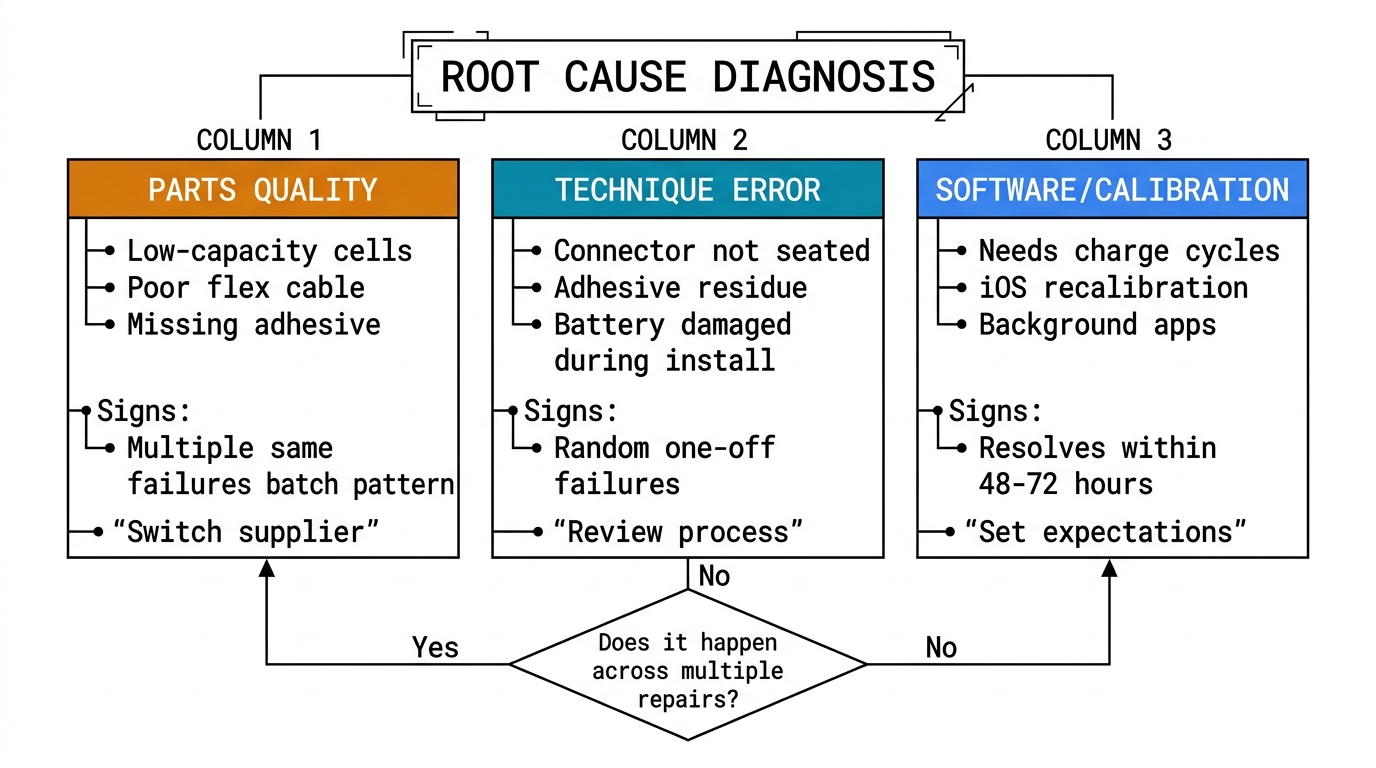
When a customer returns with phone battery replacement problems, you need a fast triage system. This table maps symptoms to likely causes.
| Complaint | Parts Quality | Installation Error | Software/Calibration |
|---|---|---|---|
| Draining fast | High probability | Medium probability | Medium probability |
| Percentage jumping | Low probability | Low probability | High probability |
| Early shutdown | High probability | Low probability | Medium probability |
| Health reading low | Low probability | N/A | High probability (fuel gauge) |
| Swelling | High probability | Low probability (damage) | N/A |
| Overheating | Medium probability | Medium probability | Low probability |
Use this as a starting diagnostic. If 3 out of 5 callbacks in a week point to "Parts Quality," your current supplier has a batch problem. If they point to "Installation Error," a technician needs retraining on a specific step.
Setting Customer Expectations Before the Repair
Half of all callbacks aren't really part failures — they're expectation failures. The customer assumed a battery swap would make their 4-year-old iPhone 11 perform like it did on launch day. It won't. The processor has been thermally cycled thousands of times, the charging IC has wear, and the OS is heavier than it was in 2020.
Build a 60-second pre-repair briefing into your workflow:
- State the battery grade clearly. "We're installing an aftermarket battery with tested capacity above 95% of original spec." Don't promise OEM equivalence unless you're using OEM pulls.
- Explain the calibration period. "Your battery percentage may be inaccurate for the first 2-3 charge cycles. This is normal — the phone needs to learn the new battery."
- Set a timeline for concerns. "If anything feels off after 5 days, bring it back. Within the first 48 hours, give it time to settle."
- Document it. A printed or digital checklist signed by the customer protects you from disputes later.
Shops that implement this briefing consistently report a 30-40% reduction in battery-related callbacks, simply because customers stop interpreting normal calibration behavior as defects.
Pre-Installation QC Steps That Prevent Callbacks
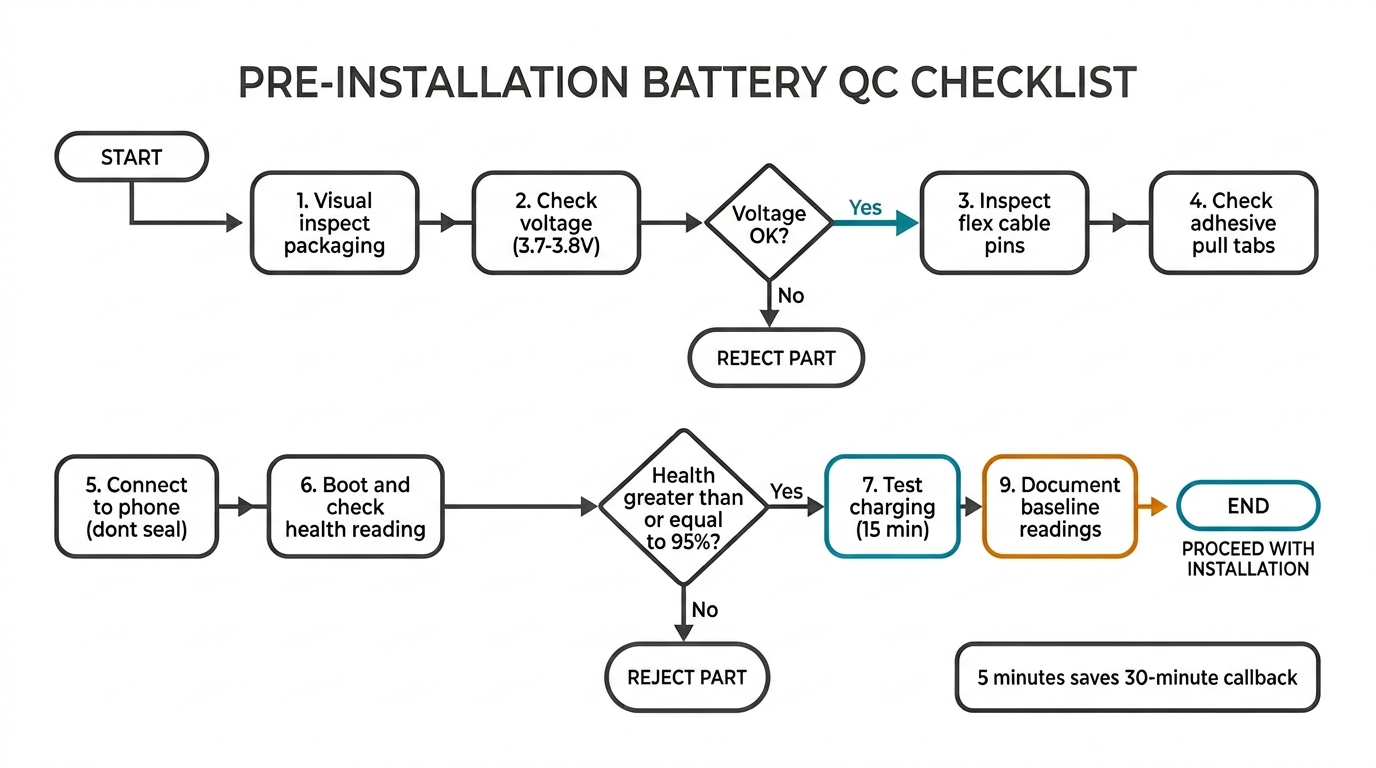
A 5-minute QC process before the battery goes into the phone eliminates the majority of battery callback repair shop headaches.
Step 1: Visual Inspection
Check the cell for any swelling, dents, or damage to the flex cable. Look at the connector pins under magnification — bent or corroded pins cause intermittent connection issues that are hard to diagnose post-install.
Step 2: Voltage Check
A healthy, new lithium-polymer cell should ship at 3.7-3.85V (storage charge). Anything below 3.5V has been sitting in a warehouse too long or has a defective cell. Anything above 4.0V suggests improper storage charging. Both are reject conditions.
Step 3: Capacity and Internal Resistance Test
If you process more than 10 battery replacements per week, a dedicated battery analyzer (like the YZXStudio ZY1280 or EBD-USB+) pays for itself quickly. Test a sample from each incoming batch. Capacity should measure within 5% of the labeled mAh rating. Internal resistance should be below 120 mOhm.
Step 4: Fuel Gauge Programming (iPhone)
For iPhone 11 and later, program the fuel gauge IC before sealing the phone. This step takes under 2 minutes with the right tool and eliminates the "Battery Health" callback entirely.
Step 5: Post-Install Functional Test
Power on the device before closing it up. Confirm the battery is recognized, check the initial percentage reading, and verify charging works in both directions (charge and discharge). Run a 30-second stress test — open the camera and record video — to check for immediate thermal issues.
If you're sourcing parts in volume and want to reduce the QC burden, working with a supplier that pre-tests batteries before shipping makes a measurable difference. At PRSPARES, our wholesale inquiry process includes batch testing data so you know what you're getting before it arrives.
When to Blame the Part vs. When to Blame Technique
This distinction matters for two reasons: warranty claims against your supplier, and internal training decisions.
Blame the part when:
- Multiple units from the same batch show identical symptoms
- The cell fails capacity or internal resistance testing
- Swelling appears within 30 days on a properly installed battery
- The battery's protection circuit fails (no overcurrent protection, missing thermistor)
Blame technique when:
- Only one unit from a batch shows the problem
- The flex cable or connector shows physical damage
- Adhesive residue is visible on the connector or board
- The fuel gauge wasn't programmed (iPhone health reading issue)
- The phone works normally after reseating the connector
Track every callback in a simple spreadsheet: date, device model, battery SKU, symptom, root cause (parts/technique/software). After 90 days, you'll have data-driven answers about which suppliers to keep and which technicians need support.
Tracking Callback Rates to Improve Parts Sourcing
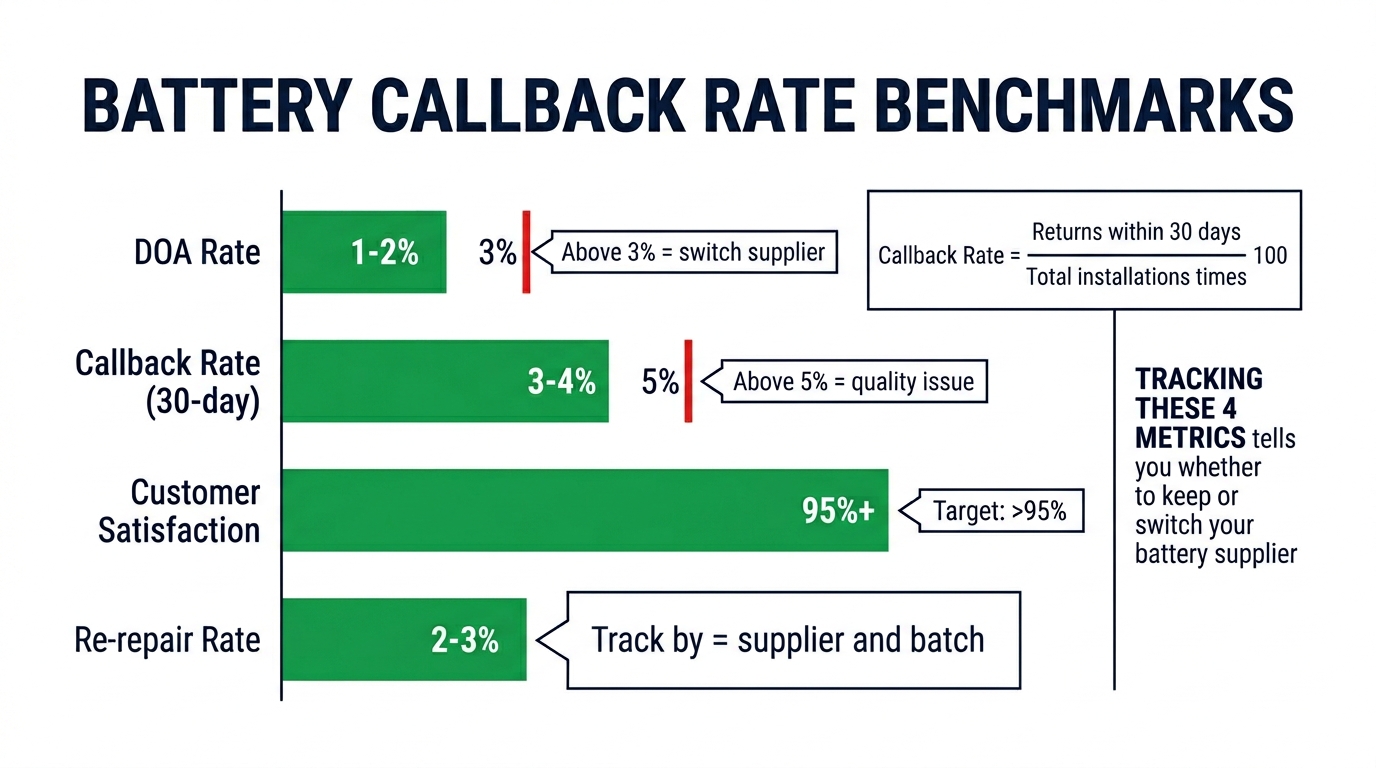
Your callback rate is the single most useful metric for evaluating battery suppliers. Here's how to calculate and use it.
Callback rate = (Battery callbacks in 30 days / Total battery replacements in 30 days) x 100
Benchmarks:
- Below 2%: Excellent. Your parts and process are solid.
- 2-5%: Acceptable, but investigate any recurring patterns.
- 5-8%: Industry average. There's room to improve.
- Above 8%: You have a parts quality problem, a technique problem, or both.
Break this down by supplier and by battery model. You might find that your iPhone 13 batteries from Supplier A have a 1% callback rate, but your iPhone 12 batteries from the same supplier run at 7%. That's a batch or SKU-specific issue worth raising with them.
Suppliers who can provide cycle test reports, capacity verification data, and internal resistance measurements for each batch give you confidence before the parts reach your bench. This is exactly why we built PRSPARES's battery quality verification process into our supply chain — because repair shops asked for it.
Battery Replacement Best Practices Checklist
For quick reference, here's the complete workflow:
| Step | Action | Time |
|---|---|---|
| 1 | Pre-repair customer briefing | 60 sec |
| 2 | Visual inspection of new battery | 30 sec |
| 3 | Voltage check (3.7-3.85V acceptable) | 15 sec |
| 4 | Capacity/resistance test (batch sample) | 5 min |
| 5 | Fuel gauge programming (iPhone 11+) | 2 min |
| 6 | Installation per model-specific guide | Varies |
| 7 | Post-install functional test | 2 min |
| 8 | Document repair and set expectations | 60 sec |
| 9 | Log callback data if customer returns | 2 min |
Total added QC time: roughly 6-7 minutes per repair. At an average labor rate of $40-60 per battery replacement, this investment in time prevents the $40-60 you lose on a free callback repair — plus the reputational cost that's harder to quantify.
FAQ: Battery Problems After Replacement
Do I need to reset anything after replacing the battery?
On most Android devices, a factory reset isn't necessary, but clearing the battery stats cache through recovery mode helps the OS build an accurate charge profile for the new cell. On iPhones, no user-facing reset is needed — iOS recalibrates automatically over 1-2 charge cycles. The critical step is fuel gauge IC programming on iPhone 11 and later, which is a technician-side task, not a customer-side one.
Should I calibrate my phone battery after replacement?
Yes, but "calibration" means different things depending on the device. For iPhones, let the phone charge to 100% uninterrupted, then use it normally until it shuts down, then charge to 100% again. Two cycles is usually enough. For Samsung Galaxy devices, the same process applies, though some models benefit from a battery stats wipe via recovery mode. The goal is to give the power management IC enough data points to map the new battery's discharge curve accurately. For more on managing batteries at scale, see our guide on buying iPhone batteries in bulk.
What should I do after replacing my phone battery?
From a shop perspective: run a post-install functional test (charge, discharge under load, check for heat), program the fuel gauge if applicable, and brief the customer on the 48-hour calibration window. From a customer perspective: charge to 100% on the first cycle, avoid wireless charging for the first 48 hours (it generates more heat than wired), and report any issues after day 3 rather than day 1. This two-sided approach — shop QC plus customer education — is what separates a 2% callback rate from an 8% one.
How long should a replacement battery last?
A quality aftermarket battery should retain 80% of its original capacity after 500 full charge cycles — roughly 18-24 months of typical use. If customers report significant degradation within 6 months, the cell quality is suspect. This is why understanding battery replacement costs and their relationship to parts grade matters for your business model. Cheap batteries create expensive callbacks.
Why does my phone still have issues after a battery replacement?
Not all phone problems are battery problems. If a device had iphone battery issues after replacement like random reboots or lag, the root cause might be a failing power management IC (common on iPhone 7 and 8 series), water damage corrosion on the logic board, or even a degraded charging port that's stressing the new battery with inconsistent power delivery. Our guide on charging port failures after replacement covers the overlap between port and battery complaints in detail.
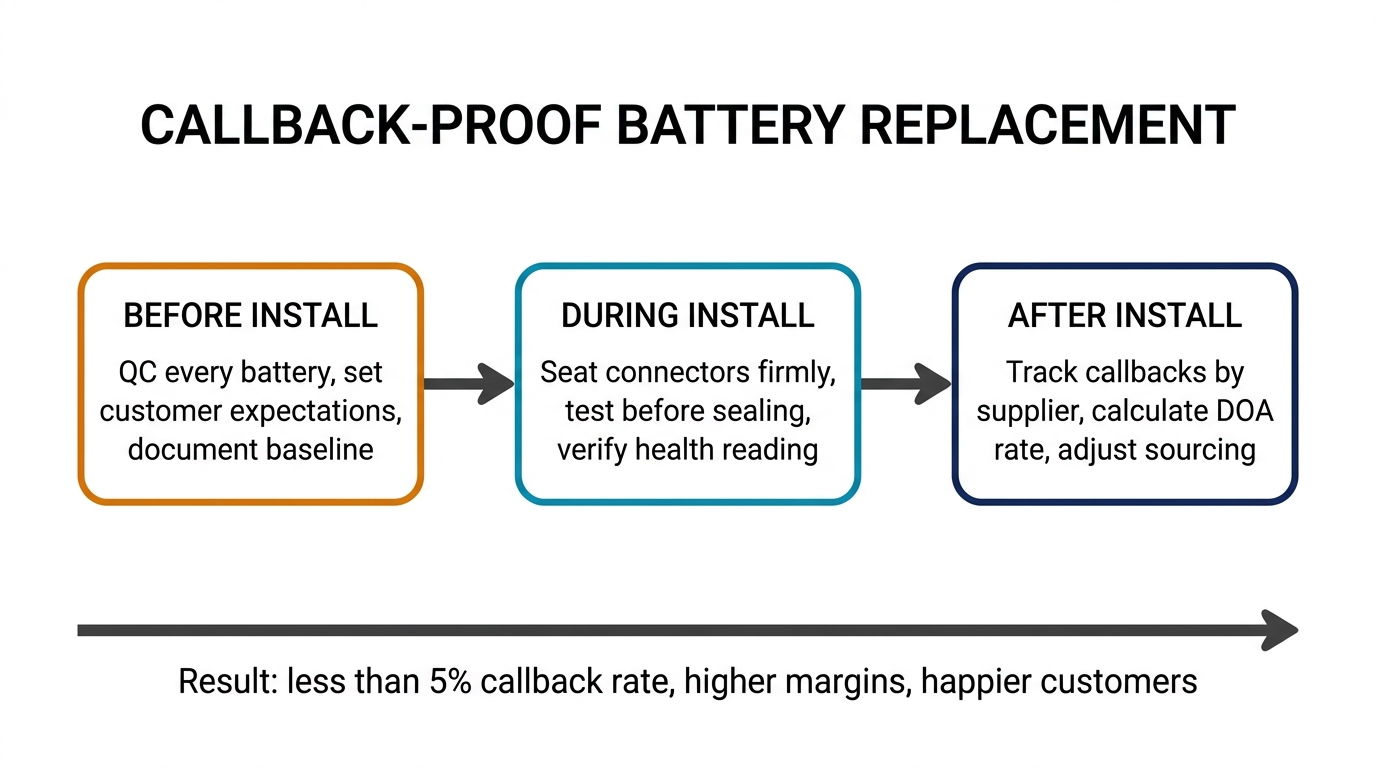
Build a Callback-Proof Battery Replacement Process
Battery callbacks are not inevitable. They're a symptom of gaps in three areas: parts sourcing, installation technique, and customer communication. Tighten all three, and your callback rate drops below the threshold where it impacts profitability.
Start with data. Track every callback for 90 days and categorize by root cause. You'll quickly see whether your problem is parts, people, or process. From there, the fixes are straightforward: upgrade suppliers, retrain on specific steps, and standardize your pre-repair briefing.
If you're looking to improve your battery parts quality and want batch-tested cells with verified capacity data, reach out through our wholesale inquiry page. We work with repair shops that take callback rates seriously, and we're happy to share testing data on any SKU before you commit to a bulk order.
Your customers don't remember the repairs that went perfectly. They remember the one that brought them back. Make sure that number stays as close to zero as possible.