iPhone 15 Battery Replacement: What Changed with USB-C and How to Get It Right
iPhone 15 battery replacement is not the same job as iPhone 14 or earlier. The switch from Lightning to USB-C changed the power architecture, Apple doubled the rated cycle life to 1,000 cycles, and iOS 18 introduced a Repair Assistant that can recalibrate genuine batteries without third-party tools. If you're a repair tech still treating this as a routine swap, you'll run into problems — boot loops, calibration failures, and "Unknown Part" warnings that scare customers.
This guide covers what's technically different, where things break, and how to handle BMS calibration across the entire iPhone 15 lineup. We'll also break down wholesale battery costs so you can price the job correctly.
Need Charging Port Flex in Bulk?
Wholesale charging port assemblies for iPhone & Samsung — tested, factory-direct.
Get Wholesale QuoteWhat's Different About iPhone 15 Battery Replacement
Three things changed that directly affect your repair workflow.
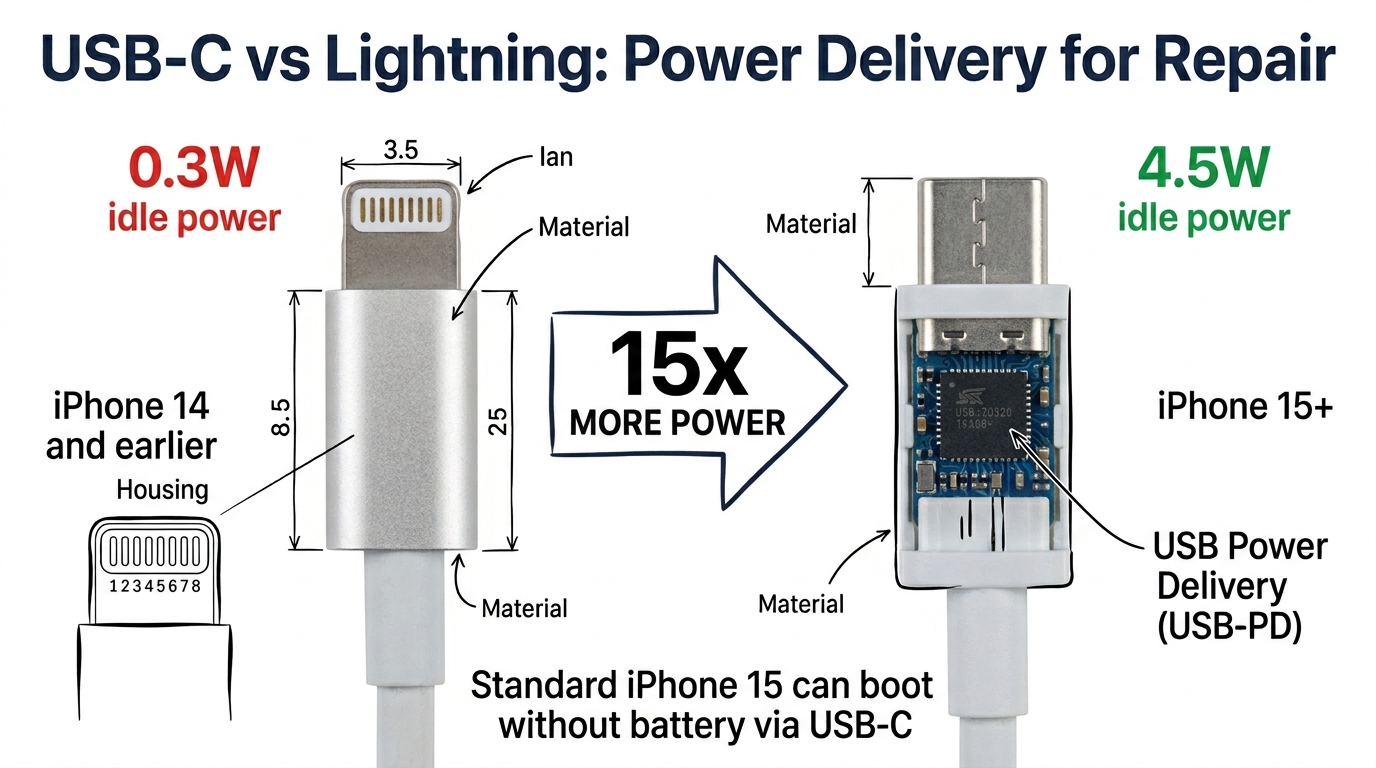
USB-C delivers 15x more power than Lightning. The iPhone 15's USB-C port pushes 4.5W idle power versus Lightning's 0.3W. This is enough to boot and run the phone without a battery connected — something discovered by a tech on r/mobilerepair who found the standard iPhone 15 running off USB-C power alone during a repair. Most older iPhones bootloop without battery communication (though behavior varies — some iPhone 12 Pro and 14 Plus units have been reported to work).
A practical note: this only works reliably on the standard iPhone 15. At least one tech on r/mobilerepair reports that the iPhone 15 Pro bootloops without a battery even over USB-C. The exact cause isn't confirmed — it may be related to the Pro's USB 3.2 controller or A17 Pro chip drawing more than USB-C idle power can supply, but that's speculation. The safe rule: don't count on batteryless operation for Pro models.
Stretch-release adhesive tabs. Apple moved to pull-tab adhesive on the iPhone 15 series, replacing the glued-down approach from earlier models. When the tabs work, removal is clean and fast. When they snap — and they do, especially on the Plus and Pro Max with larger cells — you're back to the isopropyl alcohol soak method. Never pry directly against the battery cell. A punctured lithium pouch is a fire you don't want in your shop.
1,000-cycle battery rating. Apple doubled the rated cycle life from 500 (iPhone 14 and earlier) to 1,000 cycles to 80% capacity on the entire iPhone 15 lineup. This means fewer customers will need replacements in the first two years, but the ones who do come in are likely heavy users with genuinely degraded cells — not the "my battery health is 89%" crowd.
iPhone 15 Battery Replacement: Step-by-Step Hazard Points
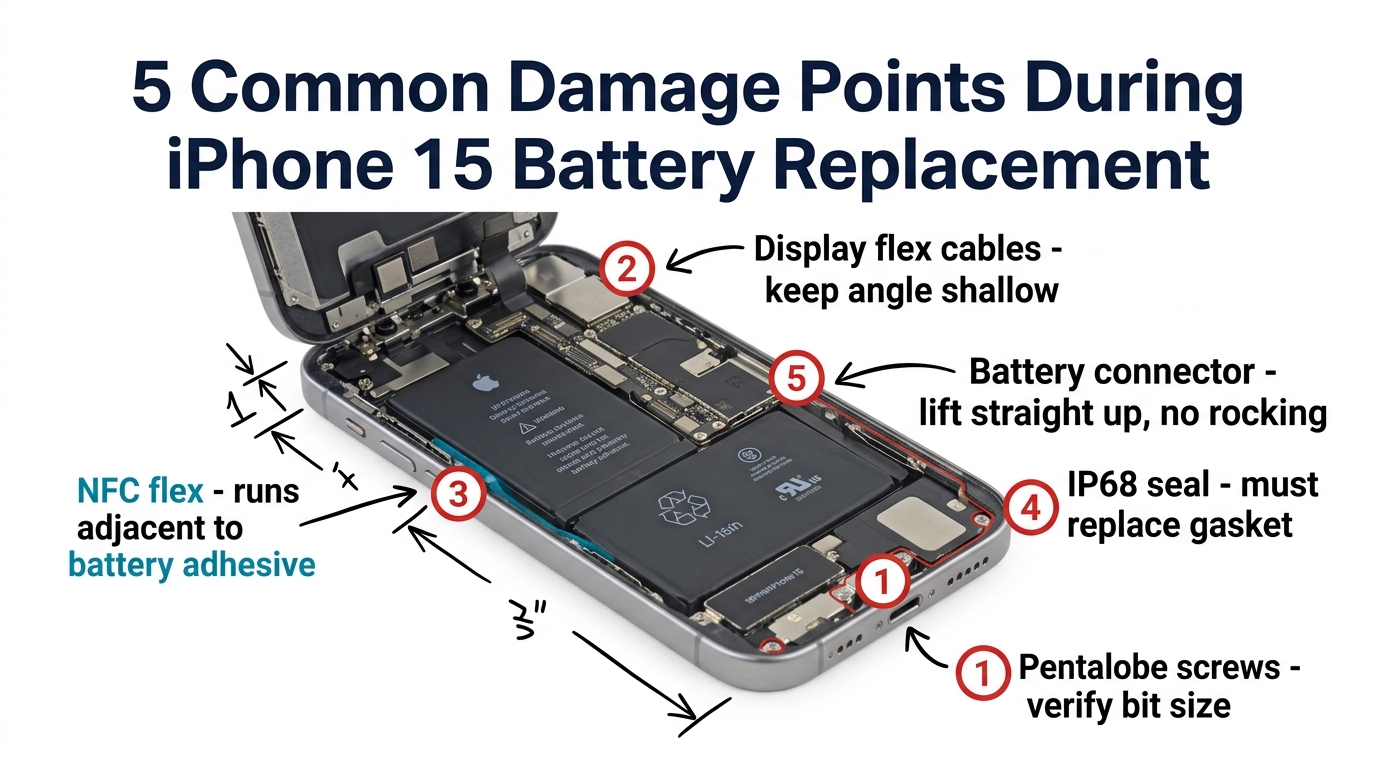
We're not going to duplicate iFixit's full teardown guide — it's thorough and free. Instead, here are the five points where techs actually damage things, based on real repair shop reports.
1. Pentalobe screws — don't strip them
The bottom pentalobe screws on iPhone 15 are slightly longer than iPhone 14's. Using an iPhone 14 driver depth can strip them. Verify your bit before starting.
2. Display flex cables sit tighter
The display connectors on the iPhone 15 are positioned closer to the battery than on earlier models. When prying the display open, keep your angle shallow — going past 90 degrees can tear the display flex. Multiple techs report panicking at adhesive residue near the flex, thinking they've damaged the board. Adhesive residue is normal. Clean it with IPA.
3. NFC and wireless charging coil proximity
The NFC antenna flex runs adjacent to the battery adhesive tabs on the left side. If your pull tab snaps and you're using a spudger, you can nick the NFC flex without realizing it. The phone will work fine — until the customer tries Apple Pay. Test NFC before closing the device.
4. Water-resistant seal
The iPhone 15's IP68 seal sits along the display frame edge. Once you open the phone, the original seal is compromised. Apply new adhesive gasket before reassembly. Skipping this step is the single biggest source of "my phone died after you fixed it" complaints — the customer gets caught in rain two months later.
5. Battery connector — don't bend the board-side socket
The battery connector on the iPhone 15 logic board is surface-mounted. Excessive leverage when disconnecting can lift the socket pads off the board. Use a plastic spudger, lift straight up, and don't rock side to side.
BMS Calibration: Repair Assistant, Programmers, and What Fails
This is where iPhone 15 battery replacement gets complicated — and where no other guide gives you the full picture.
iOS 18 Repair Assistant (the easy path)
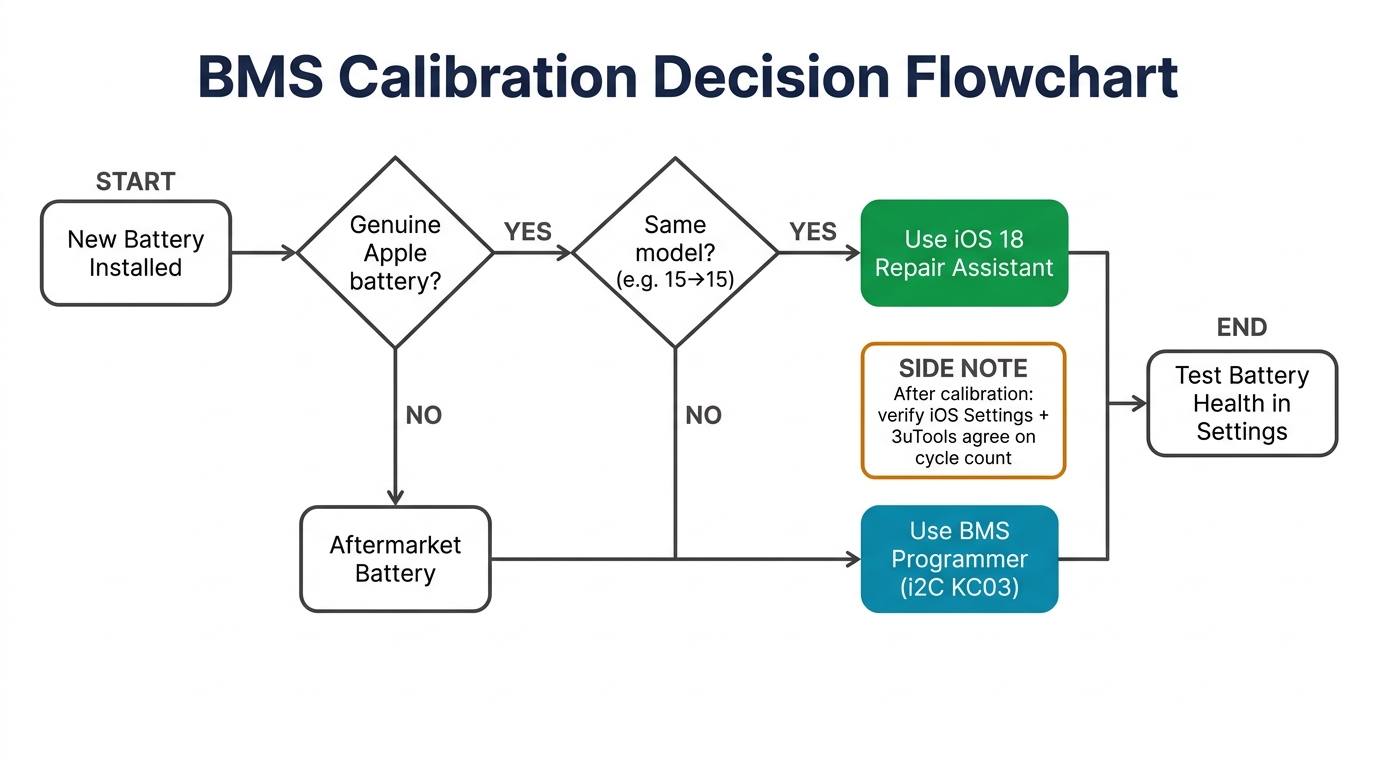
If you're installing a genuine Apple battery and the phone runs iOS 18 or later, Apple's Repair Assistant can recalibrate the battery without any third-party tools. Requirements: Wi-Fi connection, battery above 20%, and the latest iOS version.
Key detail most guides miss: If you're moving a genuine Apple battery from one iPhone 15 to another iPhone 15 (same model), Repair Assistant can typically handle recalibration without third-party BMS tools. This works in most cases on iOS 18, but not always — some techs report genuine pulled batteries being rejected by Repair Assistant, particularly from donor phones that were in lost mode or had AppleCare replacements. Have a BMS programmer on hand as backup. Full BMS programming is required when: (a) using aftermarket batteries, (b) cross-model transplants, or (c) the phone runs iOS 17 or earlier.
Third-party BMS programmers (when you need them)
For aftermarket batteries, you'll need a BMS programmer to write health data and reset the cycle count. Two main options:
| Programmer | Price | iPhone 15 Support | Reliability |
|---|---|---|---|
| JC V1SE | ~$50-80 | Inconsistent — reports of failures specific to iPhone 15 despite working on iPhone 14 | Firmware updates lag new models by months |
| i2C KC03 | ~$100-150 | More reliable on iPhone 15 series | Higher cost but fewer failed calibrations |
If JC V1SE fails on an iPhone 15, check firmware version first. The device needs specific firmware updates for iPhone 15 compatibility that weren't available at launch.
The "Unknown Part" warning
Any non-genuine battery triggers an "Unknown Part" message in Settings > About. The battery works normally — no throttling, no feature loss. But customers see this and panic. Pre-disclose it during intake: "You'll see an 'Unknown Part' notification. This is Apple's way of flagging third-party components. Your battery performance is not affected."
Stocking iPhone 15 batteries for your shop? We supply OEM-pulled and high-quality aftermarket iPhone 15 batteries in bulk, with BMS compatibility verified before shipping. Get pricing for BMS-verified iPhone 15 batteries.
When calibration fails entirely
After any BMS swap, verify that both iOS Settings and a third-party tool (3uTools or CoconutBattery) agree on cycle count and capacity. Conflicting readings between iOS and third-party tools usually mean the old BMS data was transferred instead of properly reset.
If Repair Assistant refuses to calibrate, check for mixed parts. A tech on r/mobilerepair discovered that a previously swapped LiDAR sensor blocked battery calibration on an iPhone 14 Pro — the same logic applies to iPhone 15 Pro models. If portrait mode doesn't work, your LiDAR is unpaired, and that will block Repair Assistant from completing battery calibration. If calibration fails and you see Apple's recalibration failure message, that typically means the battery itself needs replacement — it's not a software-fixable issue.
iPhone 15 Battery Replacement Cost and Wholesale Pricing
Here's what the job costs at every level — and what your margin looks like.
Retail repair pricing (2026)
| Provider | iPhone 15 / Plus | iPhone 15 Pro / Pro Max | Source |
|---|---|---|---|
| Apple (out of warranty) | $99 | $99 | Apple Support |
| Apple (AppleCare+, <80% health) | $0 | $0 | Apple Support |
| Apple Self Service Repair | ~$55 + $49/wk tool rental | Same | Apple Newsroom |
| iFixit kit (DIY) | $49.99-54.99 | $49.99-54.99 | iFixit |
| Third-party shop (US avg) | $50-80 | $60-100 | Aggregated |
| Third-party shop (UK avg) | £59-89 | £69-129 | Aggregated |
Wholesale battery part cost (B2B)
| Grade | Price/Unit | What You Get | Margin on $70 Job |
|---|---|---|---|
| OEM pulled (genuine Apple) | $15-25 | Authentic cell, requires BMS programming | $45-55 |
| High-quality aftermarket (TI gauge IC) | $8-15 | Close to OEM mAh, reliable cycle life | $55-62 |
| Budget aftermarket | $4-8 | May have inflated mAh claims, shorter lifespan | $62-66 |
The math is straightforward: at $8-15 per aftermarket battery and a $60-80 retail price, battery replacement is one of the highest-margin repairs you can offer. The catch is customer trust — a failed calibration or early degradation on a cheap battery costs you the customer relationship.
How to spot fake "genuine" batteries
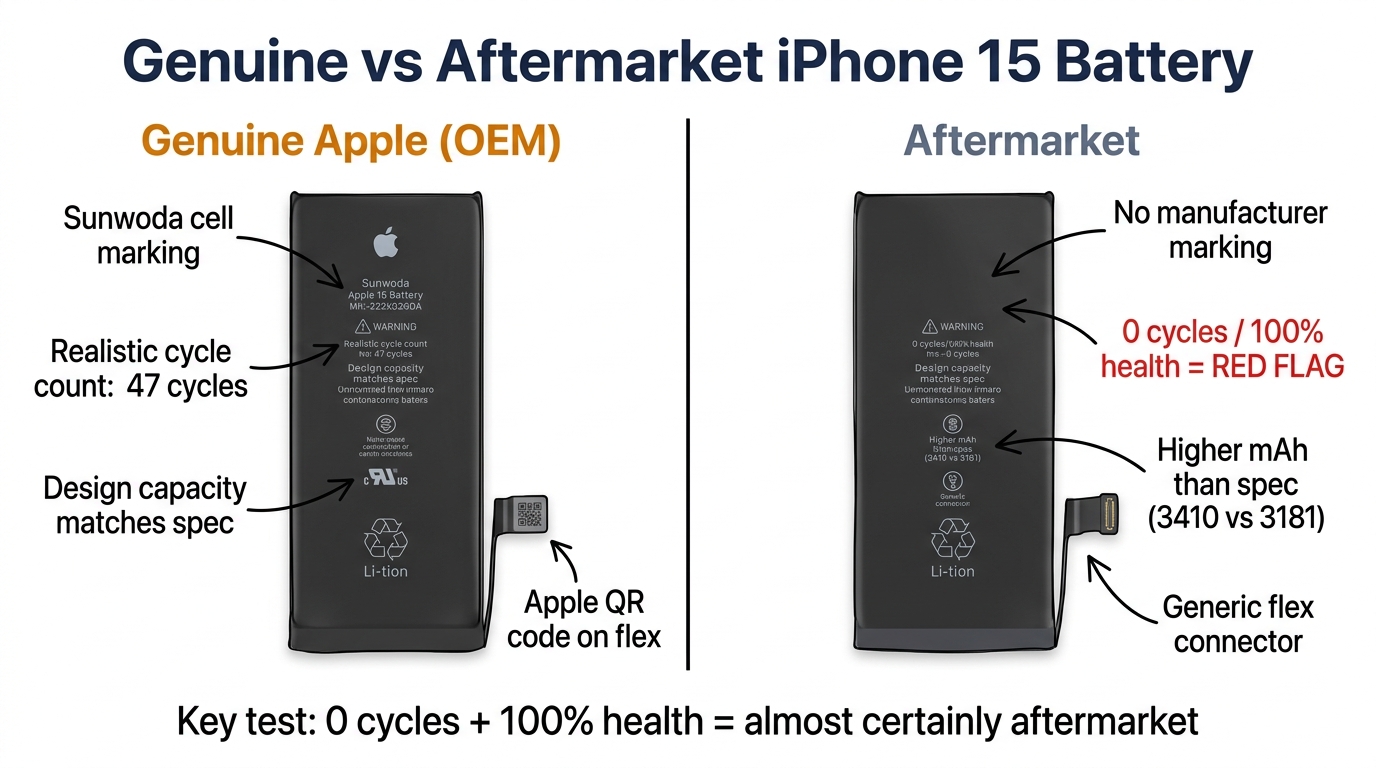
Red flags from community testing on r/mobilerepair: a battery showing 100% health with 0 charge cycles in diagnostics is almost certainly aftermarket. Genuine Apple batteries ship with realistic cycle counts. Also check the design capacity — if the reported mAh is significantly higher than Apple's spec for that model, it's likely an extended aftermarket cell, not genuine. One Reddit test found a supposed "OEM" battery reporting 3,410 mAh against a 3,181 mAh design capacity — a clear aftermarket indicator. Sunwoda is a confirmed Apple battery cell supplier — seeing their name on the cell label is a positive indicator.
5 Common Failure Modes After iPhone 15 Battery Replacement
Know these before they happen in your shop.
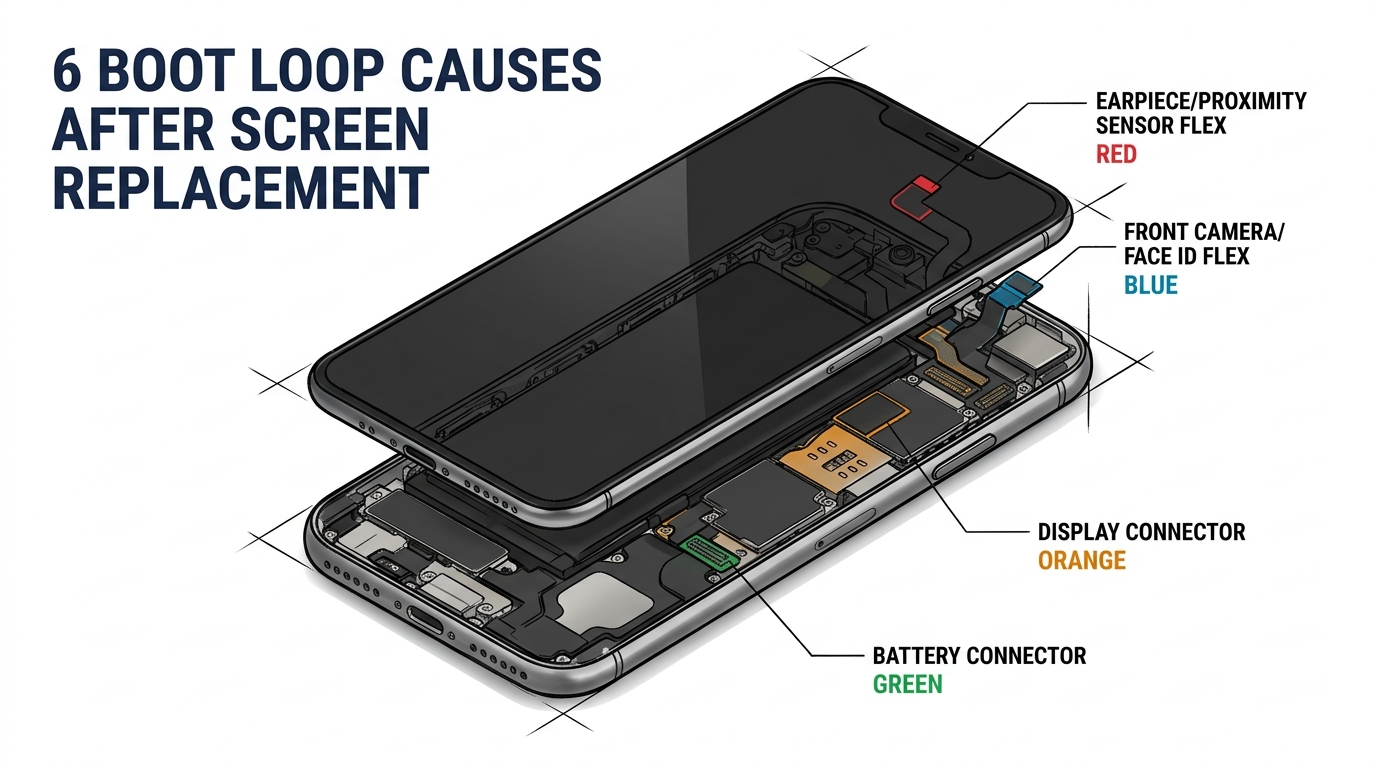
1. Boot loop after replacement. Usually caused by a damaged battery flex connector or incompatible BMS firmware. Re-seat the connector first. If it persists, try a different battery — some aftermarket cells have firmware that specific iPhone 15 builds reject.
2. Swollen battery during removal. If the adhesive pull tabs break and you resort to prying, you risk puncturing the cell. The iFixit guide warns explicitly: never insert tools between the battery and the logic board. Use the isopropyl alcohol soak method to dissolve remaining adhesive.
3. Repair Assistant calibration refusal. Check three things: iOS version (must be 18+), Wi-Fi connection, and whether any other components (display, LiDAR) were previously replaced with unrecognized parts. Mixed aftermarket parts can block calibration system-wide.
4. BMS programmer incompatibility. JC V1SE has confirmed failures on some iPhone 15 units. The i2C KC03 is more reliable but costs more. Always verify your programmer's firmware supports iPhone 15 before attempting calibration.
5. iPhone 15 Pro won't boot without battery. If you're used to the standard iPhone 15 running without a battery for diagnostics, don't assume the Pro does the same. At least one field report confirms the 15 Pro bootloops without a battery connected, even over USB-C. The Pro has a USB 3.2 Gen 2 controller that may draw more power, but the exact cause is unconfirmed. Always have a battery connected when working on Pro models.
FAQ
Does replacing the iPhone 15 battery affect AppleCare+?
This is a gray area. Apple doesn't explicitly state that third-party battery replacement voids AppleCare+, but if the replacement causes damage to other components (e.g., a torn display flex or broken water seal), Apple can refuse coverage for that damage. The safest approach: document the device condition at intake with photos, and inform the customer that any third-party repair carries some risk to their warranty coverage.
Will an aftermarket iPhone 15 battery show 100% health?
Only if it's been BMS-programmed to show 100%. Without programming, iOS will display "Unknown Part" in Settings > About, and battery health data may be unavailable or inaccurate. This doesn't affect actual battery performance — just the reported metrics.
How long does an iPhone 15 battery last before needing replacement?
Apple rates the iPhone 15 battery for 1,000 charge cycles to 80% capacity — roughly 3-4 years for average users. Heavy users (5+ hours screen time daily) may need replacement after 18-24 months. Check battery health in Settings > Battery > Battery Health & Charging.
Can I use iPhone 14 batteries in an iPhone 15?
No. The battery connector, cell dimensions, and BMS firmware are different. Cross-model transplants won't seat properly and Repair Assistant will refuse calibration. Always use model-specific batteries — find the correct one in our iPhone battery catalog.
Is the iPhone 15 Pro Max battery replacement harder than the standard?
The Pro Max has a larger battery cell (4,441 mAh vs 3,349 mAh), longer adhesive tabs, and tighter clearance around the camera module. The procedure is similar but requires more care during adhesive removal. Budget an extra 5-10 minutes.
Get the Right Batteries for the Job
iPhone 15 battery replacement is a high-margin repair — if you have the right parts and the right process. The USB-C power changes, BMS calibration requirements, and model-specific quirks make this a job worth learning properly rather than treating as routine.
The biggest variable in your success rate is battery quality. A $4 budget cell that fails calibration or degrades in 6 months costs more in rework and lost customers than a $12 aftermarket battery with a TI gauge IC that works the first time.
We stock iPhone 15, 15 Plus, 15 Pro, and 15 Pro Max batteries — OEM pulled and high-quality aftermarket — with BMS compatibility verified before shipping. Request a wholesale quote or browse our iPhone battery catalog to see current pricing and MOQs.