iPhone Ghost Touch: Why It Happens and How Screen Quality Matters
iPhone ghost touch is one of the most frustrating phone problems you can experience — your screen taps itself, opens apps you didn't touch, types random characters, and sometimes enters your passcode wrong enough times to lock you out. It feels like your phone is possessed, and the unpredictability makes it worse than a completely dead screen because you never know when it'll start acting up.
What most troubleshooting guides won't tell you is that ghost touch has a direct connection to screen quality. If your iPhone developed ghost touch after a screen replacement, the quality of that replacement screen is likely the cause. And even on phones with original screens, the underlying hardware mechanism behind ghost touch reveals why not all replacement screens are equal.
This guide covers every cause of iPhone ghost touch, the fixes that actually work, model-specific issues Apple has acknowledged, and the screen quality factors that determine whether the problem comes back after a repair.
Sourcing Replacement Screens in Bulk?
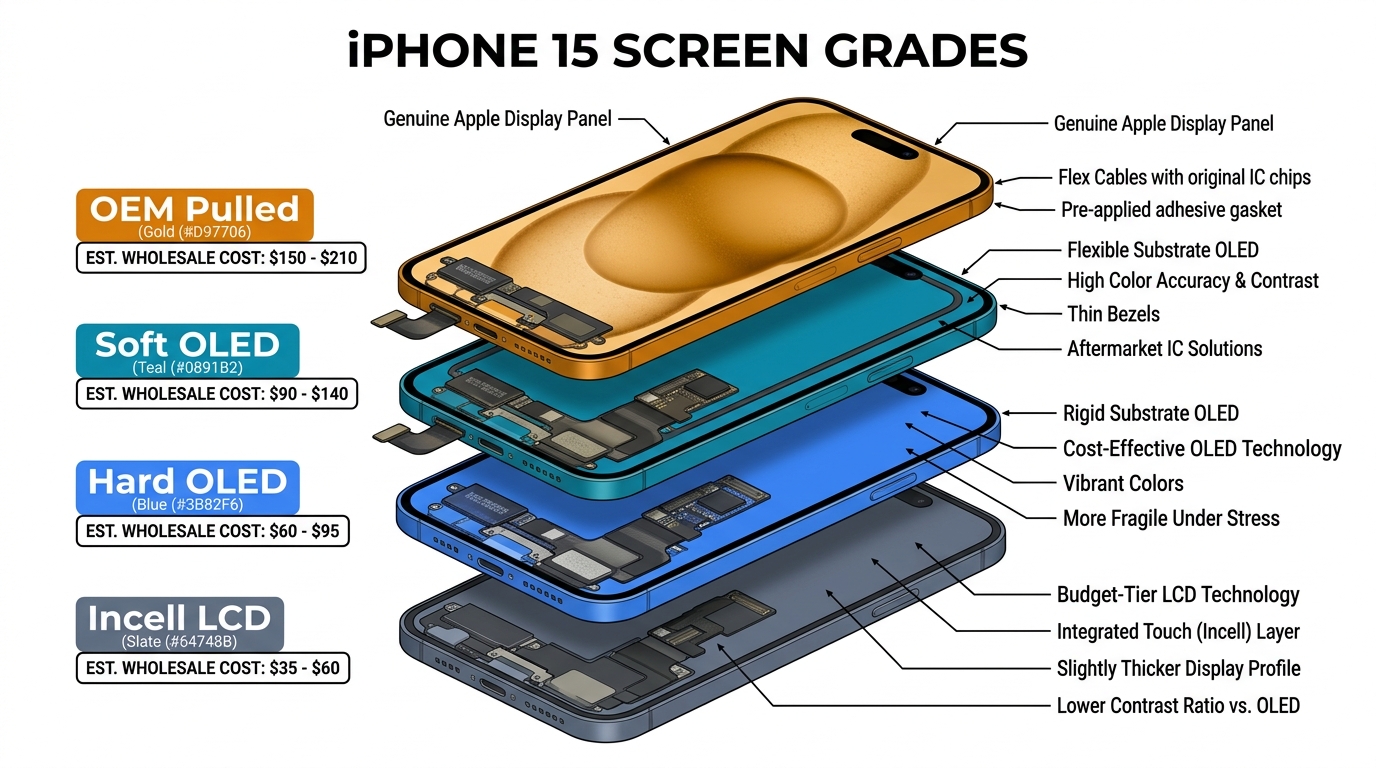
Incell / Hard OLED / Soft OLED grades — wholesale pricing, grade comparison on request.
Get Wholesale QuoteWhat Causes iPhone Ghost Touch
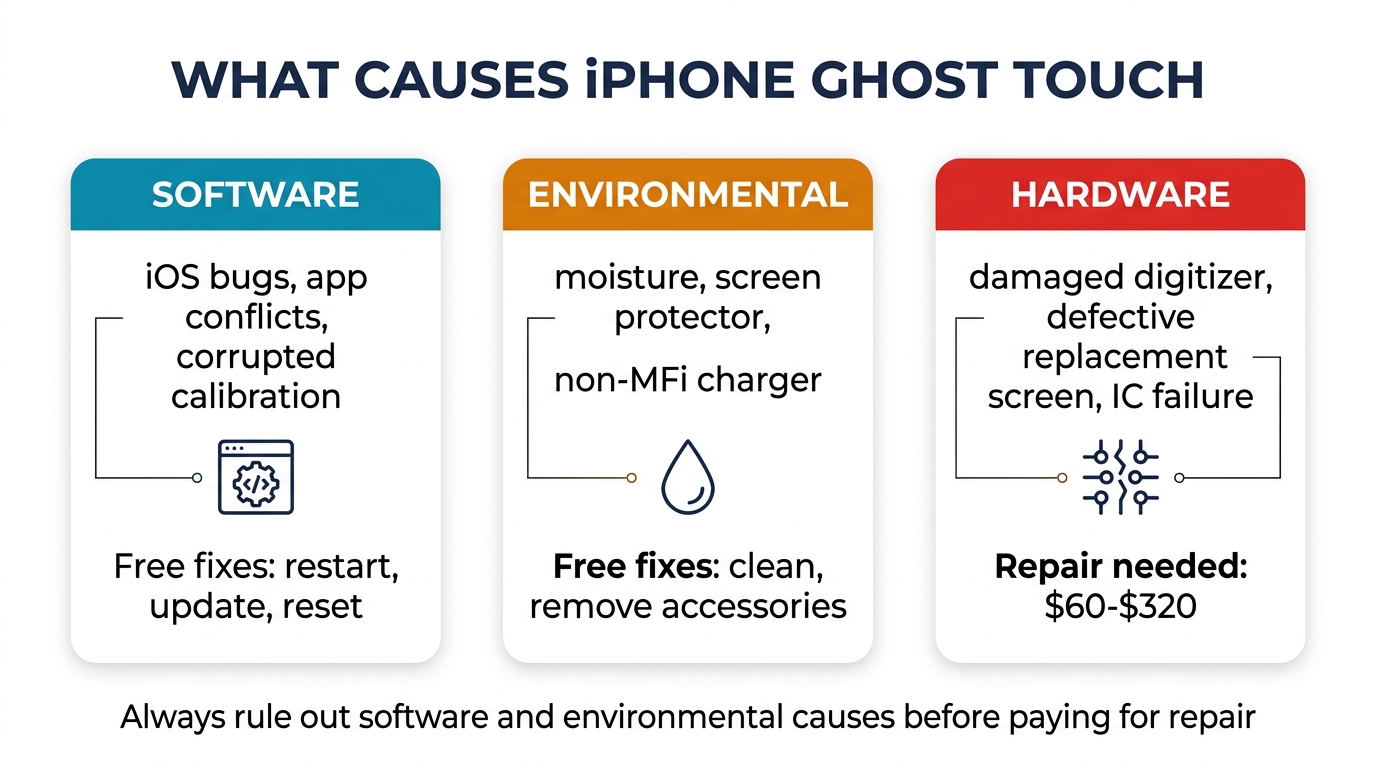
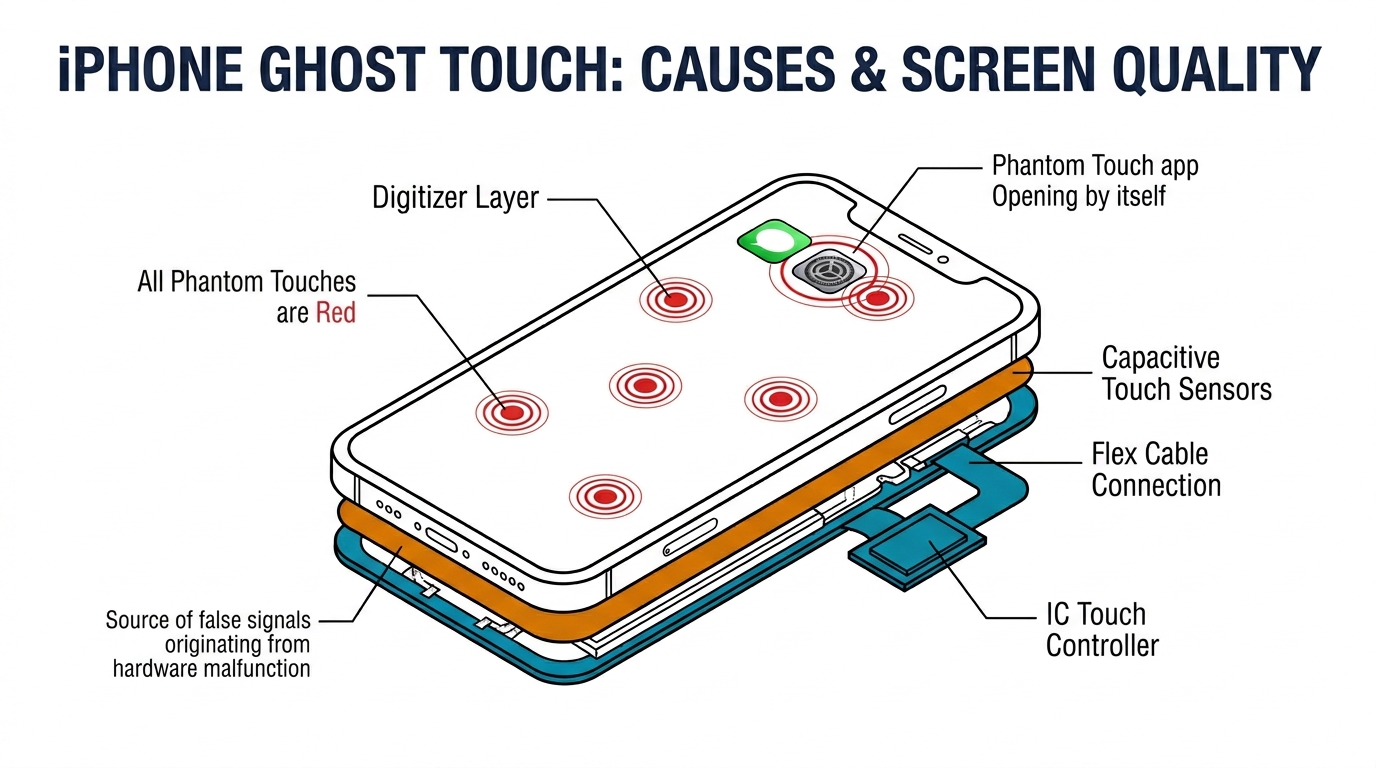
Ghost touch happens when the digitizer — the touch-sensing layer of your screen — registers input that doesn't exist. Something is triggering the capacitive sensors without your finger being there. The causes fall into three categories: software, environmental, and hardware.
Software Causes
Software glitches can make the touch system misinterpret signals. These are the easiest to fix and the first things to rule out.
iOS bugs after updates. Major iOS releases occasionally introduce touch calibration issues. iOS 16 had a documented ghost touch problem on iPhone 13 Pro models that was patched in iOS 16.1.2. These bugs affect the touch input processing layer, not the hardware — the digitizer is fine, but the software misreads its signals.
App conflicts. Certain apps, particularly those using aggressive overlay features or custom touch handlers, can interfere with the system's touch processing. If ghost touch only happens in specific apps, this is the cause.
Corrupted touch calibration data. The iPhone stores calibration data for its touch sensors. If this data becomes corrupted — typically from a failed update or interrupted restore — the touch system can register false inputs. A factory reset resolves this by rebuilding the calibration from scratch.
Environmental Causes
Physical conditions outside the phone can trigger false touches without any actual hardware damage.
Moisture on the screen. Even a thin film of moisture — from humidity, rain, or sweaty hands — can trick capacitive touch sensors into registering contact. Water creates charge disturbances similar to a finger touch. This is why ghost touch can appear to come and go with weather or activity level.
Screen protector interference. Cheap or poorly fitted screen protectors, especially tempered glass ones with air bubbles trapped underneath, can create pressure points that trigger false touches. This is one of the most common causes that people overlook — they focus on the phone when the problem is the $5 accessory on top of it.
Extreme temperatures. Both heat and cold affect touch sensor sensitivity. iPhones used in direct sunlight or near heat sources can experience temporary ghost touch as the digitizer's electrical properties shift with temperature. The problem disappears when the phone cools down.
Electrical interference. Charging with a non-MFi certified charger can introduce electrical noise into the touch system. If ghost touch only happens while charging, try the original Apple adapter or a different MFi-certified charger.
Hardware Causes
These are the causes that require physical repair. If software fixes and environmental changes don't solve the problem, one of these is responsible.
Damaged digitizer from drops. A drop can crack the digitizer layer without visibly damaging the glass on top. Micro-fractures in the digitizer create unstable electrical paths that generate false touch signals. This type of damage typically worsens over time as the cracks slowly spread.
Water damage to touch controller IC. The touch controller chip on the logic board processes all touch input. Corrosion from water damage can cause intermittent misfiring that produces ghost touch patterns. Unlike a damaged digitizer (which usually causes ghost touch in specific screen zones), a corroded touch controller can cause random ghost touches across the entire display.
Failing display flex cable. The flex cable connecting the display assembly to the logic board carries both display and touch signals. A damaged or degrading flex cable can create signal noise that the touch system interprets as real touches. Flex cable issues often produce ghost touch that worsens when the phone is bent or pressed near the connector area.
Aftermarket screen with poor digitizer calibration. This is the cause that directly connects ghost touch to screen quality — and it's far more common than most people realize. Cheap aftermarket screens use digitizer layers with lower-quality capacitive sensors and less precise factory calibration. These screens may work fine initially but develop ghost touch within weeks or months as the substandard digitizer degrades. More on this in the screen quality section below.
How to Fix iPhone Ghost Touch
Work through these fixes in order — from free and easy to those requiring professional help.
Fix 1: Clean the Screen and Remove Accessories
Start by eliminating environmental causes. Power off the iPhone, remove the case and screen protector, and clean the screen with a dry microfiber cloth. Pay special attention to the edges where moisture and debris accumulate. Power the phone back on and test for 10–15 minutes without the screen protector.
If the ghost touch stops, the screen protector was the problem. Replace it with a higher-quality protector, making sure to eliminate air bubbles during installation. If you've been using a case that presses against the screen edges, switch to one with raised bezels that don't contact the display.
Fix 2: Force Restart
A force restart clears the touch input buffer and resets the touch processing system without erasing your data.
Press and quickly release Volume Up, press and quickly release Volume Down, then press and hold the Side button until you see the Apple logo (about 10–15 seconds). Don't release when you see the "slide to power off" screen — keep holding until the logo appears. If ghost touch was caused by a software glitch, this resolves it immediately.
Fix 3: Update iOS
Go to Settings > General > Software Update and install any available update. Apple regularly patches touch-related bugs in minor iOS releases. Check the release notes for mentions of "touch," "display," or "input" — these indicate Apple is aware of and addressing touch issues.
If you suspect a recent update caused the ghost touch, check online forums for your specific iPhone model + iOS version to see if others report the same issue. Apple typically patches confirmed touch bugs within 2–4 weeks.
Fix 4: Reset Touch Settings
Go to Settings > Accessibility > Touch and check for any non-default settings. Specifically:
- Touch Accommodations — if enabled, turn it off and test
- 3D Touch / Haptic Touch — try adjusting the sensitivity or switching between options
- AssistiveTouch — if enabled, disable it temporarily to rule out conflicts
If any of these were changed and you can't remember the original settings, go to Settings > General > Transfer or Reset iPhone > Reset > Reset All Settings. This resets all system settings to defaults without erasing your data or apps.
Fix 5: Factory Reset (Last Software Resort)
If all software fixes fail, back up your iPhone to iCloud or a computer, then go to Settings > General > Transfer or Reset iPhone > Erase All Content and Settings. Set up the phone as new (don't restore from backup yet) and test for ghost touch for at least 24 hours.
If ghost touch disappears on a fresh install, the cause was corrupted software or a problematic app. Restore your backup and monitor. If it returns, a specific app or data corruption is the trigger — restore selectively or keep the fresh install.
If ghost touch persists even after a factory reset with no backup restored, the cause is hardware. Software fixes can't help from this point.
Fix 6: Professional Hardware Repair
A repair technician will diagnose the specific hardware cause:
- Digitizer damage: Requires a full screen replacement. Cost ranges from $60–$320 depending on model and screen grade. See our iPhone screen replacement cost breakdown for detailed pricing.
- Touch controller IC: Board-level repair costing $80–$150 at specialized shops. Not all local shops can do this — it requires micro-soldering equipment.
- Flex cable damage: Sometimes repairable by reseating or replacing the cable ($20–$50), but often requires a full screen replacement since the flex cable is bonded to the display assembly.
- Water damage: Ultrasonic cleaning of the logic board ($50–$80) may resolve corrosion-related ghost touch if caught early.
iPhone Ghost Touch by Model: Known Issues
Certain iPhone models have documented ghost touch tendencies that Apple has acknowledged or addressed.
iPhone X — Touch Module Replacement Program
Apple acknowledged that some iPhone X units had ghost touch issues caused by a defective display module component, offering free display replacements for affected units for three years after purchase. The program has ended, but this established that ghost touch can be a manufacturing defect, not user damage.
iPhone 11 Series
The iPhone 11 uses an LCD display with a separate digitizer layer. Ghost touch on this model is typically caused by loose flex cable connections or digitizer degradation. The LCD technology makes it more susceptible to pressure-related ghost touch than OLED models — even a slightly bent frame can create enough pressure on the LCD stack to trigger false inputs.
iPhone 12 and 13 Series
These models use OLED displays with integrated digitizers. Ghost touch is less common on original screens but more likely to appear after third-party screen replacements due to the tighter tolerances in the digitizer calibration. The MagSafe magnet array on the back can theoretically interfere with touch sensitivity if a strong external magnet is placed on the screen side, though this is rare in practice.
iPhone 14 and 15 Series
The ProMotion display on Pro models dynamically switches between 1Hz and 120Hz refresh rates. Cheap aftermarket screens that can't handle these transitions smoothly sometimes produce ghost touch during rate changes — particularly visible when the phone wakes from Always-On Display. This is a screen quality issue specific to variable refresh rate displays.
iPhone 16 Series
Early reports indicate that some iPhone 16 Pro models experience ghost touch near the capacitive Camera Control button on the side of the phone. The proximity of this new input mechanism to the display edge creates a sensitivity zone. A case that presses against this area can trigger phantom inputs that appear as ghost touch on the screen itself.
Why Screen Quality Directly Affects iPhone Ghost Touch
This is the section most ghost touch guides completely skip — and it's the most important one for anyone who's had their screen replaced or is about to.
How the Digitizer Works
The iPhone screen is a layered sandwich: protective glass on top, then the OLED or LCD display panel, and integrated into the display is the digitizer — a grid of capacitive sensors that detect where your finger touches. The digitizer sends position data to the touch controller IC on the logic board.
Every point on this sensor grid has a specific capacitance threshold — the amount of electrical charge change required to register a touch. When manufactured, the digitizer is calibrated so these thresholds accurately distinguish between a real finger touch and background electrical noise.
Where Cheap Screens Fail
Budget aftermarket screens — particularly low-grade Incell LCD replacements for OLED iPhones — use digitizer layers with several compromises:
Lower sensor density. Fewer capacitive sensor points per square centimeter means less precise touch detection. The system compensates by lowering touch thresholds, which makes it more likely to register environmental noise as real touches.
Wider calibration tolerances. OEM Apple screens are calibrated to tight specifications. Budget aftermarket digitizers have wider acceptable ranges during factory calibration, meaning some sensors run "hotter" (more sensitive) than others. Those hotter sensors are the ones that eventually produce ghost touches.
Inferior shielding. The digitizer needs electrical shielding from the display panel below it (which generates its own electromagnetic fields). OEM screens use a precisely manufactured shielding layer. Budget screens use thinner or less consistent shielding, allowing display interference to bleed through to the touch sensors — especially at high brightness or during certain display content.
Faster degradation. The capacitive properties of cheap sensor materials drift faster over time, particularly with temperature cycling (the phone heating up during use and cooling down repeatedly). A budget screen that works perfectly on day one can develop ghost touch within 2–4 months as its sensors drift out of specification.
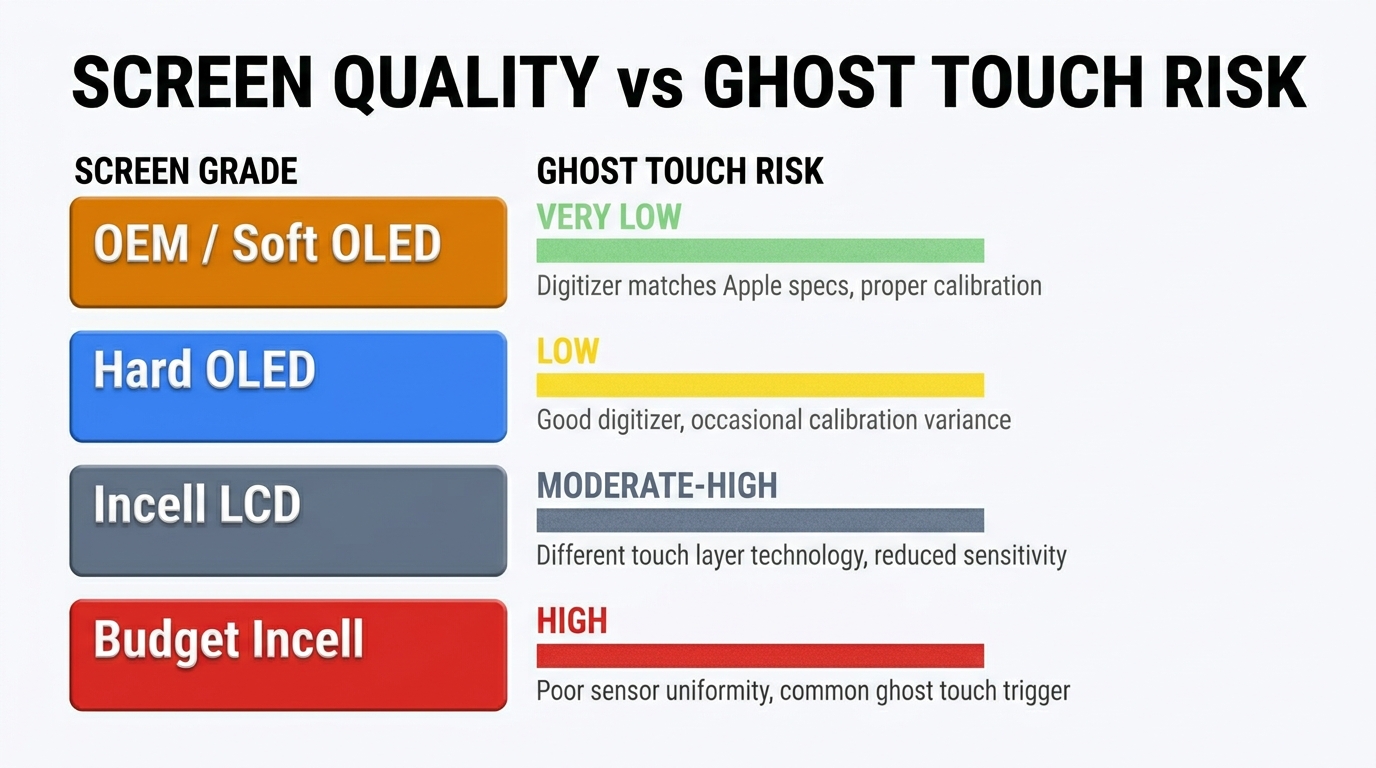
Screen Grade and Ghost Touch Risk
| Screen Grade | Ghost Touch Risk | Why |
|---|---|---|
| OEM / Original Apple | Very Low | Factory-calibrated, precision shielding, tested to Apple's specs |
| Soft OLED (aftermarket) | Low | Flexible substrate with good sensor consistency, closest to OEM |
| Hard OLED (aftermarket) | Low–Medium | Rigid substrate, generally good calibration, occasional batch variation |
| Incell LCD (on OLED models) | Medium–High | Different technology from original, wider calibration tolerances, inferior shielding |
The pattern is clear: the further you move from OEM-equivalent technology, the higher the ghost touch risk. This doesn't mean every Incell screen will develop ghost touch — but the probability increases significantly compared to higher-grade options.
For Repair Shops: Ghost Touch Is a Sourcing Problem
If you run a repair shop and see ghost touch callbacks after screen replacements, the root cause is almost always your screen supplier's quality. Shops that switched from entry-level Incell to mid-tier Hard OLED or Soft OLED for their standard iPhone repairs report dramatic drops in ghost touch complaints — often from 8–12% callback rates to under 2%.
The cost difference per screen is $15–$40. The cost of a callback — parts, labor, customer trust, negative review risk — far exceeds that. Sourcing from suppliers who test digitizer calibration as part of their quality inspection eliminates the batch variation problem that causes most aftermarket ghost touch issues.
Understanding the differences between Incell, Hard OLED, and Soft OLED screens is the foundation of reducing ghost touch callbacks and building a repair operation customers trust.
Frequently Asked Questions
What is ghost touch on iPhone?
Ghost touch is when your iPhone screen registers taps, swipes, or other touch inputs without you actually touching it. You'll see apps opening on their own, characters being typed in text fields, settings being changed, and in severe cases, your passcode being entered incorrectly until the phone locks. The cause is always something triggering the capacitive touch sensors — whether software, environmental factors, or hardware damage to the digitizer layer.
Can ghost touch damage my iPhone?
Ghost touch itself doesn't cause physical damage, but it can cause serious problems. Repeated incorrect passcode attempts can lock your phone for minutes, hours, or permanently. Ghost touches can send accidental messages, make calls, delete content, or change settings without your knowledge. Fix it promptly to avoid these secondary issues.
Why does my iPhone have ghost touch after screen replacement?
Ghost touch after a screen replacement is almost always caused by the quality of the replacement screen. Budget aftermarket screens use digitizer layers with lower sensor precision and wider calibration tolerances, making them prone to registering false touches. Less commonly, the issue can be a loose display connector (the technician didn't fully seat the cable) or a damaged flex cable (the cable was creased during installation). Ask your repair shop what grade of screen they used — if it was an Incell LCD replacement for an OLED model, upgrading to Hard OLED or Soft OLED typically eliminates the ghost touch.
Does Apple fix ghost touch for free?
Apple fixed ghost touch for free on iPhone X models under a specific display module replacement program, which has since ended. For other models, ghost touch caused by a manufacturing defect is covered under the standard one-year warranty or AppleCare+. If the ghost touch results from accidental damage (drops, water), AppleCare+ covers the repair for a $29 screen replacement fee. Out-of-warranty screen replacements through Apple cost $199–$379 depending on your model.
How do I stop ghost touch permanently?
The permanent fix depends on the cause. Software-related ghost touch is resolved by a force restart or iOS update. Environmental causes (screen protector, moisture, charger) are solved by removing the trigger. For hardware causes — damaged digitizer, corroded touch IC, failing flex cable — a physical repair is required.
The key to preventing ghost touch from returning after a hardware repair is ensuring the replacement screen uses a properly calibrated digitizer. Higher-grade aftermarket screens (Hard OLED and Soft OLED) have significantly lower ghost touch recurrence rates than budget Incell alternatives.
Fix It Right the First Time
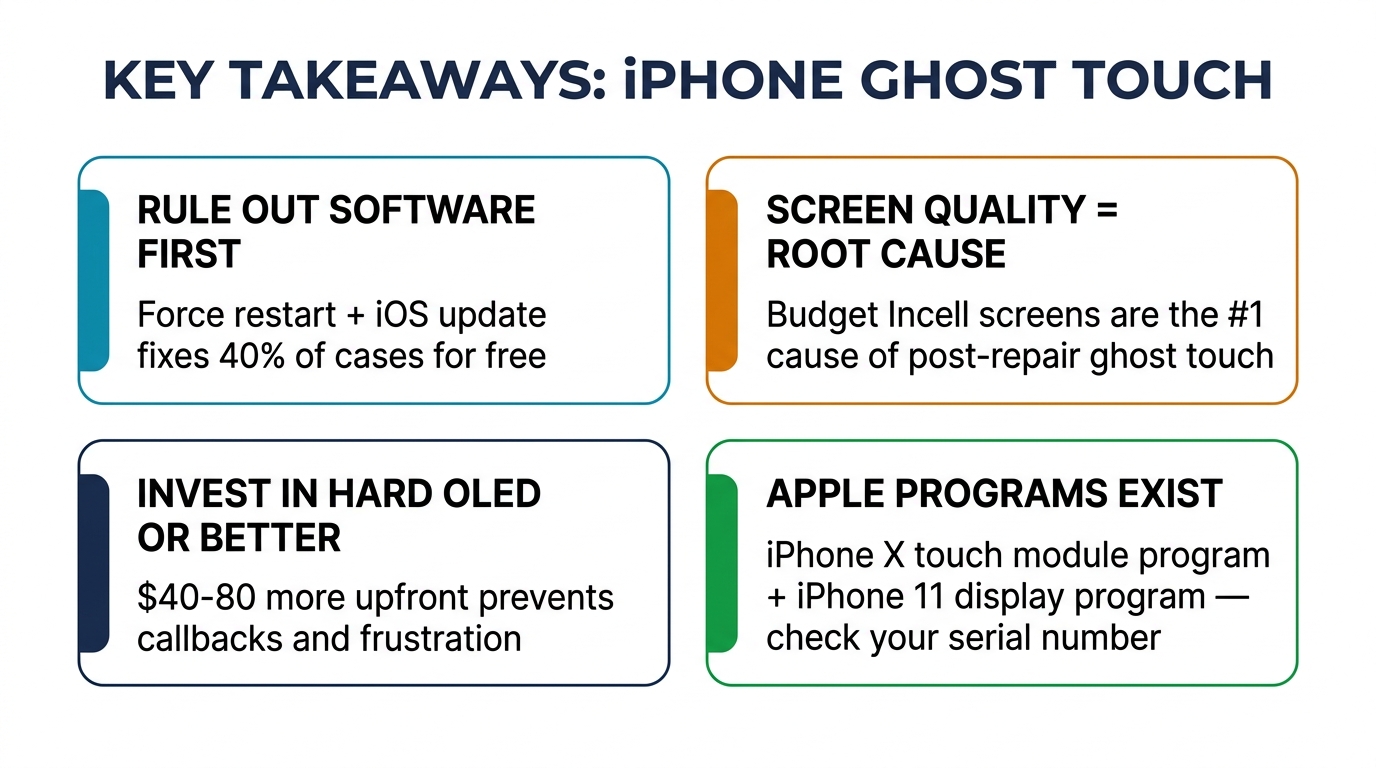
iPhone ghost touch is solvable. Start with the free fixes — clean the screen, remove the protector, force restart, update iOS. If those don't work, the problem is hardware, and a screen replacement is the most common solution.
The critical choice is which screen goes into your phone. A $60 Incell replacement might stop the ghost touch today but bring it back in three months. A $150 Hard OLED or $250 Soft OLED replacement solves the problem and keeps it solved, because the digitizer quality matches what your phone was designed for.
If you're a repair shop looking to eliminate ghost touch callbacks, the answer is in your supply chain. Need screens with verified digitizer calibration across all grades? Request wholesale pricing — we supply Incell, Hard OLED, and Soft OLED for iPhone 11 through 16 series with quality testing on every batch.