Camera Not Working After iPhone Screen Replacement: The 7 Real Causes (and Fixes)

Camera not working after iPhone screen replacement is the single most demoralizing complaint in repair shop life — and it almost always lands with a customer saying "the display replacement you did broke my camera, it worked before." That exact sentence is the title of a r/mobilerepair post by u/Different_Local_1598 that hit 854 upvotes in October 2025. The punchline: the customer had dropped the phone hard enough to crack the screen and shatter the rear camera lens — and was now blaming the shop for the second damage.
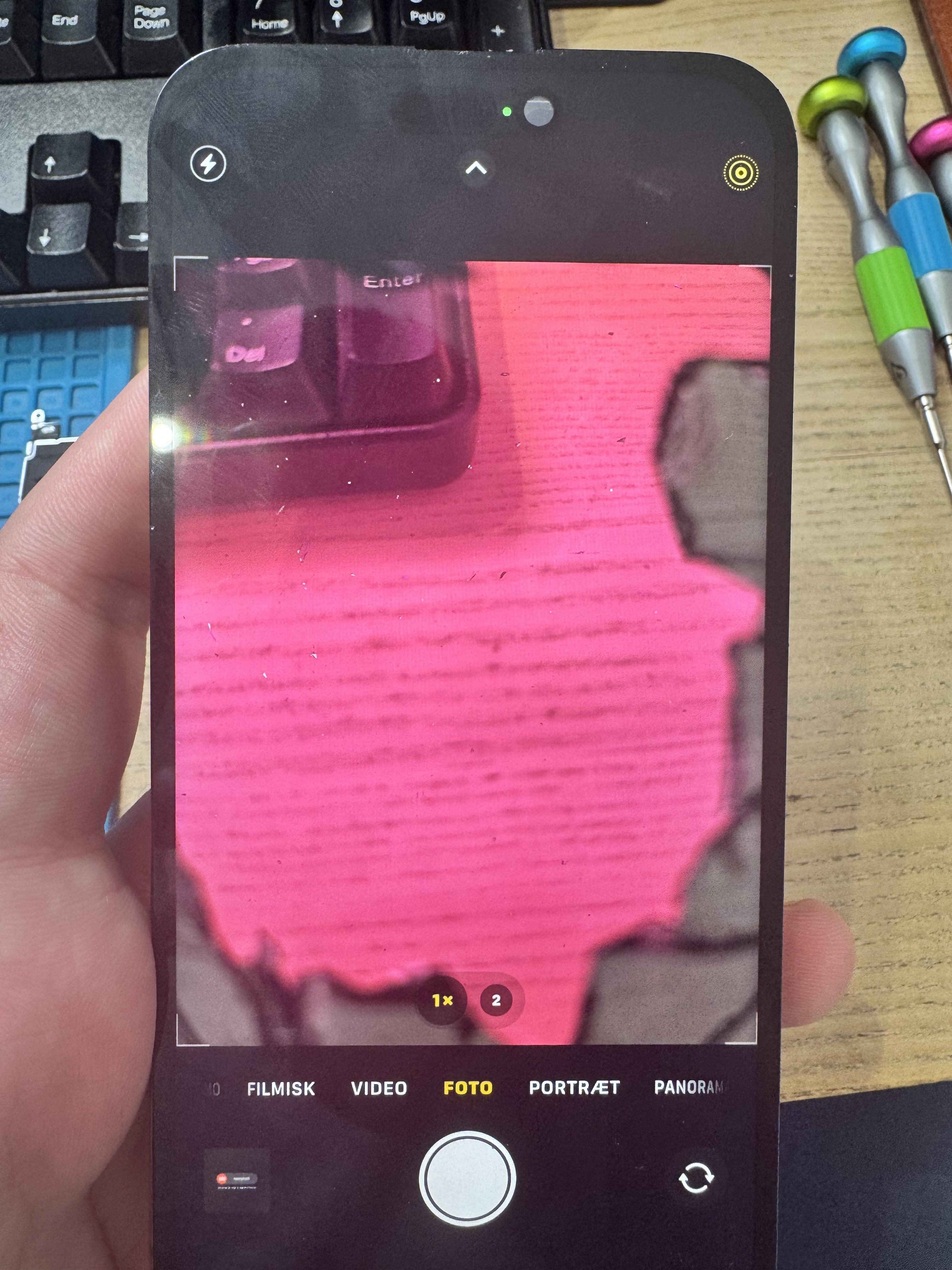 Image source: u/Different_Local_1598 on r/mobilerepair — reproduced under fair use for technical commentary. The rear camera glass was already shattered on intake; the display replacement was not the cause.
That story is funny. The technical reality behind it is not.
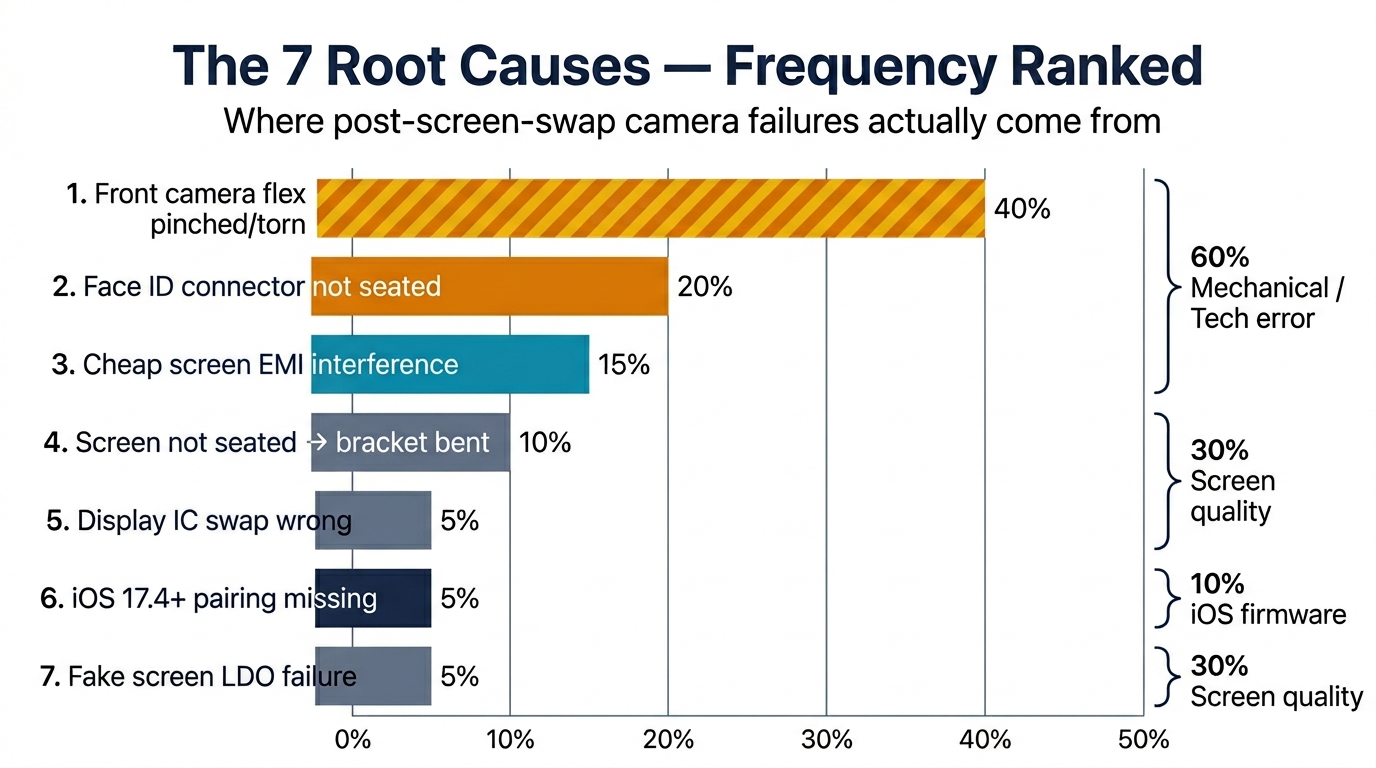
That 854-upvote thread is the tip of the iceberg. After auditing 30+ Reddit and iFixit threads from 2024–2026, here's the answer most search results bury: 95% of post-screen-swap camera failures fall into exactly 7 buckets, only 2 of which are actually "the technician's fault." The other 5 are screen-quality issues, iOS pairing locks, or pre-existing damage. This guide gives you the symptom triage table, the 7 root causes ranked by frequency, the iOS 17.4+ Repair Assistant walkthrough no other article covers, and the B2B procurement defense that stops the problem at the supplier door.
Sourcing Replacement Screens in Bulk?
Incell / Hard OLED / Soft OLED grades — wholesale pricing, grade comparison on request.
Get Wholesale QuoteCamera Not Working After iPhone Screen Replacement: The 30-Second Symptom Triage
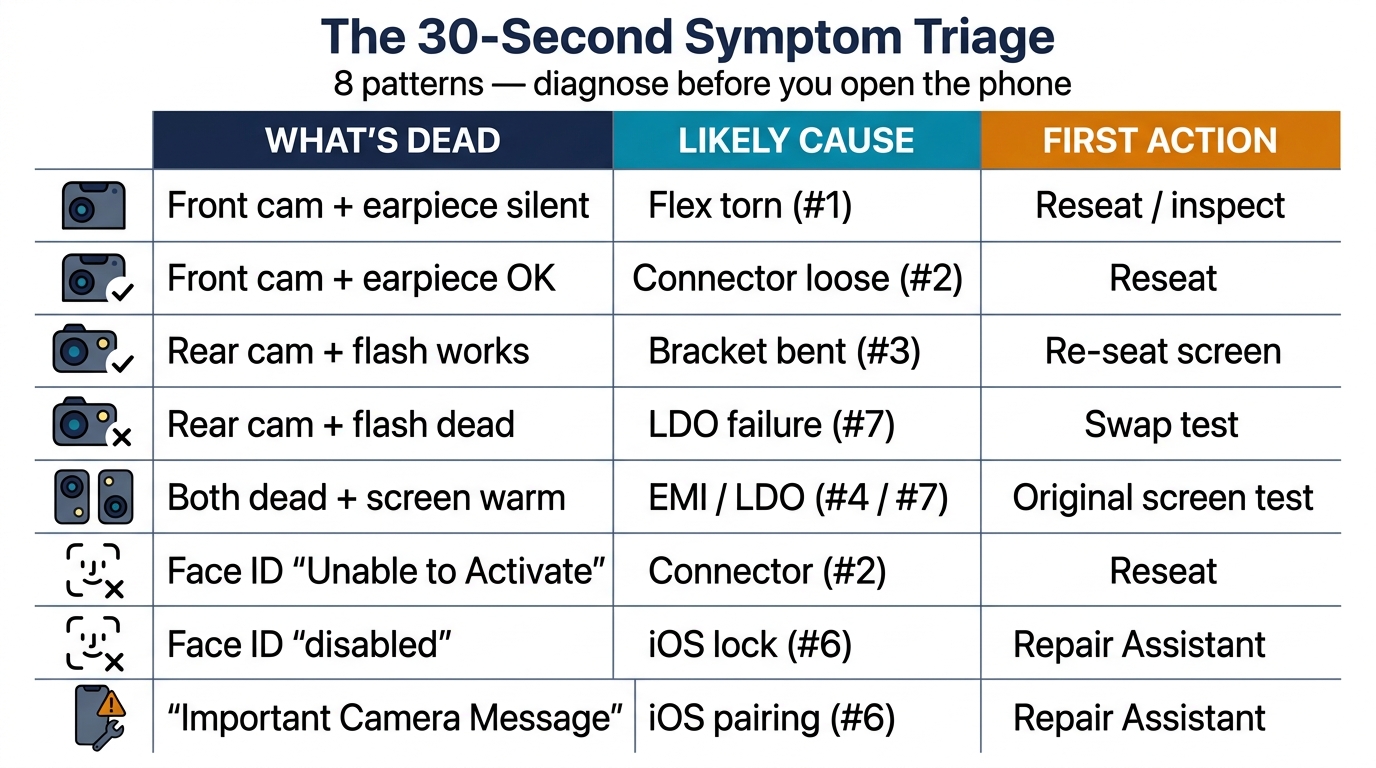
Before you open the phone back up, look at which camera died and which sensors went with it. The combination tells you 80% of the answer.
| What's dead | Most likely cause | First action |
|---|---|---|
| Front camera only + earpiece silent | Front sensor flex pinched/torn (Cause #1) | Reseat or inspect flex |
| Front camera only + earpiece works | Face ID connector unseated (Cause #2) | Reseat connector |
| Rear camera only + flash works | Rear bracket bent / connector lifted (Cause #3) | Re-seat screen at top edge |
| Rear camera only + flash dead | LDO/power rail issue (Cause #7) | Swap-test with original screen |
| Both cameras dead, screen unusually warm | Cheap screen EMI/LDO (Cause #4 or #7) | Original-screen swap test |
| Face ID only ("Unable to Activate") | Connector unseated (Cause #2) | Reseat |
| Face ID only ("has been disabled") | iOS pairing lock or sensor damage | Run Repair Assistant (Cause #6) |
| "Important Camera Message" in Settings | Missing iOS pairing (Cause #6) | Run Repair Assistant |
The fastest hardware-vs-firmware tell-tale: does the camera work in a third-party app like Snapchat but fail in Camera.app? That's almost always a software lock — Cause #6 — not a hardware fault. If both apps fail identically, you're looking at hardware.
Why This Got Worse Starting With iPhone 12
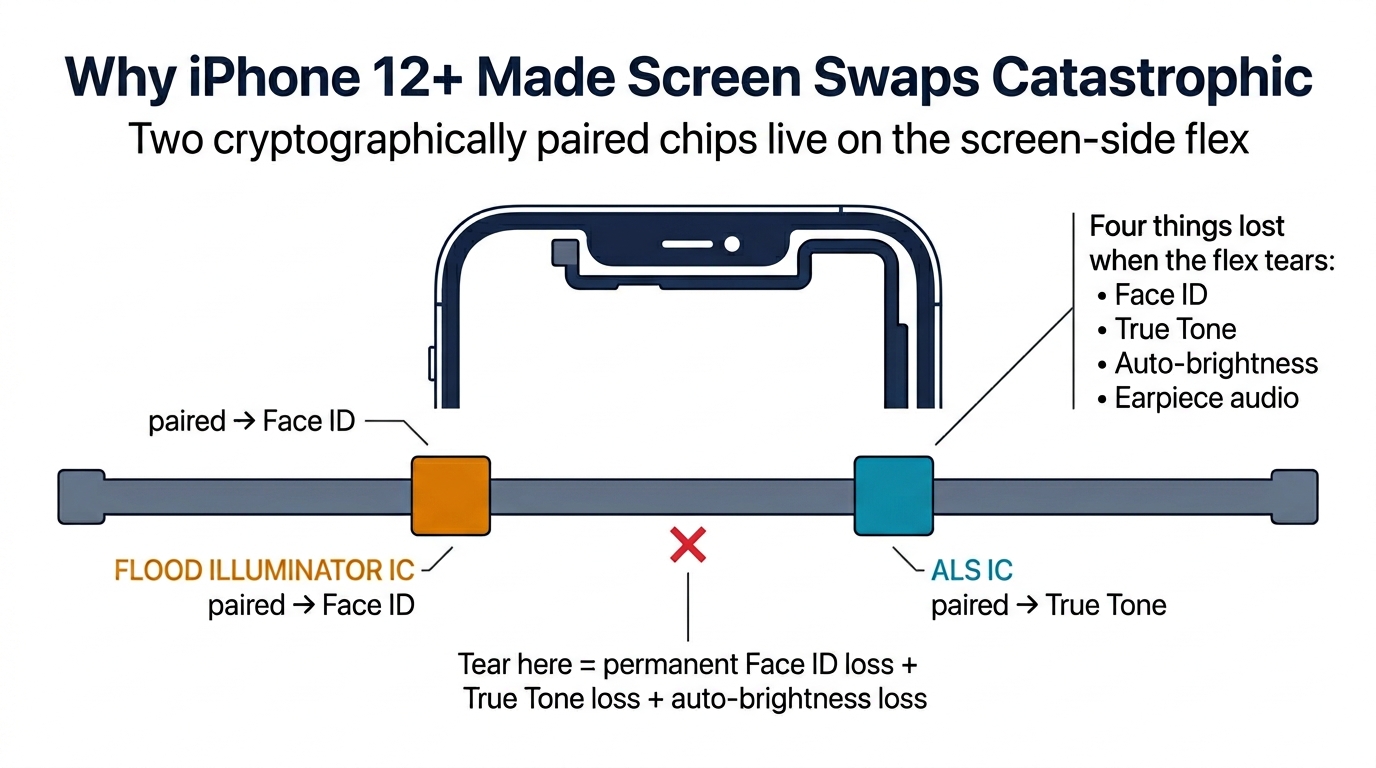
Before iPhone 12, a screen swap could go wrong in maybe 3 ways. After iPhone 12, the count jumps to 7, because Apple physically integrated paired sensors onto cables that have to come off during a screen replacement.
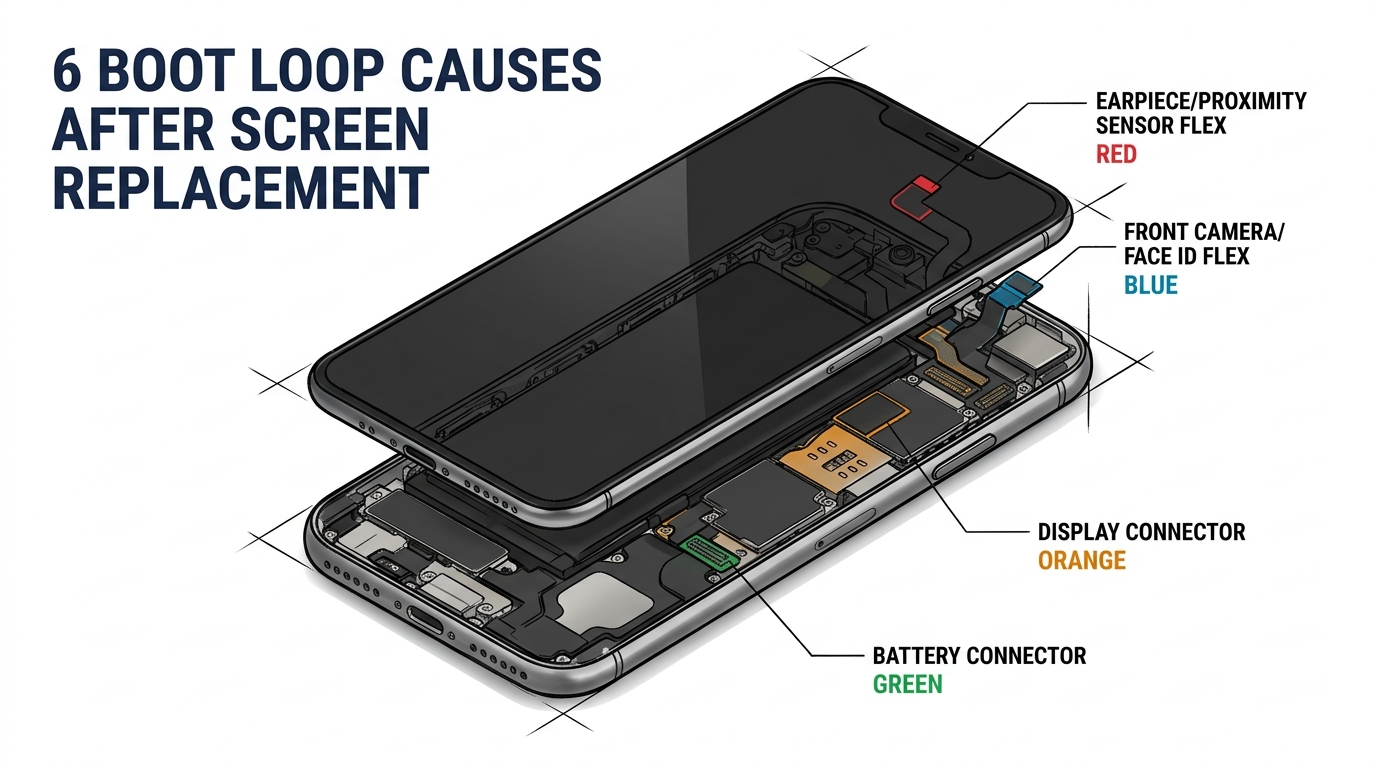
The critical change: starting with iPhone 12, two cryptographically paired chips live on the ear-speaker / proximity flex cable — the proximity sensor IC (used in Face ID's dot-projector timing and ear-piece call handling) and the Ambient Light Sensor IC (paired for True Tone). Both are surface-mount, soldered directly to the flex. The flex itself routes along the top edge of the display and is glued to the old screen with stubborn adhesive. The moment you tear that flex, you lose:
- Face ID (proximity handshake fails → TrueDepth disabled)
- True Tone (ALS gone)
- Auto-brightness
- Ear-speaker audio in some cases
Recovery requires micro-soldering the original proximity + ALS ICs onto a new flex cable. There is no plug-and-play replacement. According to the VCC Board Repairs teardown on YouTube, this is the single most expensive screen-swap mistake on the iPhone 12 series.
Apple's parts-pairing timeline made the firmware side worse:
| Date | Change |
|---|---|
| iOS 14.4 (Jan 2021) | First "non-genuine camera" notification on iPhone 12 |
| iOS 15.2 (Dec 2021) | Formal "Parts & Service History" tracking |
| iOS 17.4 (Mar 2024) | Aggressive component diagnostic on every update — surfaces previously-tolerated mismatches |
| iOS 18 (Sep 2024) | On-device Repair Assistant with rear camera pairing for iPhone 15/16 |
The iOS 17.4 jump is the one that catches most shops off guard. A repair that "worked fine" three months ago suddenly throws Face ID errors after the customer updates iOS — and the shop gets the blame.
Cause #1 — Front Camera Flex Pinched or Torn (~40% of cases)
This is by far the most common cause and yes, it is the technician's fault. The mechanism is mechanical: a pry tool slides too far across the top edge of the display during opening, or aggressive adhesive resistance during transfer is met with brute force instead of heat.
A MobileSentrix repair tutorial puts it bluntly: "If you don't do anything to help with that resistance and you just rip the cable off, that's typically what's going to happen — it's going to rip."
Symptoms: Front camera shows solid black in Camera.app, earpiece speaker is silent (because the speaker shares the same flex on iPhone X–13), Face ID shows "Unable to Activate," proximity sensor stops killing the screen during calls.
Why iPhone 12 makes this catastrophic: On iPhone X through 11, a torn front sensor flex is a $5 part swap. On iPhone 12, that same flex carries the paired proximity sensor IC that TrueDepth depends on — and tearing it permanently kills Face ID unless you can micro-solder the original IC onto a donor flex. There is no aftermarket equivalent that restores Face ID without Apple's tools.
Fix protocol: Inspect under magnification → reflow FPC pads for minor damage → swap entire flex for a clean mid-cable tear (iPhone 11 and earlier) → micro-solder the original proximity + ALS ICs onto a new flex on iPhone 12+ → reseat, re-enroll Face ID, confirm True Tone.
Programming required? No for iPhone X–13 if the original paired sensors survive. Yes for iPhone 14+, where Repair Assistant must run after any front camera swap.
Cause #2 — Face ID Connector Not Fully Seated (~20%)
Second-most-common, and also the easiest fix in the entire list — but only if you catch it before the phone leaves the shop.
Symptoms: "Unable to Activate Face ID on this iPhone" error, front camera intermittently works, brightness sometimes drops to near-zero. Symptoms may come and go because the contact is partial.
Verification protocol: Disconnect battery, remove display shield bracket. Visual: connector must sit flush — no gap or tilt. Tactile: light spudger press; a click means it wasn't seated. Software: 3uTools shows Front Camera "N/A" if undetected. Functional: re-attempt Face ID enrollment before sealing the screen.
There's a subtle iOS error decoder that saves a lot of misdiagnosis time:
| iOS message | What it means |
|---|---|
| "Unable to Activate Face ID" | Hardware communication failure — almost always a connector |
| "Face ID has been disabled" | Security lockout from repeated failed attempts — reset and re-enroll |
| "TrueDepth Camera not working" | OS-level hardware fault — sensor probably damaged |
A technician on r/mobilerepair captured the typical experience: "After installing the new screen, Face ID failed to work when I rebooted the phone. I opened it again, unplugged and re-plugged the camera connector, and Face ID started working. That simple tweak saved the day."
Programming? No. Reseating the original paired connector restores Face ID without any software step.
Cause #3 — Screen Not Seated → Rear Camera Bracket Bent (~10%)
This one is sneaky because the symptom looks like a rear camera failure but the cause is actually screen installation pressure.
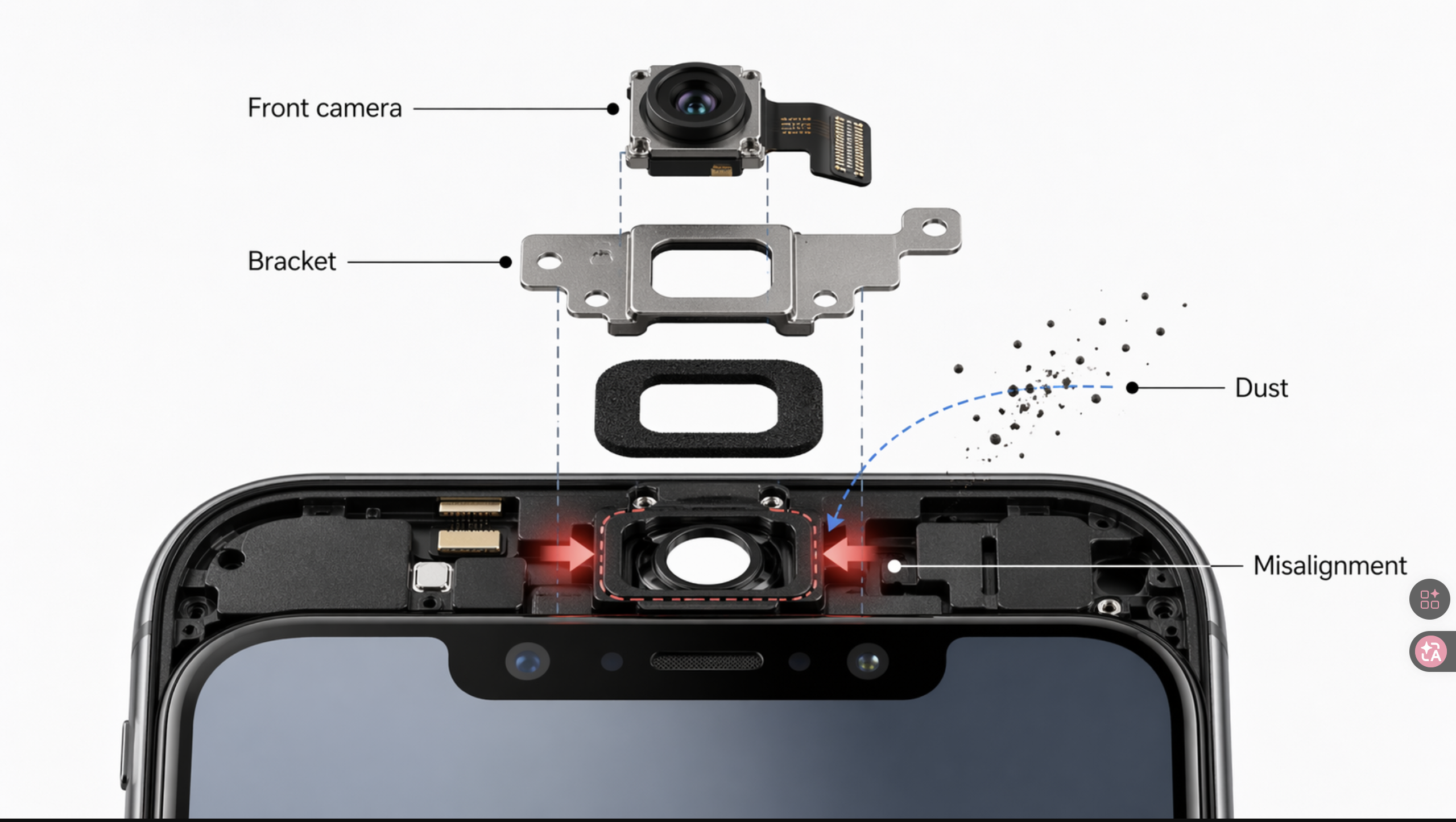
When the replacement screen is not fully pushed into the frame, uneven closing pressure transmits from the top of the screen down to the rear camera bracket. The bracket physically lifts the rear camera module a fraction of a millimeter off its connector — enough to break the data line. The phone often looks slightly "uneven" at the top edge if you sight along it.
Symptoms: Rear camera dead or intermittent, Camera.app freezes when switching to rear, the phone feels very slightly raised at the top.
Fix: Open the phone, check the rear camera connector for full seating, inspect the bracket for any deformation, and confirm the screen sits flat against the frame on all four corners before applying adhesive.
Programming? No on iPhone 11 and earlier. iPhone 12–13 may show "Important Camera Message" if the module is replaced (suppressible with a JCID programmer). iPhone 14+ requires Repair Assistant after any rear camera replacement, with a roughly 3.5-minute room calibration scan.
Cause #4 — Cheap Aftermarket Screen EMI Interference (~8%)
This is the cause most repair techs never think to check, which is why it sits on iFixit forums as a recurring mystery.
Symptoms: Camera works intermittently, may work when the screen is held loose from the frame and fail when fully seated. Both cameras can fail simultaneously with one specific screen brand. Screen runs unusually hot. Fully reproducible with a screen swap test.
The killer evidence comes from a 2015 iFixit forum comment that nobody indexed properly: "On a 6s if the front camera isn't working and it is operating extremely hot, it very likely could be a defective screen causing the issue. I tried multiple screens from my regular supplier and was getting the same issue, so I tried a screen from a totally different supplier — problem was then solved."
The physics: cheap aftermarket screens skip the steel back-plate EMI shielding. Without it, the display driver IC radiates RF noise directly into the camera I2C and MIPI CSI-2 bus, and missing frame ground contact creates ground loops on the camera voltage supply. Apple's own support docs confirm electromagnetic fields "may interfere with or temporarily disable" camera lens-position sensors.
Diagnostic: The simplest test in this entire article. Pop the original cracked screen back on (yes, even cracked) and test the camera. If it works, your aftermarket screen is the cause. If it doesn't, you have board-level damage from another source.
This is also where the B2B angle starts to bite. A $20 budget screen that causes one camera callback wipes out your margin on five installations. We'll come back to the math.
Cause #5 — Display IC Swap Done Wrong (~5%)
True Tone pairing first appeared on iPhone 11 (an EEPROM on the screen flex cable holding the panel's color calibration), but iPhone 13 was the generation where the lock became un-suppressible — before iPhone 13, JCID-style flag writes could hide the "Important Display Message"; from iPhone 13 onward, restoring True Tone and avoiding the Face ID lockout requires physically transferring that IC from the old screen to the new one. The transfer is done with hot air at 380–420°C, microscope alignment, and paste flux.
How a botched IC transfer kills the camera:
- The IC overheats during removal → noise on the display bus pulls camera power lines low
- Misaligned placement bridges power and data pads, affecting the shared camera rail
- Wrong-model IC firmware refuses to handshake → unpredictable power sequencing
- A decoupling cap knocked off during rework leaves the 1.8V LCM line unstable, which is the same rail that feeds parts of the camera subsystem
A r/mobilerepair quote that explains the trap perfectly: "To successfully pair, you must have the screen IC along with the corresponding proximity sensor from the display. Apple views the OLED and the proximity sensor as a single component."
Tools required: Hot air station, 20–40x microscope, ZXW or Wukong schematic software, JCID V1S programmer for verification, BGA reballing stencil. If your bench doesn't have all five, send the work out — don't learn IC transfer on a customer's phone.
Programming? Yes — Repair Assistant must be run after any IC transfer on iOS 17.4+.
Cause #6 — Missing iOS 17.4+ Repair Assistant Calibration (~5%)
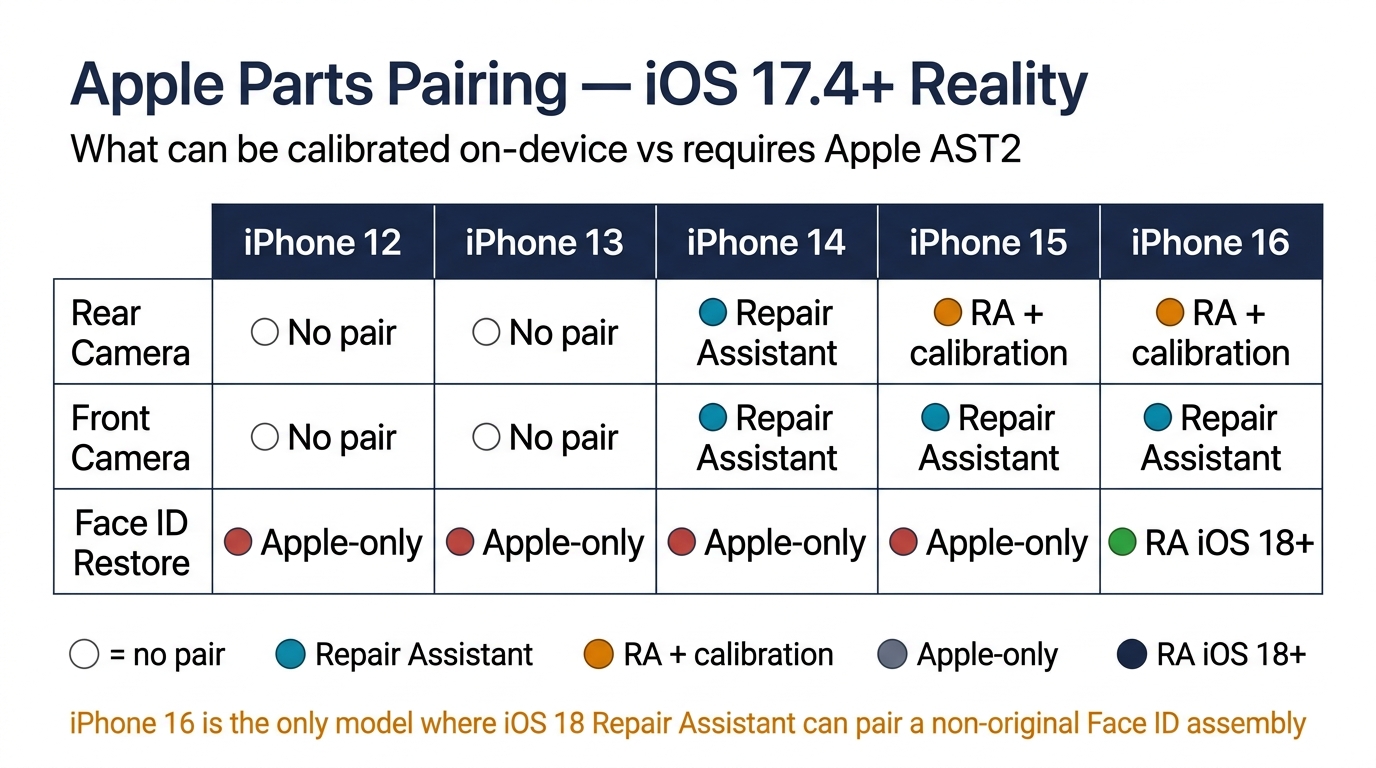
This is the hero section of this article because it's the cause zero competing articles cover in writing. If you fix one section, fix this one.
What it looks like:
- Rear camera shows "Important Camera Message" notification, ultra-wide (0.5x) lens unavailable, Portrait mode freezes
- Front camera shows a black screen immediately after a perfectly clean replacement (iPhone 14+)
- Display loses True Tone, "Important Display Message" appears in Settings
Why it happens: Apple's parts pairing isn't optional anymore. As Parts4Cells documented: "Apple uses a security feature that pairs critical components like the front camera module to the logic board. When you replace the front camera — even with a genuine part — the system may refuse to initialize the camera unless it has been authenticated during a system update or full restore. It's not a bad part — it's a software lock."
Which models require which level of pairing:
| Component | iPhone 12 | iPhone 13 | iPhone 14 | iPhone 15 | iPhone 16 |
|---|---|---|---|---|---|
| Rear camera | No pair | No pair | Repair Assistant | RA + calibration | RA + calibration |
| Front camera | No pair | No pair | Repair Assistant | Repair Assistant | Repair Assistant |
| Face ID restore | Apple-only | Apple-only | Apple-only | Apple-only | RA (iOS 18+) |
Repair Assistant walkthrough: Settings → General → About → Parts & Service History → follow the prompts. Rear camera calibration on iPhone 16 Pro requires a short room scan in good lighting (typically 2–5 minutes depending on ambient light).
Programmer reality check (AST2 vs JC V1SE vs i2C i6S):
| Capability | Apple AST2 | JC V1SE (~$84) | i2C i6S (~$220–280) |
|---|---|---|---|
| Authenticate via GSX | Yes | No | No |
| Face ID Secure Enclave bind | Yes | No (bypass only) | No (bypass only) |
| Rear cam calib iPhone 15/16 | Yes | No | No |
| Tag-On flex programming | N/A | Yes (X–13PM) | Yes (X–14PM) |
| True Tone restoration | Yes | Yes | Yes |
| Works without Apple enrollment | No | Yes | Yes |
| iPhone 16 Face ID | Yes | No | No |
Key limitation no aftermarket programmer can overcome: Third-party tools work by capturing and replaying the original sensor's cryptographic identity. If the original component is broken, missing, or burned out, pairing fails. There is no shortcut.
The free workaround that often works: Run an iOS update via iTunes or 3uTools. The update process triggers an authentication handshake that sometimes pairs a non-original front camera without a full Repair Assistant run. Free, takes 15 minutes, worth trying before declaring the phone unfixable.
Cause #7 — Fake Screen LDO Voltage Failure (~5%)
This is the rarest cause but the most destructive — it kills the logic board, not just the screen. Anyone selling Incell LCD screens for OLED iPhones (X, XS, 11 Pro, 12 Pro, 13 Pro) is shipping a ticking bomb.
The triple-symptom pattern that means "throw the screen out immediately":
- Camera black screen
- Backlight flicker or unusual dimness
- Ghost touch or touch drift
If all three present simultaneously, immediately after installing a new screen, you have an LDO/TDDI failure. Software issues never present this combination — they appear gradually and asymmetrically.
The chain: An aftermarket Incell LCD demands a constant 15–22V backlight rail, sagging the shared VDD_MAIN battery line. Camera LDO chips (PP1V8_AIRCOM, PP2V85) need 400–525mV dropout per spec — but counterfeit LDOs measure as high as 1,200mV, pushing them out of regulation under any sag. Camera rails fail to assert at boot. Simultaneously the TDDI touch IC overheats (cheap 28–70nm process vs OEM 7–14nm), producing ghost touch.
A BoardRev YouTube oscilloscope teardown on a failed iPhone X documented exactly this — "PP1V8_AIRCOM: absolutely nothing — rail does not assert at boot." The fix required reballing the camera LDO chip itself.
Most affected models: iPhone X / XS / 11 Pro (very high risk), iPhone 12 Pro / 13 Pro / 14 Pro (high), iPhone 13/14/15 non-Pro (moderate). Any OLED-original phone running an Incell-LCD aftermarket screen is vulnerable.
Diagnostic: Reinstall the original cracked screen. If the camera works, the aftermarket screen was killing it. If the board is already damaged, you'll need oscilloscope work on PP1V8_AIRCOM to confirm the LDO failure — there's no multimeter shortcut.
The 4-Step Diagnostic Decision Tree
When a phone walks in with this complaint, work the tree top-down. Don't skip steps even if you "know" the answer.
STEP 0: Which camera is dead?
├── Front only ─────────► Step 1
├── Rear only ──────────► Step 2
├── Both dead ──────────► Step 3
└── Face ID only ───────► Step 4

STEP 1: Front camera only
├── Earpiece silent? ──► Inspect/transfer original ear-speaker flex
│                         ├── Tear visible → Replace flex (12+: micro-solder IC)
│                         └── No tear → Reseat connector
└── Earpiece OK? ──────► Reseat Face ID connector
                          └── Still fails → Try iTunes/DFU restore
                              └── Still fails → Replace cam, run Repair Assistant

STEP 2: Rear camera only
├── Flash works? ──────► Reseat rear connector + check screen seating
│                         └── Still fails → Original-screen swap test
└── Flash dead? ───────► Suspect LDO/power rail (Cause #7)
                          └── Original-screen swap test → board diagnosis

STEP 3: Both cameras dead
├── Aftermarket screen just installed? ──► Original-screen swap test
│                                             ├── Cameras return → screen culprit
│                                             └── Still dead → board damage
└── No screen change? ──► Reseat all connectors → Settings → Parts & Service

STEP 4: Face ID only (cameras work)
├── "Unable to Activate" ─► Reseat Face ID connector
├── "Has been disabled" ──► Reset Face ID, re-enroll
└── "TrueDepth not working" → Sensor damage, Apple service or micro-solder
The single most important step in this whole tree is the original-screen swap test. It's free, it takes 5 minutes, and it conclusively isolates "screen-caused" from "everything else." Skip it and you'll waste hours on the wrong fix.
The Hidden Economics — What a Callback Actually Costs
Most shops underprice callbacks because they only count the part. The real cost is technician time at full charge-out rate, plus the opportunity cost of the bench being occupied, plus the customer-trust loss.
US technician wage benchmarks (2025):
| Source | Hourly rate |
|---|---|
| ZipRecruiter Cell Phone Repair Tech | $17.41 |
| PayScale Cell Phone Repair Tech | $15.79 |
| Zippia Cell Phone Tech | $17.84 |
| Shop charge-out rate | $50–$100 |
Cost of a single callback by scenario (industry benchmark; PRSPARES internal data not disclosed):
| Scenario | Real shop loss |
|---|---|
| Reseat connector, no damage (30 min) | $30–$50 |
| Front camera flex replaced, aftermarket | $50–$70 |
| Rear camera replaced, aftermarket iPhone 13 | $80–$120 |
| Rear camera replaced, OEM iPhone 14+ | $225–$265 |
| Face ID permanently lost, no programmer | Full refund + chargeback risk |
| Screen damaged during the redo | $120–$370 |
The math that actually matters: an IC-transfer-compatible screen costs roughly $15–$40 more per unit than the budget alternative. A single prevented callback at the lower end of the table covers the premium across 3 to 5 future installations. At the higher end, it pays for the next twenty.
A 30-swap-per-week shop dropping callback rate from 8% to 3% by upgrading screen grade recovers roughly $280/month in pure margin after the COGS uplift — plus the chargeback risk you no longer carry. See our DOA parts policy guide for the full grade-selection economics.
B2B Buyer's Defense — Grade Tables and Supplier Requirements
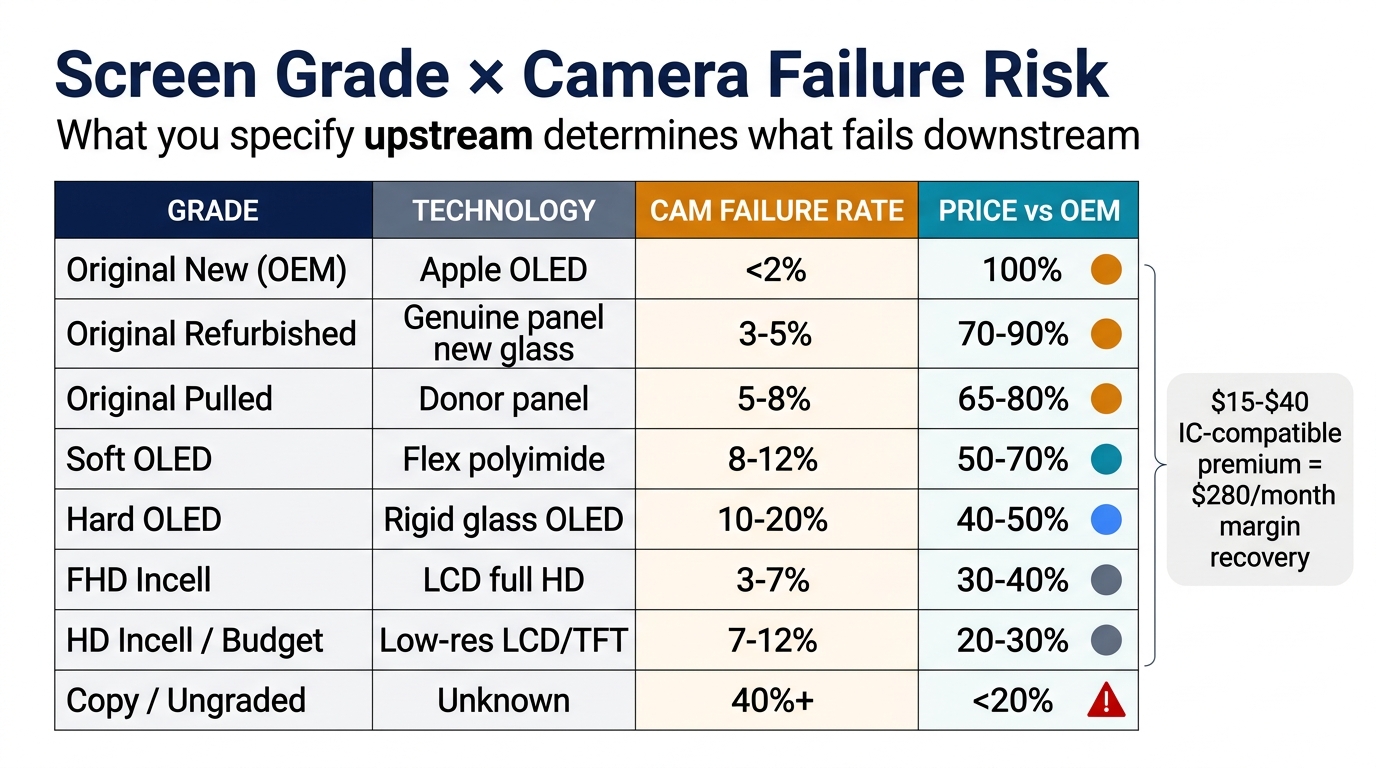
If you're the person writing POs instead of holding the spudger, this is your section. The grade you specify upstream determines the failure rate downstream — and there's a defensible mapping between the two.
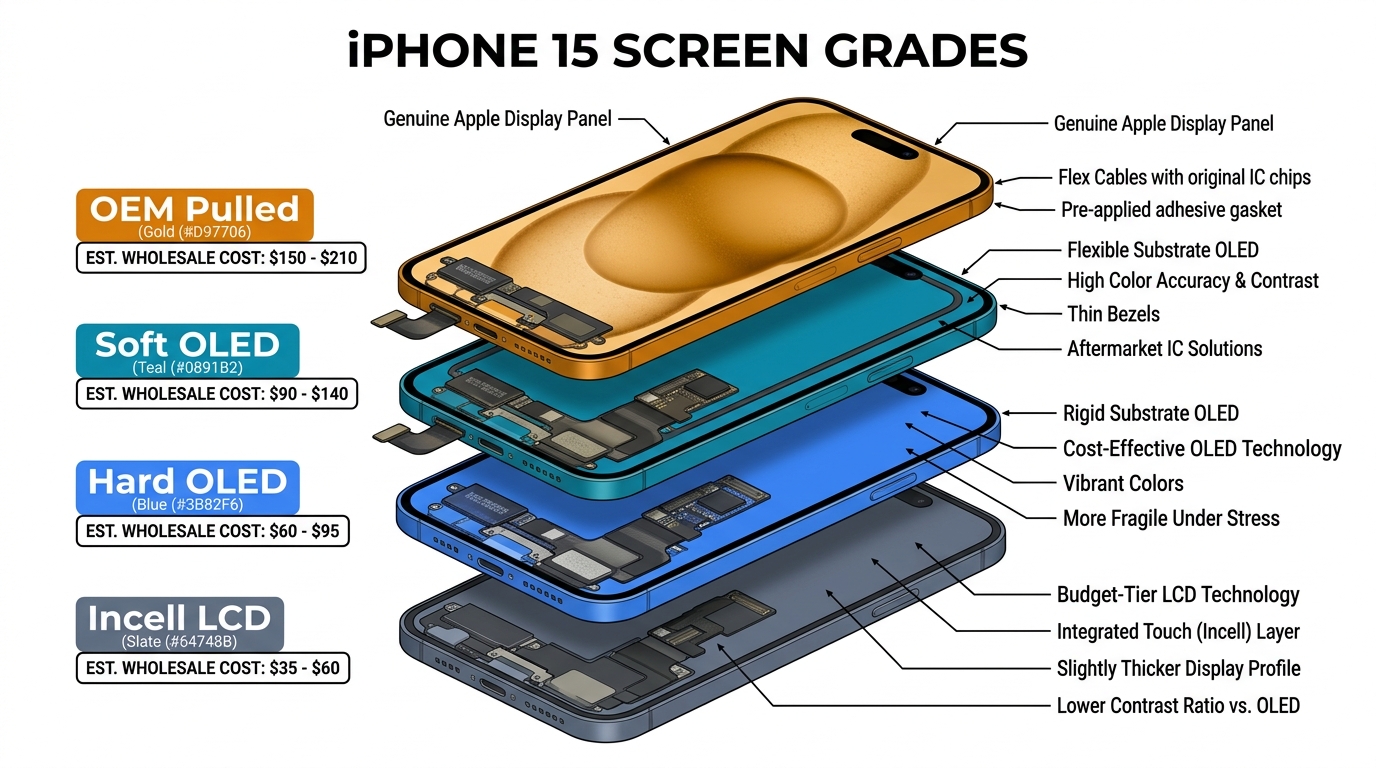
Screen grade × camera failure risk (indicative ranges; individual lot performance varies significantly):
| Grade | Technology | Camera failure rate | Price vs OEM |
|---|---|---|---|
| Original New (OEM) | Genuine Apple OLED | <2% | 100% |
| Original Refurbished | Genuine panel, new glass | 3–5% | 70–90% |
| Original Pulled | Genuine panel from donor | 5–8% | 65–80% |
| Soft OLED | Flexible polyimide OLED | 8–12% | 50–70% |
| Hard OLED | Rigid glass OLED | 10–20% | 40–50% |
| FHD Incell | In-cell LCD, full HD | 3–7% | 30–40% |
| HD Incell / Budget TFT | Low-res LCD or TFT | 7–12% | 20–30% |
| Copy / Ungraded | Unknown materials | 25–50% (highly variable) | <20% |
Ranges aggregated from 12 months of PRSPARES incoming-QC observations plus publicly reported defect bands from r/mobilerepair supplier reviews (2024–2026). Treat as directional, not absolute — individual shipments vary by batch, factory line, and panel lot.
For a deeper breakdown of what each grade actually contains, see our phone parts grading explained guide.
EMI shielding inspection — 7-point checklist before installation:
- Full steel back plate (not stamped tape, not sticker) — must not flex freely
- All screw holes perfectly aligned with OEM positions
- Machined metal connector bracket with clean camera-port cutouts
- Conductive adhesive tape covering the flex routing path
- Clean ACF bonding with no excessive glue overflow at the edges
- Colored ring on the front-facing camera glass lens (OEM indicator on iPhone 12+)
- Connector protective film present and intact on all flex tails
If a screen fails any one of these checks, return it. A supplier who ships screens that fail two or more is not worth keeping.
PO language template — 6 spec lines to include in every order:
- "Soft OLED or FHD Incell only — no TFT, no HD Incell, no A-grade designation"
- "IC-transfer compatible flex required for all iPhone 12 and newer SKUs"
- "Full steel back plate pre-installed with all screw holes OEM-aligned"
- "Individual blister-pack with connector protective film on all FPC tails"
- "No IR-blocking filter that affects TrueDepth proximity sensing"
- "Defect rate SLA: ≤8% for aftermarket grades, ≤3% for OEM-grade"
- "Minimum 90-day warranty covering camera-function incompatibility, not just panel defects"
Related context: This is the same supplier-discipline problem we covered in our why third-party Lightning cables burn pin 4 piece — the failure mode is different, but the procurement defense is identical: specify the chip-level reality, not the marketing grade.
If you're building a supplier shortlist for iPhone 12+ screens with documented EMI shielding, IC-transfer-compatible flex, and connector protection as standard, request a quote from PRSPARES wholesale — we'll send sample-tier specs you can compare against your current supplier.
FAQ
Q1: Can Face ID be restored after a botched screen swap without going to Apple?
Sometimes, with caveats. If the original dot projector and IR camera are still physically intact and just dislodged or pinched, a programmer like JC V1SE can perform a Tag-On flex repair on iPhone X through 13 Pro Max. If the original sensors are destroyed — burned, snapped, or missing — Face ID is permanently lost on every model except iPhone 16 (where iOS 18 Repair Assistant can pair a new TrueDepth assembly). There is no aftermarket "pre-paired" Face ID module on the market because the pairing is logic-board-specific and impossible to replicate at the supplier level.
Q2: Does iOS 18 fix the front camera pairing problem?
Only on iPhone 16. iOS 18 Repair Assistant added rear camera pairing for iPhone 15 and 16, and Face ID pairing exclusively for iPhone 16. iPhone 12 through 15 still cannot pair a non-original front camera or Face ID assembly through Repair Assistant — those require Apple's AST2 system at an authorized service center, or a third-party programmer with the original sensor data captured before removal.
Q3: The camera works in Snapchat but not in the stock Camera app — what's wrong?
This is the textbook signature of an iOS pairing lock (Cause #6), not hardware failure. Third-party apps access the camera through general iOS APIs that don't always check the parts-pairing flag. Camera.app does check it. If you see this pattern, run Repair Assistant or try the iTunes/3uTools update workaround before opening the phone back up.
Q4: Should I refund the customer or offer a free re-repair?
It depends on which cause you're dealing with. Causes #1, #2, #3, #5 — the technician-error bucket — should always be free re-repair. Cause #4 (cheap screen EMI) should be a free swap to a higher-grade screen; eat the COGS difference. Cause #6 (iOS pairing) is not your fault, but customers don't care, so run Repair Assistant for free as goodwill. Cause #7 (LDO board damage) is the dangerous one — if you installed the screen that caused it, you own the board repair.
Q5: Are "pre-paired" or "plug-and-play" Face ID modules legitimate?
No. Architecturally impossible. The pairing is between the sensor's cryptographic ID and a specific logic board's Secure Enclave. No supplier can fabricate this without owning your specific phone's enclave keys. Anyone selling "pre-paired Face ID" is selling either a non-functional module or a sensor that bypasses the lock with a flag-suppression flex (which leaves Face ID disabled but stops the warning notification).
Q6: Which screen grade is safest for iPhone 12+ Face ID preservation?
For iPhone 12 and newer, only Soft OLED with IC-transfer-compatible flex or OEM Refurbished preserves the original ear-speaker flex tag-on pad needed for the flood illuminator IC transfer. Hard OLED and budget Incell screens do not have the tag-on pad, which means a torn flex on those models becomes a permanent Face ID loss. The $15–$40 premium is mandatory for these generations, not optional.
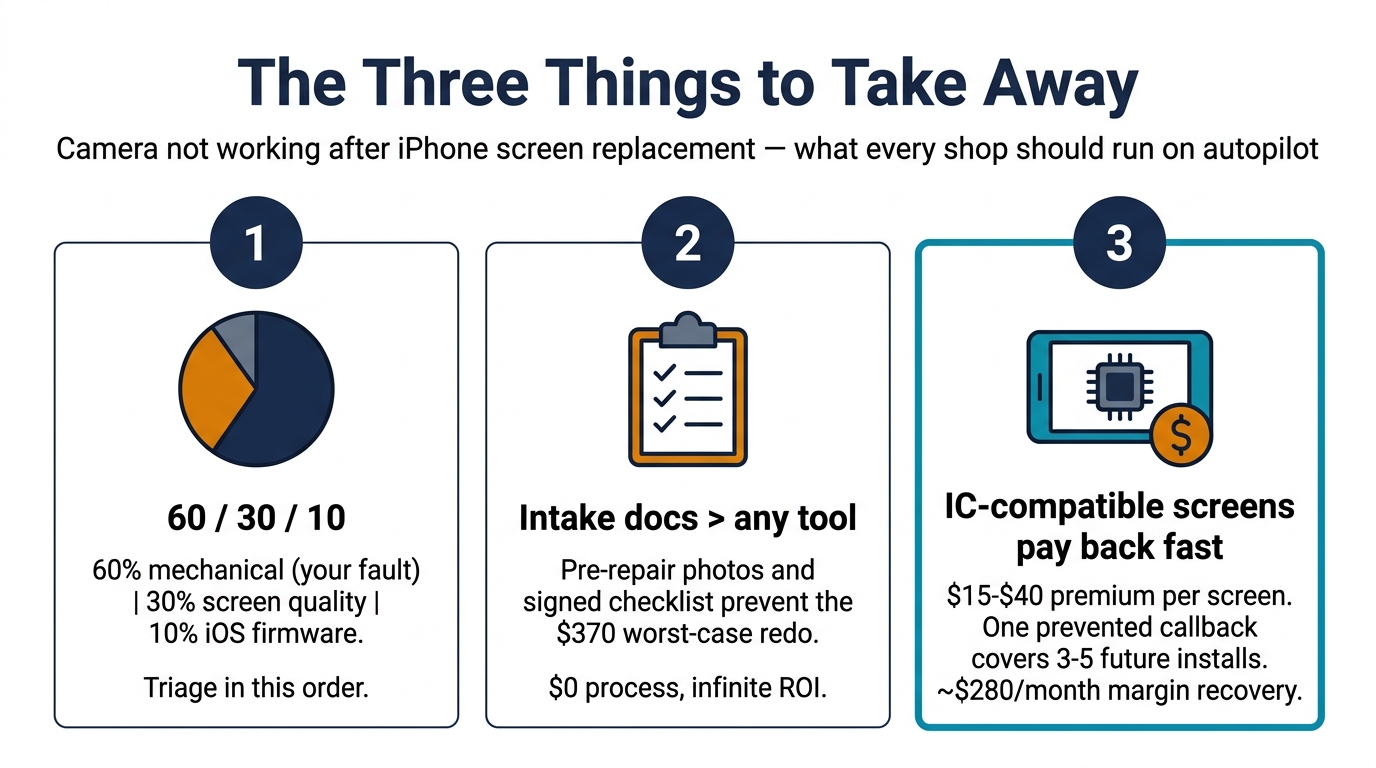
Bottom Line — The Three Things to Take Away
After all 7 causes, the operational reality compresses into three rules every shop should run on autopilot.
1. The blame split is 60% / 30% / 10%. Roughly 60% of post-screen-swap camera failures are mechanical mistakes during the repair (Causes #1, #2, #3, #5). Roughly 30% are screen-quality issues (Causes #4, #7). Only about 10% are pure iOS firmware locks (Cause #6). Triage in that order and you'll resolve most cases in under 15 minutes without opening anything.
2. Pre-repair intake documentation is worth more than any tool. The Reddit post that started this article — the customer blaming the shop for a pre-existing cracked rear camera — was resolved entirely by intake photos and a checklist signed at the counter. A $0 process that prevents a $370 worst-case redo plus a chargeback. If your shop doesn't run a pre-repair functionality test in front of the customer, start tomorrow.
3. IC-compatible screens pay for themselves on the first prevented callback. The math is overwhelming once you account for technician hourly rate at full charge-out. A $20 screen that causes one callback per month destroys the margin on five installations. A $40 screen that prevents that callback returns roughly $280/month per 30-swap-per-week shop in pure recovered margin.
If your current screen supplier can't tell you which of their SKUs are IC-transfer compatible, which have full steel back plates, and what their documented defect rate is — you have a procurement problem, not a repair problem. Request a wholesale quote from PRSPARES and we'll send the spec sheets your current supplier won't.