Charging Port Failures After Replacement: Common Problems and How to Trace Them to Parts Quality

You replaced the charging port. The customer comes back two days later: "It's doing the same thing." Or worse: "Now it doesn't charge at all."
Charging port problems after replacement are one of the most frustrating callbacks for repair shops. The repair seemed fine on the bench. The phone charged, data transferred, the microphone worked. But within days or weeks, the customer is back with the same symptoms — or new ones that didn't exist before.
The question every technician needs to answer quickly is: is this a parts quality problem, an installation error, or something else entirely? Getting that diagnosis wrong costs you time, money, and customer trust. Blaming the part when it's actually a board-level issue means you'll go through multiple replacement parts before admitting the real problem. Blaming your technique when it's actually a bad batch of flex cables means you'll waste hours re-doing a repair that was never going to work.
This guide covers the most common charging port problems after replacement, how to trace each one to its root cause, and what the diagnosis tells you about your parts sourcing.
Need Charging Port Flex in Bulk?
Wholesale charging port assemblies for iPhone & Samsung — tested, factory-direct.
Get Wholesale QuoteThe Five Most Common Post-Replacement Charging Port Failures
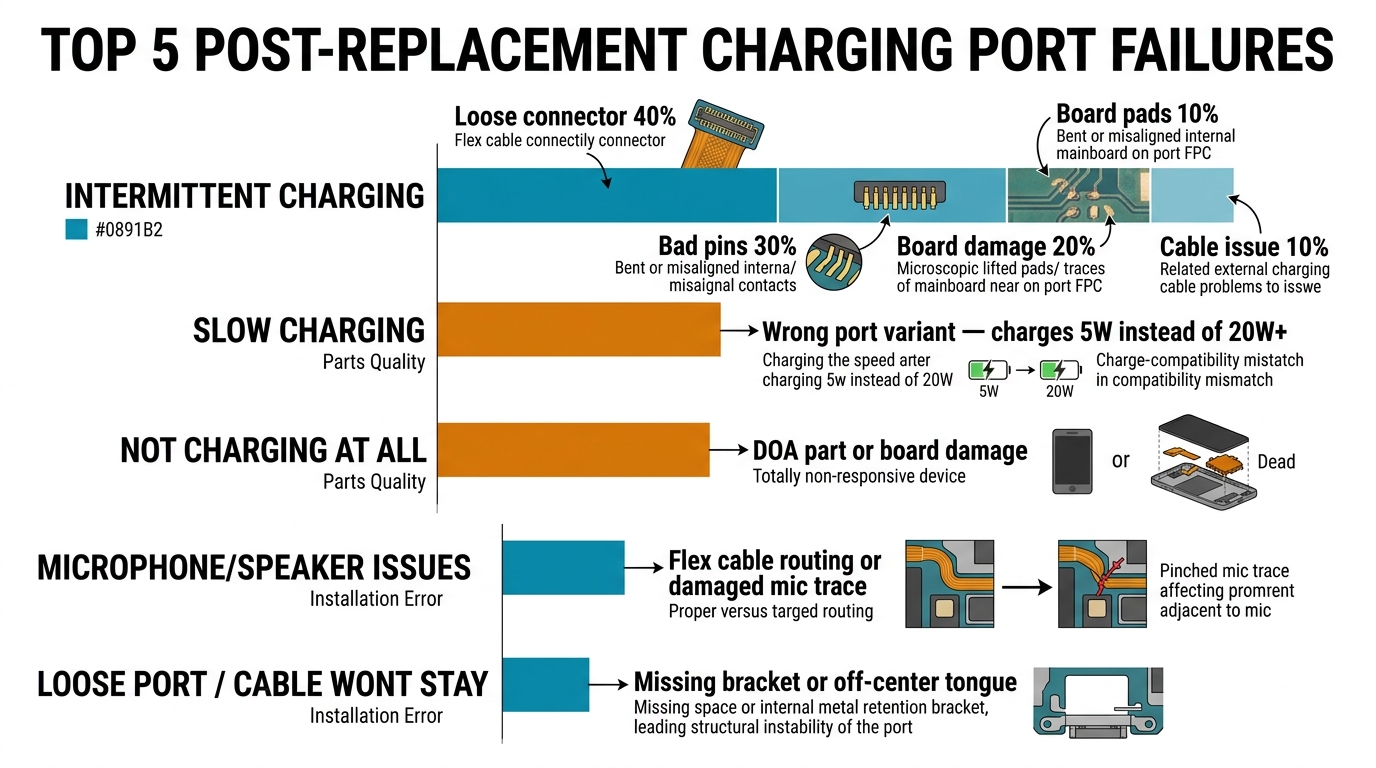
Based on patterns from repair technicians across thousands of charging port repairs, these are the failures that actually show up after replacement — ranked by frequency.
1. Intermittent Charging (Charges Sometimes, Not Always)
What the customer says: "It charges if I hold the cable at a certain angle" or "It charges fine overnight but stops during the day."
Root cause breakdown:
| Cause | Frequency | How to Identify |
|---|---|---|
| Loose flex cable connector | 40% | Open the phone, reseat the connector. If it clicks more firmly than expected, it wasn't fully seated during repair |
| Low-quality port pins | 30% | Inspect the USB-C/Lightning pins under magnification. Uneven plating or bent pins = parts quality issue |
| Board connector damage | 20% | Inspect the board-side FPC connector for lifted pins or solder pad damage from removal/insertion |
| Customer's cable issue | 10% | Test with 3 different known-good cables before opening the phone |
Parts quality indicator: If you're seeing intermittent charging across multiple repairs using the same batch of ports, the batch likely has inconsistent pin plating. Cheap charging port flex cables use thinner gold plating on the USB-C pins, which wears faster and makes inconsistent contact with the cable. Switch suppliers or upgrade to a higher grade.
2. Slow Charging After Replacement
What the customer says: "It takes twice as long to charge now" or "Fast charging doesn't work anymore."
Root cause breakdown:
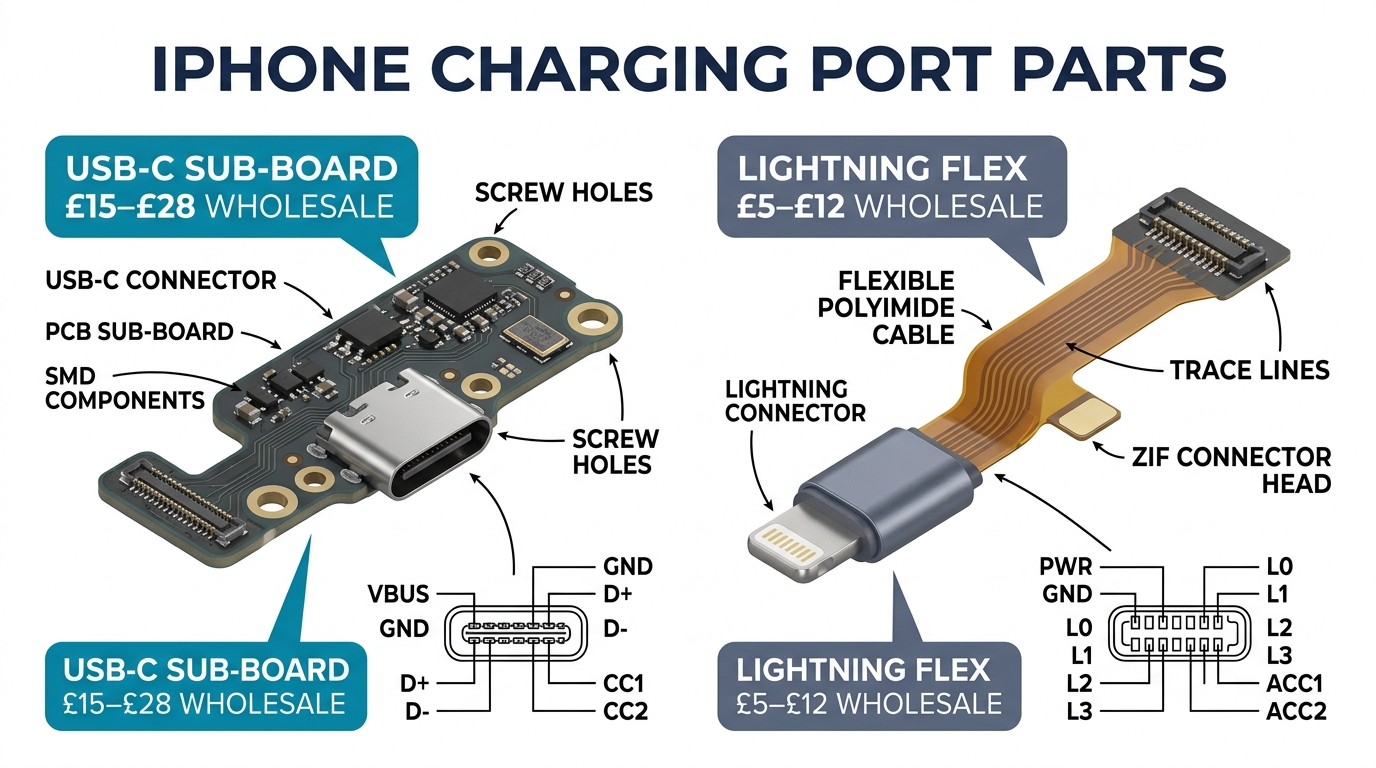
- Incorrect port variant. This is the #1 cause. Many iPhone and Samsung models have multiple charging port flex cable variants (different revisions, different regional versions). Installing the wrong variant might charge at 5W instead of 20W+ because the power delivery negotiation lines are different.
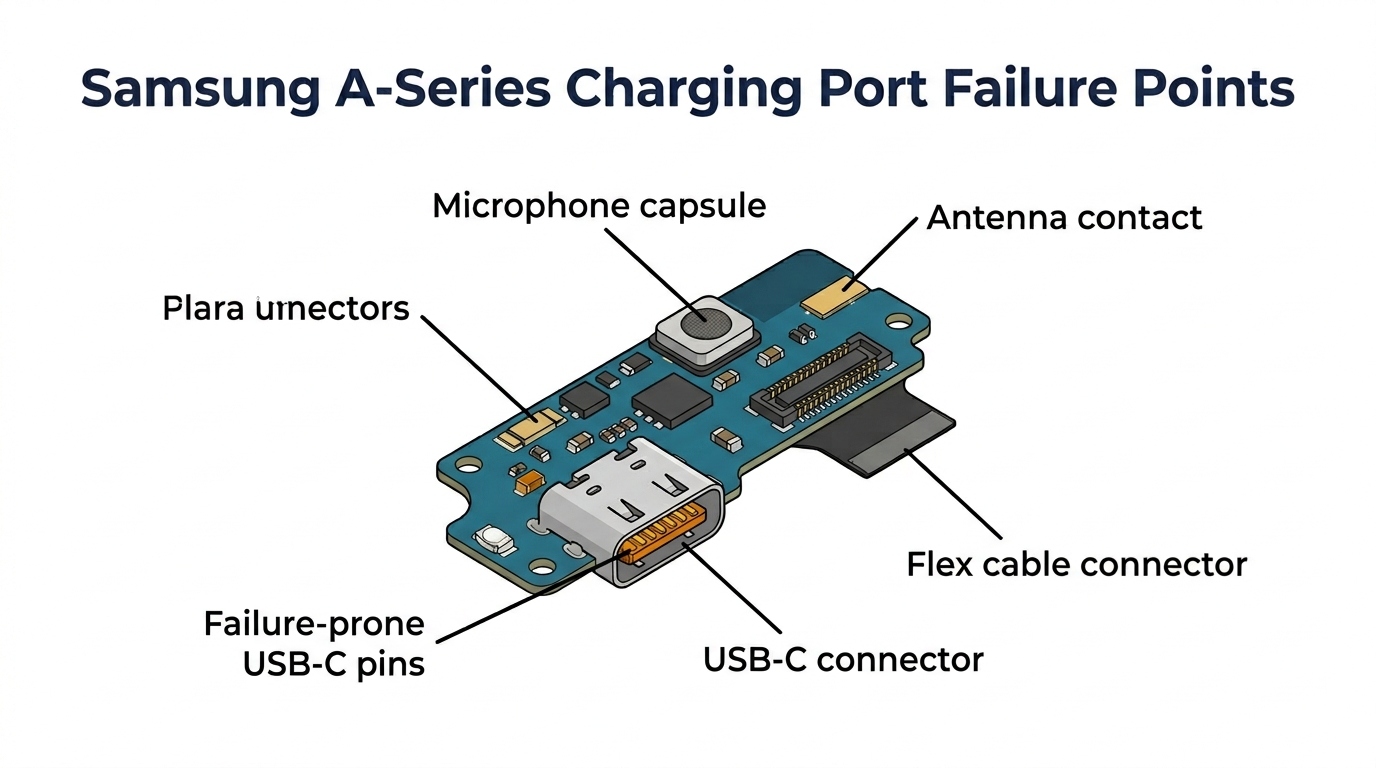
- Missing or damaged microphone. On most iPhones and many Samsung models, the charging port flex assembly includes the bottom microphone. If the microphone trace is damaged, the phone may default to a lower charging speed as a safety measure.
- Debris in the new port. Factory residue (solder flux, adhesive) inside a brand-new port can interfere with pin contact. Always inspect and clean new ports before installation.
- Aftermarket power IC limitations. Some very cheap charging port assemblies use aftermarket power management ICs that don't support fast charging protocols. This is more common in Samsung parts than iPhone.
Parts quality indicator: If slow charging persists after confirming the correct variant and cleaning the port, the flex cable's power delivery traces are likely substandard. Quality charging port flex cables support the same wattage as the original. Ask your supplier whether their parts support fast charging and PD protocols.
3. Phone Not Charging at All After Port Replacement
What the customer says: "It was charging (slowly) before you replaced the port. Now it's completely dead."
This is the most alarming callback because you've made the problem worse. Stay calm and diagnose systematically:
- Reconnect the old port. If the phone charges with the old port but not the new one, the new part is dead on arrival (DOA). This happens — even good suppliers have 1-3% DOA rates on charging ports.
- Check for board damage. Inspect the board-side connector under magnification. Prying off the old flex cable with too much force can lift solder pads or crack traces on the board. This is an installation error, not a parts issue.
- Check the battery connector. Sometimes the battery flex cable gets partially disconnected during port replacement. Reseat it firmly.
- Test with a DC power supply. If the phone draws no current at all with a known-good port, the problem is likely board-level (Tristar/Hydra IC on iPhones, or the charging IC on Samsung).
Parts quality indicator: A consistent DOA rate above 3% from a single supplier means their QC is failing. Track your DOA rates by supplier — this is the single most useful metric for evaluating parts quality over time.
4. Microphone or Speaker Not Working After Port Replacement
What the customer says: "People can't hear me during calls" or "Voice messages don't record."
This is almost always a parts quality or installation issue, not a board problem.
- Flex cable routing. The charging port flex runs past the loudspeaker and microphone. If the flex is routed incorrectly during reassembly, it can press against the microphone module and muffle it, or prevent the loudspeaker from sitting flush (causing rattling/buzzing).
- Damaged microphone on the flex. Cheap flex cables sometimes have fragile microphone connections. The microphone capsule sits on a thin branch of the flex cable — aggressive handling during installation can crack the trace feeding it.
- Wrong variant (again). Some model variants have different microphone configurations on the charging port flex. The port charges fine, but the microphone doesn't match the phone's configuration.
Parts quality indicator: If microphone problems happen consistently with a specific supplier's parts, their flex cable assembly process is damaging the microphone trace. This is a manufacturing quality issue — switch to a supplier with better QC on assembled flex cables.
5. Charging Port Feels Loose or Cable Won't Stay In
What the customer says: "The cable falls out" or "I have to push the cable in really hard."
- Port bracket/retention clip. Most phones have a small metal bracket that holds the charging port assembly in place. If this bracket is missing, bent, or not reinstalled correctly, the port has slight play — enough to make cable insertion feel loose.
- Port pin alignment. On USB-C ports, the center tongue must be perfectly centered. A slightly off-center tongue makes the cable feel loose on one side. This is a manufacturing defect in the part.
- Residual adhesive. Old adhesive from the previous port can prevent the new port from sitting flush in the housing, creating a gap that makes the cable feel loose.
Parts quality indicator: If the center tongue is off-center out of the box, the part is defective. Check 2-3 ports from each new batch before installing — this defect is visible with a simple visual inspection.
How to Trace Problems Back to Parts Quality vs Installation Error
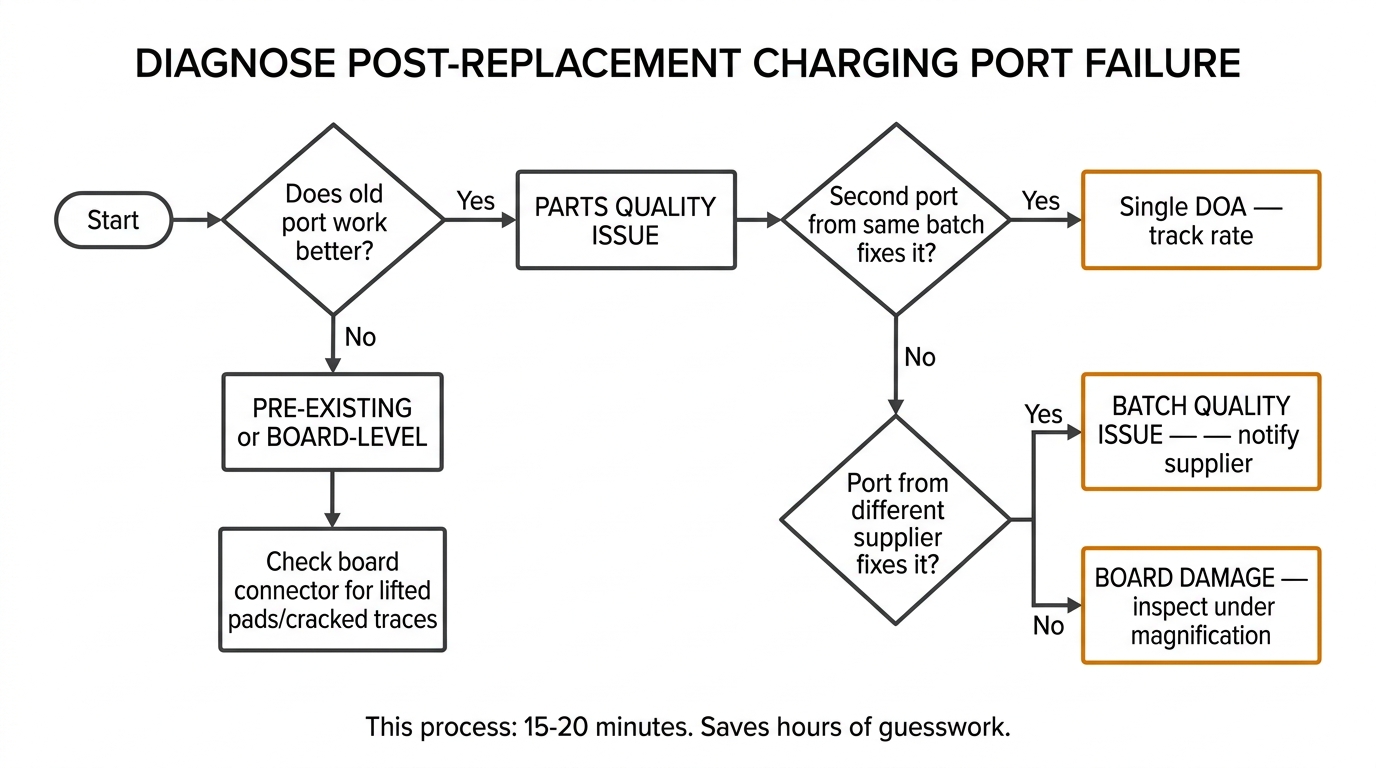
Use this decision tree when diagnosing a post-replacement charging port failure:
Step 1: Does the old port work better than the new one?
- Yes → Parts quality issue (DOA or substandard part)
- No → Problem may be board-level or pre-existing
Step 2: Does a second new port from the same batch fix the problem?
- Yes → First part was DOA. Track your DOA rate for this supplier.
- No → Either the entire batch is bad, or the problem is installation/board-level
Step 3: Does a port from a different supplier/batch fix it?
- Yes → Batch quality issue. Notify your supplier and request credit.
- No → Board-level damage or incorrect model variant
Step 4: Inspect the board connector under magnification.
- Lifted pads, cracked traces, or corroded pins → Board damage (may need micro-soldering)
- Board connector looks clean → Recheck model/variant compatibility
This process takes 15-20 minutes but saves hours of guesswork. For the diagnostic flow when the phone isn't charging at all (before you even open it), see our iPhone not charging diagnosis guide.
What Quality Indicators to Check Before Installing Any Charging Port
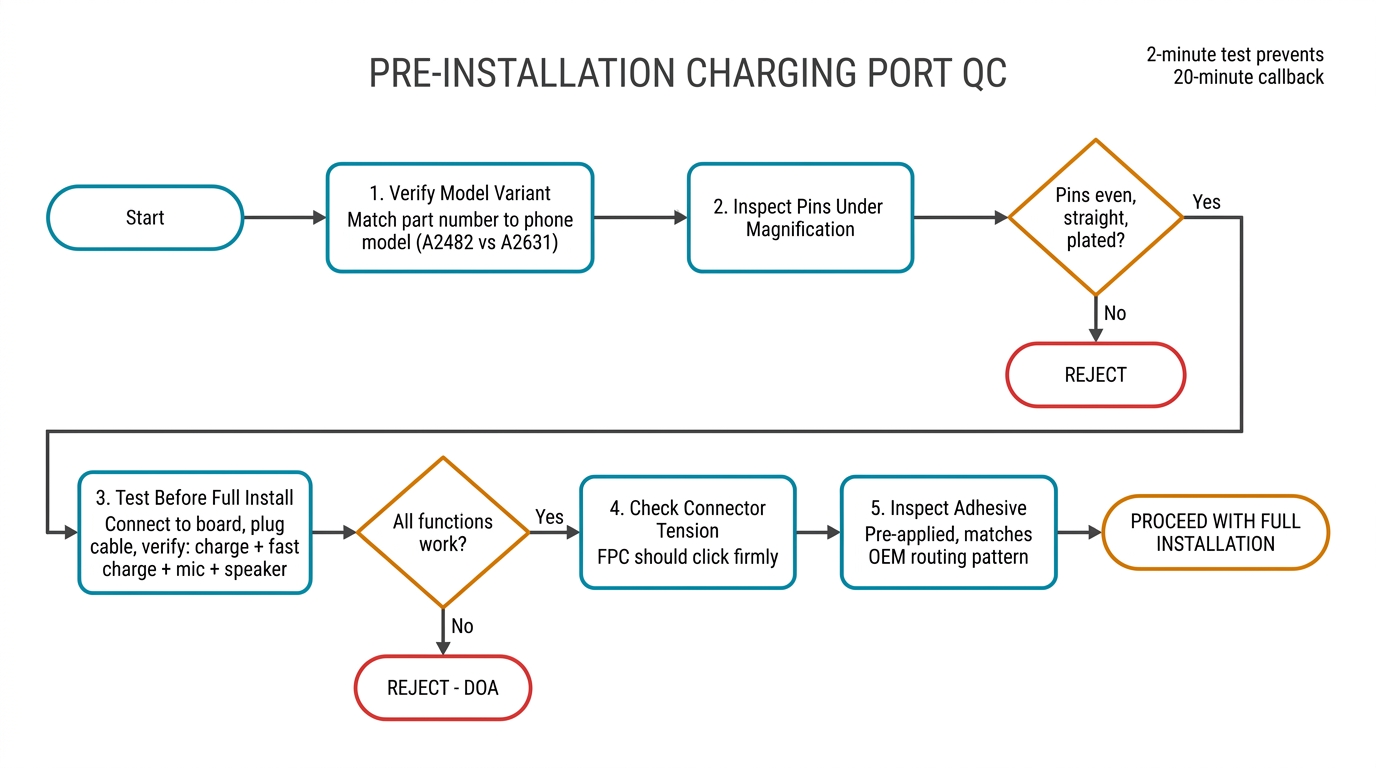
Prevention beats diagnosis. Check these before every charging port installation:
-
Verify the model variant. Match the part number on the flex cable to the phone's model number. Don't rely on "fits iPhone 13" labels — verify the specific variant (A2482 vs A2631 vs A2634, for example).
-
Inspect USB-C/Lightning pins under magnification. Pins should be evenly plated, straight, and uniformly spaced. Any bent, dull, or missing pins = reject the part immediately.
-
Test the flex cable before full installation. Connect it to the board, plug in a cable, and verify: charging works, fast charging negotiates, microphone picks up audio, and the loudspeaker plays sound. This 2-minute test prevents 20-minute callbacks.
-
Check the connector tension. The board-side FPC connector should click firmly when seated. If it feels loose or requires no pressure to connect, either the connector is worn (parts issue) or the board socket is damaged (board issue).
-
Inspect the adhesive. Quality flex cables come with pre-applied adhesive that matches the original routing pattern. If the adhesive is missing, mispositioned, or clearly different from OEM, the part may not route cleanly inside the phone.
For a broader perspective on evaluating charging port quality when buying in bulk, see our guide on how to choose charging ports for bulk repair orders.
Tracking Failure Rates to Improve Your Sourcing
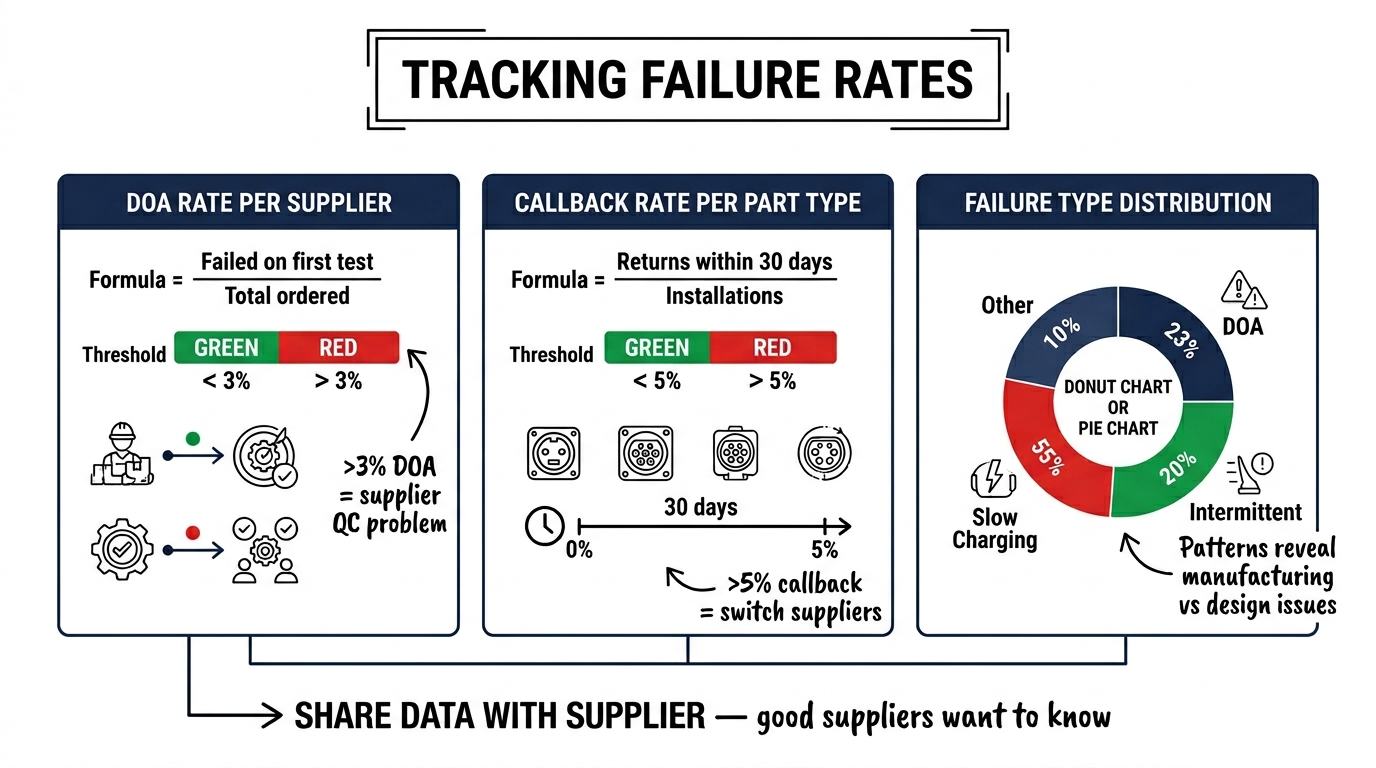
The most effective way to improve your parts quality over time is to track failures by supplier and batch:
| What to Track | How | Why |
|---|---|---|
| DOA rate per supplier | Count parts that fail on first test, divide by total ordered | >3% DOA rate = supplier QC problem |
| Callback rate per part type | Count customer returns within 30 days, divide by installations | >5% callback rate = switch suppliers |
| Failure type distribution | Log whether each failure is DOA / intermittent / slow charging / other | Patterns reveal whether the issue is manufacturing (random DOA) or design (consistent slow charging) |
Even a simple spreadsheet tracking these three metrics per batch will tell you within 2-3 orders whether a supplier is reliable. Share this data with your supplier — good suppliers want to know about systematic issues and will work with you to resolve them.
FAQ
Why is my phone not charging after changing the charging port?
The most common cause is an unseated flex cable connector — open the phone and firmly reseat all connections. If that doesn't fix it, the replacement part may be dead on arrival (1-3% DOA rate is normal). Test with the original port to confirm. If the original port also stops working, the board connector may have been damaged during repair.
Can a bad charging port damage the phone's battery?
Indirectly, yes. A charging port with faulty power delivery can allow inconsistent voltage, which stresses the battery's charging circuit over time. More commonly, a loose port connection causes repeated charge/disconnect cycles that keep the battery in a constant charging state, reducing its long-term health. Always verify stable charging before returning the phone to the customer.
How long should a replacement charging port last?
A quality replacement charging port should last 2-3 years under normal use — comparable to the original. If replacement ports are failing within 3-6 months, the parts quality is substandard. USB-C ports are rated for approximately 10,000 insertion cycles. At 2 charge cycles per day, that's over 13 years of theoretical life.
Should I clean or replace a charging port that charges intermittently?
Clean first, replace second. Over 50% of "bad charging port" complaints are actually lint and debris buildup in the port cavity. Use compressed air and a plastic spudger to clean. If cleaning doesn't resolve the issue, then replace. This saves the customer money and avoids unnecessary parts cost — and builds trust.
Is it worth stocking multiple grades of charging ports?
For most repair shops, one reliable grade is enough. Unlike screens where you might offer standard and premium options, customers don't differentiate charging port "quality tiers." Focus on finding one supplier with consistent quality and low DOA rates rather than stocking multiple grades. The price difference between grades is usually only $0.50-1, so the cost saving isn't worth the quality risk.
Every Callback Tells You Something About Your Supply Chain
Charging port callbacks aren't just customer service problems — they're data about your parts quality. A shop that tracks its failure rates, traces problems to root causes, and uses that information to adjust sourcing decisions will have fewer callbacks, better margins, and happier customers than a shop that just keeps replacing parts until something sticks.
If you're experiencing consistent charging port quality issues and want to test a different supplier, request samples from our team. We can send test units of our charging port flex cables for your most common models so you can compare quality and DOA rates against your current supplier before committing to a full order.