Phone Screen Not Working? Complete Diagnosis and Fix Guide

Your phone screen not working could mean a dozen different things — and each one has a different fix. A completely black display, a screen that lights up but won't respond to touch, a display with dead zones, and a screen that flickers before going dark are all different symptoms pointing to different root causes.
The mistake most people make is jumping straight to "I need a new screen" when the problem might be a software crash, a loose connector, or a dead battery. The opposite mistake is spending hours trying software fixes when the screen is physically damaged and only a replacement will solve it.
This guide gives you a systematic way to diagnose exactly what's wrong with your phone screen, fix what you can fix yourself, and know when — and how — to get professional help. Covers both iPhone and Android, with specific instructions for each.
Sourcing Replacement Screens in Bulk?
Incell / Hard OLED / Soft OLED grades — wholesale pricing, grade comparison on request.
Get Wholesale QuoteStep 1: Identify Your Symptom
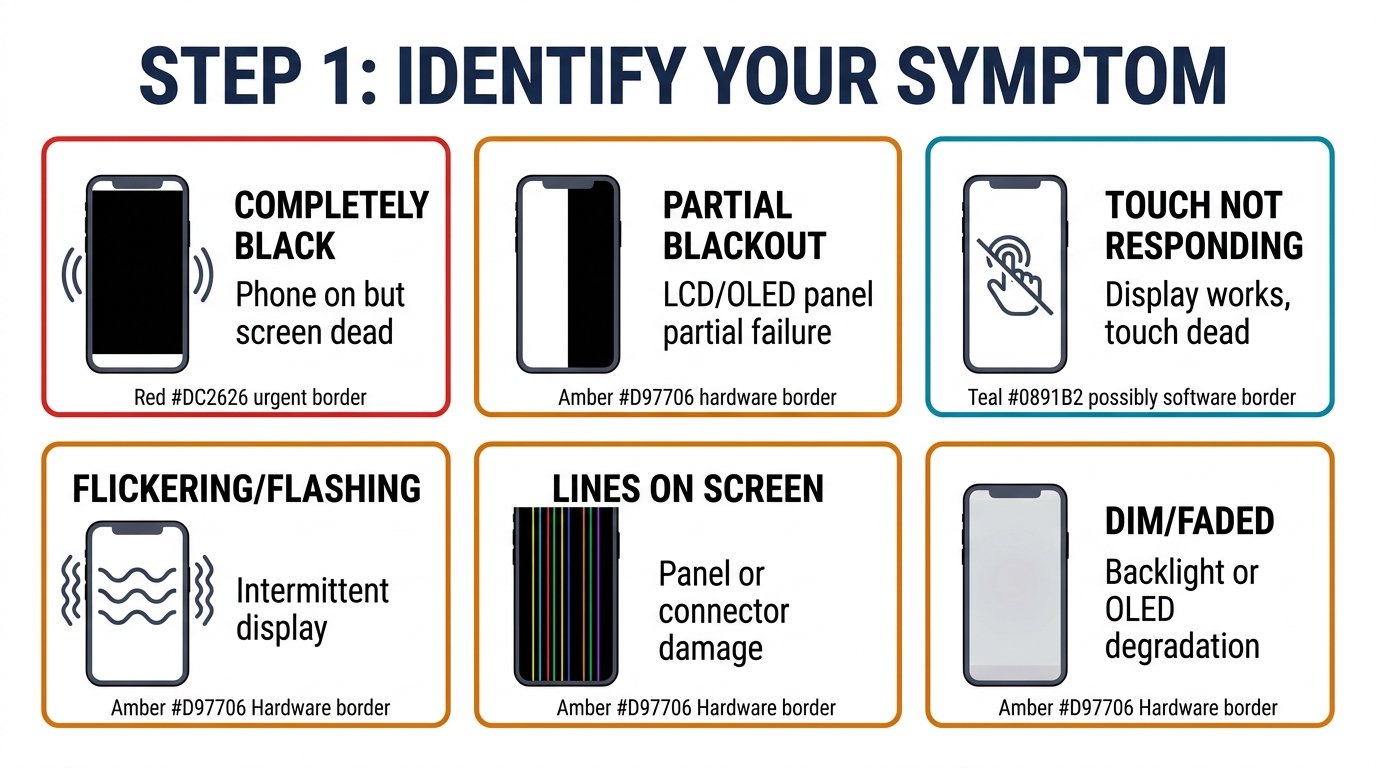
Before trying any fixes, figure out which category your problem falls into. Each symptom points to a different set of causes, and the fix depends entirely on getting this diagnosis right.
Symptom A: Screen Is Completely Black
The display shows nothing — no backlight, no faint image, nothing. But you might hear notification sounds, feel vibrations, or notice the phone responds to calls.
Most likely causes:
- Dead battery (the most common and easiest to fix)
- Software crash causing a frozen black screen
- Damaged display connector (internal cable came loose)
- Failed display panel (LCD/OLED hardware failure)
- Logic board damage affecting display output
Symptom B: Screen Lights Up But Touch Doesn't Work
You can see everything on the display — notifications, the lock screen, incoming calls — but tapping, swiping, and typing do nothing. The phone touch screen not working while the display itself looks fine points to a different set of issues than a black screen.
Most likely causes:
- Digitizer failure (the touch-sensing layer is separate from the display)
- Water damage to the touch controller IC
- Software glitch after an update or app installation
- Screen protector or case interfering with touch sensitivity
- Aftermarket replacement screen with a defective touch layer
Symptom C: Partial Screen Failure
Parts of the screen work fine, but certain areas are dead — no touch response, black patches, color distortion, or lines across the display.
Most likely causes:
- Physical damage from a drop (even without visible cracks)
- Flex cable partially disconnected
- OLED panel burn-in or degradation
- Pressure damage to specific display regions
- Connector corrosion from moisture exposure
Symptom D: Screen Works Intermittently
The display cuts in and out — sometimes it works perfectly, then goes black or freezes. It might come back after pressing harder on certain spots, or after the phone cools down.
Most likely causes:
- Loose display connector (the most common intermittent cause)
- Thermal issues — solder joints failing under heat
- Water damage that causes shorts when moisture shifts
- Failing display driver IC on the logic board
- Degrading flex cable that breaks contact with movement
Step 2: Software Fixes (Try These First)
If your phone hasn't been dropped or exposed to water, start with software troubleshooting. These take 5–10 minutes total and fix about 30% of "screen not working" cases.
Force Restart
This solves frozen screens and software crashes that make the display appear dead. The phone is actually on but the screen process has crashed.
iPhone: Press and quickly release Volume Up, press and quickly release Volume Down, then press and hold the Side button until the Apple logo appears (about 10–15 seconds).
Samsung Galaxy: Press and hold Power + Volume Down simultaneously for 10–15 seconds until the phone vibrates and restarts.
Other Android: Press and hold the Power button for 15–30 seconds. If that doesn't work, try Power + Volume Down for 15 seconds. Some older models use Power + Volume Up.
A force restart doesn't erase any data. If the screen comes back after this, the issue was a software crash — monitor it, but no repair is needed unless it happens repeatedly.
Charge for 30 Minutes
A completely dead battery can make a phone appear to have a broken screen. Plug the phone into its original charger (wall adapter, not USB port on a laptop) and wait at least 30 minutes before trying to turn it on. Some phones with deeply depleted batteries won't show a charging indicator for the first 5–10 minutes — this is normal.
Red flag: If the phone gets warm while charging but the screen stays black after 30 minutes, the battery is likely charging (phone is alive) but the display has a hardware problem.
Boot Into Safe Mode
Safe Mode disables all third-party apps, which helps determine if an app is causing the screen issue.
iPhone: There's no traditional Safe Mode on iPhone. Instead, check if the issue happens only in specific apps — if the home screen works fine but one app causes screen problems, that app is the culprit.
Android: Power off the phone. Then power on while holding Volume Down. Hold Volume Down until you see "Safe Mode" in the corner of the screen. If the touch screen works normally in Safe Mode, a third-party app is causing the conflict.
Check Touch Sensitivity Settings
Both iPhone and Android have touch sensitivity adjustments that can cause or fix unresponsive touch issues.
iPhone: Go to Settings > Accessibility > Touch > Touch Accommodations. If this is turned on accidentally, it can make the screen seem unresponsive by requiring longer press durations.
Android (Samsung): Go to Settings > Display > Touch Sensitivity. Enable the increased sensitivity option, especially if you're using a screen protector. On other Android brands, check Settings > Accessibility for similar options.
Remove Screen Protector and Case
Cheap screen protectors — particularly thick tempered glass ones — can interfere with touch sensitivity. Cases that press against the edges of the screen can trigger phantom touches that make the phone seem unresponsive. Remove both and test the bare screen.
This is an especially common cause when someone says "my phone screen not working started randomly." They recently added a new screen protector or case without making the connection.
Step 3: Hardware Diagnosis
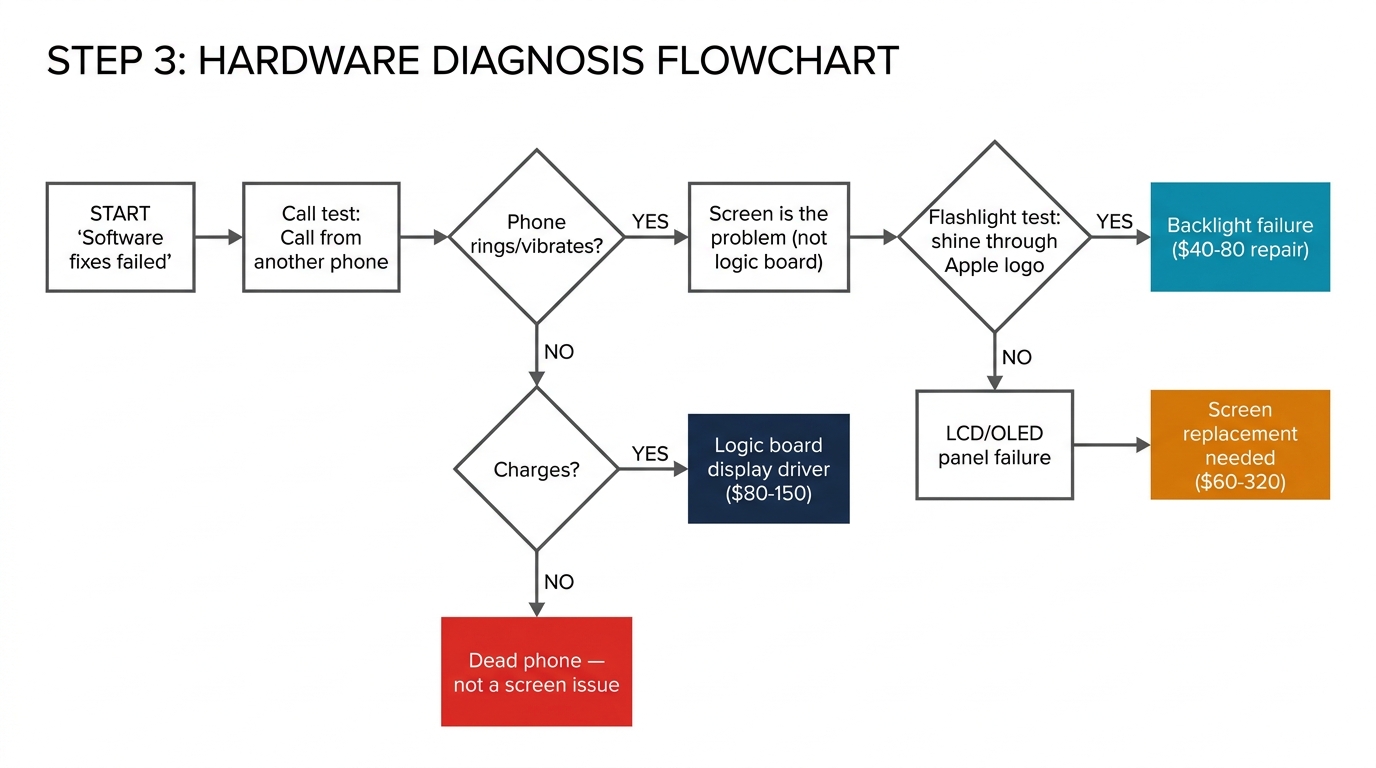
If software fixes didn't solve the problem, the cause is physical. Here's how to narrow it down further before paying for a repair.
The Flashlight Test (for Black Screens)
If your screen is completely black but the phone is on (you hear sounds, feel vibrations), try this: shine a bright flashlight directly at the screen at a slight angle in a dark room. If you can faintly see the display content, the backlight has failed but the LCD panel itself still works. This only applies to LCD screens (iPhone 11, XR, SE, and most budget Android phones). OLED screens don't have a separate backlight.
For OLED phones (iPhone 12 and newer, most Samsung Galaxy S series), a completely black screen with a working phone means either the OLED panel has failed entirely, or the display connector has come loose.
The Call Test
Call your phone from another device. If you hear the ringtone and feel the vibration:
- Phone is alive — the issue is isolated to the display
- No ringtone but vibrates — phone is in silent mode but alive
- No response at all — the phone itself may be dead (not just the screen)
This simple test prevents you from paying for a screen replacement on a phone that actually has a logic board or battery failure.
The Pressure Test (for Intermittent Issues)
If the screen works sometimes but not others, apply gentle pressure to different areas — the top, bottom, and edges of the phone. If pressing near the top (where the display connector is on most iPhones) makes the screen flicker or come back, the display connector is loose. This is a $20–$50 repair at most shops — just reseating the cable — and doesn't require a new screen.
Important: Don't press hard enough to crack the screen. Light, even pressure is all you need for this diagnostic.
The External Display Test (Android)
Many Android phones support USB-C to HDMI output. If you can mirror your phone to an external monitor and everything displays normally, the phone's logic board and software are fine — the problem is definitely the display assembly. This rules out the most expensive possible repair (logic board) and confirms you just need a screen replacement.
Water Damage Indicators
Check the liquid contact indicator (LCI) — a small sticker that turns red or pink when exposed to moisture:
- iPhone: Visible inside the SIM card tray slot
- Samsung: Inside the SIM tray or behind the battery on older models
- Other Android: Usually inside the SIM or microSD tray
A triggered LCI doesn't guarantee water damage caused your screen failure, but it tells the repair shop to look for corrosion — and it typically voids any remaining warranty.
Phone Screen Not Working After All Fixes? When You Need a Replacement
After working through the software fixes and hardware diagnostics above, here's the decision framework:
Replace the Screen If:
- The screen is physically cracked and touch is affected
- Black screen persists after force restart + 30 minutes of charging + connector reseating
- The screen has visible lines, color patches, or burn-in
- Touch fails in specific zones consistently (digitizer damage)
- Water damage has corroded the display connector and cleaning didn't help
- The display works on an external monitor but not on the phone's screen
Don't Replace the Screen If:
- A force restart fixed it (software crash)
- Safe Mode resolved the touch issue (app conflict)
- Removing the screen protector fixed touch sensitivity
- The phone itself is dead — no sounds, no vibration, no charging indicators (logic board or battery issue, not a screen issue)
- Pressing near the display connector makes the screen work (connector reseat, not a new screen)
Not Sure? Get a Professional Diagnosis
A repair shop diagnosis typically costs $0–$30 (many shops diagnose for free). The technician will open the phone, inspect the connector, test with a known-good screen, and tell you exactly what's needed. This $0–$30 investment prevents you from buying a $150 screen when the problem was a $5 connector repair — or buying a screen when the actual issue is the logic board.
Phone Screen Replacement Cost by Repair Type

Once you've confirmed you need a new screen, cost depends on your phone model, the screen grade, and where you get the repair done.
| Repair Scenario | Typical Cost | Details |
|---|---|---|
| Connector reseat (no parts needed) | $20–$50 | Technician opens phone and re-secures the display cable |
| iPhone screen (Incell LCD grade) | $60–$140 | Budget option, lower display quality on OLED models |
| iPhone screen (Hard OLED grade) | $120–$220 | Good balance of quality and cost |
| iPhone screen (Soft OLED grade) | $180–$320 | Near-original display quality |
| Samsung screen (Original AMOLED) | $150–$350 | Samsung AMOLED replacements are generally more expensive |
| Android screen (budget/mid-range) | $50–$150 | Varies widely by brand and availability |
| Apple official (out of warranty) | $199–$379 | Genuine parts, full calibration |
| Apple official (with AppleCare+) | $29 | Fixed fee regardless of model |
For a detailed model-by-model breakdown, see our iPhone screen replacement cost guide.
The hidden factor in cost: screen grade. Two repair shops can quote $100 and $250 for the same iPhone repair. The difference is almost always the screen grade — Incell LCD vs Soft OLED. Both will make your phone work, but the visual quality difference is significant on phones that originally had OLED displays. Understanding OEM vs aftermarket screen grades helps you evaluate whether a quote is fair or inflated.
Why Replacement Screen Quality Matters for Future Reliability
Here's something most diagnosis guides won't mention: the quality of your replacement screen directly affects whether you'll be back with "phone screen not working" again within months.
Low-grade aftermarket screens have higher failure rates. Common issues with budget replacement screens include:
- Touch dead zones developing within 3–6 months — the digitizer layer in cheap screens degrades faster
- Intermittent blackouts caused by inferior flex cable connectors that loosen with normal use
- Ghost touch from poor touch calibration, making the phone seem to tap randomly on its own
- Backlight failure on cheap Incell LCD screens, creating the exact "screen went black" problem you're trying to fix
Repair shops that track their callback rates consistently find that upgrading from the cheapest available screen to a mid-grade option (like Hard OLED for iPhones) reduces screen-related callbacks by 60–70%. If you're getting your phone repaired, ask which grade of screen the shop uses and consider paying the difference for a higher grade if you plan to keep the phone more than six months.
For repair shop owners, your screen failure rate is a direct function of your sourcing quality. Every callback costs you parts, labor, and customer trust.
Frequently Asked Questions
Why is my phone screen black but still on?
Your phone screen being black while the phone still rings, vibrates, or makes sounds means the display has failed but the phone's logic board is working. The most common causes are a loose display connector (fixable for $20–$50), a dead display panel (requires replacement), or a failed backlight on LCD models. Try a force restart first — if the phone was working fine before the screen went black without any drop or water exposure, a software crash is the most likely explanation.
Can I fix my phone screen not working without going to a repair shop?
Software-caused screen failures — about 30% of cases — can be fixed at home with a force restart, Safe Mode, or settings adjustment. Hardware failures generally require professional repair. The one exception is a loose display connector on phones you've previously opened — if you're comfortable using a pentalobe screwdriver and spudger, reseating the connector is a 10-minute job. For any repair involving the screen panel itself, the risk of further damage makes professional service the safer choice.
How can I tell if my phone needs a new screen or a new battery?
A dead battery makes the phone completely unresponsive — no sounds, no vibration, no display. Plug it in for 30 minutes. If you hear a charging chime or feel a vibration but the screen stays black, the display is the problem, not the battery. If the phone shows zero signs of life even after extended charging with a known-good cable and adapter, the battery (or charging circuit) is the likely cause. A repair shop can measure battery voltage directly to confirm.
Does dropping my phone always damage the screen?
No. Many drops cause zero screen damage, especially with a protective case. But drops can damage the screen without creating visible cracks. Internal damage includes: the display connector partially unseating (causing intermittent blackouts), micro-fractures in the OLED panel (causing lines or color patches that appear days later), and digitizer damage (creating touch dead zones). If screen problems started after a drop — even if the glass looks fine — the drop is almost certainly the cause.
Is it worth replacing the screen on an older phone?
Compare the repair cost to the phone's current value. For any phone worth $300+ (typically 1–2 years old), a $100–$200 screen replacement is an easy yes. For phones worth $150–$300 (2–3 years old), it depends on how long you plan to keep it. Below $150 in phone value, upgrade instead — the math doesn't work. Also consider that a phone with a broken screen has essentially zero resale value, so even a $100 repair on a $200 phone recovers value.


Diagnose Before You Spend
Phone screen not working is a symptom, not a diagnosis. A force restart fixes software crashes for free. A connector reseat costs $20–$50. A screen replacement ranges from $60 to $350 depending on grade and model, and a logic board repair costs $100–$300.
Getting the diagnosis right before spending money is the single most important step — and it's the step most people skip.
If you're a repair shop handling screen diagnosis daily, the quality and reliability of your replacement screens directly shapes your callback rate and reputation. Need consistent, tested screens across all grades? Request wholesale pricing — we supply Incell, Hard OLED, and Soft OLED for iPhone and Samsung models with quality inspection on every batch.