iPhone Screen Flickering: Causes, Fixes, and When You Need a New Screen
Your iPhone screen flickering is either a five-minute software fix or a sign that the display hardware is failing. The frustrating part is figuring out which one you're dealing with before spending money on a repair you might not need.
Screen flickering shows up in different ways — rapid brightness pulsing, green or grey flashes, vertical lines, or the display cutting to black and coming back. Each pattern points to a different root cause, and knowing the difference saves you time and money. Some causes are fixable with a settings change. Others mean the screen needs to be replaced.
This guide walks through every cause of iPhone screen flickering, the software fixes that actually work, and the hardware signs that tell you it's time for a new display.
Sourcing Replacement Screens in Bulk?
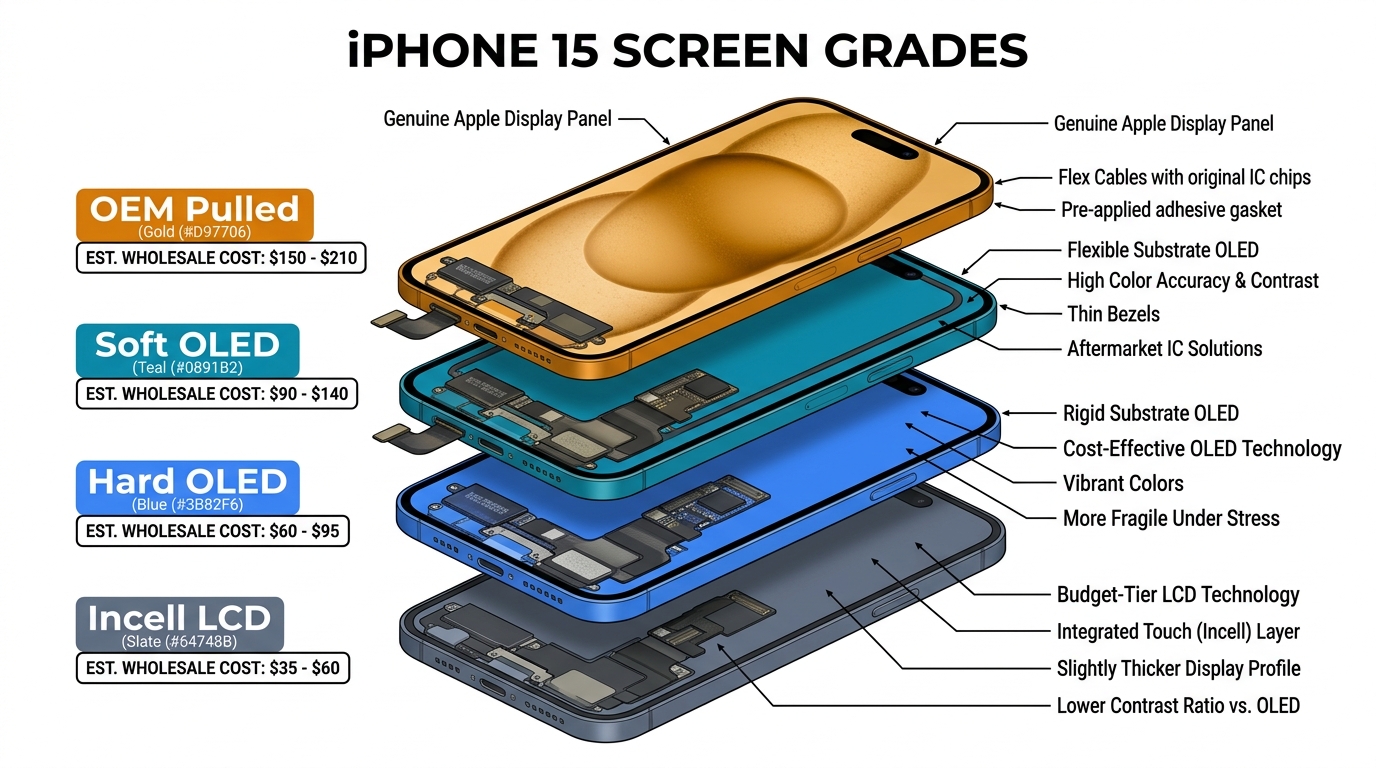
Incell / Hard OLED / Soft OLED grades — wholesale pricing, grade comparison on request.
Get Wholesale QuoteSoftware Causes of iPhone Screen Flickering
Start here. Software issues are the most common cause of screen flickering and the easiest to fix. If your phone hasn't been dropped or exposed to water recently, there's a good chance one of these solves it.
Auto-Brightness Conflicts
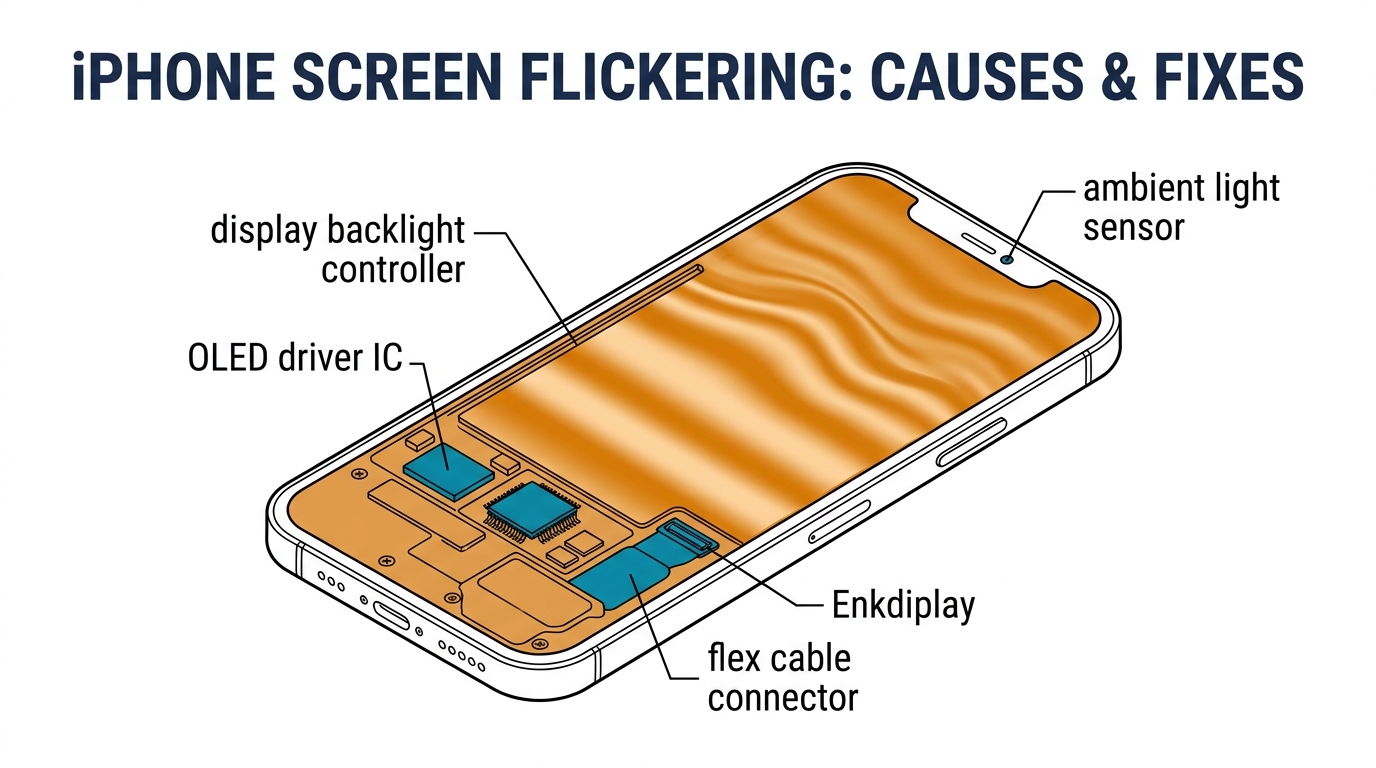
Auto-brightness uses an ambient light sensor to adjust screen brightness based on your environment. On some iPhone models — particularly after iOS updates — this feature can cause visible brightness pulsing that looks like flickering. The sensor overreacts to minor lighting changes, creating a rapid up-down cycle.
Fix: Go to Settings > Accessibility > Display & Text Size and toggle off Auto-Brightness. Set your brightness manually and see if the flickering stops. If it does, this was the cause. You can try re-enabling it after the next iOS update to see if Apple has patched the behavior.
iOS Software Bugs
Major iOS updates sometimes introduce display rendering bugs. iOS 17 had a documented issue causing screen flickering on iPhone 13 and 14 models during specific animations. These bugs typically get patched within 1–2 minor updates.
Fix: Check Settings > General > Software Update and install the latest version. If you're already on the newest release and the flickering started after the update, try a force restart first: press and release Volume Up, press and release Volume Down, then hold the Side button until you see the Apple logo.
App-Specific Rendering Issues
Sometimes the flickering only happens inside a specific app. This points to a rendering conflict between the app and your display's refresh rate — especially on ProMotion (120Hz) models like iPhone 13 Pro and newer. Poorly optimized apps can cause frame rate mismatches that appear as screen glitching.
Fix: Close the app (swipe up from the bottom, swipe the app away). If the flickering stops, the app is the problem. Check for an app update, or uninstall and reinstall it. If multiple apps trigger flickering, the issue is more likely system-level.
HDR Display Settings
HDR content pushes your display to higher brightness peaks and wider color ranges. On OLED iPhones, viewing HDR photos or videos can occasionally cause brightness flickering, especially at low ambient light levels.
Fix: Go to Settings > Photos and turn off View Full HDR. For video streaming apps, check their playback settings and disable HDR if available. This is more common on iPhone 12 and 13 series models where the peak HDR brightness can push the OLED panel to its limits, creating a pulsing effect that's especially visible in dark rooms.
Corrupted System Files
If the flickering persists across all apps and settings changes don't help, corrupted system files may be the cause. This is more common after interrupted updates or failed restore attempts.
Fix: Back up your iPhone, then connect it to a computer and put it into Recovery Mode. Choose Update first — this reinstalls iOS without erasing your data. If that doesn't work, choose Restore (this erases everything and starts fresh from your backup).
Hardware Causes of iPhone Screen Flickering
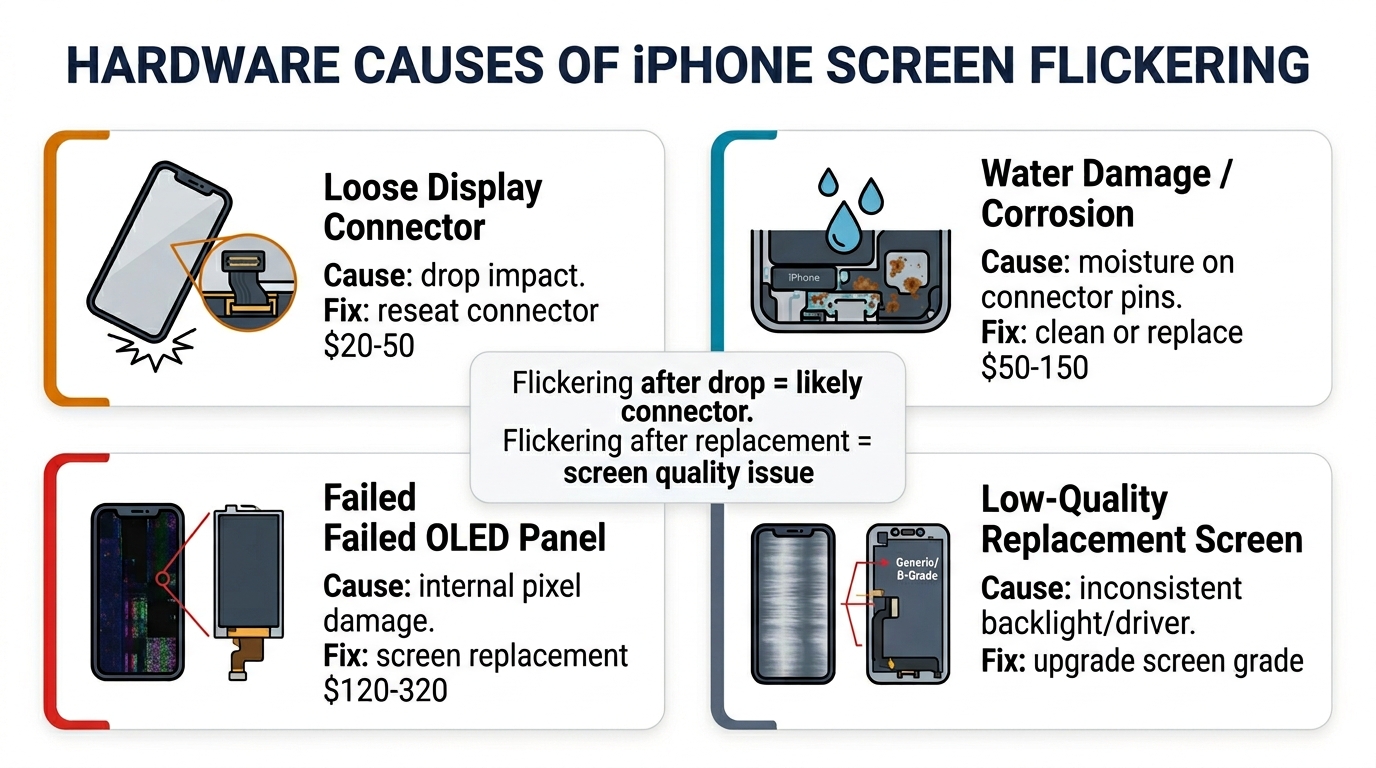
If none of the software fixes resolved the issue — or if your phone was recently dropped, exposed to water, or had its screen replaced — the problem is almost certainly hardware-related. Here's what's happening inside the phone.
Loose or Damaged Display Connector
The iPhone display connects to the logic board via flex cables and ribbon connectors. A drop can partially unseat these connectors, causing intermittent contact that produces flickering, especially when you press on certain areas of the screen or change the phone's orientation.
How to identify: The flickering changes when you apply gentle pressure to the top or bottom of the screen. It may get worse when the phone heats up (thermal expansion loosens the connection further).
Fix: A technician needs to open the phone and reseat the display connector. This is a 10–15 minute repair at most shops and typically costs $20–$50 since no parts are needed. However, if the flex cable itself is torn, you'll need a full screen replacement.
Water Damage to Display Components
Water damage doesn't always show up immediately. Moisture that reaches the display connector pins or the display driver IC can cause corrosion over days or weeks. Symptoms include green tint flickering, random bright spots, or the screen working fine until the phone warms up.
How to identify: Check for the liquid contact indicator (a small white sticker visible inside the SIM tray slot). If it's turned red or pink, water has entered the phone at some point. Green-tinted flickering is a particularly strong indicator of moisture damage to the OLED panel itself.
Fix: A repair shop can clean corrosion from the connector and logic board using ultrasonic cleaning, but if the OLED panel is damaged internally, the screen needs to be replaced. Water damage repairs are unpredictable — cleaning may buy you weeks or months, but the corrosion often returns. The sooner you address water-related flickering, the better the chance of saving the logic board and limiting the repair to just a screen swap.
Display Driver IC Failure
The display driver IC (integrated circuit) on the logic board controls signal timing to the screen. When this chip fails or develops poor solder joints, it causes systematic flickering — usually consistent, not intermittent. This is a logic board issue, not a screen issue.
How to identify: The flickering follows a regular pattern (same frequency, same area of the screen), doesn't respond to pressure or temperature changes, and persists even with a known-good replacement screen.
Fix: This requires micro-soldering — a board-level repair that most local shops can't do. Specialized repair shops can reball or replace the IC for $80–$150. Alternatively, replacing the entire logic board is an option but often costs more than the phone is worth.
Aftermarket Screen Quality Issues
This is a cause that rarely gets mentioned in troubleshooting guides: iPhone screen flickering after replacement is often caused by the quality of the replacement screen itself. Not all aftermarket screens are equal. Low-grade Incell LCD screens used as replacements for OLED models can produce visible flickering due to inferior backlight controllers and lower refresh rate consistency.
How to identify: The flickering started after a screen replacement (even if it was weeks ago). The display looks noticeably different from the original — dimmer blacks, lower contrast, slight color shift.
Fix: Have the screen replaced again with a higher-grade panel. Moving from an Incell LCD to a Hard OLED or Soft OLED replacement eliminates flickering caused by panel quality in most cases. If you're a repair shop customer, ask specifically what grade of screen was used in your original repair.
For repair shops dealing with callback customers who report flickering after a screen replacement, this is a sourcing quality issue. Screens from unreliable suppliers have higher defect rates and inconsistent backlight performance. Sourcing from established wholesale suppliers with quality inspection processes dramatically reduces these callbacks.
How to Tell If You Need a New Screen
Here's the decision framework. Work through the software fixes first — they take 10 minutes total. If the flickering persists, use these signals to determine whether hardware repair is needed.
Signs It's a Software Issue (No Replacement Needed)
- Flickering started after an iOS update or app installation
- Flickering stops in Safe Mode or after a force restart
- The display looks physically normal — no discoloration, dead pixels, or cracks
- Brightness flickering only, no color distortion or lines
- Issue is intermittent and not related to physical movement
Signs You Need a Screen Replacement
- Flickering started after a drop, even if there's no visible crack
- Green or purple tint visible during flickers
- Vertical or horizontal lines appear on the screen
- Flickering worsens with pressure on the display
- Touch responsiveness is also affected — phantom touches, dead zones
- The phone was exposed to water within the past few weeks
- The screen was previously replaced with an unknown-grade part
Signs It's a Logic Board Issue (Screen Replacement Won't Fix It)
- Flickering persists even after installing a brand-new screen
- Regular, rhythmic flickering pattern that never changes
- Other functions are also affected — camera, Face ID, speakers
- The phone has severe overheating issues alongside the flickering
- The phone experienced a major impact or was run over
iPhone Screen Flickering by Model: Known Issues
Certain iPhone models have documented tendencies toward specific flickering problems. Knowing these patterns helps with faster diagnosis.
iPhone 11 series: Green tint flickering at low brightness is a known OLED behavior on the iPhone 11 Pro and Pro Max. Apple acknowledged this and released a software update (iOS 13.6.1) that partially addressed it. If the issue persists, it's the panel aging.
iPhone 12 series: Some units experienced screen flickering related to the green tint issue at low brightness. A display module replacement under Apple's service program resolved it for affected units.
iPhone 13 series: Screen flickering after iOS 15 updates was widely reported. Most cases were resolved by subsequent software patches. Hardware cases are typically related to the display flex cable connection.
iPhone 14 Pro / Pro Max: The Dynamic Island cutout introduced new flex cable routing, and some early units had intermittent flickering near the top of the display. This was a hardware defect addressed under warranty.
iPhone 15 and 16 series: Fewer widespread hardware flickering issues, but aftermarket screen replacements on these models are more prone to flickering due to the tighter tolerances in the display connector and the sensitivity of the ProMotion controller to non-OEM panels. The ProMotion display dynamically switches between 1Hz and 120Hz — cheap aftermarket panels that can't handle these transitions smoothly produce visible flicker during the rate change, particularly noticeable when scrolling or waking the phone from Always-On Display.
What iPhone Screen Flickering Costs to Fix
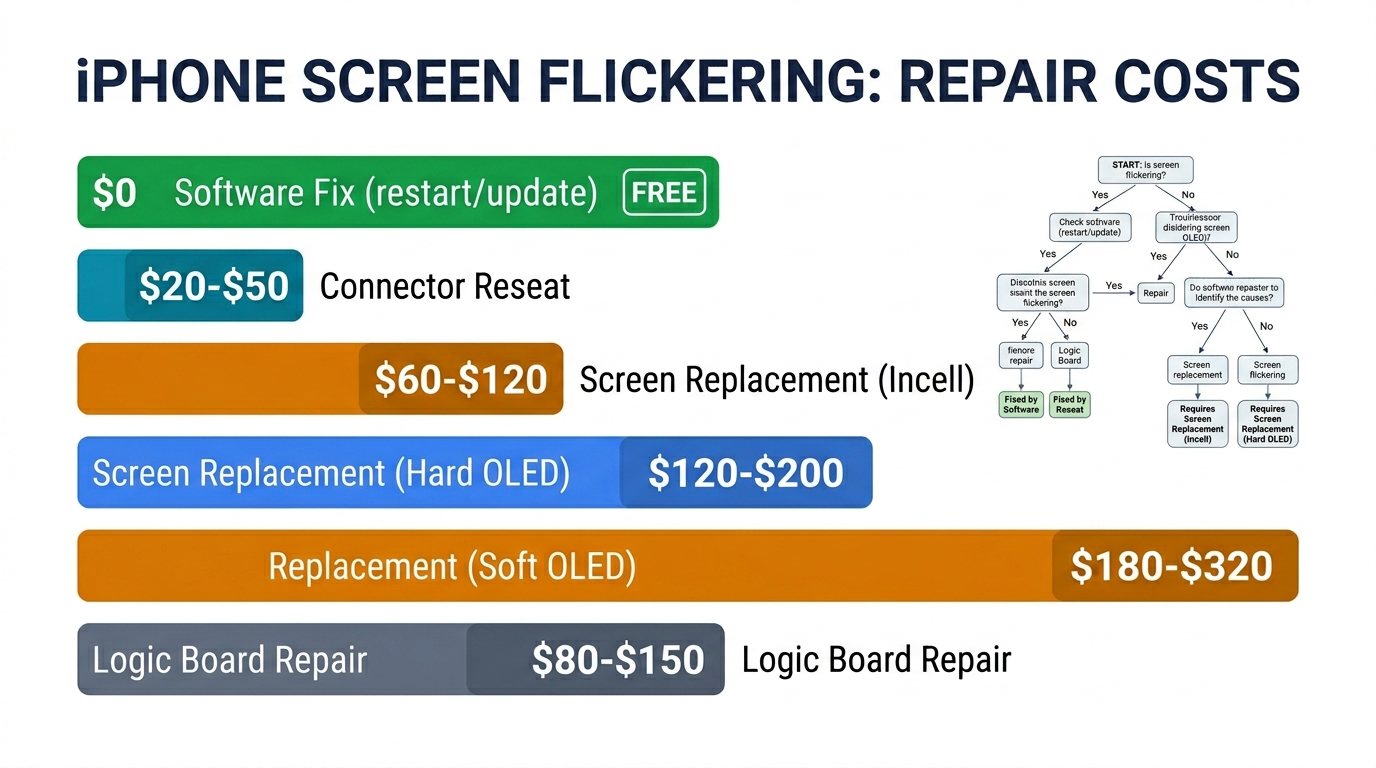
The cost depends entirely on the root cause:
| Cause | Fix | Typical Cost |
|---|---|---|
| Software bug | Settings change / iOS update | Free |
| Loose connector | Reseat connection | $20–$50 |
| Damaged flex cable | Screen replacement (Incell) | $60–$140 |
| Damaged flex cable | Screen replacement (Hard OLED) | $120–$220 |
| Water damage to panel | Screen replacement (Soft OLED) | $180–$320 |
| Display driver IC failure | Board-level repair | $80–$150 |
| Low-quality aftermarket screen | Re-replacement with better grade | $120–$280 |
For a full breakdown of screen replacement pricing by model and grade, see our iPhone screen replacement cost guide.
If you run a repair shop and want to minimize flickering callbacks, the screen grade you source makes a measurable difference. Shops that switched from entry-level Incell screens to mid-tier Hard OLED for their standard repairs report 60–70% fewer display-related callbacks. Understanding the differences between OLED and Incell screens is essential for building a reliable repair operation.
Frequently Asked Questions
Why is my iPhone screen flickering after I dropped it?
A drop can partially disconnect the display flex cable from the logic board, causing intermittent flickering. Even without visible cracks, internal damage to the connector or the OLED panel can produce flickering that worsens over time. If the flickering started immediately after a drop, it's hardware damage — software fixes won't help.
Can a software update fix iPhone screen flickering?
Yes, if the flickering is caused by a software bug. iOS updates have resolved flickering issues on iPhone 11, 12, and 13 series. Check for the latest update first. If the flickering started before any update and doesn't respond to a force restart, the cause is likely hardware.
Is iPhone screen flickering covered under warranty?
Manufacturing defects that cause flickering are covered under Apple's standard one-year warranty and AppleCare+. Accidental damage (drops, water exposure) is only covered under AppleCare+ with a $29 service fee. Apple has occasionally run service programs for specific models with known display issues — check Apple's support page for your model.
Does screen flickering damage my iPhone permanently?
The flickering itself doesn't cause additional damage, but the underlying cause might. A loose connector can worsen over time with thermal cycles. Water corrosion spreads gradually. If your screen is flickering, diagnose and fix it sooner rather than later to prevent the root cause from creating more expensive problems.
Can a cheap replacement screen cause flickering?
Yes. Low-grade aftermarket screens — particularly Incell LCD panels used as replacements for OLED models — can produce backlight flickering, uneven brightness, and refresh rate inconsistencies. This is one of the most common causes of screen flickering after a third-party repair. The issue is especially pronounced on ProMotion-equipped models where the variable refresh rate exposes quality differences in the display controller. Upgrading to a Hard OLED or Soft OLED replacement typically resolves the issue completely.
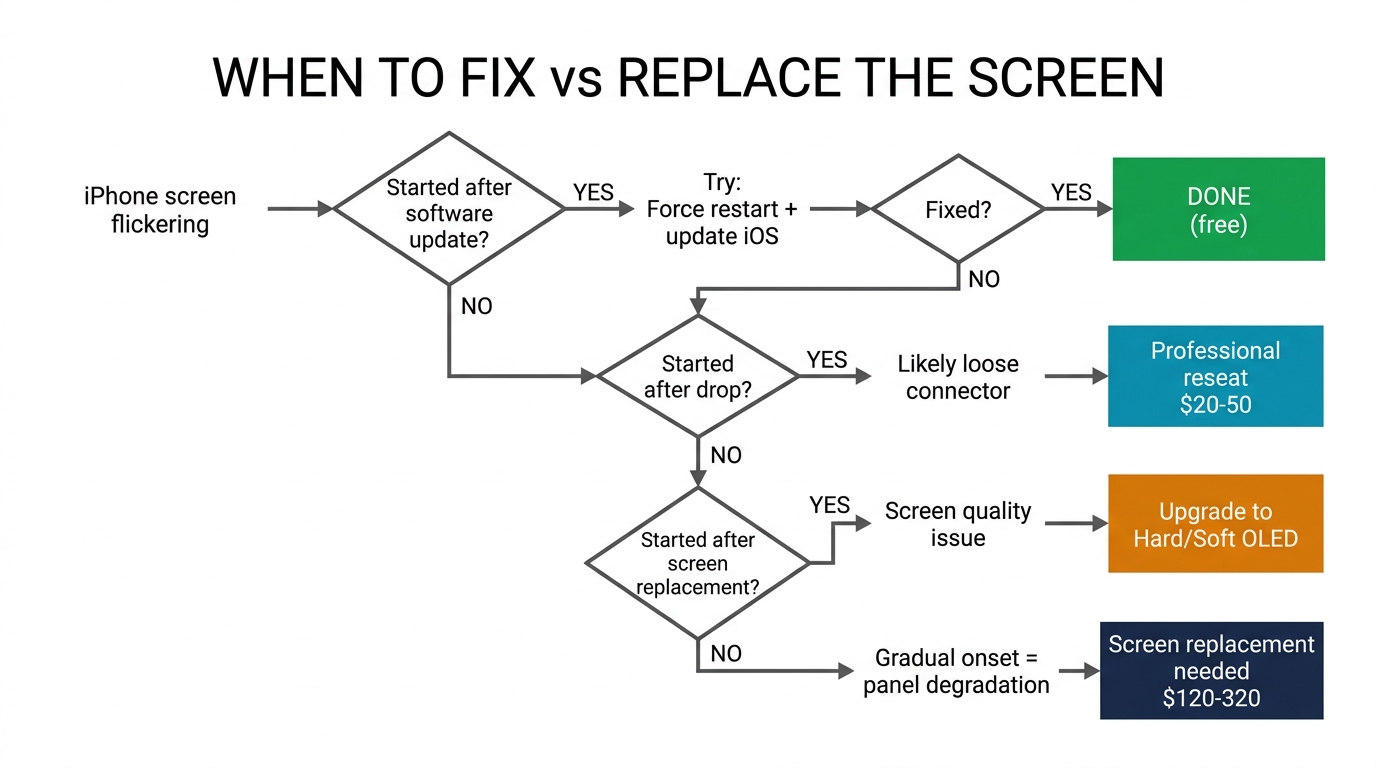
When to Fix It and When to Replace the Screen
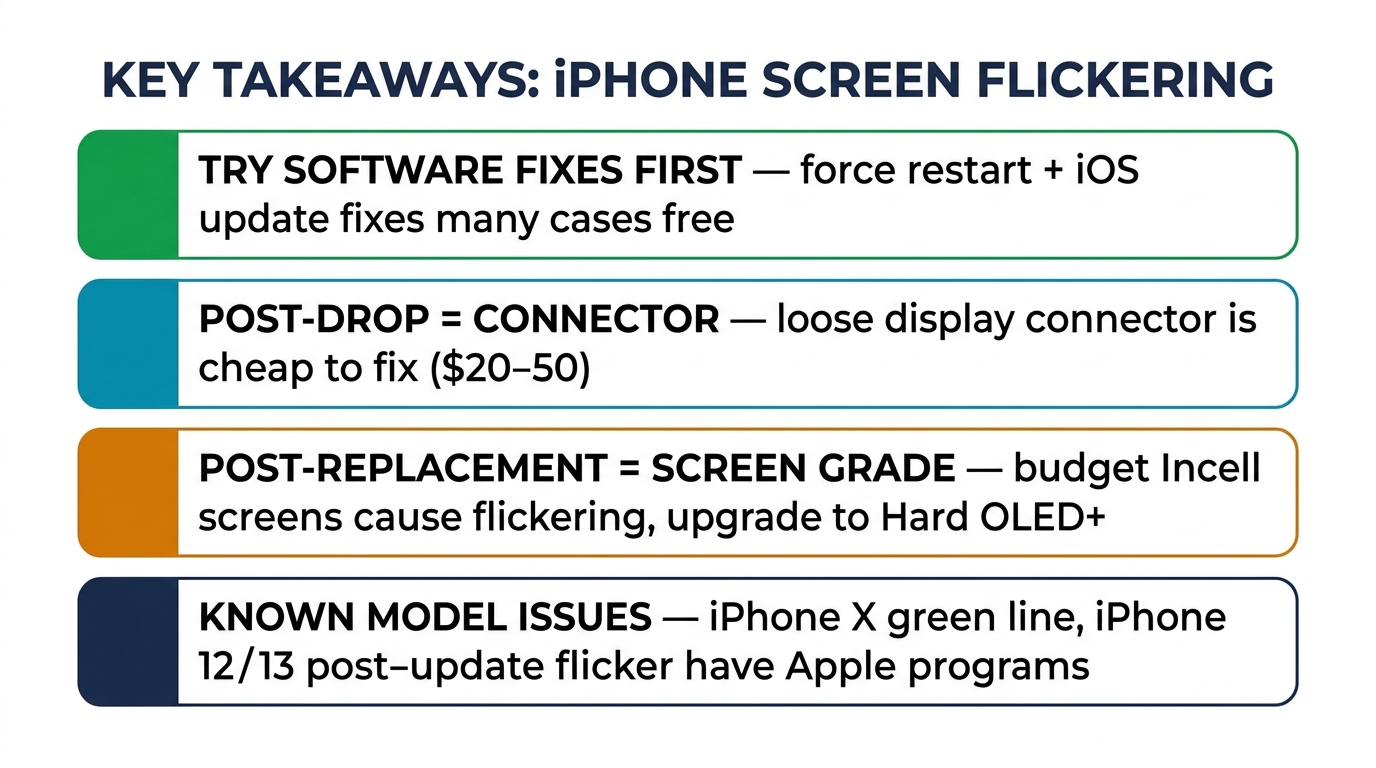
iPhone screen flickering is a solvable problem. Start with the free software fixes — auto-brightness, force restart, iOS update. If those don't work, the cause is hardware, and you need a professional diagnosis.
For drops and water damage, expect a screen replacement. The cost ranges from $60 to $320 depending on the screen grade and your iPhone model. For logic board issues, get a second opinion before committing to an expensive repair.
And if you've had a screen replaced before and the flickering started afterward, the fix is straightforward: get a better screen. Quality aftermarket displays from reliable suppliers don't flicker. If you're a repair shop looking to source screens that won't generate callbacks, request wholesale pricing on tested, graded iPhone screens — we supply Incell, Hard OLED, and Soft OLED for iPhone 11 through 16 series.