Incell vs Hard OLED vs Soft OLED: Which Screen Type to Order for Each iPhone and Samsung Model
The incell vs hard OLED vs soft OLED decision is the most consequential sourcing choice a repair shop makes on screens. The price difference between the cheapest Incell and the best Soft OLED can be $15–25 per unit — but the wrong choice doesn't just affect your margin, it affects callback rates, customer satisfaction, and which repairs you can confidently offer.
The confusion exists because these three screen types serve different purposes, and no single type is "the best" across all situations. Incell is the budget workhorse. Hard OLED is the mid-range compromise. Soft OLED is the premium aftermarket option. But which one to stock for which model — and in what ratio — depends on your customer base, repair pricing, and technical capability.
This guide breaks down the real differences, gives model-by-model recommendations, and shows you how to build a screen inventory that matches your shop's positioning.
Sourcing Replacement Screens in Bulk?
Incell / Hard OLED / Soft OLED grades — wholesale pricing, grade comparison on request.
Get Wholesale QuoteIncell vs Hard OLED vs Soft OLED: The Core Differences
Before diving into model-specific recommendations, you need to understand what's physically different about these three screen types. The names describe how the display panel is manufactured — and that manufacturing difference drives every performance gap.
| Specification | Incell LCD | Hard OLED | Soft OLED |
|---|---|---|---|
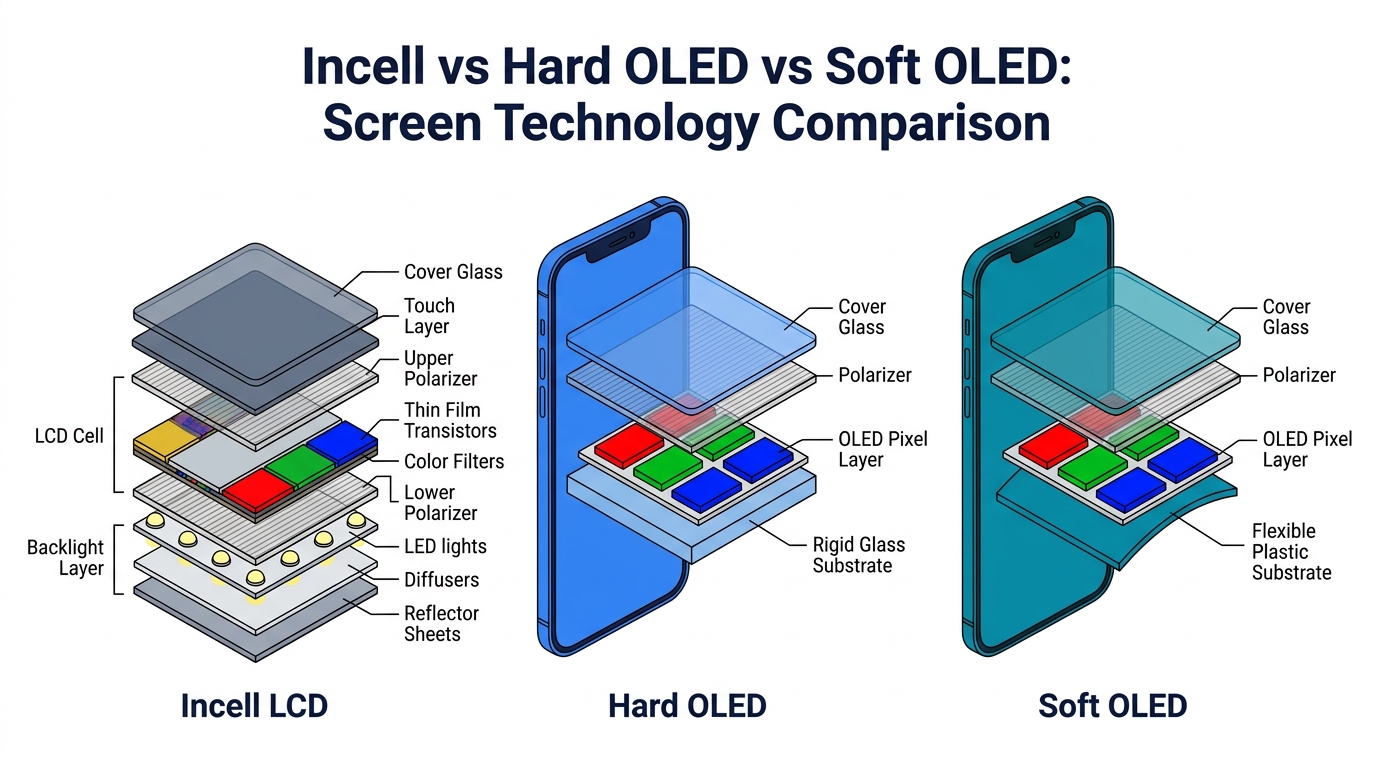
| Display technology | LCD with touch layer integrated into LCD cell | OLED pixels on rigid glass substrate | OLED pixels on flexible plastic substrate |
| Blacks | Dark gray (backlight always on) | True black (pixels off) | True black (pixels off) |
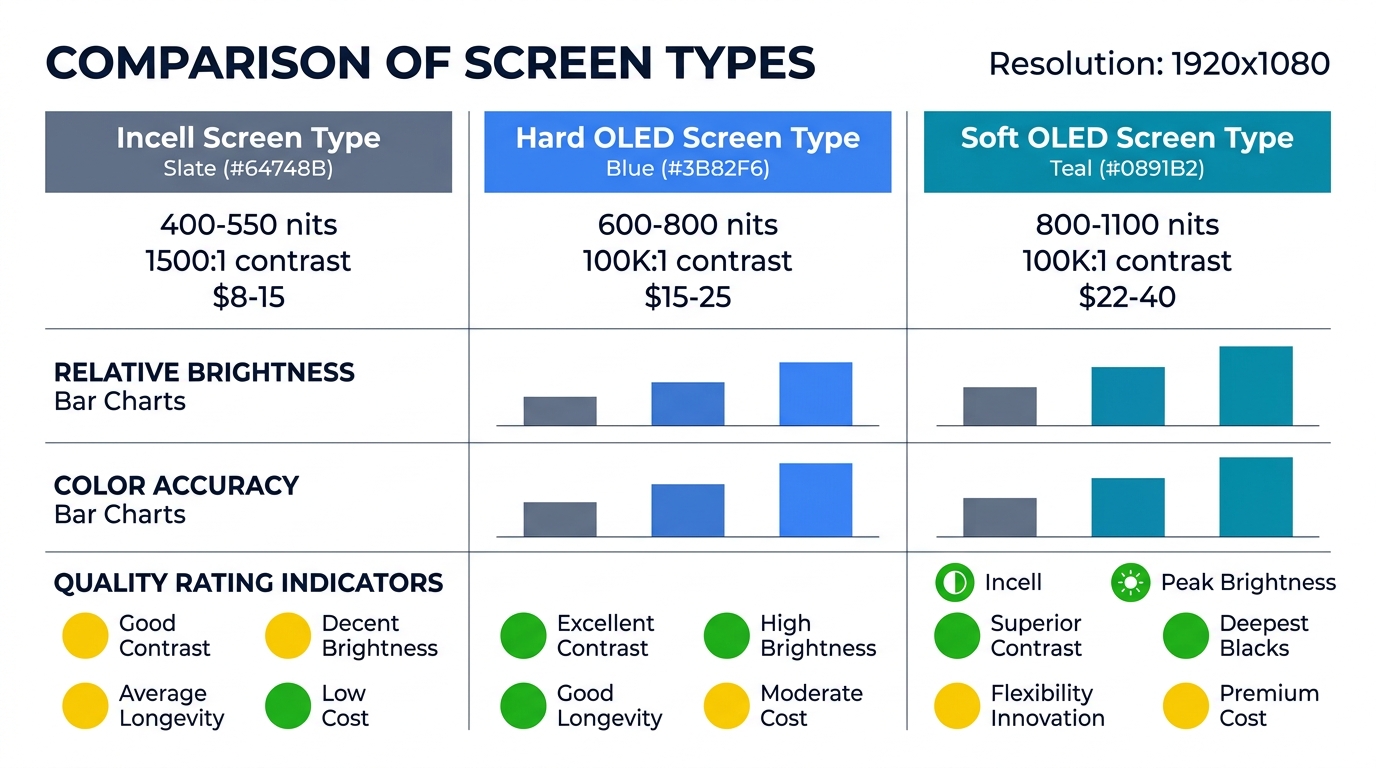
| Brightness (typical) | 400–550 nits | 600–800 nits | 800–1100 nits |
| Color accuracy | 70–80% of OEM | 85–90% of OEM | 90–97% of OEM |
| Contrast ratio | 1,500:1 | 100,000:1+ | 100,000:1+ |
| Touch response | Good — slight latency vs. OLED | Good — comparable to OEM | Excellent — closest to OEM |
| Flexibility / drop resistance | Rigid — no flex | Rigid — glass substrate cracks on impact | Flexible — absorbs impact better |
| Thickness | Thicker (backlight layer) | Same as Soft OLED | Thinnest |
| True Tone support | Via programmer | Via programmer | Via programmer or IC transfer |
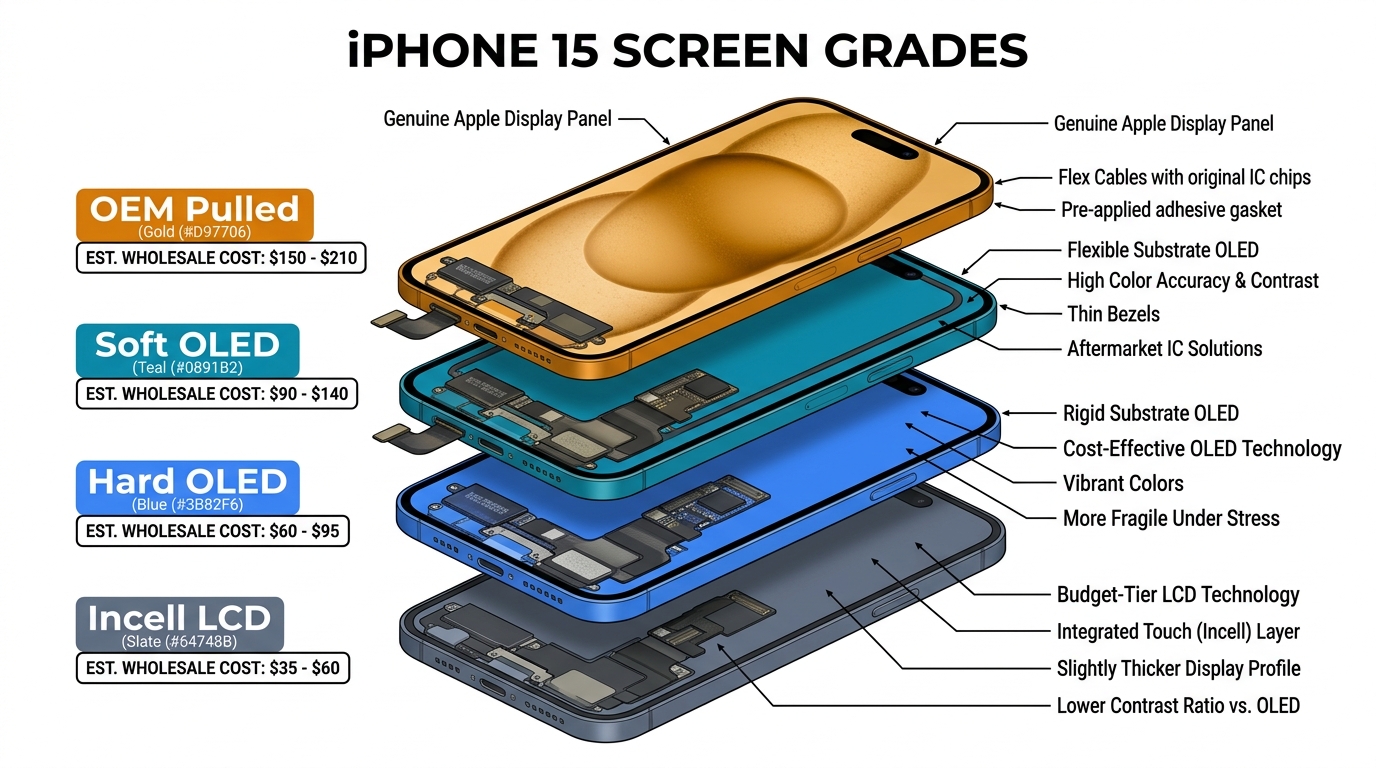
| iPhone price range | $8–15 | $15–25 | $22–40 |
| Best for | Budget repairs, older models | Mid-range repairs, price-sensitive OLED demand | Premium repairs, Pro models, quality-focused shops |
What "Incell" Actually Means
Incell LCD integrates the touch digitizer layer directly into the LCD cell structure, making the panel thinner than traditional LCD+separate touch panels. It's still LCD technology with a backlight — it cannot produce true blacks, and brightness is limited by the backlight output. The "Incell" name is an industry shorthand for "the best LCD-based aftermarket option," not an OLED variant.
Hard OLED vs Soft OLED: The Real Difference
Both use OLED pixel technology (self-emitting, true blacks, high contrast). The difference is the substrate:
- Hard OLED: OLED layers deposited on a rigid glass substrate. The glass makes it thinner than Incell but inflexible — it cracks more easily on drop impact. Lower manufacturing cost than Soft OLED.
- Soft OLED: OLED layers deposited on a flexible plastic substrate (the same approach Apple and Samsung use for OEM screens). The flexibility allows the display to absorb minor impacts and bend around edges. Higher manufacturing cost, but closest to OEM in every measurable spec.
The practical impact: Hard OLED looks nearly as good as Soft OLED when installed and working. The differences emerge in durability (Soft OLED survives drops better), brightness at peak (Soft OLED is brighter in direct sunlight), and long-term color consistency.
Model-by-Model: Which Screen Type to Order
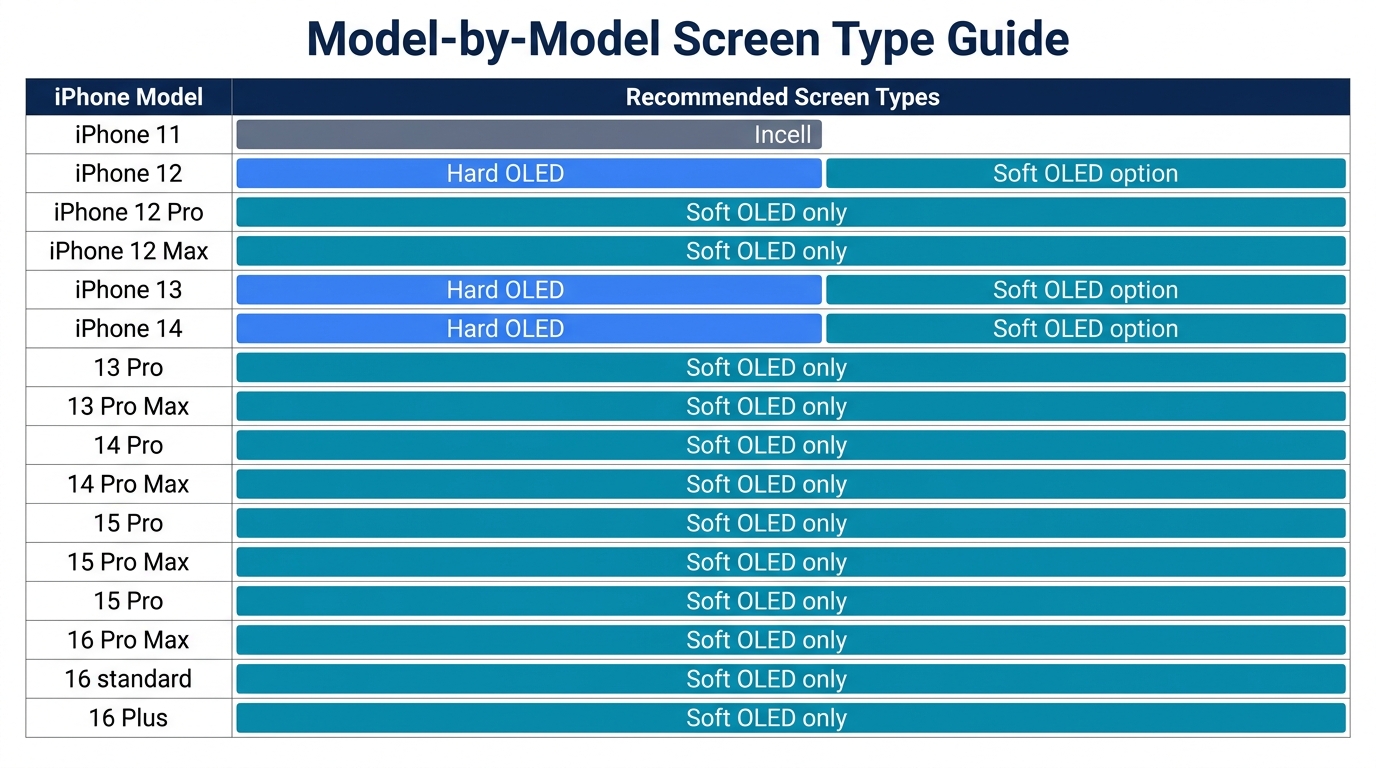
This is the table most repair shops actually need — not a technology explanation, but a clear recommendation per model based on what works in practice.
iPhone Models
| iPhone Model | Original Screen Type | Recommended Aftermarket | Why |
|---|---|---|---|
| iPhone 11 | LCD (Liquid Retina) | Incell | Original is LCD — Incell matches the technology. No reason to pay for OLED on an LCD-original phone. |
| iPhone 11 Pro / Pro Max | OLED | Soft OLED or Hard OLED | Pro customers expect OLED quality. Hard OLED is acceptable for budget repairs. |
| iPhone 12 / 12 mini | OLED | Hard OLED (volume) + Soft OLED (premium) | High-volume repair model. Hard OLED offers the best margin; stock some Soft OLED for quality-sensitive customers. |
| iPhone 12 Pro / Pro Max | OLED | Soft OLED | Pro model customers are more likely to notice and complain about display quality differences. |
| iPhone 13 / 13 mini | OLED | Hard OLED (volume) + Soft OLED (premium) | Same logic as iPhone 12. Incell is technically possible but the quality gap is too noticeable on a phone with OEM OLED. |
| iPhone 13 Pro / Pro Max | OLED (ProMotion 120Hz) | Soft OLED | ProMotion requires high refresh rate support — only quality Soft OLED panels reliably deliver 120Hz. Hard OLED on ProMotion models often has noticeable frame rate issues. |
| iPhone 14 / 14 Plus | OLED | Hard OLED (volume) + Soft OLED (premium) | Standard models without ProMotion. Both grades work well. |
| iPhone 14 Pro / Pro Max | OLED (ProMotion + AOD) | Soft OLED | Always-On Display (AOD) requires OLED. ProMotion needs high-quality panel. Soft OLED is the only reliable aftermarket option. |
| iPhone 15 / 15 Plus | OLED | Hard OLED or Soft OLED | Both work for standard models. Hard OLED offers better margin. |
| iPhone 15 Pro / Pro Max | OLED (ProMotion + AOD) | Soft OLED | Same as 14 Pro — AOD + ProMotion demands quality OLED. |
| iPhone 16 series | OLED | Soft OLED (limited aftermarket availability) | Newest models — aftermarket options still maturing. Stock conservatively. |
Samsung Models
| Samsung Model | Original Screen Type | Recommended Aftermarket | Why |
|---|---|---|---|
| Galaxy A15 / A25 | LCD (PLS) | Incell or compatible LCD | Original is LCD — match the technology. |
| Galaxy A35 / A55 | AMOLED | Soft OLED | Samsung AMOLED color profile is distinctive. Only Soft OLED aftermarket gets close enough. Hard OLED on Samsung AMOLED phones shows noticeable color temperature differences. |
| Galaxy S23 / S24 | Dynamic AMOLED 2X | Soft OLED (premium) or OEM refurbished | Flagship Samsung — aftermarket OLED quality varies significantly. OEM refurbished often offers better value than aftermarket for these models. |
| Galaxy S23 Ultra / S24 Ultra | Dynamic AMOLED 2X (curved) | OEM refurbished | Curved edge displays are extremely difficult to replicate in aftermarket. OEM refurbished is the practical choice. |
Want to compare screen grades side by side before ordering in bulk? PRSPARES can send labeled samples of Incell, Hard OLED, and Soft OLED for the same model so you can see the differences yourself. Request a sample comparison.
How to Build Your Screen Inventory by Type

Knowing which screen type fits which model is step one. Step two is figuring out the right ratio for your shop's inventory.
For Budget-Focused Repair Shops
If most of your customers choose the lowest-price repair option:
- 70% Incell (for iPhone 11, 12, 13, 14 standard models + Samsung A-series LCD models)
- 20% Hard OLED (for customers who want better quality but won't pay premium)
- 10% Soft OLED (for Pro models where Incell isn't viable and the occasional premium customer)
Typical margin: Higher per-repair margin percentage, but lower ticket price. Volume-dependent business model.
For Mid-Range Repair Shops
If you offer "good" and "premium" tiers:
- 30% Incell (budget tier for older models and price-sensitive customers)
- 45% Hard OLED (standard tier for most OLED-original iPhones)
- 25% Soft OLED (premium tier for Pro models and quality-focused customers)
Typical margin: Balanced — mid-tier pricing with manageable parts cost. This is where most established repair shops operate.
For Premium Repair Shops
If your reputation is built on quality and you charge accordingly:
- 10% Incell (only for LCD-original models like iPhone 11 and Samsung A15)
- 30% Hard OLED (secondary option when Soft OLED isn't required)
- 60% Soft OLED (primary stock for all OLED-original models)
Typical margin: Lower margin percentage per repair, but higher absolute dollar margin per ticket. Requires quality-conscious customer base.
For pricing guidance on building these tiers, see our guide on phone screen repair pricing strategy.
Common Mistakes When Choosing Between Incell, Hard OLED, and Soft OLED
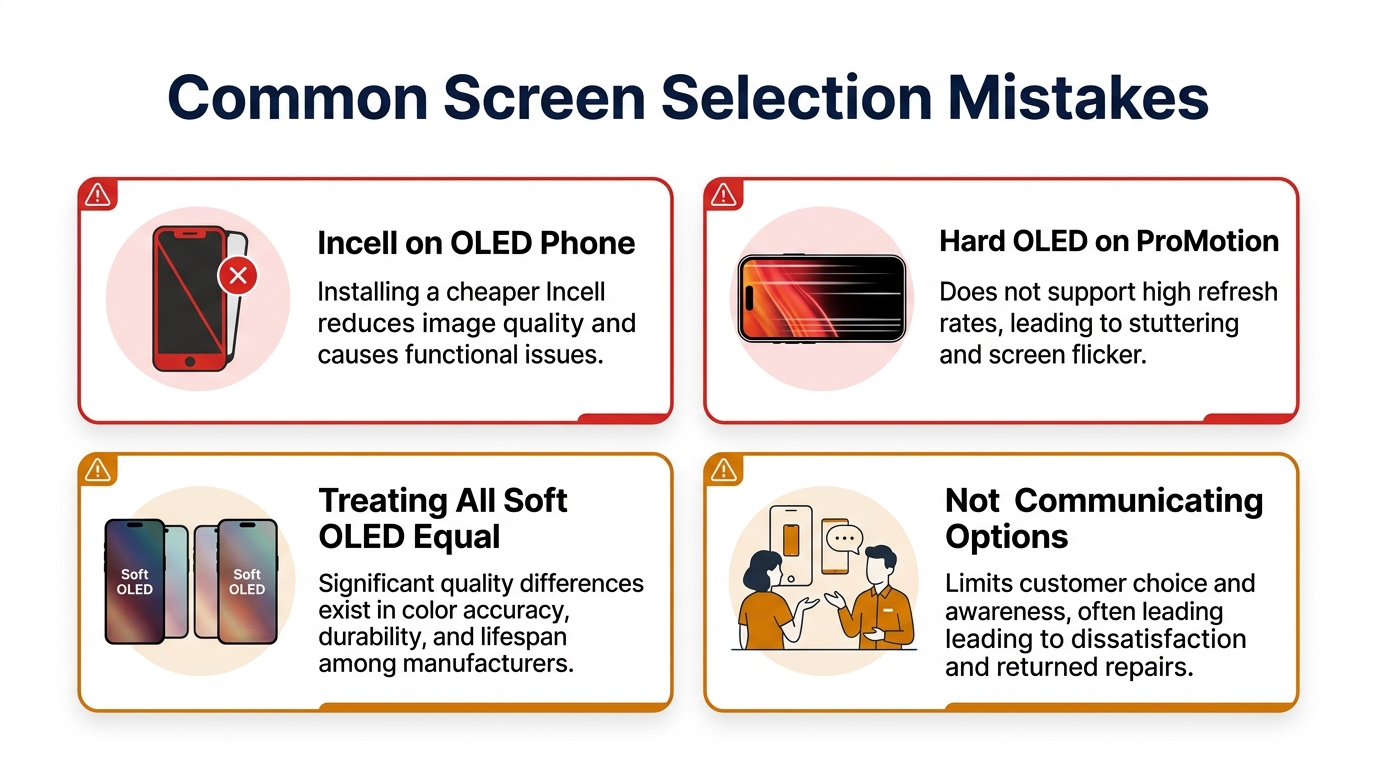
Mistake 1: Using Incell on OLED-Original Phones
Installing an Incell screen on an iPhone 12 or newer "works" — the phone functions. But the customer immediately notices: grayer blacks, lower brightness, slight color shift. If they compare with a friend's phone, or check online, they may question your repair quality. On budget repairs where the customer explicitly chooses the lower option and understands the trade-off, Incell on OLED phones is fine. Without that conversation, it's a callback waiting to happen.
Mistake 2: Using Hard OLED on ProMotion Models
iPhone 13 Pro, 14 Pro, and 15 Pro use 120Hz ProMotion displays. Most Hard OLED aftermarket screens only support 60Hz, or support 120Hz inconsistently. The customer may not identify the issue as "frame rate" but will feel that scrolling isn't as smooth, animations look choppy, or the screen "feels different." For ProMotion models, Soft OLED is the safe choice.
Mistake 3: Treating All Soft OLED as Equal Quality
"Soft OLED" is a category, not a quality guarantee. Soft OLED screens from different manufacturers vary in brightness, color calibration, and longevity. A cheap Soft OLED may actually perform worse than a premium Hard OLED. Always test samples from a new Soft OLED supplier before ordering in bulk — compare brightness, color temperature, and viewing angle against a known-good reference.
Mistake 4: Not Communicating the Options to Customers
The shops with the lowest callback rates aren't the ones using the most expensive screens — they're the ones that let customers choose. Offer two or three tiers with clear descriptions: "Budget (LCD replacement)" / "Standard (OLED, matches original display type)" / "Premium (closest to Apple-original quality)." When customers make an informed choice, they own the outcome.
Frequently Asked Questions
Is Incell LCD really that much worse than OLED for iPhone?
For models that originally shipped with OLED (iPhone 12 and newer), yes — the difference is immediately visible. Blacks are gray instead of true black, outdoor brightness is noticeably lower, and color saturation is reduced. For the iPhone 11 (which shipped with LCD), Incell is a near-perfect match. The technology gap only matters when you're replacing OLED with LCD — on LCD-original phones, Incell is the correct choice.
Can customers tell the difference between Hard OLED and Soft OLED?
Most customers cannot distinguish them in normal daily use on standard (non-ProMotion) models. The differences — slightly higher peak brightness on Soft OLED, marginally better color accuracy, better drop durability — are measurable but subtle. The exception is ProMotion models (13 Pro+), where the 120Hz support gap makes the difference noticeable. For non-Pro models, Hard OLED offers the best balance of quality and margin.
Which screen type has the lowest defect rate?
In our experience, Soft OLED from established manufacturers has the lowest incoming defect rate (typically under 1.5%), followed by Hard OLED (2–3%), then Incell (3–5%). However, these rates vary enormously by supplier and manufacturer. A top-tier Incell supplier can have lower defect rates than a mediocre Soft OLED supplier. Supplier consistency matters more than screen type for defect rates — see our guide on incoming screen QC beyond bench testing.
Do I need different tools or equipment for each screen type?
No. The installation process is identical across screen types for the same phone model. The flex cable connector, frame mounting, and adhesive are the same regardless of whether the panel is Incell, Hard OLED, or Soft OLED. The only difference in your workflow is IC transfer and True Tone programming — see our guide on iPhone 'Unknown Part' warning and IC transfer for details.
Match Your Screen Stock to Your Customer Base
The incell vs hard OLED vs soft OLED decision isn't about finding the "best" screen — it's about stocking the right mix for your specific shop. A budget shop in a price-sensitive market needs a different inventory than a premium shop serving quality-conscious customers.
Start with the model-by-model table above, adjust the ratio to match your customer segments, and test samples of each type from your supplier before committing to bulk. The shops that get this right don't just save on parts cost — they reduce callbacks, increase customer satisfaction, and build the kind of reputation that drives repeat business.
Ready to build your screen inventory with the right mix? PRSPARES offers all three screen types with transparent grading and per-model compatibility data. Browse the wholesale iPhone & Samsung screen catalog, or get a quote for your screen mix.
Related reading: OEM vs Aftermarket Phone Screens: What Wholesale Buyers Need to Know | Wholesale iPhone Screens: Pricing & Grades