Lightning Cable Pin 4 Burned: The Real Cause Explained

If you've Googled lightning cable pin 4 burned, you've probably seen the same problem every repair tech hits sooner or later: the same physical contact, on cable after cable, scorched black. Flip the cable and it works again — for a few weeks. Then it dies for good. Last year a repair tech on r/mobilerepair posted exactly that question and it pulled 1,483 upvotes and 163 comments, one of the subreddit's highest-scoring threads ever.
Here's the answer most of the SERP doesn't give you. The contact you're looking at is not Pin 4. Counted by Apple's official pinout, it is Pin 5 (Vcc) — the main 5V power supply pin. It burns because of hot-plug arcing, a basic electrical phenomenon that affects every Lightning cable ever made, including genuine Apple ones. But non-MFi cables burn faster, and worse, they can quietly damage the iPhone's Tristar IC and turn your $0.50 cable savings into a $50 logic-board repair claim.
This guide is built for two audiences sharing the same problem. If you're a repair tech, you'll get the engineering-level explanation no consumer blog has bothered to write. If you're a B2B buyer about to commit to 1,000+ Lightning cables, you'll get a 5-minute bench test protocol you can run before the order ships. We'll cover the pinout, the arcing physics, the MFi chip family, manufacturing shortcuts, the QC protocol, and the wholesale market reality going into 2026.
Need Wholesale Phone Repair Parts?
Factory-direct pricing from Shenzhen — OEM-quality screens, batteries & small parts.
Get Wholesale QuoteThe 1,483-Upvote Question Every Repair Tech Has Asked
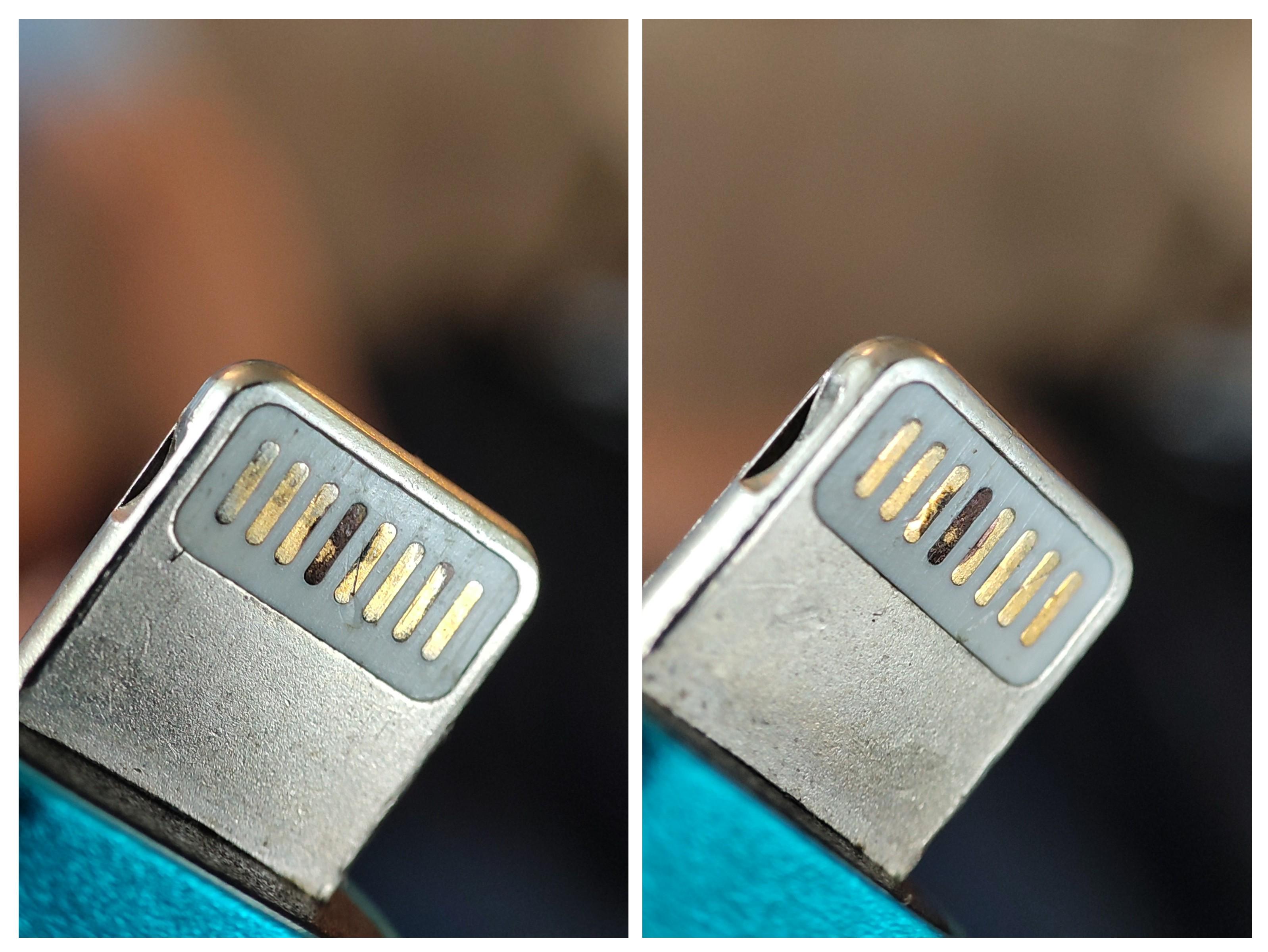 Image source: u/original poster on r/mobilerepair — reproduced under fair use for technical commentary. The "fourth pin" visible here is, by Apple's official pinout, Pin 5 (Vcc).
Three replies in the Reddit thread tell you everything about why this problem has stayed unsolved for a decade.
The top comment, with 208 upvotes, called out the uncomfortable truth: "The same issue occurs with the official cables, because the pin that is burned is the one that consistently carries 5 V."
Over on r/iphone, u/DynamiteRuckus (215↑) added the part most repair techs miss: "Not weird that flipping it temporarily solves the issue — designing reversible plugs requires some redundancy." And u/leafleap nailed the design contrast: "MagSafe doesn't have this problem, as it waits to confirm contact before supplying juice; it's surprising Lightning doesn't have a similar feature."
Read those three together and the picture comes into focus. The repair community has been arguing about two separate problems at once: a physics problem (Lightning cables arc on insertion because the connector is always live) and a supply chain problem (non-MFi cables burn through that arc damage in a fraction of the time). Solve them separately, and the mystery dissolves.
The Real Cause of Lightning Cable Pin 4 Burned Contacts: It's Pin 5, and It's Hot-Plug Arcing
The pin numbering trap
Lightning is a reversible connector. The same physical contact maps to a different pin number depending on which face is up. Users counting visually from the left of a burned cable almost always say "Pin 4." Apple's official pinout says that contact is Pin 5 (Vcc) — the main power supply pin carrying 5V, or up to 9V on PD-capable chargers.
TheTechMentor confirms it: "technically you count pins from the left when facing the iPhone charger cable, so technically it is pin 5." The TechInsights teardown confirms it from the inside — the BQ2025 authentication chip's connections are labelled A1 and B5 on the cable PCB. The "Pin 4 mystery" is partly a counting error. The pin that burns is the power pin. That's not a coincidence — it's the only pin that can burn.
Why the power pin arcs
When you plug a cable that's already connected to a live charger into an iPhone, the Vcc contact approaches the mating pin in the device port. Before metal touches metal, the air gap shrinks until its resistance is low enough for current to jump across as a spark. One Reddit commenter put it bluntly: "it generates a tiny spark that's invisible yet reaches temperatures of about a thousand degrees Celsius."
That arc is made worse by inrush current — the phone's internal capacitors draw a momentary burst of current as they charge, far higher than the steady-state load. An electrical engineer on r/iphone in 2016 explained: "a capacitor charging and drawing more current for a tiny fraction of a second... the electric current is able to jump between the plates 'easier' and this spark will overtime erode the copper."
Pin 1 (GND) carries the same current but at 0V — no voltage differential to drive an arc to ground. The data pins (L0±, L1±) carry milliamp-level signals, nowhere near enough to sustain a visible arc. Of the 8 pins in the connector, Vcc is the only one that meets all three conditions for arcing: high voltage differential, high current, and a forced make/break event every plug-in. That's why it's always the same pin.
Lightning 8-Pin Pinout, Decoded for Repair Techs
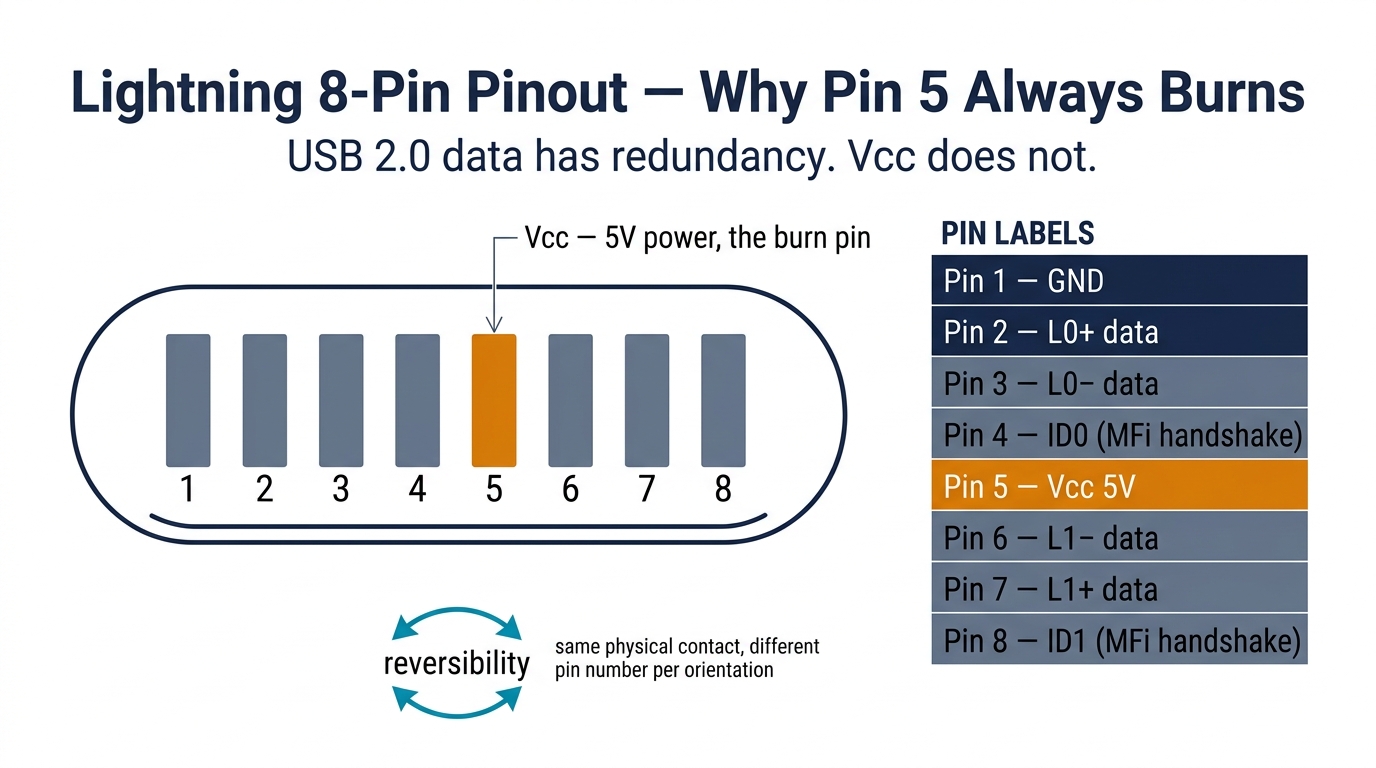
Here's the official pinout, with the pins that matter for failure analysis highlighted.
| Pin | Code | Function | Notes |
|---|---|---|---|
| 1 | GND | Ground | Return path for all current |
| 2 | L0+ | Lane 0 positive | USB D+ data (one orientation) |
| 3 | L0- | Lane 0 negative | USB D- data (one orientation) |
| 4 | ID0 | Authentication / control | MFi chip handshake (IDBUS line) |
| 5 | Vcc | 5V (or 9V PD) power | The pin that burns |
| 6 | L1- | Lane 1 negative | USB D- data (reversed orientation) |
| 7 | L1+ | Lane 1 positive | USB D+ data (reversed orientation) |
| 8 | ID1 | Authentication / control | MFi chip handshake (reversed) |
Source: Apple Wiki, Wikipedia, TechInsights teardown.
Three things repair techs need from this table.
The connector is not electrically palindromic. The same physical contact that's Pin 1 on Side A becomes Pin 8 on Side B. A processor inside the cable plug detects orientation and routes signals — Tristar probes Pin 5 first, and if there's no response, it falls back to Pin 1.
USB 2.0 data uses two pins, power and ground use two, and authentication uses two — leaving only two pins for accessories. There is no spare Vcc rail. All charging current funnels through one physical contact at a time.
The data pins have orientation redundancy (L0± and L1±). The Vcc contact does not. Whichever way you plug the cable in, the same physical contact carries the full charging current. When that single contact starts to oxidize, there is no fallback path.
Why Non-MFi Cables Burn Faster (and Take Your Customer's Tristar With Them)
This is where the physics problem becomes a supply chain problem. Hot-plug arcing happens to every Lightning cable. But on a genuine MFi cable with a C89 or C94 chip, you'll get thousands of insertion cycles before the rhodium-ruthenium plating breaks down. On a $0.50 Alibaba cable with a pull-up resistor instead of an MFi IC, you might get 50 cycles before the bare nickel contact pits, oxidizes, and starts running hot.
That's the cosmetic story. The hidden story is what's happening on the other end of the cable — inside your customer's iPhone.
Meet Tristar (the real victim)
Tristar (also called U2) is the NXP 1610A3 chip behind every Lightning port on every Lightning-era iPhone and iPad. It's 2.2 mm × 2.2 mm with 36 solder connections. Per iFix Electronics Australia, it handles USB protocol negotiation, orientation detection, charger type identification, and accessory authentication — and it is "delicate and prone to damage by voltage spikes and noisy electrical signals" from cheap cables.
When Tristar dies, symptoms cascade: no charging or intermittent charging, "Accessory may not be supported" pop-ups, rapid battery drain, error 9/4005/4013/4014 during iTunes restore, eventually no power at all.
The design philosophy that makes this so dangerous, summarized by u/iphoneusterdom on r/mobilerepair: "Apple does not fully trust third parties... The iPhone puts almost all trust into the cable itself for voltage regulation; there is almost no onboard protection in the device." The MFi spec exists to enforce that assumption. Plug in a cable with none of those protections, and unregulated voltage spikes go straight into the most expensive chip in the front of the device.
What the protection ICs actually do
A genuine MFi cable contains four discrete components in the connector head, per the TechInsights teardown:
- TI BQ2025 — ~5K-gate authentication chip with EPROM and SDQ interface
- NXP NX20P3 — power management IC (75%+ of its die area is one large power transistor)
- Two additional power transistors handling switching
A counterfeit cable replaces all of this with a single pull-up resistor, per iFixit. The NXP power management IC is entirely missing — no inrush limiting, no overvoltage clamping, no soft-start. Lab data referenced in Alibaba's industry write-up found 71% of non-MFi USB-C-to-Lightning adapters delivered 5.8–6.3V during transient surges, above Apple's 5.25V ±5% spec. (Industry benchmark; original validation studies not independently sourced.) That extra volt and a half of overshoot, repeated thousands of times a day, is what eats Tristar.
The repair shop liability math
Here's the part that should change how you stock cables.
A non-MFi cable from Alibaba lands at around $0.55. A C94-chip MFi cable from a reputable Shenzhen factory lands at $1.80–$3.20. The temptation is obvious — at scale, the spread is real money.
Now price the failure case. Tristar replacement involves a microscope, a hot air station, a $25 chip, and 30–60 minutes of skilled labor. Most independent shops charge $50–$80 per Tristar repair, and many won't touch it at all. Even if you only blow up one in fifty cables you sell, the math collapses fast.
u/Yrguiltyconscience, a longtime r/mobilerepair contributor, put it this way:
"You don't want a return in a few weeks because it charges intermittently, or even worse: because a junk cable blew an IC in the phone."
That's the real reason MFi exists. Not Apple's licensing fees. Tristar protection.
If you're already running into batch inconsistency from a current cable supplier, our team can run an incoming QC pass on a sample lot before you commit to a repeat order — see also our DOA parts policy & repair shop checklist for the broader incoming-acceptance framework.
The MFi Chip Family: C48 / C89 / C91 / C94
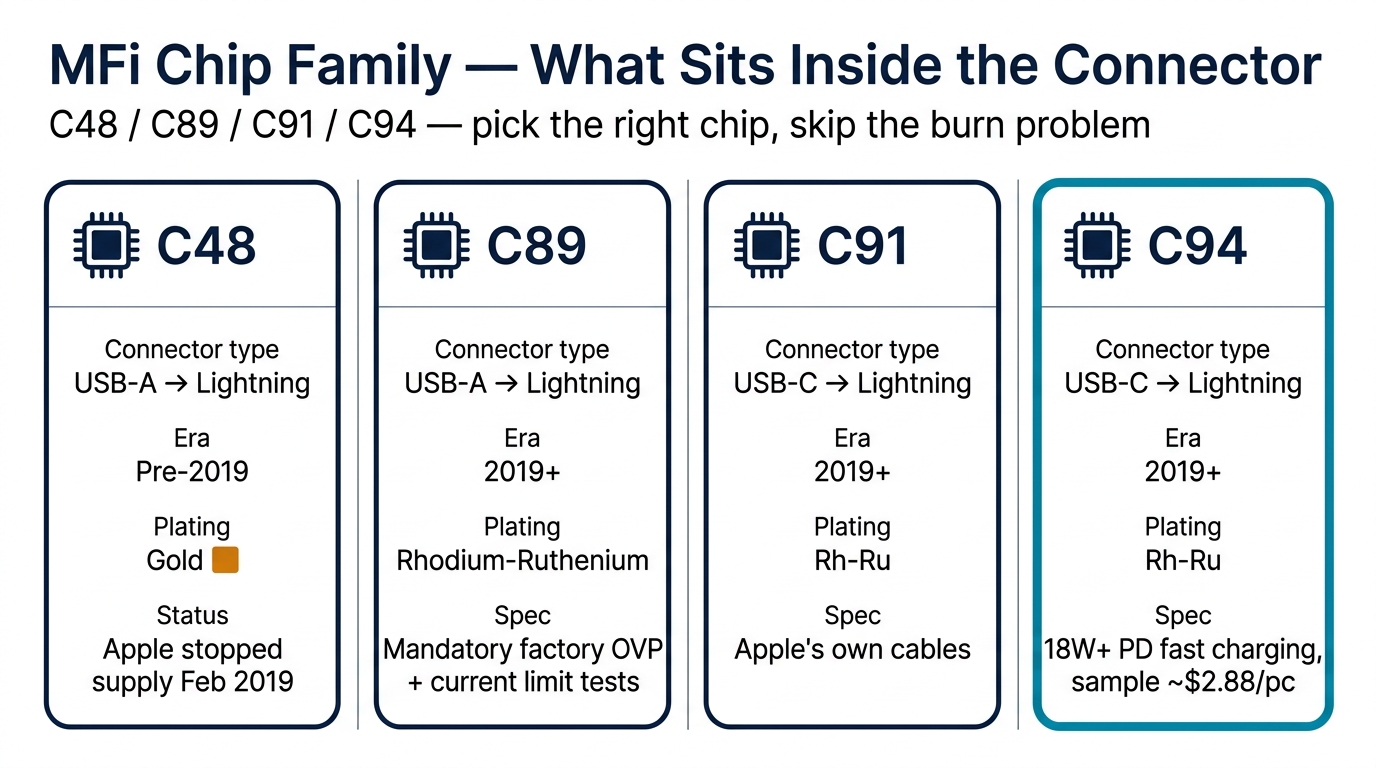
If you're sourcing Lightning cables, you need to know the four chips you'll encounter. They're not interchangeable, and the differences matter.
| Chip | Connector type | Era | Plating | Key feature |
|---|---|---|---|---|
| C48 | USB-A → Lightning | Pre-2019 | Gold-plated copper | Original chip; Apple stopped supplying it in Feb 2019 |
| C89 | USB-A → Lightning | 2019+ | Rhodium-ruthenium (silver) | Mandatory factory-line OVP, current limit, and quiescent current tests |
| C91 | USB-C → Lightning | 2019+ | Rhodium-ruthenium | Apple's own cables; functionally identical to C94 |
| C94 | USB-C → Lightning | 2019+ | Rhodium-ruthenium | Third-party MFi version; supports 18W+ PD fast charging; sample price ~$2.88/pc |
Source: ByteCable, r/mobilerepair MFi chip discussion.
The 2019 transition from gold (C48) to rhodium-ruthenium (C89) was the single biggest improvement in Lightning cable durability. Rh-Ru is significantly harder than gold and far more arc-resistant. Apple and licensed third parties moved on; the bottom of the counterfeit market is still shipping bare nickel.
The handshake (per TechInsights): Tristar detects insertion, probes Pin 5 then Pin 1 to determine orientation, and the cable's BQ2025 chip replies over the SDQ one-wire protocol with 8 bytes of binary plus a 16-character ASCII string at up to 85 kbps. If the handshake succeeds, iOS allows full charging current. If it fails, iOS throttles to 0.5–1A or shows "This accessory may not be supported."
The three ways counterfeits cheat:
- Pull-up resistor — the cheapest fakes spoof the expected line resistance. Works for initial detection, fails repeated checks.
- Cloned chip — reverse-engineered authentication ICs. Works until Apple revokes the crypto keys via an iOS update. As u/iphoneusterdom put it: "There is NO aftermarket chip that duplicates the recent C94/C89 and functions 1:1 in every situation."
- Stolen or recycled chips — real Apple chips harvested from scrapped devices or factory leaks. Foxconn Vietnam was reportedly fined $15 million by Apple for selling nearly 200,000 C100 chips to third parties.
Each iOS update is a roll of the dice. iOS 7 introduced the warning in 2013; iOS 16.2 revoked pre-2021 firmware support overnight. If your supplier is shipping cloned-chip stock, your inventory has an expiration date you don't control.
The 3 Manufacturing Shortcuts That Doom Cheap Cables
Strip away the chip story, and the physical cable has three corners cut on every cheap unit.
Shortcut #1 — Missing protection ICs. No NXP NX20P3 power management means no inrush limiting, no overvoltage clamp. The IP4220 ESD protection diode pack found in compliant accessories per Experimental Engineering's teardown is also absent.
Shortcut #2 — Undersized contacts and wire gauge. Genuine cables use 24 AWG tinned copper (~0.084 Ω/m). Counterfeit cables use 28–30 AWG (~0.212 Ω/m). At 2A over 1m, that's 0.42V drop on a fake versus 0.17V on a genuine. Lab tests cited by Alibaba's industry analysis found 82% of counterfeit cables delivered less than 4.2V at the device end under 2A. Below 4.2V, modern iPhones throttle charging to a crawl and complain about the accessory.
Shortcut #3 — No potting compound or strain relief. Genuine Apple cables use epoxy potting and a steel sleeve with proper solder joints. Per ChargerLAB's teardown, all internal wires are reinforced with glue. Counterfeits substitute a plastic sleeve with little or no potting — which is why cheap cables fail at the boot rather than the connector when you flex them.
Apple's own counterfeit lawsuit tested 100+ iPhone accessories sold as genuine on Amazon: 90% were fakes, with overheating, fire, and shock risks. UL's white paper on counterfeit chargers tested 400 samples and reported a 99% electric-strength failure rate. (Industry benchmarks; both widely cited but not fully open-access.)
The 5-Minute B2B QC Protocol Before You Order 1,000 Units
If you're a procurement buyer about to commit to 1,000 Lightning cables, here is the protocol I run before approving any new supplier sample. Total tool budget: under $50. Total time per cable: about 5 minutes.
Test 1 — Voltage drop under load (~90s)
Tools: Digital multimeter (Fluke 17B+ or equivalent, $50–$80) plus a USB inline power meter — RELIFE XA3 Pro ($15–$30) or Fnirsi FNB58 ($20–$50).
Procedure: Plug the USB-A end into a 5V / 2.4A+ charger. Apply a 2.4A load at the Lightning end. Measure voltage drop from VBUS at the USB-A side to Pin 5 at the Lightning side.
| Reading | Verdict |
|---|---|
| Drop ≤ 0.25V at 2.4A | Pass |
| Voltage at device ≥ 4.75V | Pass |
| Drop > 0.30V | Reject |
| Voltage at device < 4.2V | Reject immediately |
Apple's MFi spec calls for ≤3% droop at 2.4A. Non-MFi cables in published tests showed swings of ±0.45V.
Test 2 — MFi chip verification (~60s)
Plug the iPhone into a Windows PC via the cable under test. Open 3uTools (free) → Toolbox → Genuine Accessories Detection.
| 3uTools result | Meaning |
|---|---|
| Manufacturer: "Apple Inc." | Genuine OEM |
| Manufacturer: [brand name] | MFi-certified third party — pass |
| Manufacturer: "None" | No MFi chip — reject |
Source: 3uTools documentation.
Test 3 — Visual inspection (~60s)
Apple's 10-point checklist at support.apple.com/en-us/111103. High-leverage items: Lightning boot 7.7 mm × 12 mm, contacts rounded (not squared), faceplate gray/metallic (not white or black), USB-A contacts gold-plated (silver = critical fail), strain relief firmly attached at both ends, MFi badge on packaging, cable body printed with brand or "Designed by Apple in California" plus 12-digit serial.
Test 4 — Continuity and flex check (~60s)
Multimeter on continuity mode. Probe each wire end-to-end — all connections should read less than 1 Ω. Flex the cable 50 times at 90° at the strain relief, then re-test. Any degradation means the connector strain relief is below spec. For a 1,000-unit order, sample 80 cables (8%) — roughly 6.5 hours of bench time, one afternoon for one tech.
Test 5 — MFi database cross-check (~30s)
Official Apple lookup: mfi.apple.com/account/accessory-search. Search by brand, model, or UPC/EAN. Labels reading "MFi Licensed" or "MFi Compatible" have no legal meaning. Per Alibaba's industry write-up, 68% of Lightning listings on open marketplaces lack a verifiable MFi license number at all.
If you'd rather not run this in-house on every shipment, this is the kind of incoming verification we handle for B2B clients — see our supplier evaluation framework for the full process.
Wholesale Reality Check: MFi vs Non-MFi Pricing, MOQ, and Sourcing in 2026
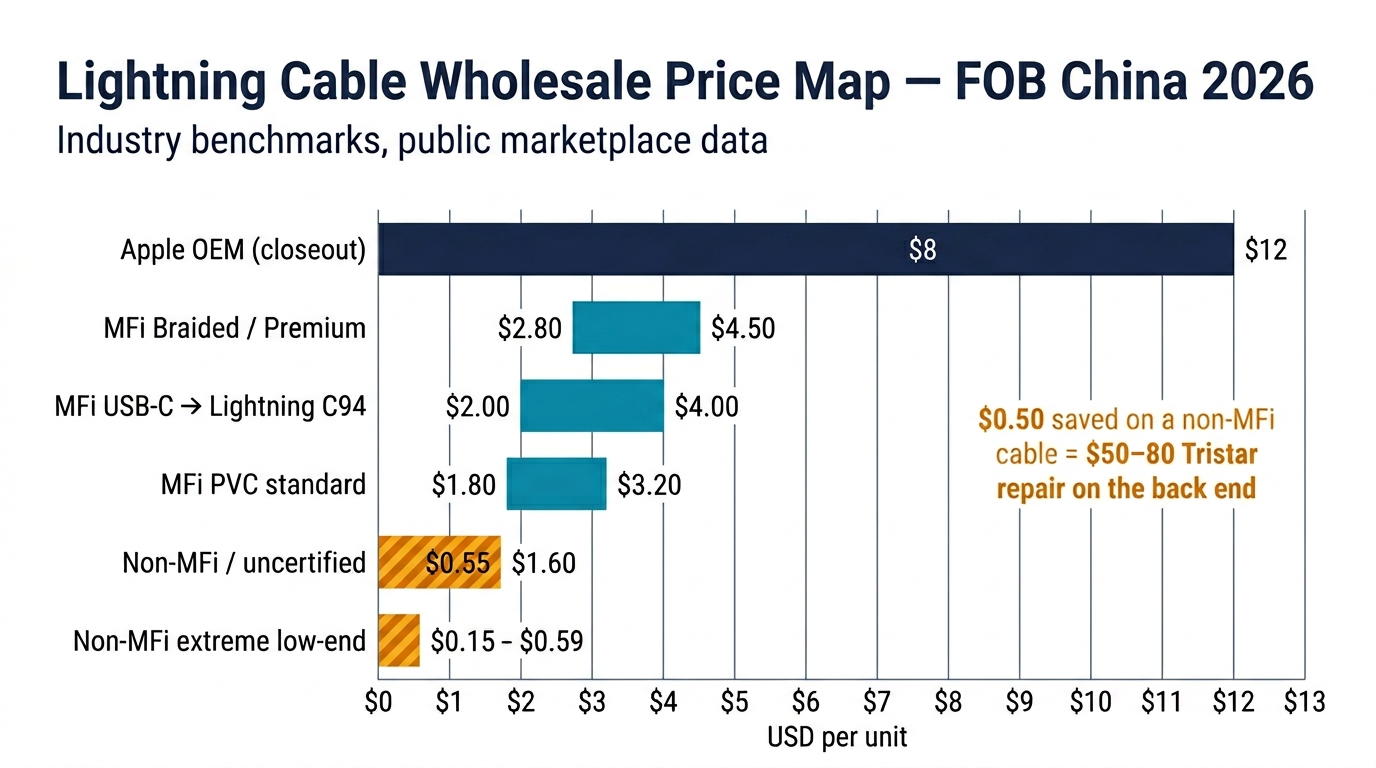
Here's what the market actually looks like FOB China in early 2026.
| Cable type | Price per unit | Notes |
|---|---|---|
| Apple OEM (closeout, 1m USB-A) | ~$8–$12 | Apple does not sell wholesale; closeouts only |
| MFi third-party PVC, 1m USB-A | $1.80–$3.20 | Standard Shenzhen factory output |
| MFi braided / premium | $2.80–$4.50 | Higher gauge, retail box |
| MFi USB-C → Lightning (C94) | $2.00–$4.00 | 18W+ PD capable |
| Non-MFi / uncertified | $0.55–$1.60 | No auth chip; variable quality |
| Non-MFi extreme low-end | $0.15–$0.59 | MOQ as low as 10 pcs; high failure rate |
(Industry benchmarks from public marketplace data; PRSPARES internal pricing not disclosed.)
MOQ structure: non-MFi generic 300–500 pcs (spot-buy possible at 10–30); MFi standard 500–1,000 pcs; MFi with custom packaging 2,000–3,000 pcs. Channels: Alibaba has the largest volume but 68% of listings can't show a verifiable MFi license; direct Shenzhen factories typically start at 3,000–5,000 pcs and require signing an Apple MFi NDA; US wholesalers like WirelessNeed price in the $2.25–$3.00 range if you can't accept the China lead time.
Should you still stock Lightning at all?
iPhone 15 dropped Lightning for USB-C in September 2023, and Apple declared Lightning end-of-life for new devices in early 2025. The question for any buyer is: how long does aftermarket demand last?
At least until 2027–2028. iPhone 6 through iPhone 14 represent a massive installed base, and the average iPhone replacement cycle is about 3.5 years. The 2025 global consumer charging cable market sits at ~$11.6B, with USB-C-to-Lightning hybrid cables alone running ~$1.5B. If your customer base skews iPhone 13/14 repair, do not clear Lightning inventory yet — but start introducing C94 USB-C-to-Lightning SKUs alongside your USB-A stock to capture the hybrid segment.
FAQ
Is Pin 4 burning a fake-cable problem or normal physics? Both. Hot-plug arcing affects every Lightning cable, including genuine Apple ones. But non-MFi cables compress what should be years of slow degradation into weeks because of thinner plating, missing ESD protection, and inferior contact geometry. If your "Pin 4" turns black in under three months of normal use, the cable is the problem.
Can a non-MFi cable actually damage my customer's iPhone? Yes — through the Tristar IC. The iPhone has minimal onboard voltage protection and trusts the cable's NXP NX20P3 power management chip to regulate inrush current and clamp transient surges. A counterfeit cable with no NX20P3 lets unregulated voltage hit Tristar directly. Repeated exposure produces the classic Tristar failure cascade: charging dropouts, "Accessory Not Supported," error 4013 on restore, eventually no power at all.
How do I tell a real MFi cable from a counterfeit at receiving inspection? Run the 4-step protocol: read the manufacturer field in 3uTools, look up the brand in the official Apple MFi database at mfi.apple.com, check the contact plating colour (silver Rh-Ru or gold both pass; bare nickel fails), and walk through Apple's 10-point visual checklist at support.apple.com/en-us/111103. Two consecutive fails = reject the lot, not just the unit. See our breakdown of what "Grade A" actually means at different suppliers for the broader QC mindset.
Are USB-C to Lightning cables better than USB-A to Lightning? Yes, materially. C94-chip USB-C cables support 18W+ PD fast charging, run cooler under load thanks to better current regulation, and use rhodium-ruthenium plating that's far more arc-resistant than the gold plating on the older C48 USB-A generation. If you're refreshing your stock, USB-C-to-Lightning is the right SKU to lead with.
With iPhone 15 on USB-C, is Lightning cable inventory still worth stocking? Yes, through at least 2027–2028. The installed base of iPhone 6 through iPhone 14 won't disappear overnight, and the average iPhone replacement cycle is about 3.5 years. Hybrid USB-C-to-Lightning is the growth segment — stock both, and shift the mix gradually as your repair intake shifts.
Bottom Line
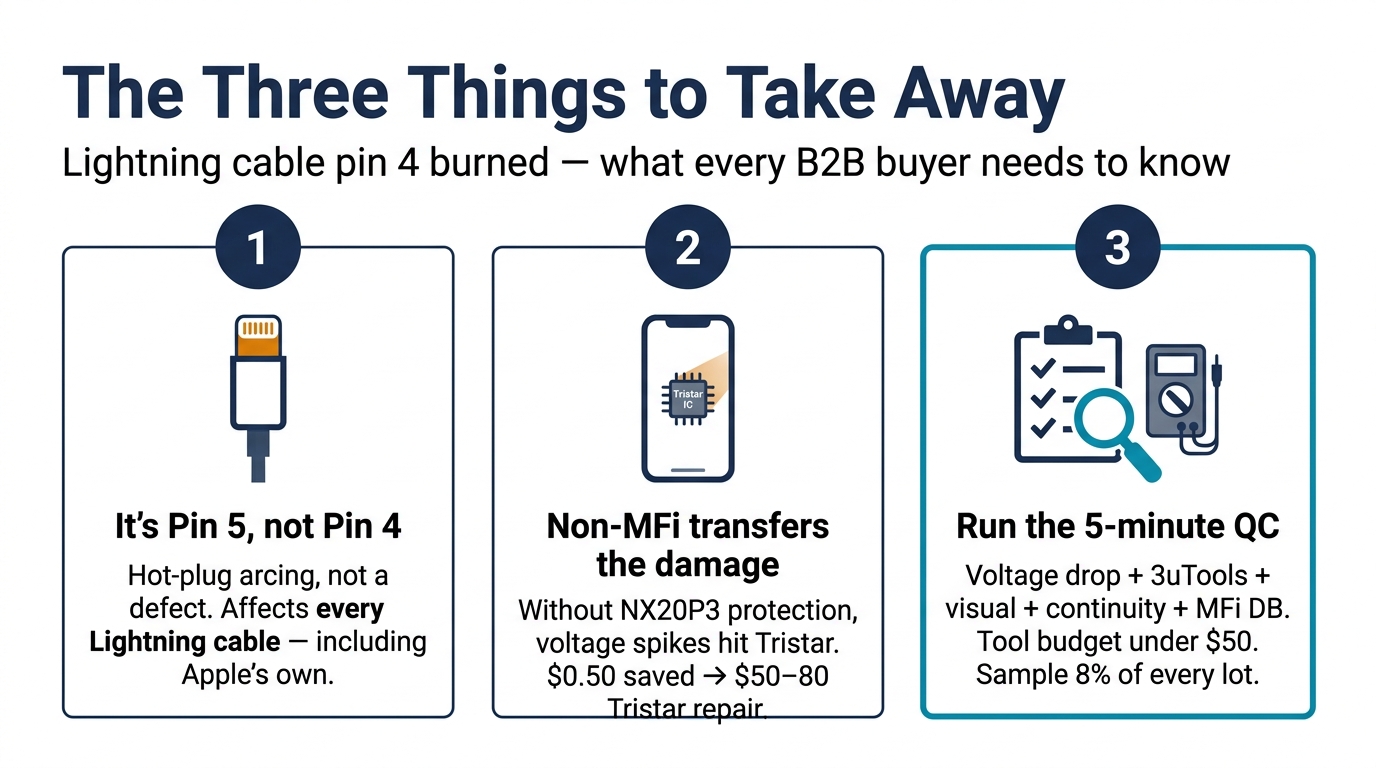
Three things to take away from this guide.
-
The pin that burns is Pin 5 (Vcc), not Pin 4. The mechanism is hot-plug arcing, not a manufacturing defect, and it happens to every Lightning cable ever made — including Apple's own. Stop blaming the supplier for the burn pattern itself.
-
Non-MFi cables transfer the arc damage from the cable to the phone. Without the NXP NX20P3 power management chip and ESD protection, voltage spikes go straight into Tristar. The $0.50 per cable you save at sourcing turns into $50–$80 per Tristar repair on the back end — and that's before counting the customer trust you lose.
-
Run the 5-minute QC protocol before any 1,000-unit order. Voltage drop test, 3uTools chip verification, visual inspection, continuity and flex check, MFi database cross-check. Total tool budget under $50. Sample 8% of any incoming lot.
If you're sourcing Lightning cables in bulk and want a supplier that publishes its incoming-QC standards instead of asking you to take their word for it, request a wholesale quote — we'll send you our current MFi-tested SKU list along with a sample inspection report so you can see exactly what we test and reject before anything ships.