How Repair Shops Should Use a Small Test Order to Evaluate a New Supplier

A supplier can show you certificates, factory photos, and sample images all day. None of that tells you what actually arrives at your door.
Placing a test order with a phone parts supplier is the only reliable way to evaluate quality, packaging, and communication before committing to larger purchases. Not just buying a few screens to stock your shelf — using a small, deliberate order as a structured evaluation of everything the supplier claims to offer. That's what a test order is for. Not just buying a few screens to stock your shelf. Using a small, deliberate order as a structured evaluation of everything the supplier claims to offer: product quality, packaging, communication, and after-sales support.
This article covers how to design a test order that gives you maximum evaluation data with minimum financial risk. If you're still figuring out what quantities and models to include in a first order, start with our order template guide. This page assumes you've decided to place an order — and now you want to make that order work as hard as possible to tell you whether this supplier deserves your repeat business.
Looking for a Reliable Wholesale Parts Supplier?
Factory-direct from Shenzhen — transparent grades, invoices & 12-month warranty.
Get Wholesale QuoteWhy Certificates and Chat Promises Are Not Enough
Every wholesale phone parts supplier will tell you their screens are "Grade A," their batteries are "original capacity," and their defect rate is "under 1%." These claims are easy to make and impossible to verify from a product listing.
Here's what actually happens:
- Grade labels vary between suppliers. One supplier's "A-grade" Incell screen might be another supplier's "B-grade." There is no universal grading authority for aftermarket phone parts. The only way to know what "A-grade" means from a specific supplier is to hold the product in your hand.
- Sample photos can be curated. A supplier might send you photos of their best stock. The batch you receive could come from a different production run or a different sub-supplier entirely.
- Certificates prove compliance, not consistency. ISO certificates and test reports show that a supplier met a standard at one point in time. They don't guarantee that every shipment meets the same standard.
- Communication quality before the sale is always better than after. Every supplier responds quickly when you're about to buy. The real test is how they respond when something goes wrong.
This is why experienced buyers treat the test order as an evaluation tool, not just a purchase. You're not just buying parts — you're running a structured test of the entire supply relationship.
What to Include in a Test Order for Maximum Evaluation Value
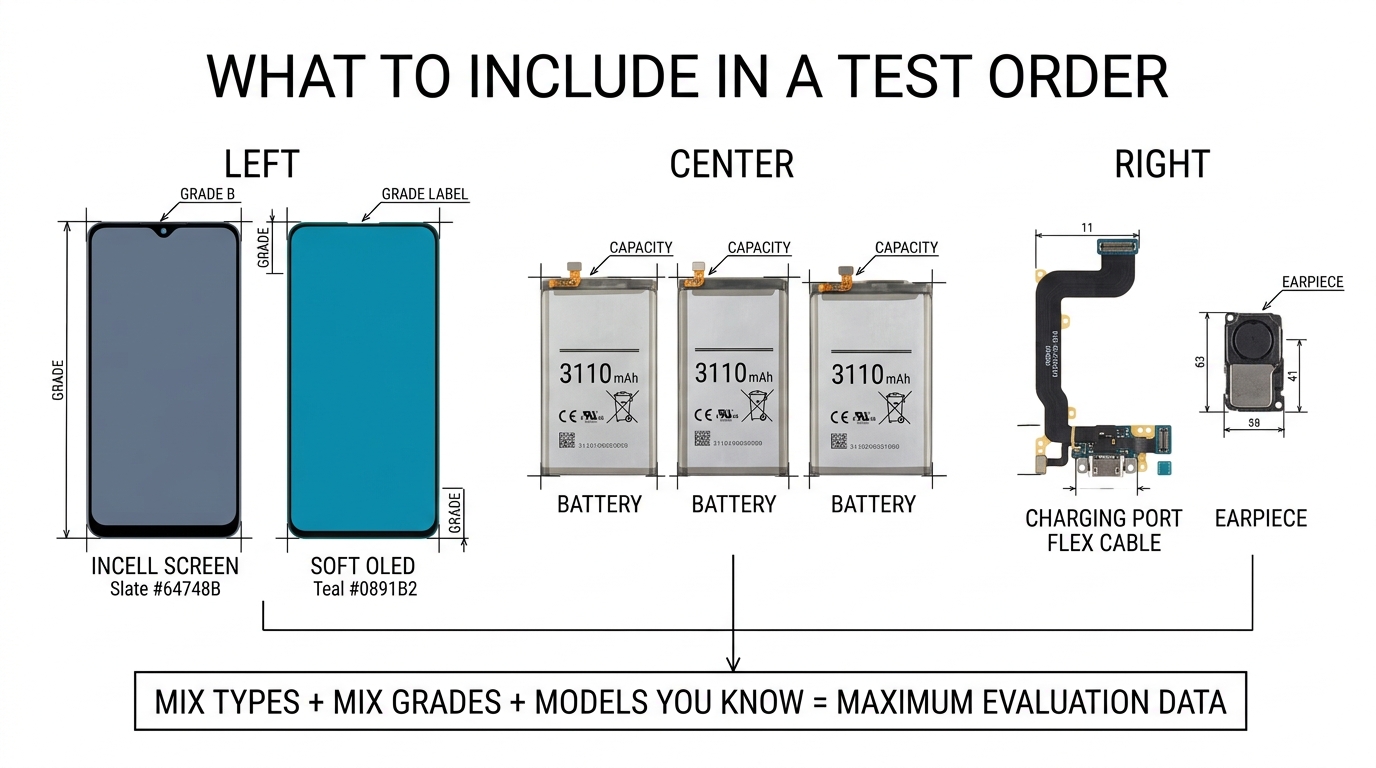
A random order of 20 iPhone 12 Incell screens tells you one thing: whether that specific product from that specific batch is acceptable. A well-designed test order tells you much more.
Mix Product Types
Include at least two, ideally three categories:
- Screens (your highest-value, highest-risk item)
- Batteries (different quality indicators than screens — cycle count, capacity accuracy)
- One small part — a charging port flex cable or earpiece — to see how the supplier handles lower-margin items
This tests whether the supplier maintains quality standards across their entire catalog or only on high-margin items. Some suppliers invest in good screens but ship bottom-tier batteries and small parts. You need to know this before you build a long-term relationship.
Mix Quality Grades
If the supplier offers multiple grades — say, Soft OLED and Incell for iPhone screens — order a small quantity of each. This lets you:
- Compare whether the price difference is justified by a real quality difference
- Verify that the supplier actually has separate inventory for each grade (some suppliers ship the same product under different grade labels)
- Establish your own benchmark for what "premium" and "standard" mean from this specific supplier
For batteries, request both their standard and premium tier if available. Incoming QC standards for screens apply here too — you should know what to test before the order even ships.
Choose Models You Already Know
This is the most important rule. Order models you repair frequently and know well. If you've installed 200 iPhone 11 Incell screens from your current supplier, you know exactly what a good one looks and feels like — the color temperature, the touch response speed, the bezel fit. When the test order arrives, you'll spot differences immediately.
Ordering a model you've never worked with before defeats the purpose. You won't have a baseline to compare against.
Keep the Total Small but Not Too Small
A test order should be large enough to be statistically meaningful but small enough that you can absorb the loss if the supplier turns out to be poor.
| Shop Size | Suggested Test Order Budget | Typical Mix |
|---|---|---|
| Small shop (1-2 techs) | $200–400 | 5-10 screens + 10 batteries + 5 small parts |
| Mid-size shop (3-5 techs) | $400–800 | 10-20 screens + 20 batteries + 10 small parts |
| Buying for resale | $500–1,000 | 15-25 screens in 2 grades + 20 batteries + 10 mixed small parts |
Ordering just 2-3 pieces isn't enough. You might get lucky with a small sample. A slightly larger batch gives you a better read on consistency — which is the thing that actually matters for a long-term supplier.
What to Evaluate When the Order Arrives
The moment your test order arrives is when the real evaluation starts. Don't just unpack and shelve the parts. Inspect systematically.
Packaging and Labeling
Check before you open individual items:
- Are screens individually protected? Each screen should be in anti-static packaging with foam or bubble wrap protection. Screens loose in a box or wrapped only in thin plastic is a red flag.
- Are items labeled accurately? Each part should be clearly labeled with model, grade, and quantity. If you ordered iPhone 12 Soft OLED and iPhone 12 Incell, the packaging should distinguish them clearly. Mixed-up labels suggest sloppy warehouse processes.
- Is the outer packaging adequate for international shipping? Crushed boxes, water damage, or missing padding means the supplier isn't investing in logistics — and your regular orders will arrive damaged more often.
Screen Quality Testing
For every screen in the batch — not a random sample, every one:
- Visual inspection: Check for dust under the glass, scratches, uneven backlight, dead pixels. Hold the screen at an angle against a white background.
- Color accuracy: Compare side by side with a known good screen. Is the color temperature similar? Excessive yellow or blue tint compared to your current supplier's screens is a sign of lower-tier panels.
- Touch response: Install on a test device. Open a drawing app and draw circles in all four corners. Slow response, missed touches, or ghost touches indicate a poor digitizer.
- Fit and alignment: Does the screen sit flush in the frame? Are the flex cable routing and connector position correct? Poor fit means either wrong specs or sloppy manufacturing.
Battery Testing
- Capacity check: Use a battery tester to measure actual capacity vs. labeled capacity. A battery labeled 3,110 mAh that tests at 2,800 mAh is misrepresented.
- Cycle count: If the battery reports cycle data, it should show zero or near-zero cycles. High cycle counts mean refurbished cells, not new.
- Physical inspection: Look for swelling, uneven surfaces, or poor-quality connector solder joints.
Small Parts Check
For charging ports, earpieces, and flex cables:
- Verify connector pin alignment
- Test basic functionality (charging ports should charge at full speed, earpieces should have clear audio at full volume)
- Check flex cable flexibility — stiff or brittle flex cables break during installation
Red Flags That Mean You Should Not Scale Up
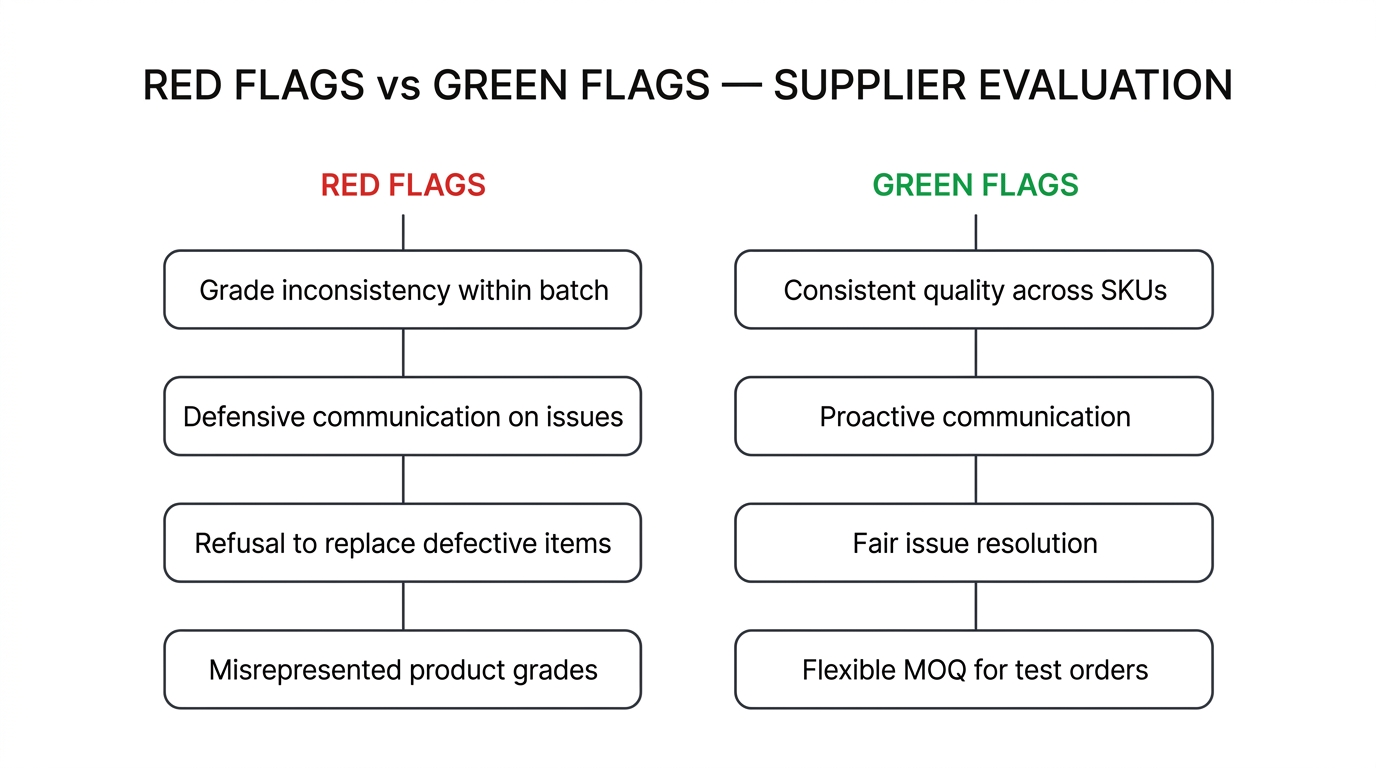
Some problems are fixable. Others tell you the supplier isn't worth your time. Here's the difference.
Stop and find another supplier if you see:
- Grade inconsistency within the same batch. If you ordered 10 "A-grade" Incell screens and 3 of them are noticeably worse than the other 7, the supplier either doesn't have real grading standards or is mixing grades intentionally. Either way, your customers will get inconsistent repair quality.
- Defensive or slow communication when you report issues. A good supplier responds within 24 hours when you flag a quality problem, acknowledges the issue, and offers a replacement or credit. A bad supplier argues, makes excuses, goes silent, or blames shipping. This is the single most important test — how they handle problems tells you everything about the relationship going forward.
- Refusal to replace or credit defective items. If the supplier won't make good on defective items in a test order — when they should be trying hardest to win your business — they certainly won't do it on a regular order. Check the supplier's warranty and return policy before ordering, and see if their actual behavior matches what they promised.
- Misrepresented products. If you ordered Soft OLED and received Hard OLED (or worse, Incell labeled as OLED), walk away. This isn't a mistake — it's a business practice.
Fixable problems you can discuss with the supplier:
- Minor packaging issues (can be improved with feedback)
- 1-2 defective units out of 15-20 (a 5-10% defect rate on a small test is within normal range for aftermarket parts — but ask for credit)
- Slightly slower shipping than quoted (ask what happened and whether it's typical)
Green Flags That Mean the Supplier Is Worth Scaling
When a test order goes well, you'll notice these patterns:
- Consistent quality across all SKUs. The screens, batteries, and small parts all meet the grade they were sold as. This means the supplier applies quality standards across their catalog, not just on their highest-margin items.
- Accurate labeling and organized packaging. Every item is what it says it is, packed properly, and easy to identify. This sounds basic, but a surprising number of suppliers fail here.
- Proactive communication. The supplier sends tracking updates without you asking. They inform you if a specific model is out of stock before shipping rather than substituting silently. They follow up after delivery to ask if everything arrived okay.
- Fair handling of issues. If you report a defective unit, they don't argue — they offer a credit or replacement on your next order. This tells you that they value the relationship over a few dollars.
- Willingness to accommodate your test. Some suppliers resist small test orders because they don't meet standard MOQ. A supplier who adjusts MOQ for a test order — even if the per-unit price is slightly higher — is signaling that they want long-term buyers, not one-time transactions. This matters more than the price difference.
For more on what makes a supplier worth committing to long-term, read our guide on building strong supplier relationships.
How to Move from Test Order to Regular Orders
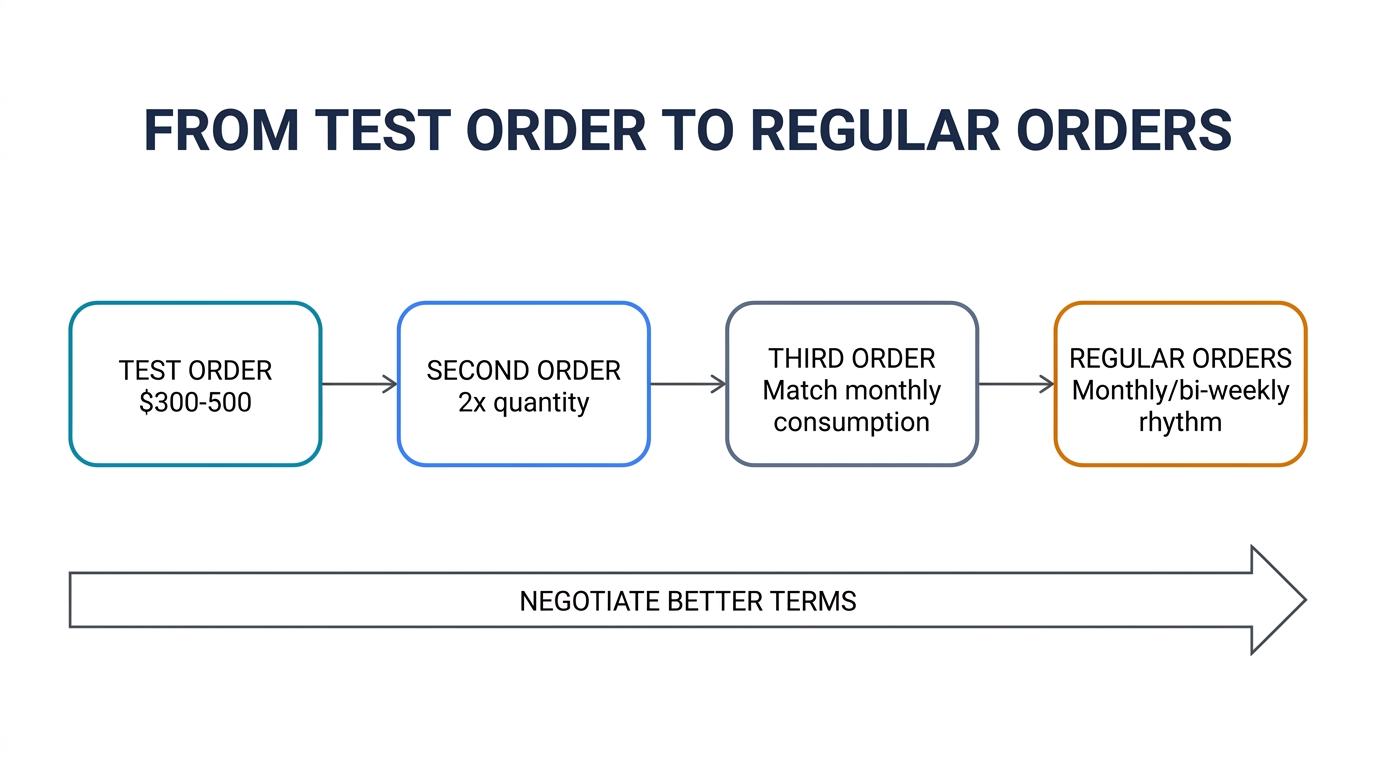
Your test order went well. The quality was consistent, the communication was responsive, and the after-sales was fair. Now what?
Don't Jump to Maximum Volume Immediately
Scale gradually. A common progression:
- Test order: $300-500, mixed products and grades
- Second order (2-4 weeks later): Double the quantity on the products that passed your test. Drop anything that didn't meet your standard.
- Third order: Introduce the quantities that match your actual monthly consumption. By now you've seen two shipments and have real data on consistency.
- Regular orders (monthly or bi-weekly): You're now ordering based on demand, not testing.
Negotiate After You've Proven Value
After 2-3 successful orders, you have leverage. You've shown that you're a reliable buyer who pays on time and orders consistently. This is when you negotiate:
- Better per-unit pricing on your highest-volume models
- Lower or waived MOQ on slow-moving items
- Priority processing or faster shipping on urgent orders
- Extended payment terms (Net 15 or Net 30 instead of upfront payment)
Don't try to negotiate hard on a test order. The time for negotiation is after you've established trust — and you'll get better terms because the supplier knows you'll follow through.
Build a Reorder Rhythm
The end goal of a successful test order isn't just "finding a good supplier." It's building a sustainable reorder pattern where:
- You know which models and grades to order, and in what quantities
- The supplier knows your preferences and prepares accordingly
- Quality remains consistent because both sides have established expectations
- You're not scrambling to find parts because you have a reliable supply chain
This is what separates shops that grow from shops that stay stuck in reactive, case-by-case purchasing.
Frequently Asked Questions
How many units should a test order include?
Aim for at least 10-20 total units across categories. Fewer than 5 screens gives you too small a sample to judge consistency. A mix of 5-10 screens, 10 batteries, and 5 small parts gives you enough data points without excessive risk.
Should I tell the supplier it's a test order?
Yes. A good supplier will actually appreciate the transparency — they may offer to include a wider product mix or adjust MOQ to help you evaluate more thoroughly. A supplier who discourages test orders or pressures you to order large quantities upfront is not a good sign.
What if the test order is okay but not great?
Give specific feedback. Tell the supplier exactly which items met your standard and which didn't, with photos. A supplier who takes your feedback seriously and improves on the second order is worth keeping. A supplier who dismisses your concerns isn't — regardless of how the test order scored overall.
How long should I wait before placing a second order?
Use the test order parts in actual repairs first. Install the screens, use the batteries in customer devices, and wait at least 2-3 weeks to see if any early failures appear. Rushing into a second order before you've tested the first one in real repairs defeats the purpose.
Make Your Test Order Count
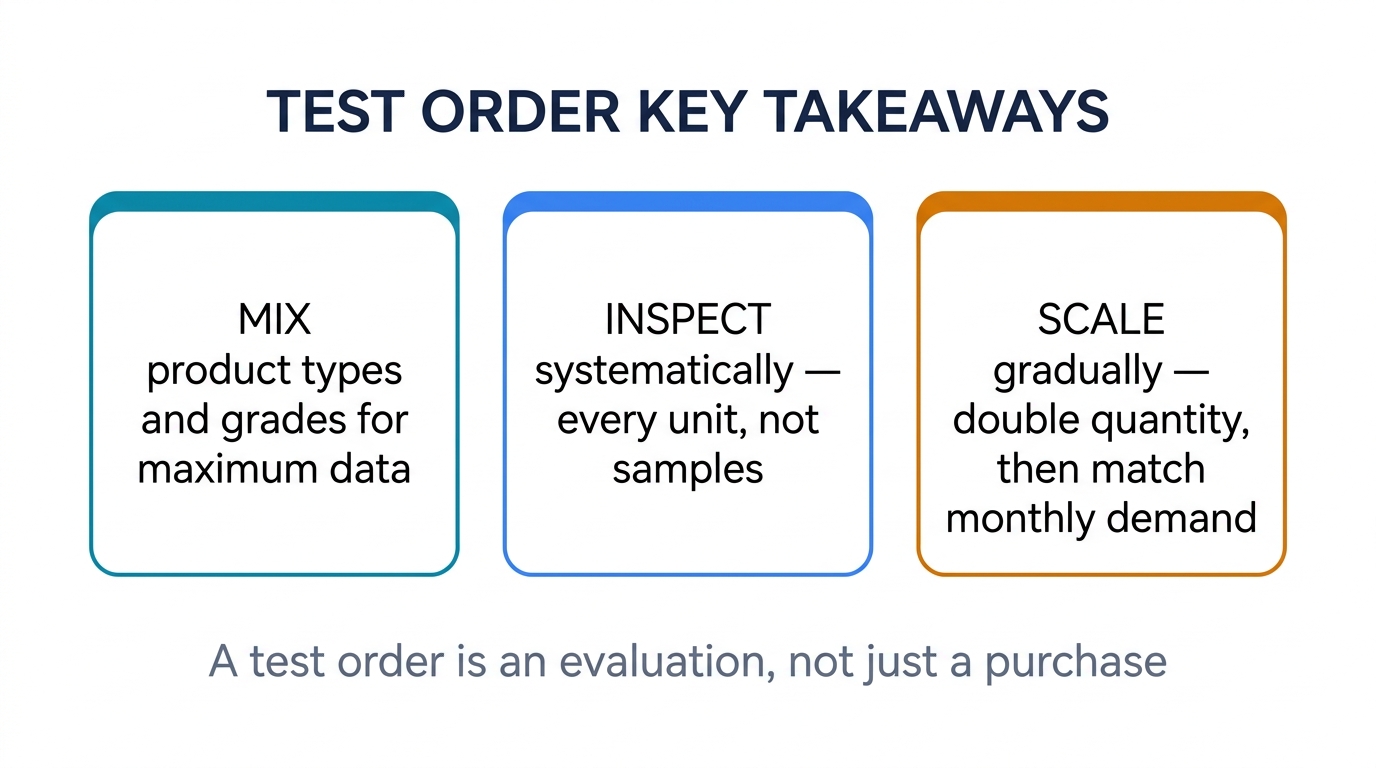
A test order is the most cost-effective way to separate a reliable supplier from one that looks good on paper. The key is treating it as an evaluation process, not just a purchase. Design it deliberately, inspect it systematically, and base your scaling decision on evidence — not promises.
If you're ready to place a test order, send us your model list and quantities. We'll suggest a practical starter package that covers screens, batteries, and small parts — sized for evaluation, priced for testing. We welcome test orders because we know what happens after: buyers who test us come back.
Related reading: