First 5 LCD Refurbishes: Tools, Mistakes, and What Actually Worked
A Reddit user named u/jmsn123 posted about their first 5 LCD refurbishes and summed it up: "It's pretty easy with the right tools." As an LCD refurbishing beginner, that's exactly what you want to hear — but there's a catch. Another user, u/Anagaz, damaged 3 Apple Watch screens before getting a single successful refurb. Both are telling the truth — screen refurbishing has a real learning curve, but the economics make it worth pushing through.
This guide covers everything an independent repair shop owner needs to know before starting glass-only screen refurbishing: what equipment to buy, what mistakes will cost you screens, and how the numbers actually work out. We're drawing from 12 Reddit threads with real practitioner data, 16 YouTube tutorials (4 with full transcripts), manufacturer documentation, and FTC compliance sources — not just one person's opinion.
A note on terminology: despite "LCD" in the title, the biggest profit opportunity is in OLED screen refurbishing (iPhone 12 and up). LCD refurbishing is where you learn the skill; OLED is where you make the money.
Sourcing Replacement Screens in Bulk?
Incell / Hard OLED / Soft OLED grades — wholesale pricing, grade comparison on request.
Get Wholesale QuoteIs Screen Refurbishing Actually Worth It in 2026?
Let's address the skeptic case first. u/BattleSausage, the top commenter (21 upvotes) in a widely-read r/mobilerepair thread, was blunt: "Absolutely not worth it. Put money into high margin stuff like screen protectors and cases."
That advice made sense in 2018 when iPhone 7 and 8 screens cost $20–$40 to replace outright. Spending 30–60 minutes on a glass-only repair to save $15 was bad math.
In 2026, the picture has flipped. An iPhone 14 Pro OLED screen costs $329 through Apple or $200–$280 at a third-party shop. A glass-only refurb on the same screen costs $8–$15 in materials. That's a $135–$192 profit per screen at a 75–90% gross margin.
When refurbishing makes sense:
- Your shop handles 2+ screen repairs daily on iPhone 12 or newer
- You're replacing OLED screens that cost $80+ wholesale
- You have (or can make) bench space for 3–4 machines
When it doesn't:
- You're working on old LCD models where full screens cost $20–$40 — experienced techs on r/mobilerepair consistently say "iPhone 12 and up only, anything older just replace"
- Your shop does fewer than 1 screen repair per day — break-even takes too long
- You don't have patience for 3–5 ruined practice screens before consistency
Stop — don't refurb if you see any of these:
- Dead pixels, lines, or discoloration on the display (panel damage, not just glass)
- Touch failure or phantom touch (digitizer/flex damage — glass-only won't fix it)
- Water ingress indicators triggered (moisture under the display layers)
- Bent or warped frame (alignment will be impossible)
- Screen from an unknown source or low-grade copy (not worth preserving the panel)
The Economics: What Your First 5 Refurbs Will Cost and Earn
Shop owners need to see the ROI before caring about wire thickness. Here's how the numbers break down by model.
Per-Model Refurb Economics
| Model | Full Screen (third-party) | Glass-Only Cost | Charge to Customer | Profit per Refurb | Beginner Difficulty |
|---|---|---|---|---|---|
| iPhone 11 (LCD) | $40–$60 | $5–$8 | $50–$70 | $42–$65 | Easy — start here |
| iPhone 12 (OLED) | $60–$90 | $5–$10 | $70–$100 | $60–$95 | Medium |
| iPhone 13 (OLED) | $80–$130 | $5–$12 | $90–$130 | $78–$125 | Medium — sweet spot |
| iPhone 14 Pro (OLED) | $180–$280 | $8–$15 | $150–$200 | $135–$192 | Hard (serialization) |
| iPhone 15 Pro (OLED) | $250–$310 | $10–$18 | $180–$250 | $162–$240 | Experienced only |
| Samsung Galaxy S (curved OLED) | $150–$350 | $10–$20 | $120–$200 | $100–$190 | Very Hard — avoid as beginner |
Sources: iFixit, DeviceFixes, Reddit practitioner data
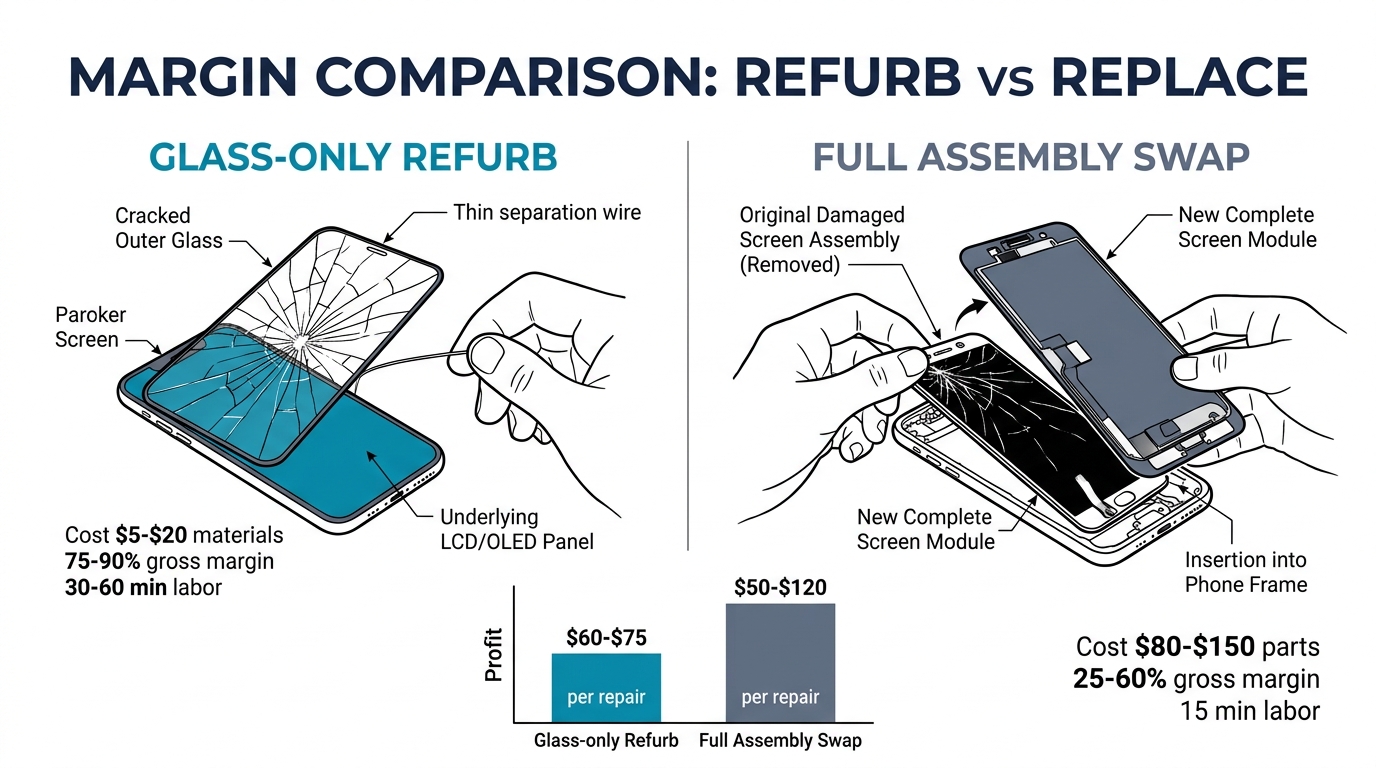
Margin Comparison: Glass-Only vs Full Assembly
| Glass-Only Refurb | Full Assembly Replacement | |
|---|---|---|
| Average customer charge | $80 | $200 |
| Parts cost | $5–$20 | $80–$150 |
| Gross profit | $60–$75 | $50–$120 |
| Gross margin | 75–90% | 25–60% |
| Time per repair | 30–60 min | ~15 min |
The margin difference is dramatic, but notice the time cost. A full assembly swap takes 15 minutes. A refurb takes 30–60 minutes. On a busy Saturday, your tech could do 4 full swaps in the time it takes to refurb one screen. Factor that labor opportunity cost into your decision.
Break-Even Timeline
| Setup Level | Investment | Avg Profit/Refurb | Repairs to Break Even | Days (at 2/day) |
|---|---|---|---|---|
| Budget | $1,000 | $65 | ~16 | ~8 working days |
| Standard | $2,500 | $65 | ~39 | ~20 working days |
The Hidden Costs Nobody Mentions
| Cost Factor | Budget |
|---|---|
| Learning curve scrap | $150–$500 (expect to destroy 3–5 practice screens) |
| Ongoing defect rate | 5–15% for beginners, 2–5% experienced |
| Warranty reserve | ~5% of revenue for comebacks |
| Workspace | ~1m × 2m bench space; compressor noise; ventilation |
u/jmsn123 was honest about it: "about 2k give or take but margins are crazy so don't ask that question." Another practitioner, u/546emilio, broke it down more precisely: "The machines cost me around $1500 and the repairs go around $15 to $90, when the cost of a glass for me is $2."
The Essential Equipment: What You Actually Need
Three Tiers of Setup
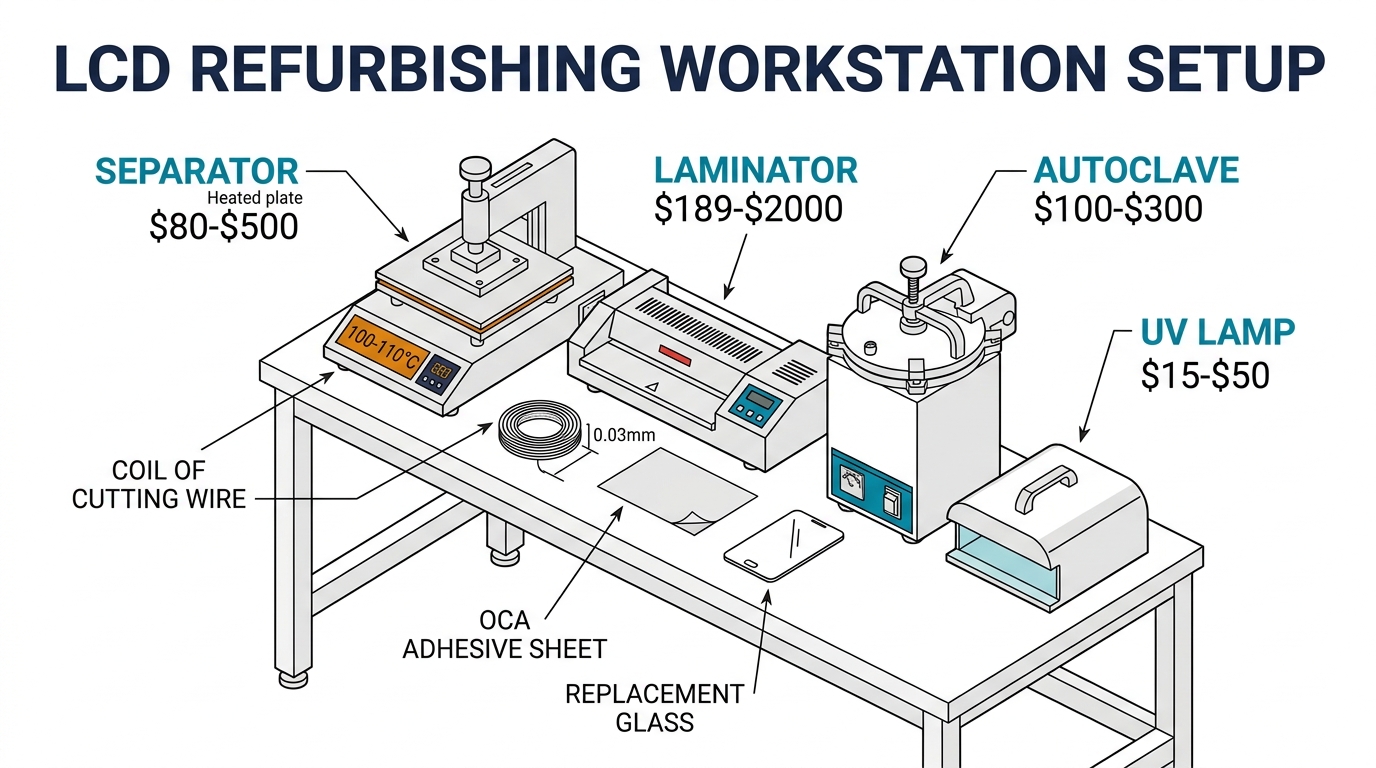
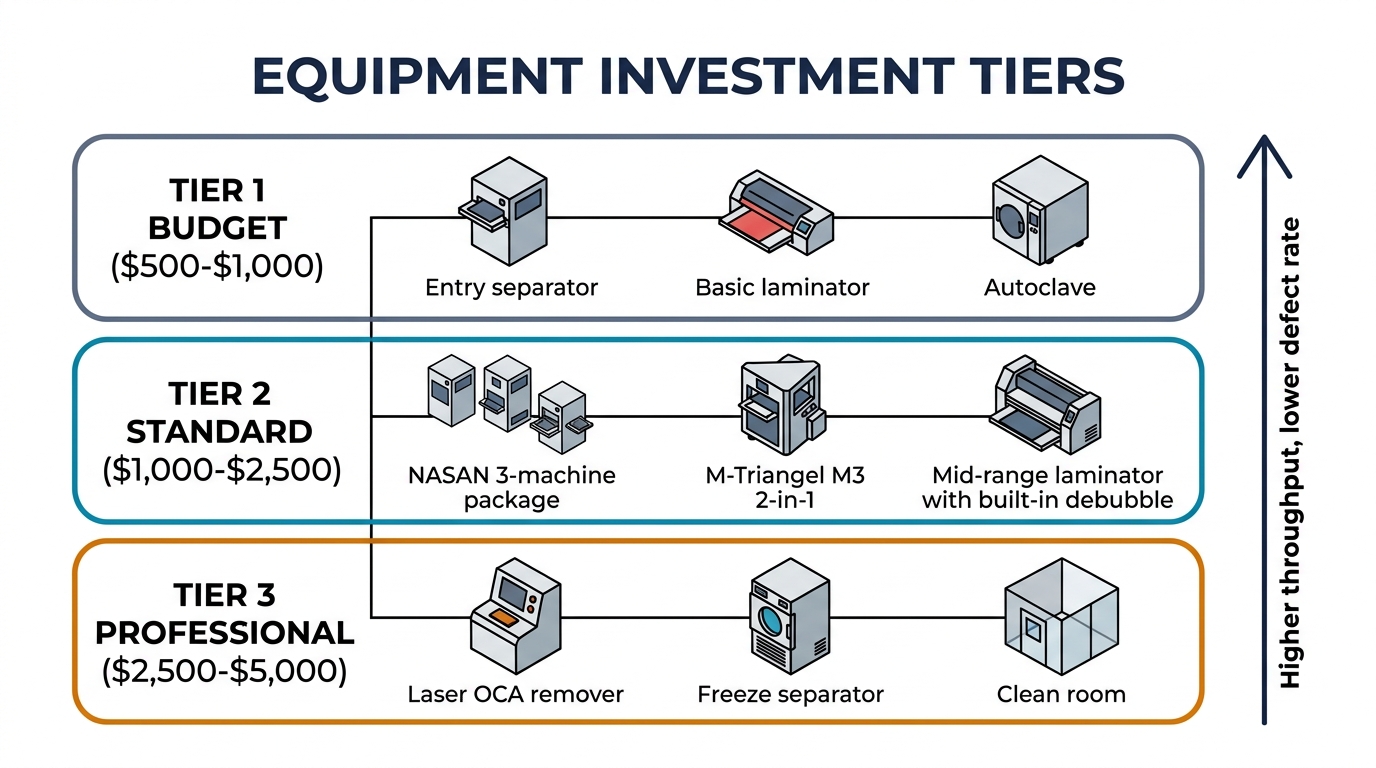
Tier 1 — Budget ($500–$1,000): Entry-level separator ($80–$200), basic vacuum laminator ($189–$300), standalone autoclave ($100–$300). Gets you started but slower workflow. Good for testing whether refurbishing fits your shop.
Tier 2 — Standard ($1,000–$2,500): The NASAN 3-machine package at $1,200 is the most commonly recommended starting point on Reddit. M-Triangel's M3 2-in-1 separator+laminator is another solid option. Mid-range laminators often include built-in debubbling, eliminating the need for a separate autoclave.
Tier 3 — Professional ($2,500–$5,000): Adds laser OCA remover (u/criplefinger: "Best tool I got — the glass comes off by itself with the right settings"), freeze separator for curved Samsung screens, and a proper clean room or dust-free workstation.
For context, NASAN USA notes that a comparable setup cost $10,000+ just a few years ago. Equipment costs have dropped dramatically.
The Tool Everyone Forgets
iDoctor UK's #1 tip from their equipment tour: buy a digital thermometer. Heat plate temperature displays are often 10–15°C off from actual surface temperature. Operating at the wrong temperature is behind most beginner failures — too low and you'll force the wire (cracking the OLED), too high and you'll damage the display.
A $15 thermometer saves hundreds in ruined screens.
Workspace Requirements
You'll need roughly 1m × 2m of bench space for 3–4 machines, plus a compressor (noisy — ideally in a separate area or closet). If you're using D-Limonene for glue removal (recommended by u/Promackid as "the best glue remover"), ensure basic ventilation. Even a cheap dust-free cabinet ($100–$200) makes a significant difference — dust under the glass means a failed refurb, full stop.
The 7 LCD Refurbishing Beginner Mistakes Everyone Makes
These aren't theoretical — they come from practitioners who learned the hard way.
1. Trusting the Heat Plate Temperature Display
iDoctor UK's equipment tour demonstrated that built-in temperature readings can be 10–15°C off from surface temperature. Always verify with an external thermometer. The safe range for separation is 100–110°C per experienced technicians, or as low as 95°C for OLEDs.
2. Confusing LCD and OLED Cleaning
u/aumutakin's critical warning: "You can clean OLEDs with alcohol but you can't clean LCD with it — it will ruin the display." Know which panel type you're working on before you start cleaning.
3. Skipping Tape on Cracked Screens
u/jmsn123's #1 lesson: "Always tape cracked screens. Midway through you'll hit a crack, lose suction, and the screen can fall apart." Five minutes of taping saves an hour of frustration.
4. Using the Wrong Wire Thickness
u/0fficialKUBA tried dozens of old LCDs and "in most cases sliced the polarizer or the touch layer." Too-thick wire is the usual cause. Gadget Gear Guide's experience: "My first few screens I used wire that was too thick and damaged the OLED." See the wire thickness guide below.
5. No Dust Management
Jiutu's manufacturer guide puts it plainly: "Even the smallest speck of dust can cause imperfections." You don't need a $2,000 clean room — even a basic dust-free cabinet ($100–$200) dramatically reduces failed refurbs.
6. Not Enough Time in the Autoclave
u/Paint-Ancient's one-line answer to a bubble problem: "Not long enough in pressure chamber." Many beginners pull screens after 15–20 minutes. Give it a full hour — bubbles that look gone at first can reappear if curing was incomplete.
7. Starting on Expensive OLED Screens
Multiple Reddit practitioners recommend the same thing: practice on cheap LCD models first. iPhone 11 LCDs cost $40–$60 for a full screen — a ruined one during practice costs $40. An iPhone 14 Pro OLED costs $180–$280. Destroying 3–5 of those during your learning phase is $540–$1,400 in scrap. Start cheap, graduate to OLED after you're consistent.
Wire Thickness: The Spec Nobody Gives You
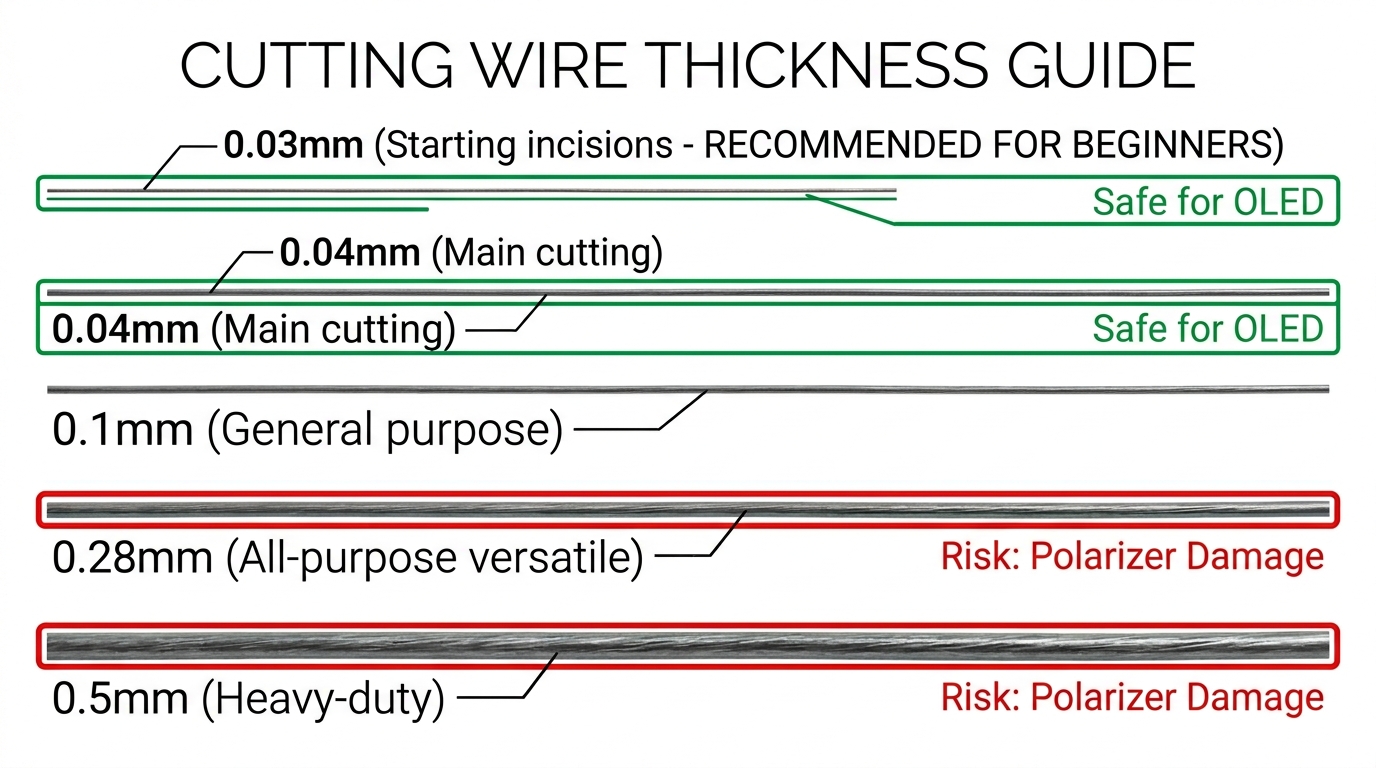
No manufacturer guide publishes this, but wire thickness is one of the most discussed topics among practitioners.
| Wire Size | Use Case | Source |
|---|---|---|
| 0.025–0.035mm | Starting incisions, delicate entry points | Gadget Gear Guide |
| 0.04mm | Main cutting wire | Multiple YouTube sources |
| 0.1mm | General purpose, less snapping | Community consensus |
| 0.25–0.28mm | Versatile all-purpose | iDoctor UK, u/OnlyBean |
| 0.5mm | Heavy-duty separation | Specialty use only |
The original poster recommends .028 or .03mm: "Anything else and you'll hit the polarizer without even trying." u/OnlyBean prefers 0.25mm for speed but notes it's "easier to snap" than thicker options like 0.5mm. The core trade-off: thinner wire is safer for the display but breaks more often; thicker wire cuts faster but risks polarizer damage if you're not careful.
Pro tip from u/manifesto7473: "Buy 0.03mm metal sheets and use them as insertion points" instead of trying to start the wire directly. Thin plastic OCA film also works for creating the initial entry gap.
Step-by-Step: Your First Glass-Only Refurb
Combining manufacturer SOPs from TBK and M-Triangel with Reddit/YouTube practitioner adjustments:
- Tape the cracked screen — cover the entire glass surface with clear tape to maintain structural integrity
- Verify heat plate temperature — set to 100–110°C, confirm with external thermometer
- Heat the screen — place on separator, wait 2–5 minutes for adhesive to soften
- Create entry points — use thin plastic or 0.03mm metal sheet at corners (u/Alarmed-Tea-354, u/manifesto7473)
- Insert cutting wire — use 0.028–0.04mm wire, work slowly from corners inward. Corners are where OLED damage most commonly occurs
- Separate glass from display — steady, even pressure. If the wire catches, add more heat rather than forcing it
- Clean OCA residue — D-Limonene is preferred (u/Promackid). Alcohol for OLED only — never on LCD
- Apply new OCA + glass — use alignment mold, apply OCA sheet, position replacement glass
- Vacuum laminate — press in laminating machine per your equipment's specs
- Autoclave debubble — minimum 1 hour in pressure chamber. Test the screen before final delivery
Expected time: 30–60 minutes per screen once you have the workflow down. Your first few will take longer.
Where to Buy Equipment
| Supplier | Products | Price Range | Notes |
|---|---|---|---|
| M-Triangel | Separators, laminators, molds, OCA | $189–$2,000+ | Direct factory, KO-3 laminator at $189.90 |
| TBK | 3-in-1 machines, freeze separators, laser machines | $200–$5,000 | Widest range, well-documented guides |
| REWA Technology | Full equipment ecosystem + training | Varies | Best training content (2.4M views on flagship video) |
| OCAMaster | Machines, OCA film, molds | $100–$3,000 | 200K+ machines sold |
| Jiutu | Laminators, bubble removers, separators | $150–$2,000 | Exports to 80+ countries |
| NASAN USA | Complete 3-machine packages | $1,200 package | US-based support + training videos |
| Alibaba | Bulk equipment, full kits | $80–$5,000 | Lowest prices, variable quality |
Reddit community favorites: Refox FM-30/FM-40 (recommended by u/OnlyBean, featured in Phone Repair Guru's 1.4M-view video) and Nasan (recommended on r/mobilerepair as a setup that "will get the job done").
Legal Quick-Check: Labeling and Warranty
Three things to know before selling refurbished screens:
1. The FTC protects your right to repair. Under the Magnuson-Moss Warranty Act, manufacturers cannot void a customer's warranty solely because you used third-party parts. "Warranty void if removed" stickers are illegal per FTC enforcement. One important caveat: manufacturers can deny warranty coverage for damage specifically caused by a third-party repair — they just can't blanket-void the whole warranty.
2. Label refurbished screens honestly. Under FTC Section 5, deceptive trade practices are prohibited across all consumer products. Never represent a refurbished screen as "new" or "OEM original." Use "refurbished," "reconditioned," or "glass-replaced" clearly in invoices and customer communications.
3. Offer a warranty. Industry standard for refurbished screens is 30–90 days covering workmanship defects. Document each repair with before/after photos for dispute resolution.
FAQ
How many screens will I ruin before getting consistent results? Expect 3–5 failed attempts. Multiple Reddit practitioners report similar numbers — u/Anagaz damaged 3 Apple Watch screens before a success, and another technician "ripped the polarizer" on their first screen. Start on iPhone 11 LCDs ($40–$60) to keep scrap costs low.
Should I start with LCD or OLED screens? Start with LCD for practice (more forgiving, cheaper if you ruin one), then move to OLED for profit. most experienced techs stick to iPhone 12 and up for the economics. The real money is in iPhone 13+ OLED where full screens cost $80–$250.
Is it worth buying a laser OCA remover? u/criplefinger calls it a "lifesaver" — the glass comes off by itself and the wire glides through the OCA. But lasers add $500–$2,000 to your setup cost. Most beginners start with heat+wire and add a laser after they've confirmed the business model works.
Can I refurb Samsung curved OLED screens? Technically yes, but this is expert-level work. Curved glass separation requires freeze separation technology and different techniques. u/Blastsail832 notes that freezer machines are outdated and heat+wire on vacuum bed is the current best method for flat screens. For curved screens, get comfortable with flat panels first.
Do I need a proper clean room? A full clean room isn't necessary, but dust management is non-negotiable. iDoctor UK shows that even a basic dust-free cabinet ($100–$200) is enough. The key is controlling the lamination environment, not the entire room.
Getting Started
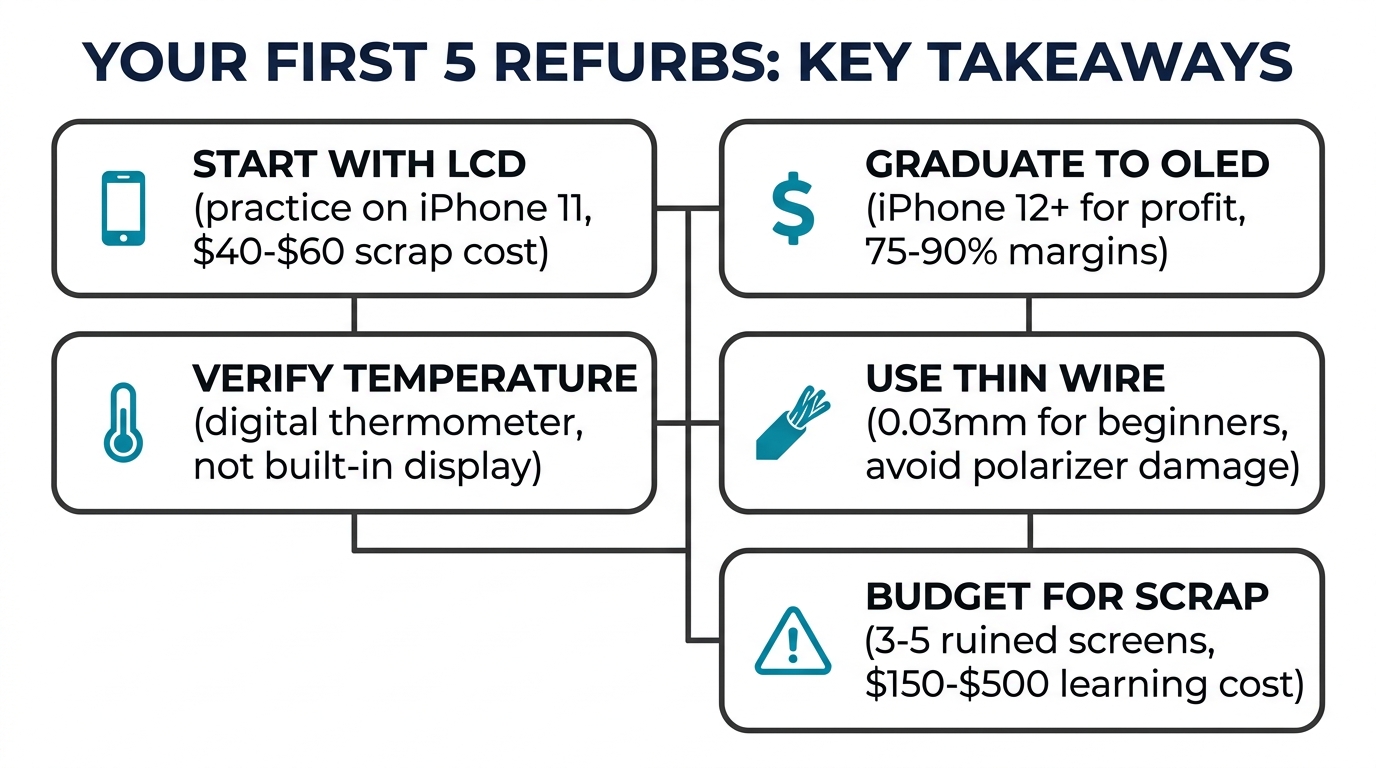
Screen refurbishing in 2026 is more accessible and more profitable than it's ever been. Equipment that cost $10,000+ five years ago now runs $1,200 for a complete package. The learning curve is real — budget for 3–5 practice screens and about 2–4 weeks to reach consistent quality.
The strongest starting point: buy a mid-tier setup ($1,000–$2,500), practice on iPhone 11 LCDs, graduate to iPhone 12–13 OLEDs for profit, and work up to Pro Max and newer models as your skill develops. For more on screen costs and grades, see our iPhone screen replacement cost guide and how to handle aftermarket screen complaints.
Ready to start refurbishing? Whether you need replacement glass, OCA adhesive, refurbishing consumables, or full screen assemblies for models that aren't worth refurbishing — request a wholesale quote from our team. We supply independent repair shops across the US and UK with competitive pricing on aftermarket and OEM-equivalent parts.