iPhone Pro Camera Dust: DIY Cleaning, Module Replacement & Why It Keeps Happening
iPhone Pro camera dust shows up as hazy spots, dark artifacts, or persistent soft focus that no amount of external wiping fixes. The fix depends entirely on where the dust sits: external smudges cost nothing, ultrasonic cleaning runs $50–80 per job, a lens-only swap costs $75–130, and a full module replacement ranges from $125 to $259 at a third-party shop (or $249 at Apple).
Here's the problem most guides won't tell you: this isn't random bad luck. iPhone Pro models are structurally more prone to dust ingress than standard iPhones — and Apple's own assembly process is partly to blame. This article covers the three approaches to fixing it, ranked by risk and cost, with real 2026 pricing data and profit margins for repair shops running this as a service line.
Need Camera Modules in Bulk?
Wholesale rear camera assemblies — tested, factory-direct pricing.
Get Wholesale QuoteWhy Pro Models Are Dust Magnets
Camera dust isn't exclusive to Apple — Samsung Galaxy S and Note owners report the same issue, and it's been a known problem across flagship phones with large protruding camera modules. But iPhone Pro models get hit harder and draw more scrutiny due to Apple's premium pricing and specific assembly constraints. Three design factors converge.
The Camera Bump Problem
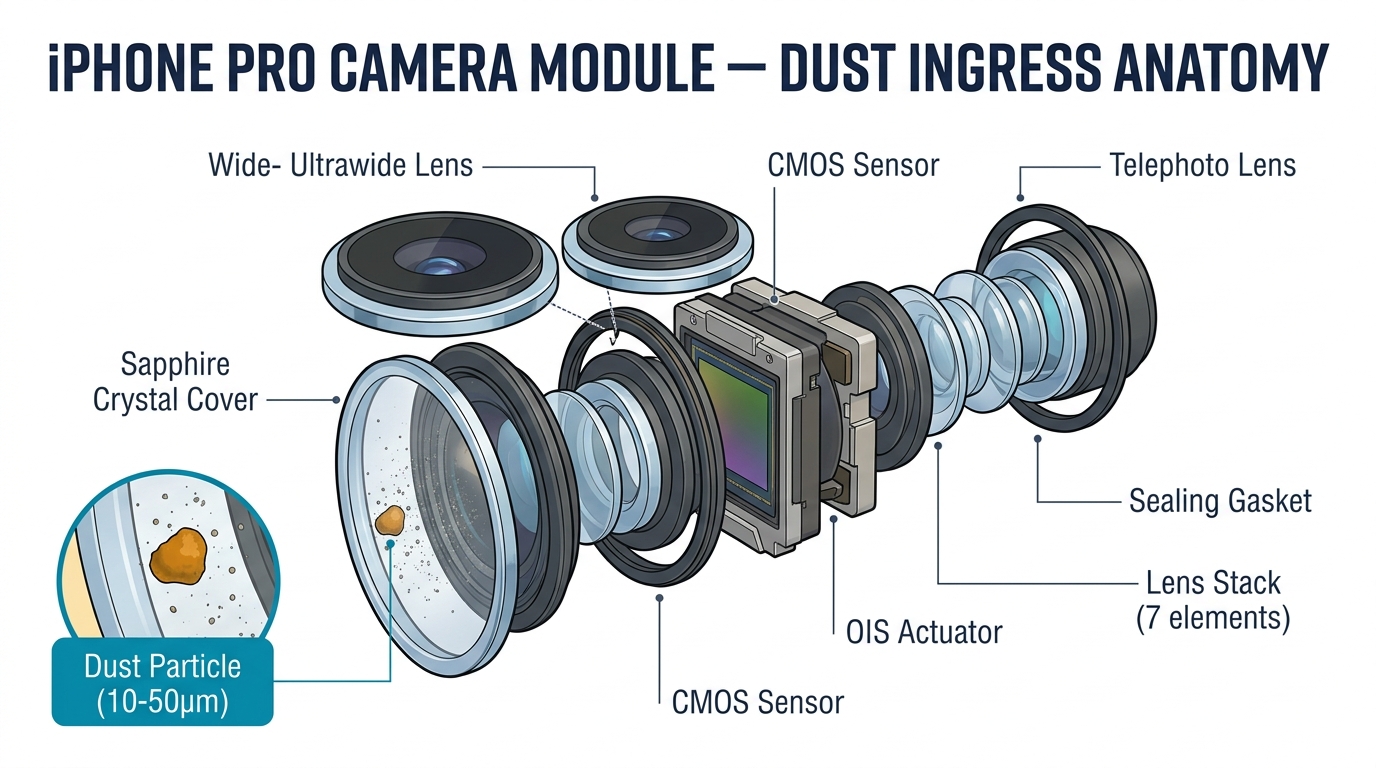
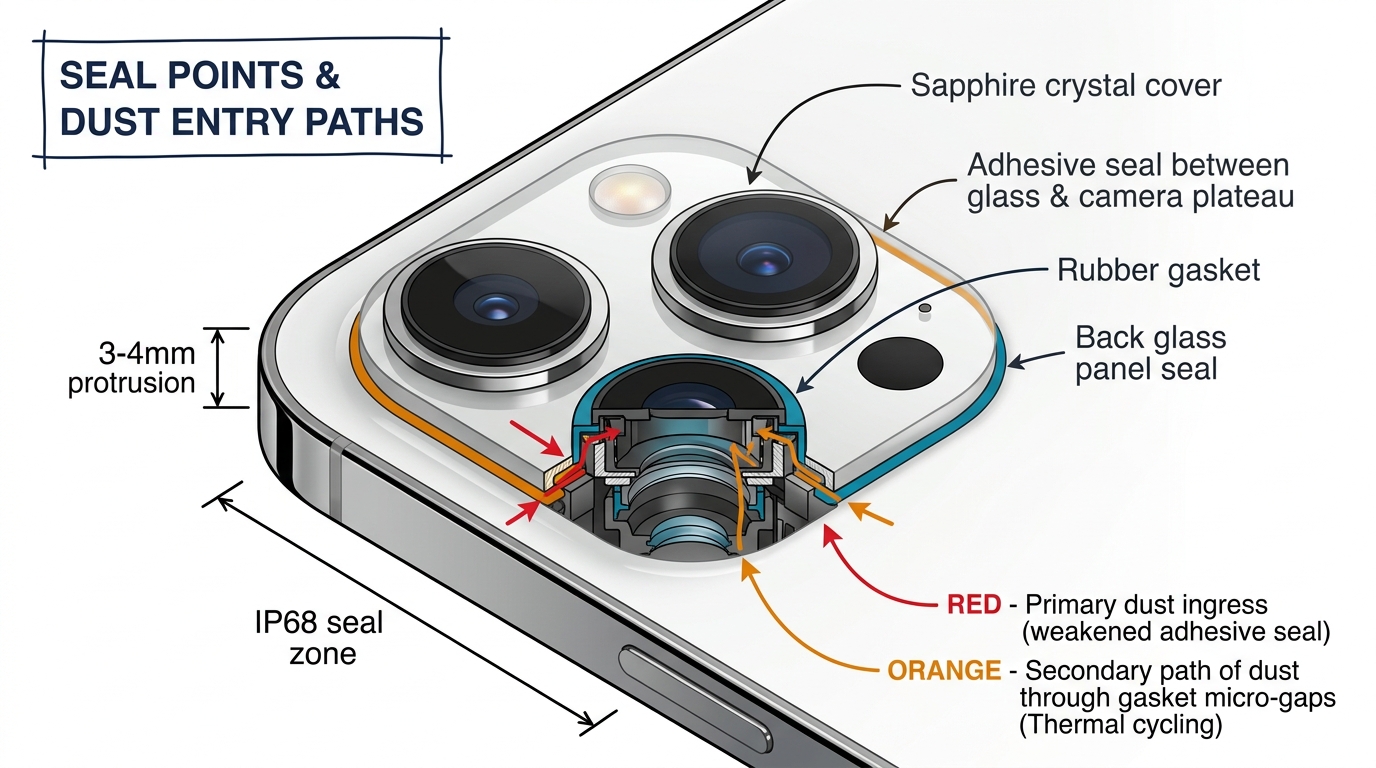
Pro models pack three camera lenses (plus a LiDAR scanner) into a raised plateau that protrudes 3–4mm from the back glass. Each lens has its own sapphire crystal cover, OIS actuator, and sealing gasket. More lenses means more seal points. More protrusion means more surface area exposed to pocket lint, debris, and impact.
On iPhone 15 Pro and later, iFixit's teardown revealed that the camera module sits beneath a removable back glass panel — an improvement for repairability, but the seal between glass and camera plateau relies on adhesive that weakens with thermal cycling and minor drops.
The iPhone 17 Pro introduced a new failure mode. iFixit's materials science analysis found that the anodized aluminum camera plateau is prone to "spalling" — the protective oxide layer flakes off at the sharp edges of the camera bump, even from light contact with keys or coins. A materials engineer consulted by iFixit explained that "Apple could have prevented this by making a more gradual curve and avoiding a relatively sharp corner." Once the anodized layer spalls, the exposed edge becomes a potential dust ingress point where the seal meets the chassis.
The Assembly Line Factor
A widely-discussed theory in the repair community points to Apple's assembly sequence as a contributing factor. According to a MacRumors forum investigation into iPhone 15/16 Pro dust prevalence, Apple's current process bonds the back glass as one of the final steps, meaning the camera lenses may face upward — exposed — during earlier stages of assembly. If these lines don't maintain full clean-room conditions at every stage, microscopic particles could settle onto sensors and lens elements before sealing.
This explains why brand-new iPhones arrive with dust already inside. One Apple Community thread about iPhone 15 Pro dust collected over 400 "Me too" responses from owners who found particles on day one.
IP68 Doesn't Mean Dustproof Forever
Apple's own fine print states: "Splash, water, and dust resistance are not permanent conditions and resistance might decrease as a result of normal wear." Every drop, temperature swing, and prior repair degrades the gaskets slightly. After 12–18 months of normal use, seals that were adequate at the factory may have micro-gaps.
Diagnosis: Is the Dust Worth Fixing?

Before touching any tools, determine what you're dealing with. Not all camera dust needs intervention — and some "fixes" create more problems than the dust itself.
The White Wall Test
- Open the Camera app and point it at a plain white wall or bright white screen
- Switch between all lenses: 0.5x (ultra-wide), 1x (main), 2x/3x (telephoto), and 5x (periscope on 15 Pro Max / 16 Pro)
- Look for persistent dark spots or hazy areas
If the spot moves when you switch lenses, it's likely on the external glass — wipe it off. If the spot stays fixed on one specific lens, dust has probably penetrated the sealed module. This is a screening test, not a definitive diagnosis — confirm with a magnified visual inspection of the lens before proceeding to disassembly.
The Decision Framework
| Dust Location | Impact on Photos | Recommended Action | Urgency |
|---|---|---|---|
| External glass surface | Soft focus, easy to see | Wipe with microfiber + IPA | Immediate, free |
| Lens edge (inside, cosmetic) | None — outside sensor field of view | Leave it alone | Low — monitor only |
| Sensor center (inside) | Dark spots, haze in all photos | Ultrasonic cleaning or module replacement | High |
| Multiple lenses affected | Multiple dark spots at different zoom levels | Module replacement | High |
The warranty gap you should know about: Apple's in-store diagnostic test captures a photo with each camera and runs automated analysis. If dust sits on the edge of the lens and doesn't show up in the test photo, the diagnostic passes — and the AASP may refuse free repair even if the dust is physically visible. One user in Turkey reported being told "this is not a hardware problem" and was offered only a paid camera swap despite the phone being under warranty.
Method 1: External Cleaning (Risk: None | Cost: $0)
Start here. In many cases, what looks like internal dust is actually oil residue, pocket lint, or debris trapped under a lens protector.
What you need:
- Microfiber lens cloth (not paper towels, not tissues)
- Isopropyl alcohol, 90% or higher concentration
- Chemical-free compressed air (optional)
Steps:
- Power off the iPhone
- If you have a lens protector installed, remove it completely. Glass lens protectors frequently trap dust between the protector and the sapphire lens, creating the appearance of internal contamination. Many users fix their "dust problem" just by removing the protector
- Apply a small amount of IPA to the microfiber cloth — never directly onto the lens
- Wipe each lens in a gentle circular motion
- Use compressed air at an angle (never perpendicular) to blow loose particles away from lens edges
- Check results with the white wall test
When this won't work: If the spot persists through all cleaning, the dust is inside the sealed module. External cleaning cannot reach it. Move to Method 2 or 3.
Method 2: Ultrasonic Cleaning (Risk: Medium | Cost: $30–80 Equipment)
Warning: Opening the phone to perform ultrasonic cleaning will void any remaining Apple warranty or AppleCare+ coverage, and compromises the IP68 water/dust resistance seal. Only proceed if the phone is out of warranty or the customer has explicitly accepted this trade-off.
This is the method that sparked a 51-comment thread on r/mobilerepair. Instead of replacing the $49+ camera module, you submerge it in an ultrasonic cleaning bath to shake loose internal dust. When it works, it saves the cost of a new module and takes about 30 minutes.
Equipment
- Ultrasonic cleaner ($30–80 for a basic unit; a jewelry-grade cleaner works fine)
- Camera Cleaning Solution ($15–25/bottle) — a specialized solvent designed for delicate optical surfaces
- Nitrile gloves and ventilation — this is not optional. Camera Cleaning Solution carries a Prop 65 cancer warning on the label. Work in a ventilated area or under a fume hood
- Standard phone opening tools (pentalobe screwdriver, suction cup, spudger, tweezers)
Step-by-Step Process
- Disassemble the iPhone to access the camera module. The disassembly path varies by model — most Pro models (iPhone 12 Pro through 15 Pro) require entering through the front display. iPhone 16 Pro opens from the rear glass. Always follow the iFixit guide for your specific model, as even one-generation differences change the procedure
- Disconnect and remove the camera module. On most Pro models, this involves disconnecting 2 ribbon cables and removing 3 Phillips screws. Do not damage the black silicone seals around board connections — these are your water and dust barriers
- Pour Camera Cleaning Solution into the ultrasonic cleaner tank — enough to fully submerge the camera module
- Place the camera module in the solution and run the ultrasonic cleaner for one full cycle (typically 3–5 minutes)
- Remove the module and let it dry completely. This is critical — reinstalling a damp module will cause condensation and potential short circuits. Allow at least 30 minutes, or use low-pressure compressed air to accelerate drying
- Reinstall the module, reassemble the phone, and test all cameras with the white wall test
When Ultrasonic Cleaning Works
- Light haze or film across the lens
- Fine dust particles that haven't bonded to the sensor coating
- Contamination introduced during a previous repair (fingerprints, adhesive residue)
When It Doesn't
- Heavy particle contamination embedded in the sensor surface
- Damaged OIS actuator (you'll hear buzzing or see unstable images even after cleaning)
- Cracked internal lens elements
- Dust that returns within weeks — one iPhone 15 Pro owner reported dust coming back after 4 authorized repairs including a camera replacement. If the phone's structural seal is compromised, cleaning is a temporary fix at best
The Honest Risk Assessment
Ultrasonic cleaning is not risk-free. You're submerging a precision optical assembly in solvent. Potential downsides:
- The cleaning solution may not fully evaporate from between tightly stacked lens elements
- OIS actuators can be affected by prolonged solvent exposure
- Reassembly without proper re-sealing means dust returns faster than before
- If the module is damaged during the process, you've now turned a cleaning job into a replacement job
For repair shops considering this as a service: test the process on a few sacrificial modules before offering it to customers. The margin is excellent ($45–75 profit per job) but the failure rate during your learning curve will eat into that.

Method 3: Camera Module Replacement (Risk: Low if Skilled | Cost: $125–259)
When cleaning isn't enough — or when the customer wants a guaranteed fix — module replacement is the definitive solution.
2026 Pricing Comparison
| Service Provider | Lens Glass Only | Full Camera Module | Notes |
|---|---|---|---|
| Apple Store (no AppleCare+) | N/A (Apple replaces full module) | $169 (standard) / $249 (Pro) | May classify as "other damage" = up to $599 |
| Apple Store (with AppleCare+) | N/A | $99 flat rate | Regardless of model |
| Third-party shop | $75–$130 | $125–$259 | Varies by model and region |
| DIY (self-sourced parts) | $20–$40 (wholesale glass) | $49–$63 (OEM module) | Tools + skill required |
Lens Glass vs. Full Module: When Each Applies
Lens glass only works when the external sapphire cover is cracked or chipped, but the internal sensor and OIS are fine. This is a 15-minute repair that prevents dust from entering through the crack. A cracked lens left unrepaired turns a $75 fix into a $250 module replacement within weeks.
Full module replacement is required when:
- Dust is on the sensor itself (confirmed by white wall test)
- OIS is damaged (buzzing sound, unstable image)
- Multiple lenses are contaminated
- The customer wants a clean diagnostic pass (no "Unknown Part" warnings — use genuine modules with Apple's Repair Assistant on iOS 18+)
Parts Pairing: What Repair Shops Need to Know
Since iPhone 12, Apple pairs camera module serial numbers to the logic board. Swapping in a nongenuine module triggers an "Unknown Part" notification in Settings. On iOS 18 and later, Apple's Repair Assistant tool allows calibration of genuine replacement modules — eliminating the "Unknown Part" warning and completing the pairing process so the camera functions as intended.
For repair shops, this means:
- Genuine OEM modules ($49–63 wholesale) work with Repair Assistant = no customer complaints
- Aftermarket modules ($4–20 from Alibaba) will trigger warnings and may lack full computational photography support
- The price premium for genuine parts pays for itself in reduced returns and customer trust
For Repair Shops: Pricing This Service in 2026
Camera dust cleaning and replacement is an underserved revenue stream. Most shops don't offer it because they don't realize the margin potential.
Revenue Per Method
| Method | Your Cost | Charge to Customer | Margin | Time |
|---|---|---|---|---|
| External cleaning | $0 (consumables only) | $15–25 (or free with other service) | ~$15–25 | 5 min |
| Ultrasonic cleaning | ~$5/job (amortized equipment + solution) | $50–80 | $45–75 (90%+ margin) | 30 min |
| Lens glass replacement | $20–40 (wholesale) | $75–99 | $35–79 | 15 min |
| Full module replacement (iPhone 15 Pro) | $49 (OEM wholesale) | $150–259 | $100–210 | 45 min |
Building a Tiered Service Menu
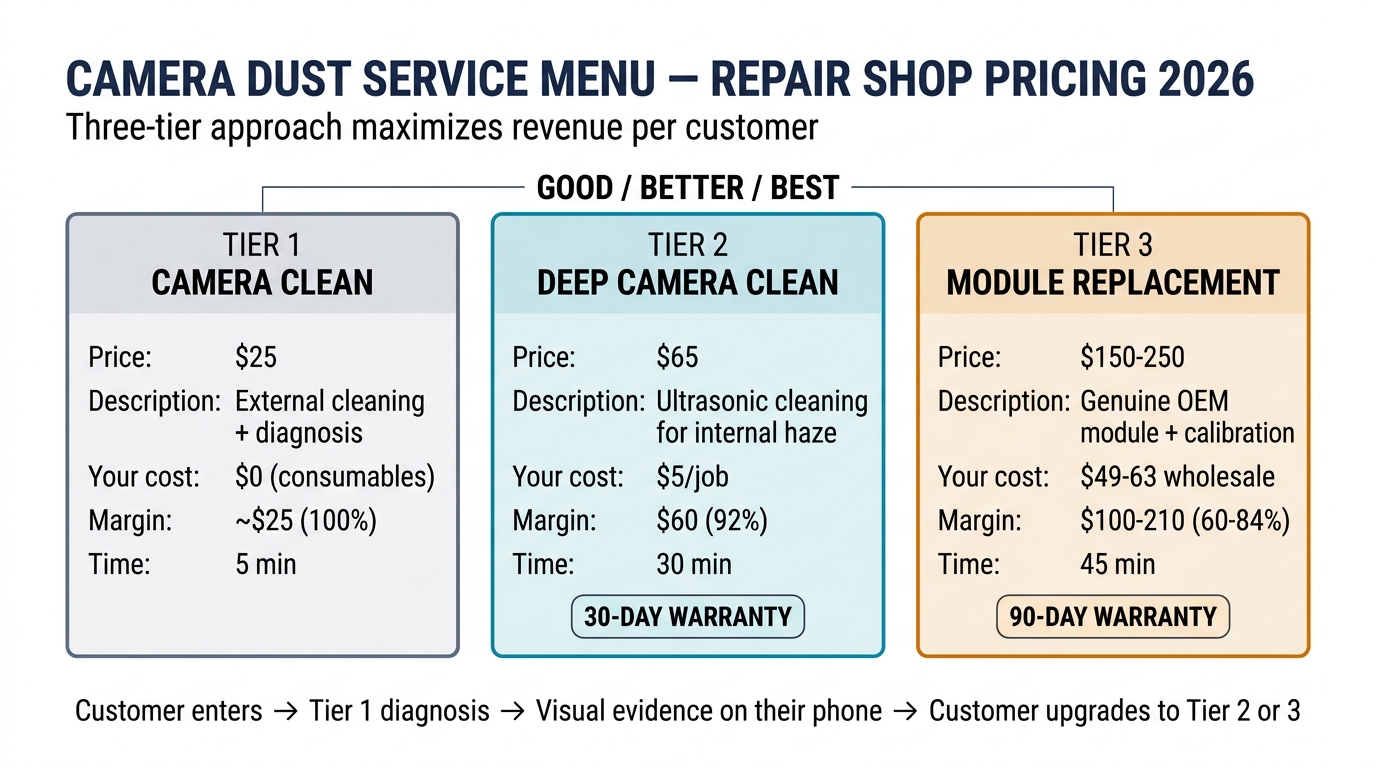
Offer all three as a Good / Better / Best menu:
- Camera Clean ($25): External cleaning + diagnosis. If dust is internal, upsell to the next tier
- Deep Camera Clean ($65): Ultrasonic cleaning for internal haze and light contamination. Include a 30-day warranty
- Camera Module Replacement ($150–250, model-dependent): Guaranteed fix with genuine OEM module. Include parts pairing calibration and a 90-day warranty
The "Camera Clean" tier costs you almost nothing but builds trust. Once you show customers the white wall test results on their own phone, many with internal dust will voluntarily upgrade to tier 2 or 3 — the visual evidence sells itself.
Wholesale Part Sourcing
OEM rear camera modules for iPhone 13–16 Pro models typically wholesale at $39–63 depending on the model and supplier. Key suppliers in the US include Mengtor ($48.95 for iPhone 15 Pro Max, with volume discounts at 5+ units dropping to $46.50). UK shops can source from Phone Parts (£39.99 per module) or Star Phone Parts.
Avoid the cheapest Alibaba listings ($4–20 range). These are almost always aftermarket copies that trigger parts pairing warnings and lack proper dust sealing — which means the customer's dust problem returns within months, and your reputation takes the hit.

Prevention: Stopping Dust Before It Starts
Whether you're advising a customer after a repair or protecting your own inventory, these measures reduce dust recurrence:
- Case with raised camera edges — the single most effective prevention. A case that extends 1–2mm above the camera plateau keeps the lenses from touching flat surfaces where they pick up debris. Cost: under $15
- Tempered glass lens protectors — controversial. They prevent scratches and absorb impacts, but cheap ones trap dust between the protector and the lens. If you recommend them, specify quality options that sit flush with no air gaps
- Proper re-sealing after any repair — if you've opened the phone for any reason (screen replacement, battery swap), verify the camera module gaskets are seated correctly. A screen that sits too high creates a gap where dust enters continuously
- Store phones camera-side up — gravity is simple physics. Phones left face-down on dusty surfaces collect debris in the camera rings
- Silica gel for humid environments — moisture causes condensation fog on internal lens elements. For repair shops in humid climates, store replacement modules in sealed bags with silica gel packs
When to Send the Customer to Apple
Not every camera dust case belongs in your shop. Here's when Apple is the better path:
- Phone is under 1-year warranty or has AppleCare+: Apple may cover the repair at no cost (warranty) or $99 (AppleCare+) if they confirm a manufacturing defect. Turnaround varies but is typically same-day. Don't compete with a potentially free repair
- Dust is truly cosmetic (edge only, no photo impact): If Apple's diagnostic passes, the customer might be stuck — but attempting a repair on a functional camera carries liability you don't need
- iPhone 16 Pro or later with periscope telephoto: The tetraprism lens assembly is significantly more complex than previous modules. Unless you've trained specifically on this component, the risk of damaging the periscope mechanism during cleaning outweighs the revenue
The diagnostic gap workaround: If a customer's dust is visible but Apple's diagnostic says "pass," advise them to request a Genius Bar appointment at an Apple Store (not just an AASP) and ask specifically for a visual inspection. Apple Stores generally have better diagnostic equipment, and Genius technicians may have more flexibility to escalate edge cases than third-party service providers.
FAQ
Can dust inside iPhone camera damage the sensor permanently?
Dust particles themselves rarely damage the sensor coating. The bigger risk is scratching — if you attempt to wipe a sensor directly or use compressed air at high pressure, particles can drag across the coating surface. Leave sensor-level dust to ultrasonic cleaning or module replacement.
Why does dust keep coming back after repair?
Two common causes: the phone's structural seal was compromised by a previous repair (screen or back glass that doesn't seat flush), or the camera module gasket wasn't properly re-seated during the dust cleaning. One iPhone 15 Pro owner went through 4 authorized repairs before concluding the chassis itself had a micro-gap allowing continuous dust ingress.
Is ultrasonic cleaning safe for iPhone camera modules?
It works for light contamination when done correctly — several repair technicians on r/mobilerepair report success. However, the cleaning solution carries health warnings (gloves and ventilation required), and prolonged exposure can affect OIS actuators. Test on a sacrificial module first before offering it as a customer service.
What about dust in the front (Face ID) camera?
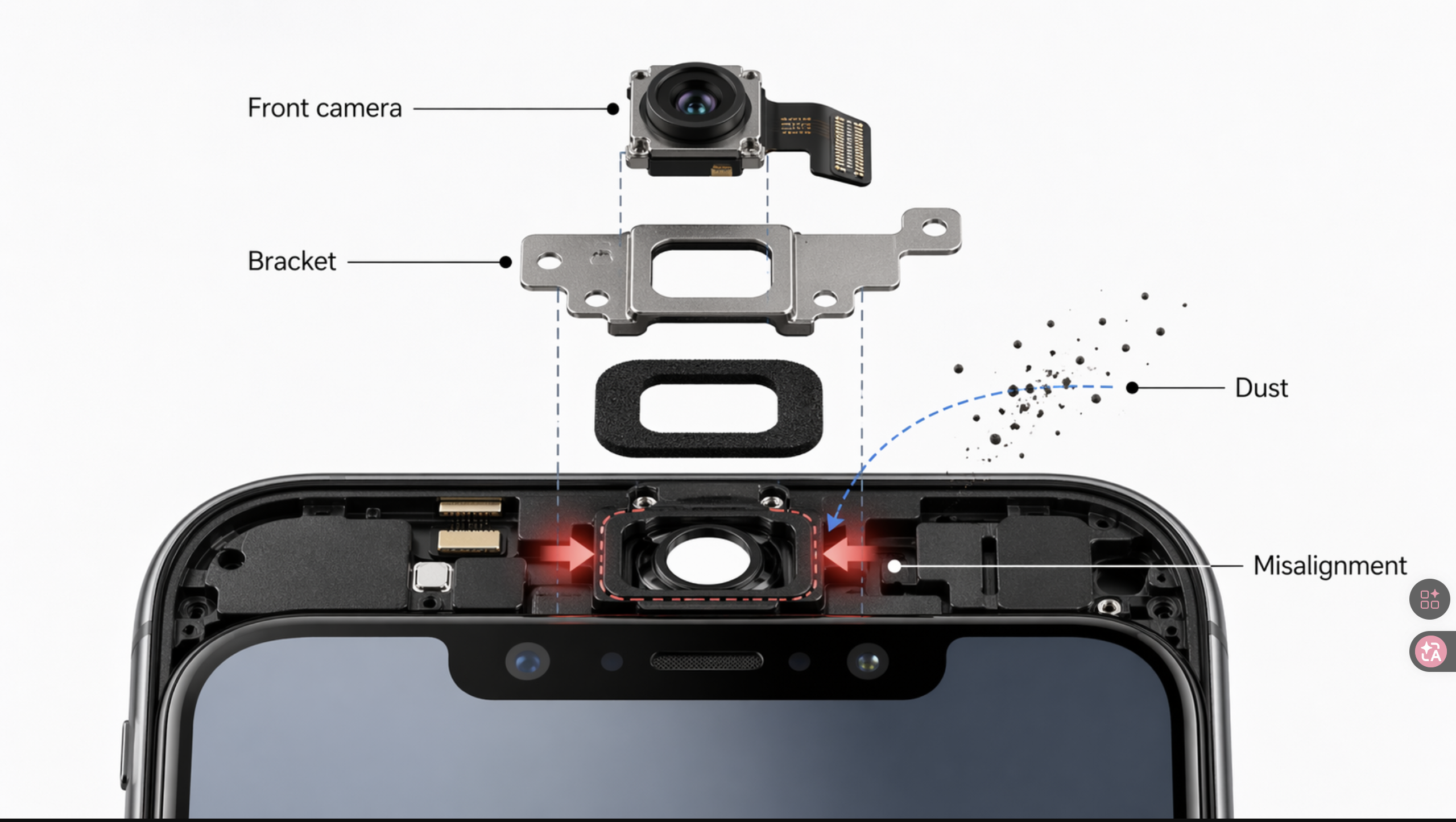
Front camera dust is a separate issue with different causes. Since the Face ID redesign, the front camera seal is weaker than on older models, and dust commonly enters through the ear speaker mesh area. One community-tested trick: hold the phone vertically with the volume buttons pointing down and firmly tap the back near the top edge with a plastic tool — this can dislodge particles from the visible field. If that doesn't work, front camera module replacement is typically cheaper ($21–27 wholesale) than rear modules.
Does replacing the camera module trigger an Apple warning?
Yes, since iPhone 12. Apple pairs camera serial numbers to the logic board. Nongenuine modules display an "Unknown Part" notification. On iOS 18+, genuine modules can be calibrated via Apple's Repair Assistant tool, which removes the warning and restores full computational photography features.
How much does camera dust repair cost at Apple vs. a repair shop?
Apple charges $249 for Pro model camera replacement (or $99 with AppleCare+). Third-party shops charge $75–130 for lens-only replacement and $125–259 for full module swap, depending on model and region. Ultrasonic cleaning at independent shops typically runs $50–80.
Bottom Line
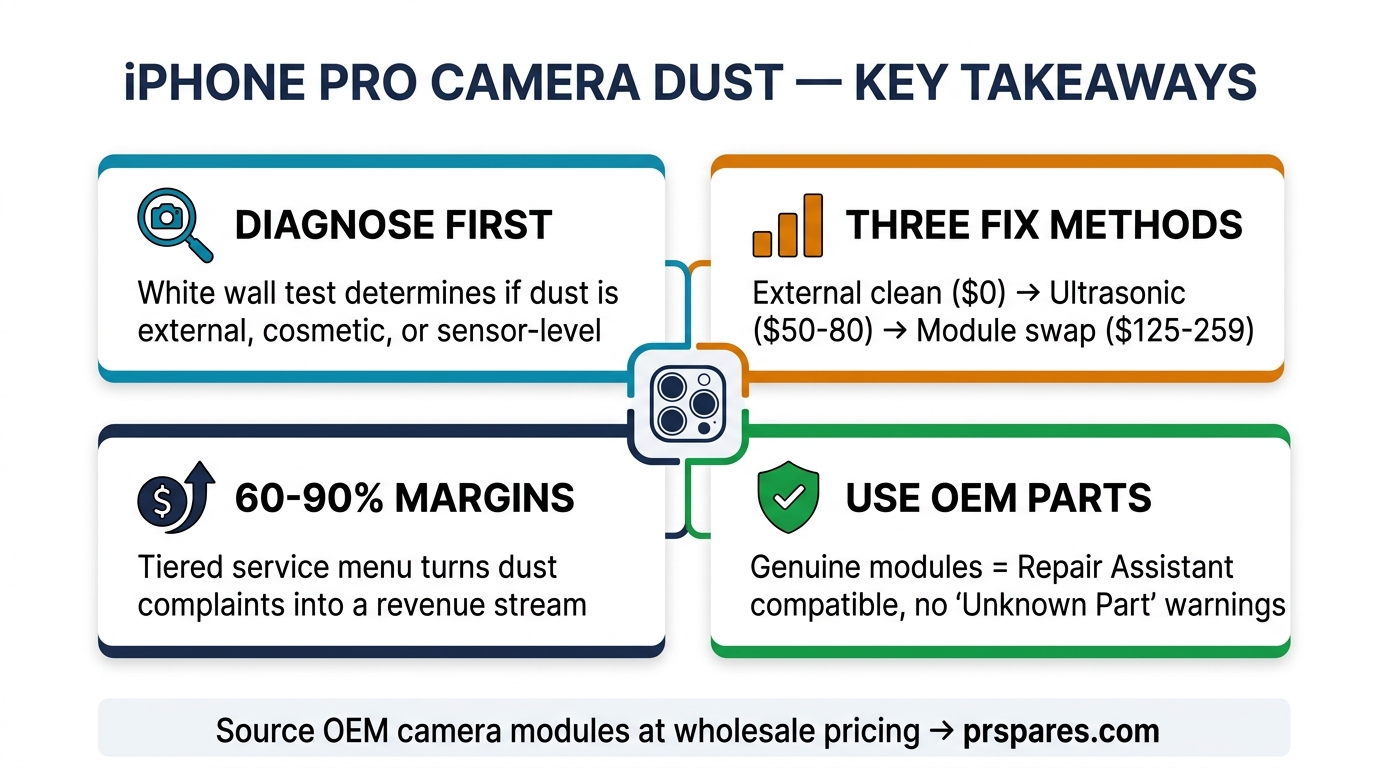
iPhone Pro camera dust is a design-level issue that affects every generation from iPhone 11 Pro through 17 Pro. The fix isn't one-size-fits-all — it ranges from a free wipe to a $249 module swap depending on where the dust sits and how it affects image quality.
For repair shops, this is an underpriced service category with 60–90% margins. The key is offering a tiered menu (clean → deep clean → replace) and using genuine OEM parts that don't trigger "Unknown Part" warnings or leak dust again weeks later.
Don't risk your shop's reputation on cheap aftermarket modules with poor dust sealing. Browse our OEM-quality iPhone camera parts or request a wholesale quote — we stock fully sealed, calibration-ready modules for iPhone 13 through 16 Pro.