How to Diagnose iPhone Display IC Faults Without Tearing It Apart — The 3uTools Real-Time Screen Method (2026)
Or: why your iPhone 14 Pro is flickering and how to tell if the fault is the screen or the board — before you remove a single screw.
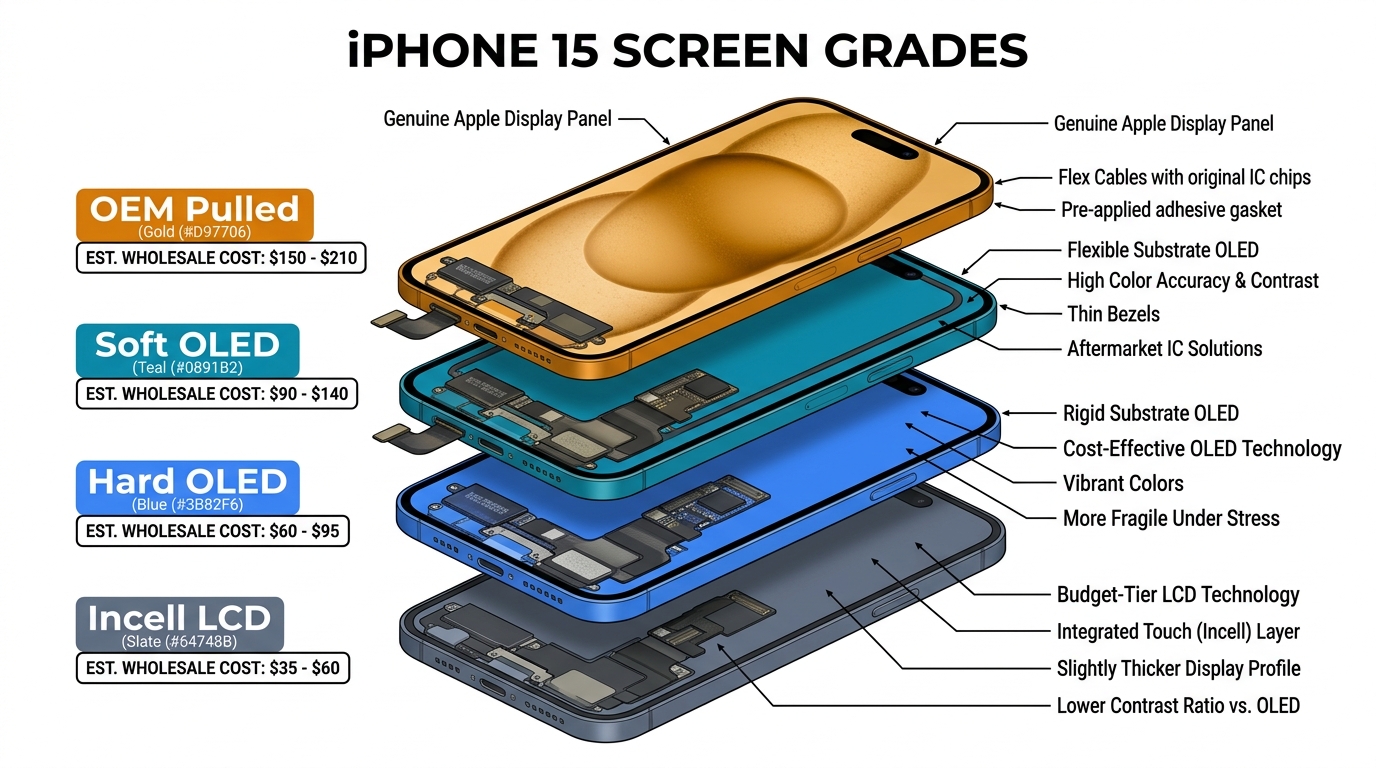
iPhone display IC fault diagnosis used to mean a full teardown, a hot-air station, and a dedicated JC-class programmer. In 2026 it can start with a software test. An iPhone 14 Pro Max soft-OLED costs around $69.66 wholesale (see table below) — so if you swap the screen and the flicker comes back ten minutes later because the real fault was on the logic board, you just burned the part, the labor, and the customer's trust in one go.
This guide walks through the Rockney Briskey method posted to r/mobilerepair: Developer Mode plus 3uTools Realtime Screen, used as a triage test before a screen comes off. It tells you whether iPhone screen flickering is upstream of the display connector (board, IC cluster, SoC) or downstream of it (flex, panel, glass). It is not root-cause analysis — we'll be honest about what it cannot see — but it pays for itself after the first saved part.
Sourcing Replacement Screens in Bulk?
Incell / Hard OLED / Soft OLED grades — wholesale pricing, grade comparison on request.
Get Wholesale QuoteSymptoms that should trigger this test
Pull the phone before you teardown if the customer describes any of this:
- Purple spots, bars, or full-screen tint — especially after a drop
- Horizontal or vertical flicker once iOS fully boots
- Random reboots after the lock screen appears
- Always-On Display artifacts on iPhone 14 Pro / 15 Pro / 16 Pro
- Half-screen black or a dead pixel row
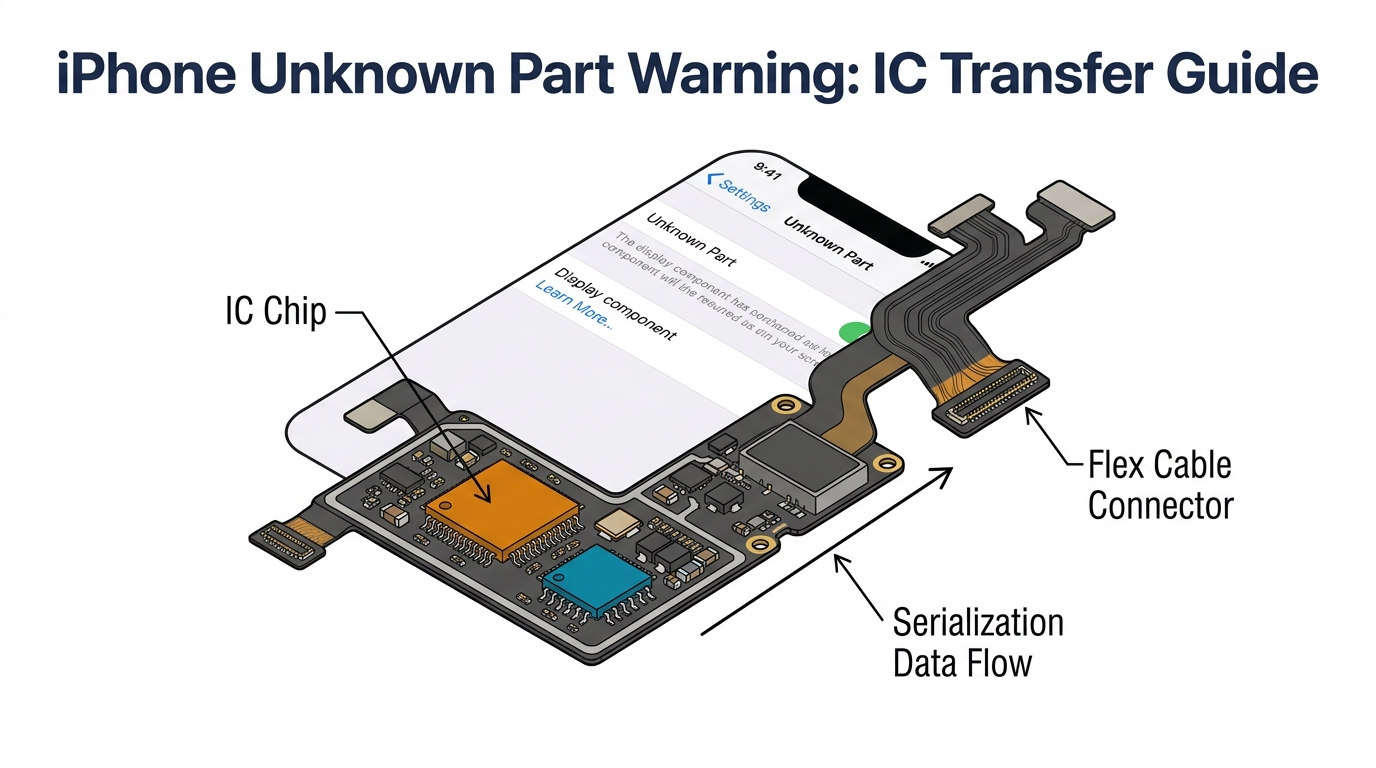
- "Finish setting up your display" / "Unknown Part" warning after a previous swap
Every one of those symptoms can also be caused by a damaged proximity sensor flex, a leaking rear camera module, or an SoC GPU failure that mimics a DDIC fault. Don't blame the display IC before you've actually tested it.
What is a "Display IC" in 2026, actually?

There is no single chip you can buy labeled iPhone display IC. When technicians say it, they mean one of several things — and the answer matters because the transfer procedure, the programmer you need, and the cost all change.
Flex-resident (IC transfer candidates on refurb-workflow Pro OLED assemblies):
- DDIC (Display Driver IC) — on the display's own flex cable on the Pro-class OLED assemblies discussed here. Turns the bitstream from the logic board into row/column drives for the OLED matrix.
- Touch IC on the flex. As u/luckyspic described the flex layout in r/mobilerepair 17jjyiq: "Left chip is display, right chip is touch." Refurb workflows treat both as flex-resident parts that move with the donor.
Board-resident (board repair, not flex transfer):
- TPS65657B0 display power PMIC — confirmed as a display power supply on the iPhone 14 Pro Max logic board in iFixit's chip ID teardown. When this rail drops, the panel goes dark even though the glass is fine.
- U9100 (338S00616) — a separate board-side display-related IC identified on repair.wiki's 12–16-series display-fault guides. It is not the same part as TPS65657B0; don't treat them as interchangeable. Both are schematic + board-view jobs, not IC transfer.
- Backlight IC (U1501 and relatives). Irrelevant on OLED models, but still relevant on later LCD iPhones — XR, 11, and SE 2/3 all use LCDs, so backlight faults remain a real call on those handsets. Don't confuse with Touch Disease on iPhone 6 Plus, which is associated with the Meson (U2402) / Cumulus (U2401) touch-controller area, especially board-flex damage around Meson per Sydney Microsoldering's breakdown.
"Swapping the display IC" isn't one procedure — flex-side transfer and board-level PMIC repair are completely different jobs.
Zero-teardown triage — do this first

Four things to try before you commit to a screen swap. All software-diagnostic, no teardown:
- Force-restart, then update iOS. A surprising share of "flickering" tickets are broken framework state a reboot fixes — always try it first.
- Disable True Tone and Auto-Brightness. A failing ambient-light sensor can drive visible PWM oscillation that looks like an IC fault.
- Settings → Accessibility → Motion → Limit Frame Rate. Forcing ProMotion devices to 60 Hz isolates glitches that only appear at 120 Hz.
- Pull panic logs from a Mac. Connect via USB, open Analytics Data, and scan
panic-fullentries for any display-side keywords. Don't trust a single code blindly — REWA Tech's restart-log guide notes that some codes likeDart-disp0 SMMU erroractually trace back to camera-side faults, so cross-reference before acting.
If nothing surfaces, move on.
The 3uTools Realtime Screen walkthrough for iphone display ic fault diagnosis
⚠️ Trust-dialog paradox — read this first. Realtime Screen is pairing-gated: if the host PC has already been trusted on a prior session the prompt may not reappear, but on first-time or reset pairing you have to tap Trust This Computer on the phone itself. If the glass is too damaged to confirm it and you're on a fresh PC, the fix is to temporarily fit a known-good donor screen long enough to tap through the dialog. Several techs have hit this exact wall in r/3uTools thread 1j2qop0.
Once the phone is paired:
Step 1 — Connect via USB to a Windows PC running 3uTools. Open Toolbox → Realtime Screen. Tap Trust on the phone when prompted.
Step 2 — Observe the mirrored feed alongside the physical screen. You are comparing what iOS is sending out (the mirror) against what the panel is actually showing (the glass).

Under the hood, 3uTools mirrors a USB-paired iOS screen-capture feed — conceptually similar to the QuickTime-style capture path Apple has exposed to desktop tools for years. Public 3uTools docs don't spell out the exact framework; treat this as a heuristic signal, not a proof-of-chip tool. In practice, a clean mirror alongside a corrupted physical panel strongly suggests the fault is downstream of the display connector; matching corruption on both sides suggests the fault is upstream of the connector. It will not pinpoint a specific IC, a bent connector pin, or a bypass cap — it only tells you which side of the display connector to look on.
Known start-up failure modes (all host-side, not phone hardware):
- Error code -15 (documented on iPhone 15 in a 3uTools Facebook thread) — reinstall doesn't always fix; check cable, port, and trust state before blaming the handset.
- "Failed to Initialize Device." Per 3uTools' 2026-03 troubleshooter, WeChat Channels Live, Douyin Live, Kuaishou Live, and OBS all hold the USB casting channel. Kill them before blaming the phone.
If any of these fire, the diagnostic is inconclusive — not a hardware signal. Re-run on a known-good PC or move to Branch 3 in the decision tree.
The 3-branch decision tree — Upstream / Downstream / Inconclusive
Rockney Briskey's original post framed this as a binary: mirror clean = screen, mirror dirty = IC. That's too clean. Real cases split three ways.
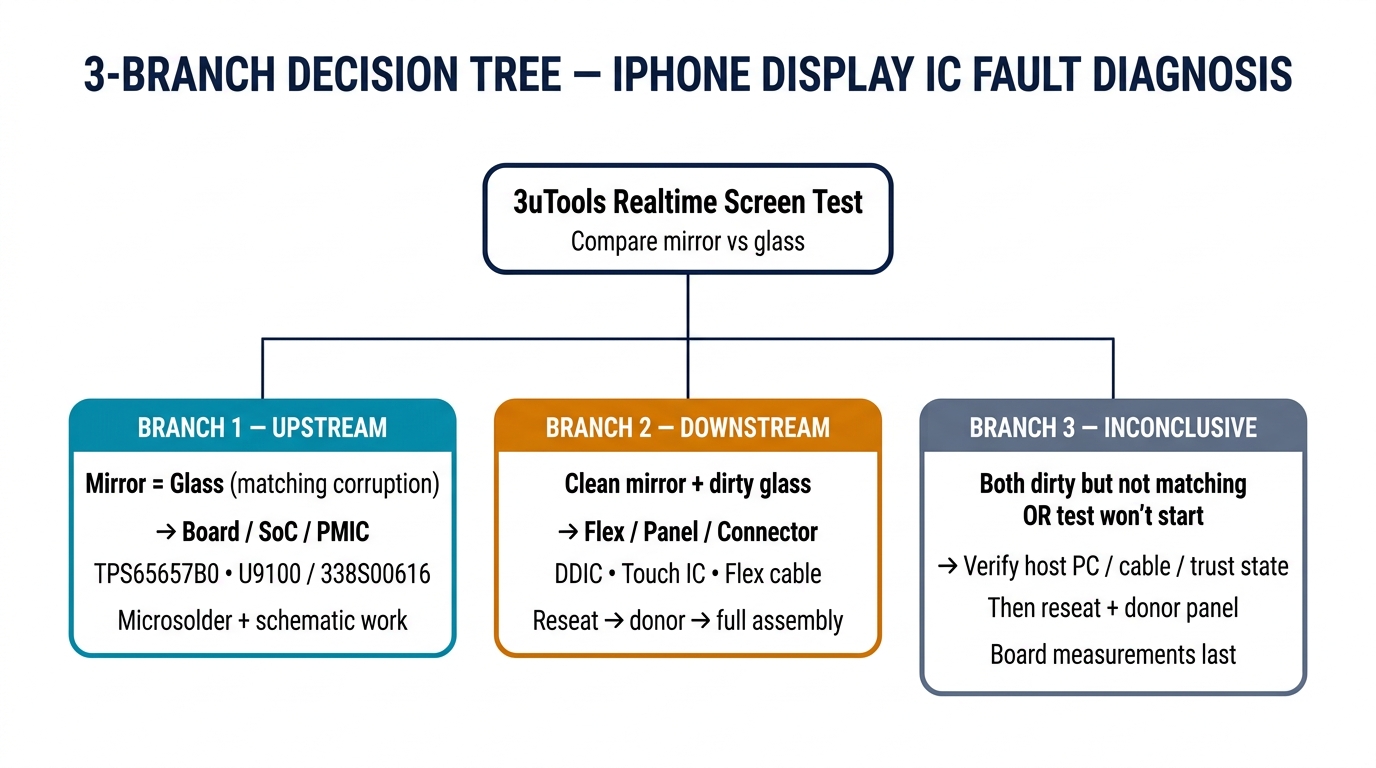
Branch 1 — Upstream / Board-level fault. Mirror shows exactly the same corruption as the glass. Fault is upstream of the display connector: SoC GPU, framebuffer corruption, or a crashing display driver. This is board repair territory, not IC transfer — microsolder, schematic work, thermal imaging, or a logic-board swap. REWA used a thermal camera to find a broken capacitor under a Touch IC on iPhone 14 Pro precisely because the 3uTools mirror couldn't see the fault. A dead display-power rail — either TPS65657B0 (iPhone 14 Pro Max, per iFixit) or a separate U9100 / 338S00616 board IC documented on repair.wiki for 12–16 series — also lives in this branch. Both are board-PMIC jobs, not flex-side IC transfers.
Branch 2 — Downstream / Panel or connector fault. Mirror is clean, glass is dirty. Do not order a screen yet. Reseat the display flex connector first (cheapest fix on the bench), then try a donor screen to isolate panel-versus-flex. Only then order the replacement. "Clean mirror + dirty glass" can also mask a bent connector pin, a dead pixel row, or cracked internal glass under a pristine top layer. Flex-side DDIC and Touch IC transfer candidates also sit here on iPhone 11–15 refurb work.
Branch 3 — Inconclusive / need more data. Mirror and glass are both dirty but not a clean match, or Realtime Screen refuses to start. Don't force a call on this branch. A "Realtime Screen fails to launch" symptom usually traces back to trust / pairing state or a USB channel conflict (see the streaming-software list below), not a hardware fault. Verify host PC, cable, trust, and kill any live-capture software; then do the Branch 2 reseat-plus-donor sequence; only then move to board measurements. This is where most techs go wrong — forcing a binary call on an inconclusive signal is how a $70 part gets wasted.
The honest limit. The mirror separates "upstream of the connector" from "downstream of the connector". It does not specifically identify which chip in the downstream cluster is bad, nor does it prove a board PMIC fault versus a logic-board trace failure. Everything past the three branches still needs a board view and schematic.
Model-by-model economics — IC swap, full screen, or JCID?
| Model | ProMotion | TPS65657B0 | iOS 18+ pairing | REPART Soft OLED 2026 | JCID Diagnostic OLED 2026 | Recommended path |
|---|---|---|---|---|---|---|
| iPhone 11 | ❌ | ❌ | Mild | ~$22 | n/a | Full screen — IC swap not worth it |
| iPhone 13 Pro Max | ✅ | ❌ | Enforced | $45.75 | $57.55 | Full screen or JCID |
| iPhone 14 Pro | ✅ | ✅ | Enforced | $70.46 | $114.99 | JCID if no JC V1SE; else IC transfer + REPART |
| iPhone 14 Pro Max | ✅ | ✅ | Enforced | $69.66 | $132.99 | JCID is the highest-margin path in 2026 |
| iPhone 15 Pro | ✅ | ✅ | Enforced + iOS 26.1 | $85.76 | Listed | JCID or full screen + disclosure |
| iPhone 15 Pro Max | ✅ | ✅ | Enforced + iOS 26.1 | $84.95 | Listed | Same as 15 Pro |
| iPhone 16 Pro Max | ✅ | ✅ | Enforced + full pairing | $56.33 | In development | Standard REPART + written disclosure |
REPART prices verified on irepart.com/collections/screen on 2026-04-11. JCID diagnostic-compatible OLED prices from ecufixtool.com's JCID lineup.
On iPhone 16-series, don't bother with the IC swap. r/mobilerepair consensus is blunt — u/Gloomy-Map2459 in thread 1qz41te: "No reason to do display IC swaps on the 16 series. You don't gain any features."
For iPhone 12–16, the IC transfer isn't dead — it's a JC-programmer workflow now. repair.wiki's guide documents two JC-programmer methods, both of which require a JC V1SE or equivalent programmer: Method 1 reads the donor's MTSN with the programmer before you desolder, and rewrites it after transfer; Method 2 is a post-transfer rescue — with the new display already installed, connect the programmer and run its "Fix True Tone" / MTSN-rewrite flow against the installed panel. Method 2 is not a software-only shortcut; both methods need the hardware. If you don't own a JC V1SE at all, the JCID Diagnostic-Compatible OLED — factory-pre-paired so no IC move or MTSN write is needed — is the profit-maximizing path. The premium over REPART varies by model: roughly $12 on iPhone 13 Pro Max, ~$44 on 14 Pro, and ~$63 on 14 Pro Max (all from the table above).
When this method gives you the wrong answer
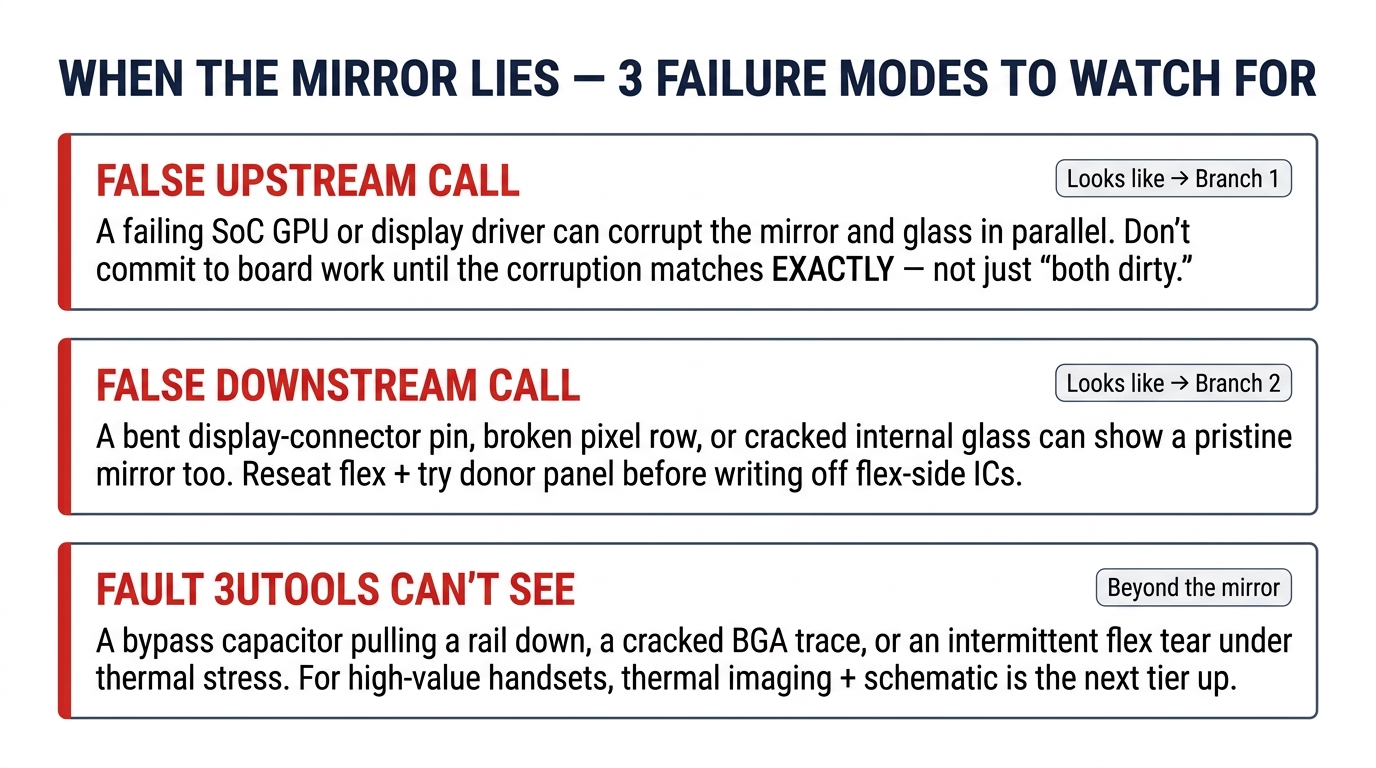
Save yourself the embarrassment of ordering a $70 part on a bad call:
- False "upstream" call (looks like Branch 1): a failing SoC GPU or display driver can corrupt the captured stream and the glass in parallel, but don't jump to board work until you confirm the corruption is exactly mirrored — not just "both dirty." An imperfect match is Branch 3 (Inconclusive), not Branch 1.
- False "downstream" call (looks like Branch 2): a bent display-connector pin, a broken pixel row, or cracked internal glass can produce a pristine mirror too. Reseat the flex and try a donor panel before writing off the flex-side ICs.
- Fault 3uTools can't see at all: a bypass capacitor pulling a rail down, a cracked trace under a BGA, an intermittent flex tear under thermal stress. For root-cause work on high-value handsets, thermal plus schematic is still the next tier up.
3uTools Realtime Screen is a triage heuristic, not a root-cause tool. It separates upstream from downstream faults but does not point to a specific chip.
FAQ
How do I tell if an iPhone screen or the logic board is at fault? Run the 3uTools Realtime Screen test above. Clean mirror with corrupted glass points downstream (panel, flex, or connector). Matching corruption on both sides points upstream (SoC, GPU, display driver, board PMIC). An inconclusive result — both dirty but not a clean match, or the test refuses to start — means verify host PC / trust / cable first, then reseat the flex.
Does flickering always mean hardware damage? No. Force restart, disable True Tone and Auto-Brightness, and limit frame rate to 60 Hz first. A meaningful share of "flickering" tickets are software state and go away after a reboot.
How much does it cost to fix an iPhone display IC? Depends on where the IC lives. Flex-side DDIC/Touch IC work is usually a full-flex or full-assembly swap — $45–85 wholesale for iPhone 13 Pro Max through 15 Pro Max soft OLEDs. Many shops prefer donor-harvested ICs, but standalone chips are also sold through aftermarket component vendors. Board-side PMIC work on TPS65657B0 or the separate U9100 / 338S00616 rail is a microsolder job with shop-hour pricing, not a part price. JCID diagnostic-compatible panels run $115–133 and skip the transfer entirely.
Can a cracked iPhone screen damage the motherboard? Rarely. Impact energy that cracks glass can bend the display connector; true board-level damage is uncommon unless the impact was severe.
What is the most common cause of iPhone screen failure? Drop impact cracking the OLED encapsulation, followed by liquid ingress via the camera cutout. Pure display-IC deaths without a physical event are a minority.
"Unable to verify this iPhone has a genuine Apple display" — what does it mean? iOS read the pairing data and didn't find a match. Use a JC V1SE to copy MTSN before transfer, or buy a JCID diagnostic-compatible panel.
Does iOS 18 block IC transfer? No — it changes the procedure. A naked transfer without MTSN pre-copy leaves the "Finish repairing your display" message, but repair.wiki documents both pre-transfer and post-transfer workflows.
Touch IC vs Display IC — what's the difference? Touch IC processes capacitive finger input; DDIC drives OLED pixels. On iPhone 13 Pro and later they sit side-by-side on the same flex cable.
Is it worth replacing the display IC or the whole screen? iPhone 11–13: full screen wins on labor ROI. iPhone 14 Pro–15 Pro Max: JCID diagnostic-compatible panels beat both. iPhone 16: don't IC-swap at all.
Credit and next steps
The 3uTools Realtime Screen method is Rockney Briskey's discovery, posted to r/mobilerepair with his iPhone 14 Pro purple-artifact photo. Owed credit.
When the test points to a full-screen replacement, see our related coverage on INCELL vs Soft OLED vs Hard OLED cost and margin, the camera-after-screen-replacement fix list, and how to handle aftermarket-screen customer complaints. PRSPARES stocks REPART Ultra Soft OLED, Prime Soft OLED, and INCELL tiers for iPhone 11 through 16 Pro Max with volume discount tiers — request a wholesale quote for current 2026 stock and pricing.