How Repair Shops Can Buy Phone Screens in Bulk Without Increasing Return Rates

Buying phone screens in bulk is the practice of ordering 100+ display units per purchase to cut per-unit cost, and it pays off only when grade mix, incoming QC, and return tracking keep the defect rate flat. Buying in bulk saves money — that's the theory. In practice, many repair shops that buy phone screens in bulk see their return rate double within two months, from 2-3% to 6-8%.
We've tracked this pattern across hundreds of repair shop accounts. A shop doing 8–12 repairs per day moves from ordering 20 screens at a time to 150+ screens per order. Unit cost drops 10–15%. But returns jump from 2–3% to 6–8%. The savings evaporate — and sometimes go negative.
The problem isn't bulk buying itself. It's how most shops approach it. This guide covers the specific mistakes that inflate return rates on bulk orders and the systems that prevent them — so you can buy phone screens in bulk and actually keep the cost savings.
Sourcing Replacement Screens in Bulk?
Incell / Hard OLED / Soft OLED grades — wholesale pricing, grade comparison on request.
Get Wholesale QuoteWhy Bulk Buying Phone Screens Often Increases Returns
Before fixing the problem, understand what causes it. Return rate increases on bulk orders come from three predictable sources.
Wrong Grade Mix
A shop ordering 20 screens at a time adjusts naturally — they order what they need this week based on what customers are asking for. When they jump to 150 units, they guess. And they guess wrong.
The most common mistake: over-ordering the cheapest grade. Incell screens at $8–$12 look like the best margin play, so buyers load up. But if 40% of your customers expect OLED-level quality and you're installing Incell, those customers come back complaining about dim displays and color shift. That's not a defect — it's a grade mismatch that creates returns.
Skipping Incoming QC
When 20 screens arrive, you can check each one in 10 minutes. When 150 arrive, most shops open the box, spot-check 2–3, and shelve the rest. Bad units get discovered during installation — after the customer is already waiting. This creates rush re-repairs, wasted labor, and sometimes a refund when the second screen also has issues because the whole batch has a problem you didn't catch.
Over-Ordering Slow-Moving Models
Bulk ordering encourages stocking "just in case" models. That iPhone 12 Mini stock sits for 3 months. Screens in storage can develop issues — adhesive degradation, flex cable oxidation in humid environments, touch layer sensitivity changes. A screen that tests fine in March may fail in June. Old inventory is a silent return rate driver.
How to Build a Grade Mix Strategy Before You Buy Screens in Bulk
Your grade mix should mirror your customer base, not your margin aspirations. Here's how to calculate it.
Step 1: Audit Your Last 30 Days of Repairs
Pull your repair records and categorize each screen repair by what the customer actually wanted:
| Customer Segment | What They Say | Grade Match | Typical % of Repairs |
|---|---|---|---|
| Budget ("cheapest option") | "Just make it work" | Incell LCD | 25–35% |
| Standard ("good quality, fair price") | "Something decent" | Hard OLED | 35–45% |
| Premium ("best you've got") | "I want it like original" | Soft OLED | 15–25% |
| OEM-only ("original parts only") | "Only genuine Apple" | OEM Refurbished | 5–10% |
Step 2: Map Models to Volume
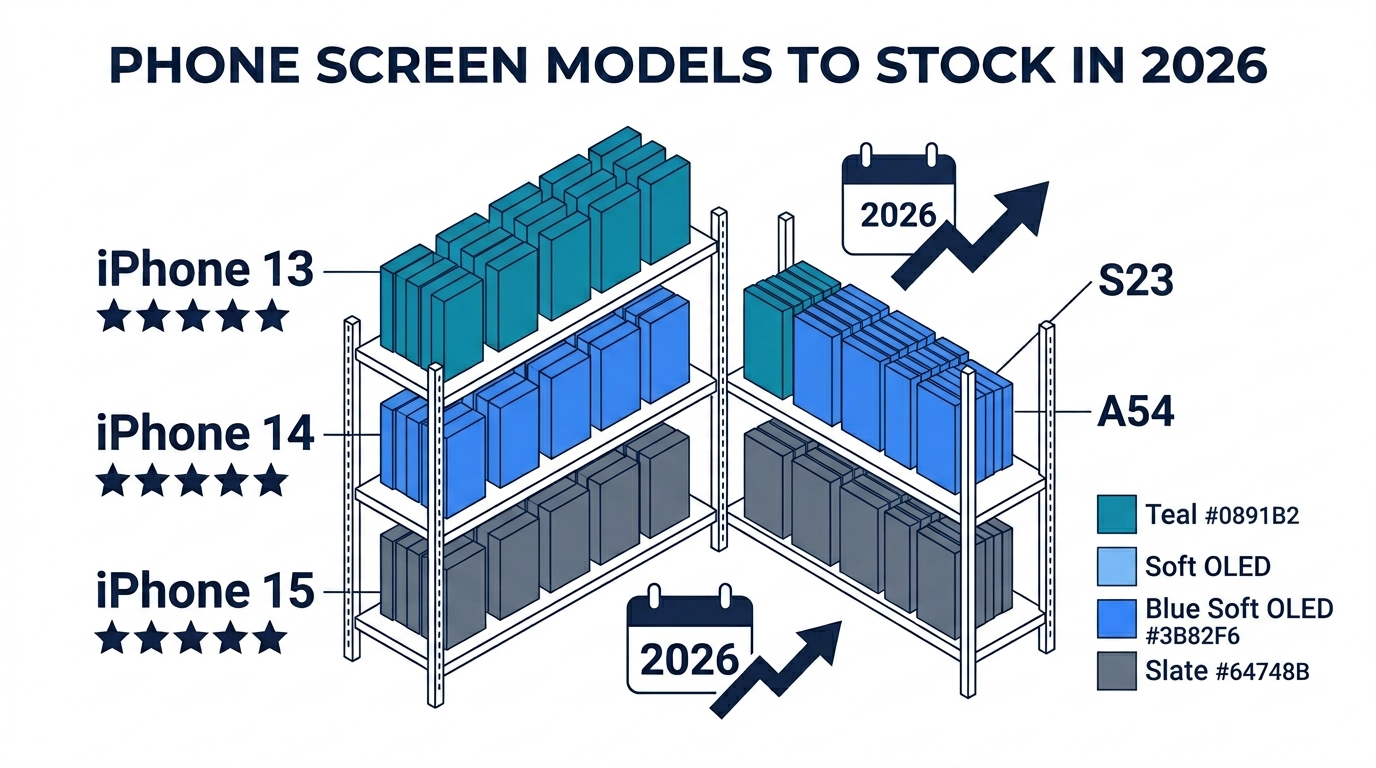
Not all iPhone models sell equally. In most US/UK markets in 2026, repair volume breaks down approximately:
| Model | % of iPhone Repairs |
|---|---|
| iPhone 14 / 14 Plus | 25–30% |
| iPhone 13 / 13 Mini | 20–25% |
| iPhone 15 / 15 Plus | 15–20% |
| iPhone 12 / 12 Mini | 10–15% |
| iPhone 15 Pro / Pro Max | 8–12% |
| Others (SE, 11, older) | 5–10% |
Step 3: Calculate Your Bulk Order
Multiply your daily repair count × 28 days × model percentage × grade percentage. Example for a shop doing 10 screen repairs per day:
| Model | Grade | Calculation | Order Qty |
|---|---|---|---|
| iPhone 14 | Hard OLED | 10 × 28 × 27% × 40% = 30 | 30 |
| iPhone 14 | Incell | 10 × 28 × 27% × 30% = 23 | 23 |
| iPhone 13 | Hard OLED | 10 × 28 × 22% × 40% = 25 | 25 |
| iPhone 13 | Incell | 10 × 28 × 22% × 35% = 22 | 22 |
| iPhone 15 | Hard OLED | 10 × 28 × 17% × 40% = 19 | 19 |
| iPhone 15 | Soft OLED | 10 × 28 × 17% × 25% = 12 | 12 |
| iPhone 12 | Incell | 10 × 28 × 12% × 50% = 17 | 17 |
Total: ~148 screens. Each one matches a real demand pattern — not a guess.
The rule: Never order a grade/model combination that you can't sell within 4 weeks. Anything beyond 4 weeks of stock becomes a depreciation risk and a quality risk.
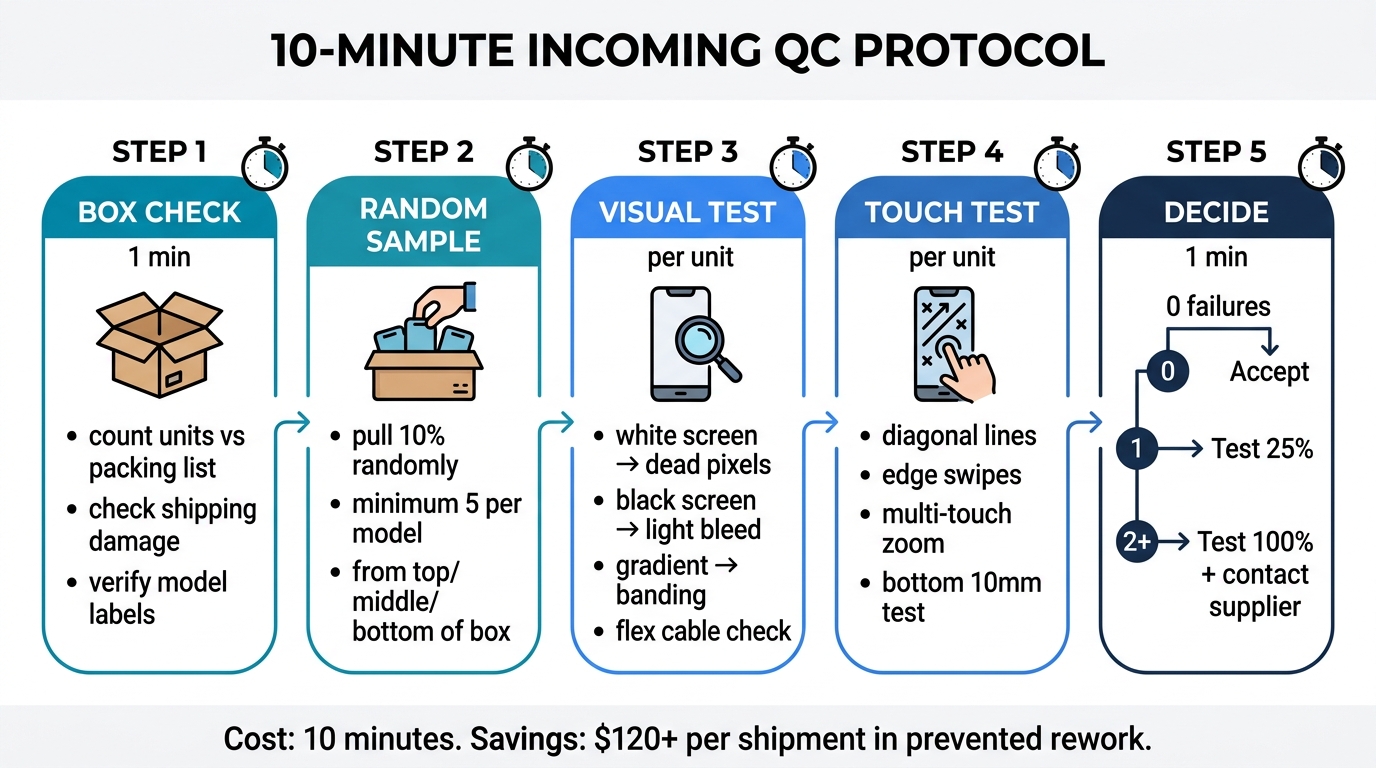
The 10-Minute Incoming Inspection Protocol for Bulk Phone Screens
This is the single highest-ROI activity in your bulk buying process. Ten minutes of inspection when screens arrive prevents hours of rework and customer disputes later.
What You Need
- Screen testing jig (or 2–3 test phones covering your top models)
- Full-white, full-black, and color gradient test images saved to the test phone
- A well-lit workspace (natural light or 5000K lamp)
- 10 minutes per delivery
The Protocol
Step 1: Box-Level Check (1 minute)
- Count units against packing list
- Check for shipping damage — crushed corners, moisture indicators triggered
- Verify model labels match what you ordered
Step 2: Random Sample Pull (2 minutes)
- Pull 10% of units randomly (minimum 5, maximum 15 per model/grade)
- From different positions in the box — top, middle, bottom
Step 3: Visual Inspection Per Sample (1 minute each)
- Power on via test jig
- Full-white screen: check for dead pixels, yellow spots, backlight bleed
- Full-black screen: OLED should be completely dark, no light leakage
- Color gradient: look for banding or abrupt transitions
- Flex cable: check for bends, cracks, or loose connectors
Step 4: Touch Test Per Sample (1 minute each)
- Draw diagonal lines corner to corner in a drawing app — should be smooth with no gaps
- Test all four screen edges — swipe from each edge
- Multi-touch: pinch-to-zoom should track both fingers accurately
- Test the bottom 10mm of the screen — this is where cheap ICs fail first
Step 5: Decision (1 minute)
- 0 failures in sample: accept the shipment
- 1 failure in sample: expand testing to 25% of that model/grade
- 2+ failures in sample: isolate that model/grade, test 100%, and contact supplier immediately
Buying your first bulk order and want to reduce risk? We include a QC report with every shipment showing test results per unit. Tell us your model mix and volume — we'll recommend the grade combination that fits your customer base. Request a quote.
What This Prevents
On a 150-unit order with a 4% incoming defect rate, that's 6 bad screens. Without incoming QC, each bad screen costs you:
- 30 minutes wasted installation labor ($15–$25)
- Customer wait time and dissatisfaction
- Possible refund or free re-repair with a new screen
- Review damage if the customer posts online
Six bad screens × $20 average rework cost = $120 in hidden losses. The 10-minute inspection costs you nothing but catches the problem before it reaches a customer.
Match Screen Grades to Customer Segments When You Buy in Bulk
The grade-customer mismatch is the return rate killer most shops ignore. Installing the wrong grade isn't a defect — but the customer treats it like one.
How Mismatches Create Returns
| Situation | What Happens | Result |
|---|---|---|
| Budget customer gets Soft OLED | They're happy, but you lost $15–$20 margin | Over-spending, not returns |
| Premium customer gets Incell | Screen works but looks dim, colors are off | Customer returns within 48 hours |
| Standard customer gets old-stock Incell | Touch lag after iOS update broke generic IC | Functional return — "screen stopped working" |
The most expensive mismatch is #2: a premium customer who received a budget screen. They don't just return — they leave a 1-star review and tell friends. That $8 screen costs you $200 in lost future revenue.
Build a Grade Menu for Your Customers
The shops with the lowest return rates don't just stock different grades — they present them as options at the point of sale:
Option A — Budget Repair ($45–$60)
- Incell LCD screen
- Visible quality difference vs. original (explain upfront: "colors will be slightly different")
- 30-day warranty on the repair
Option B — Standard Repair ($70–$90)
- Hard OLED screen
- 85–90% of original quality, most customers can't tell the difference
- 60-day warranty
Option C — Premium Repair ($100–$130)
- Soft OLED screen
- 90–95% of original, virtually identical to original display
- 90-day warranty
When customers choose their own grade, they own the quality expectation. Returns from grade mismatch drop to near zero.
Track Return Rates Per Grade and Per Supplier to Protect Bulk Buying Margins
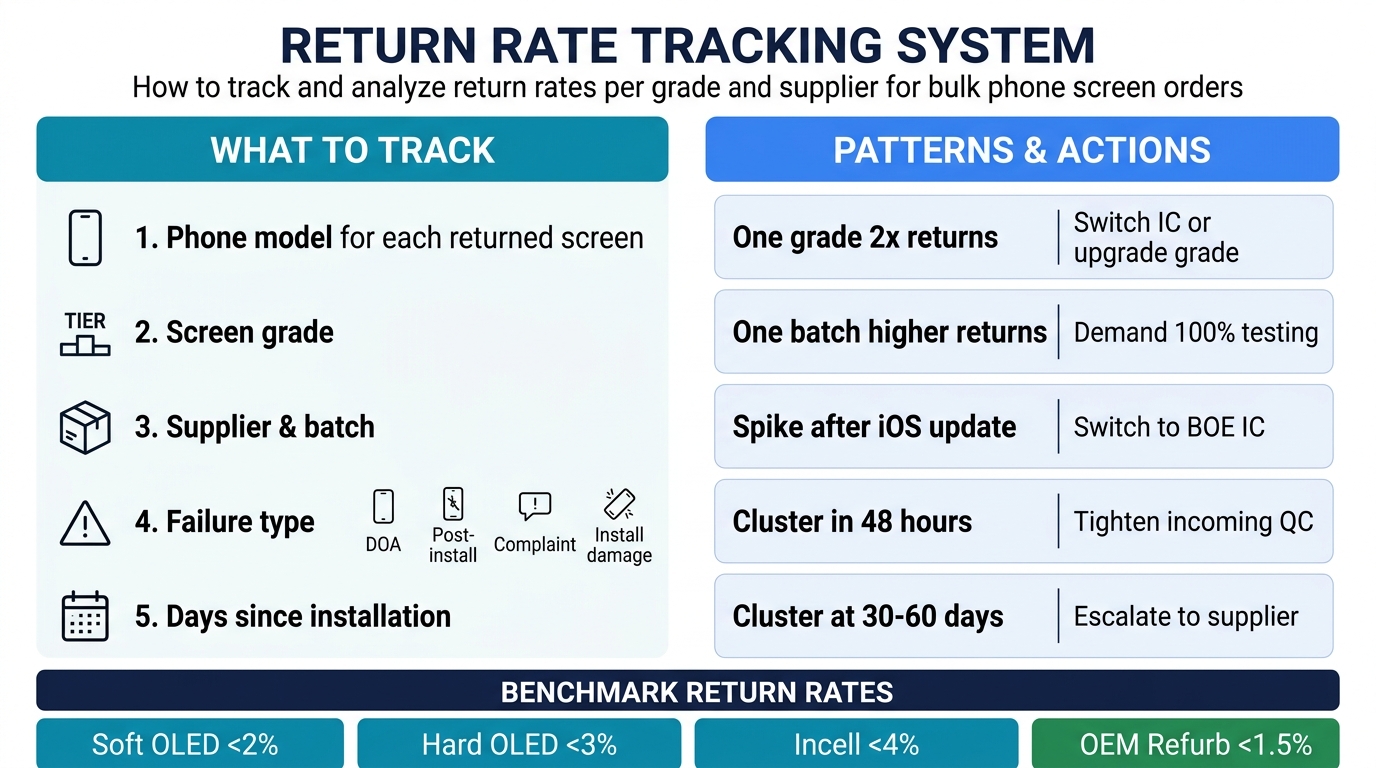
You can't improve what you don't measure. Most shops track overall return rate. That number is useless for optimization. You need return rate broken down by two dimensions: grade and supplier.
What to Track
For every screen return, record:
- Phone model (iPhone 15, iPhone 14, etc.)
- Screen grade (Incell, Hard OLED, Soft OLED)
- Supplier and batch (which order the screen came from)
- Failure type: DOA (dead on arrival), post-install defect, customer complaint (not a defect), installation damage
- Days since installation (separates early failures from long-term issues)
How to Read Your Data
After 60–90 days of tracking, you'll see patterns:
| Pattern | What It Means | Action |
|---|---|---|
| One grade has 2x the return rate of others | That grade has a quality problem or IC issue | Switch to different IC or upgrade grade |
| One supplier's batch has higher returns | QC inconsistency at supplier level | Demand 100% testing or switch supplier |
| Returns spike after iOS update | Generic IC compatibility broke | Switch to BOE IC screens for affected models |
| Returns cluster in first 48 hours | Likely incoming defects you missed | Tighten incoming QC protocol |
| Returns cluster at 30–60 days | Panel degradation or adhesive failure | Grade quality issue — escalate to supplier |
Benchmark Return Rates
| Grade | Acceptable Return Rate | Action Trigger |
|---|---|---|
| Soft OLED | <2% | Investigate above 2.5% |
| Hard OLED | <3% | Investigate above 4% |
| Incell LCD | <4% | Investigate above 5% |
| OEM Refurbished | <1.5% | Investigate above 2% |
If any grade consistently exceeds the action trigger for two consecutive orders, it's time to either change the supplier or change the grade spec.
When to Switch Suppliers on Bulk Phone Screen Orders
Loyalty to a supplier is smart — until it costs you money. Here are the specific triggers for when to start evaluating alternatives.
Hard Triggers (Switch Immediately)
- Defect rate jumps 2x from one order to the next without explanation
- Supplier stops responding to quality claims within 48 hours
- Grade fraud: you ordered Hard OLED but received Incell (yes, this happens)
- IC downgrade without notice: they switched from BOE to generic IC to improve their margin
Soft Triggers (Start Evaluating Alternatives)
- Defect rate is creeping up over 3 consecutive orders
- Response time to technical questions has increased from hours to days
- They can't supply your growing model list (you need iPhone 16 screens but they only have 14 and 15)
- Pricing hasn't adjusted downward as models age — you're still paying launch prices for iPhone 13 screens
How to Switch Without Disrupting Your Business
- Overlap, don't cut over. Order your next batch split: 70% from current supplier, 30% from the new one.
- Track returns separately for each supplier's screens for 60 days.
- Compare on equal terms: same models, same grades, same time period.
- Shift volume gradually — 70/30 → 50/50 → 30/70 → full transition over 2–3 order cycles.
Never switch 100% to a new supplier on the first order. A sample kit doesn't predict bulk consistency.
How to Negotiate Replacement Policies for Bulk Phone Screen Orders
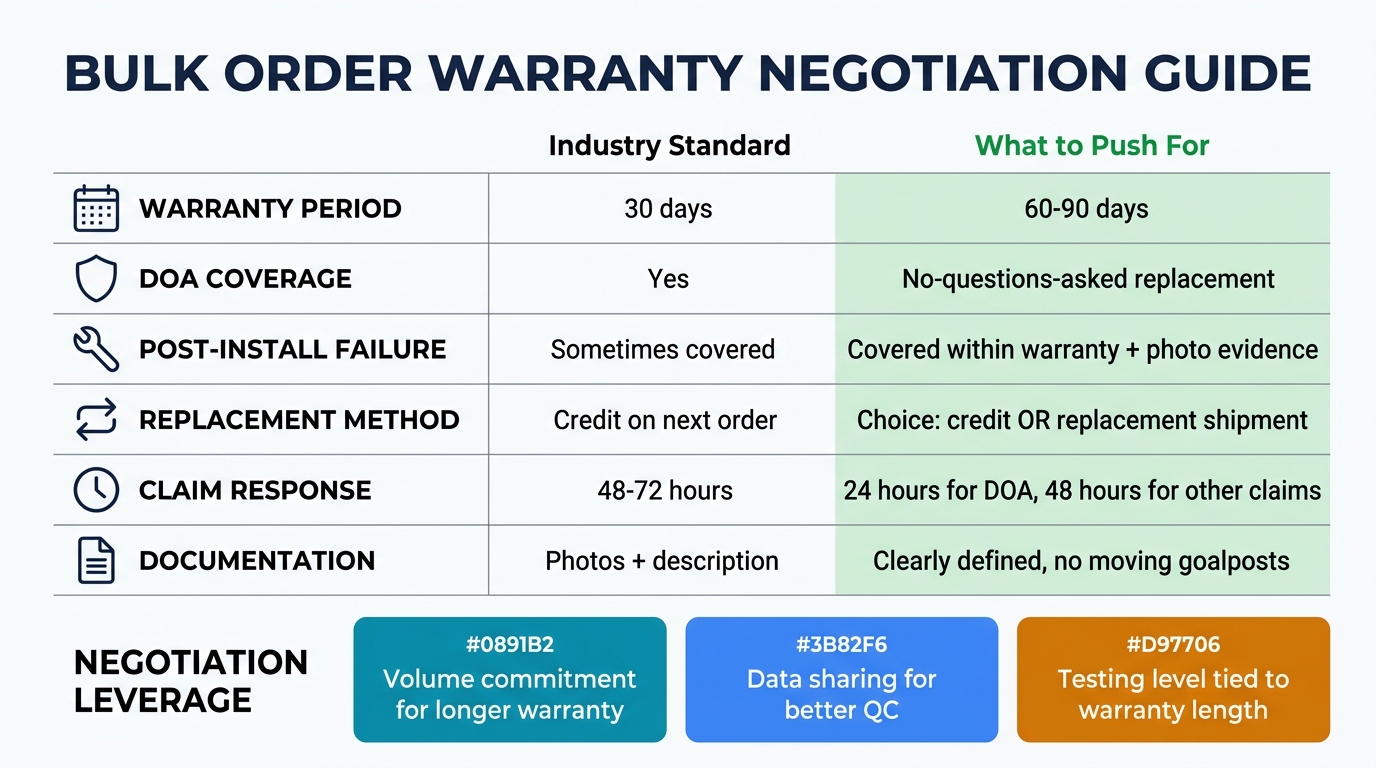
Your replacement policy is your safety net. Negotiate it before your first bulk order, not after you find 10 dead screens in a 200-unit shipment.
What to Get in Writing
| Term | Industry Standard | What to Push For |
|---|---|---|
| Warranty period | 30 days | 60–90 days (especially for OLED) |
| DOA coverage | Yes | Yes, with no-questions-asked replacement |
| Post-install failure | Sometimes | Covered if within warranty + photo evidence |
| Replacement method | Credit on next order | Choice: credit OR replacement shipment |
| Claim response time | 48–72 hours | 24 hours for DOA, 48 hours for other claims |
| Documentation required | Photos + description | Clearly defined — no moving goalposts |
Negotiation Leverage Points
- Volume commitment: "I'll commit to monthly orders of 150+ units if the warranty is 90 days instead of 30."
- Data sharing: "I'll share my return rate data with you so we can both improve quality — but I need coverage on defects that pass your QC."
- Testing trade-off: "If your screens are 100% jig-tested, I'm fine with 60-day warranty. If they're batch-sampled, I need 90 days."
The best supplier relationships are transparent in both directions. A supplier who knows your return data can improve their QC. A buyer who understands the supplier's testing limits can set realistic expectations.
First Bulk Order Checklist for Repair Shops
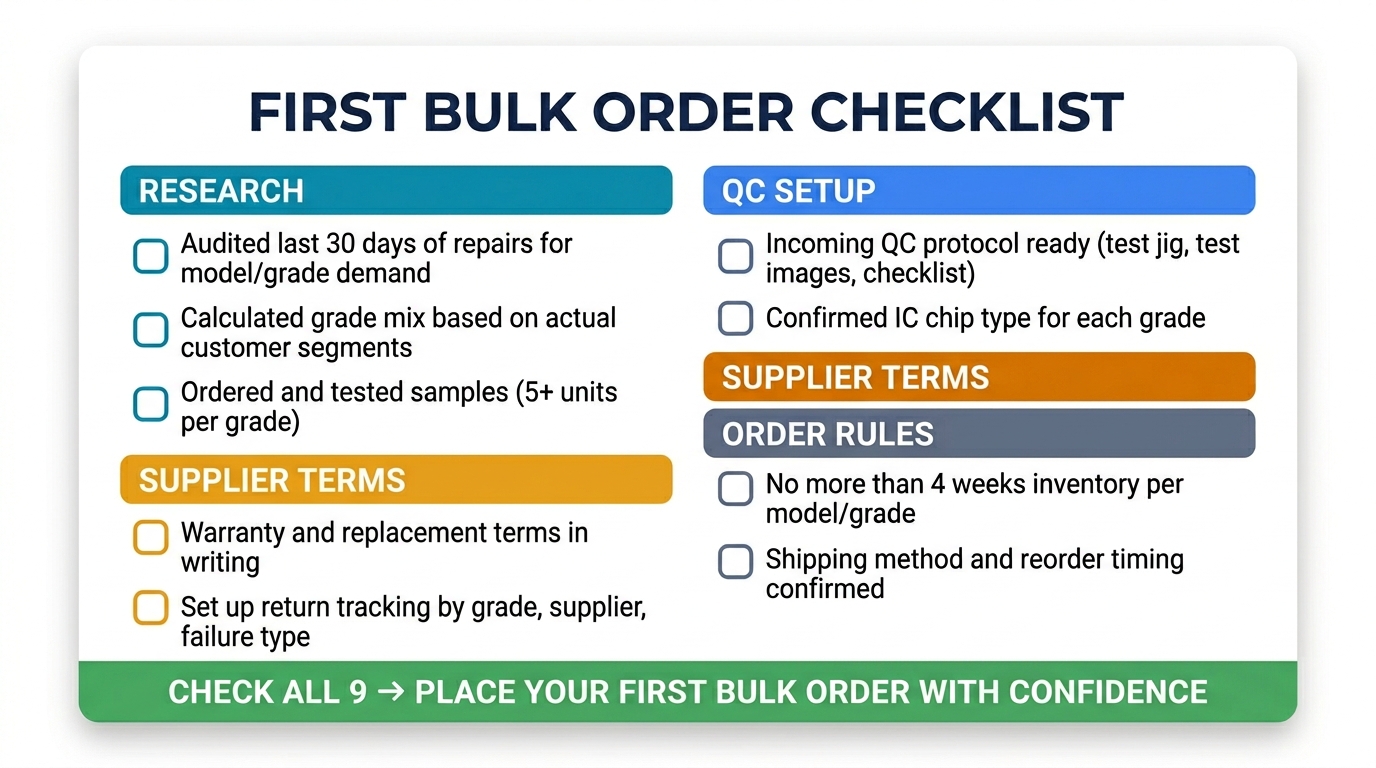
If you're about to buy phone screens in bulk for the first time, run through this before placing the order:
- Audited last 30 days of repairs for model/grade demand data
- Calculated a grade mix based on actual customer segments (not margin assumptions)
- Ordered and tested samples from the supplier (5+ units per grade)
- Confirmed incoming QC protocol is set up (test jig, test images, checklist)
- Negotiated warranty and replacement terms in writing
- Confirmed IC chip type for each grade (BOE, Tianma, or generic)
- Set up a tracking system for returns by grade, supplier, and failure type
- Ordered no more than 4 weeks of inventory for any single model/grade
- Confirmed shipping method and transit time to plan reorder timing
Frequently Asked Questions
How many phone screens should a repair shop order in bulk?
The right bulk order quantity is roughly four weeks of inventory, sized to your actual daily repair volume and broken down by model and grade. First, a shop doing 10 repairs per day typically orders 130–160 screens, roughly $1,500–$2,500 in stock. Second, never exceed 6 weeks of stock — screen prices depreciate 10–15% as models age, and stored screens can develop adhesive and flex-cable issues over time.
What's a normal return rate for bulk phone screen orders?
A normal return rate for bulk phone screen orders is 1–2% for Soft OLED, 2–3% for Hard OLED, and 3–4% for Incell in a well-managed operation. First, if your overall rate exceeds 5%, the cause is usually grade mismatch, poor incoming QC, or a supplier quality issue — not the bulk buying itself. Second, track the rate per grade and per supplier so you can see exactly which one is leaking margin — a single point of return rate on a 150-unit order is roughly $300 in rework. Third, benchmark each grade against its target and investigate any grade that runs above it for two orders straight.
Should I buy all one grade or mix grades in a bulk order?
A bulk grade mix is the practice of splitting one order across 2–3 quality tiers so each customer segment gets the right screen, and the answer is to always mix grades. First, a single-grade strategy either over-serves budget customers (wasting $15–$20 margin per repair) or under-serves premium customers (generating returns). Second, most shops do best with Incell at $8–$12 for budget, Hard OLED for standard, and Soft OLED for premium requests.
How do I handle defective screens from a bulk order?
A defective bulk screen is any unit that fails QC or installation and must be claimed against your supplier's warranty within its 30–90 day window. First, document every defect with photos and failure type, then report with batch information before the window closes. Second, track whether defects are random (normal) or concentrated in one batch (a supplier QC issue). Third, watch for batch concentration. If one batch exceeds double the expected 3–4% defect rate, request full replacement or credit. On a 200-unit order that is $400+ of screens at stake.
Buy Phone Screens in Bulk the Right Way
Bulk buying reduces your per-unit cost. But cost savings only matter if your return rate stays flat. The shops that profit most from bulk purchasing are the ones that treat it as a system — grade mix strategy, incoming QC, customer-grade matching, return tracking, and supplier accountability all working together.
Skip any one piece and the savings leak out through returns, rework, and lost customers.
Ready to place a bulk order with built-in quality protection? We supply all screen grades with per-unit QC reports, clear grade specs, and written replacement policies. Tell us your top models and daily volume — we'll recommend a grade mix that matches your customer base.
Request a Wholesale Quote — include your repair volume and top models for a custom grade mix recommendation.
Related reading: